Learn Coding Visually
Learn to code with interactive, live-preview playgrounds — HTML, CSS, JavaScript, React & more.
 HTML Playground42 lessons · Click-based · Live preview
 CSS PlaygroundLearn CSS with a live editor
 JavaScript Playground60 lessons · DOM · Async · Canvas
 React PlaygroundLearn React with a live code editor
 GSAP PlaygroundLearn GSAP animation interactively
 SVG Playground44 lessons · shapes · paths · animation
 SCSS Playground45 lessons · Sass modules · tokens
 Tailwind PlaygroundLearn Tailwind CSS with a live editor
 Bootstrap 5 Playground50 lessons · live preview
Memory Match Game — Free HTML CSS JS Snippet
Memory Match Game · Games · Plain HTML, CSS & JS · Live preview
What's included
Features
About this UI Snippet
Memory Match Game — 3D Card Flip, Match-Lock State Machine & Lightweight Confetti Burst in Vanilla JS
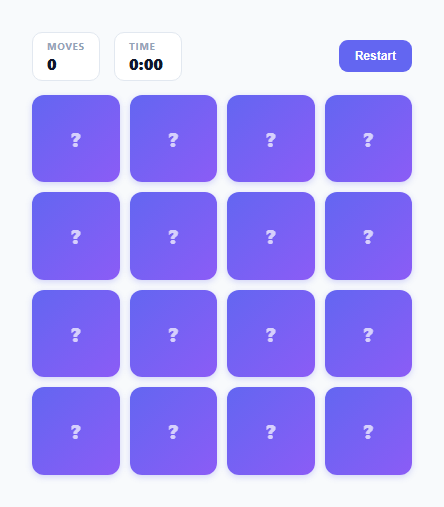
A memory-matching game looks simple — flip two cards, check if they match, repeat — but a naive click handler breaks almost immediately under fast, real-world clicking. This snippet implements the classic game using the same 3D CSS flip mechanics as the site's 3D flip card and flip card modal snippets, paired with a small but essential game-state guard, a move counter, a live elapsed timer, and a hand-rolled particle-burst celebration effect using the Web Animations API rather than a canvas confetti library.
The 3D flip: perspective, preserve-3d, backface-visibility
Each card lives inside a .card-scene wrapper; the grid container itself carries perspective: 900px, establishing the 3D viewing context all cards share. Each .card has transform-style: preserve-3d so its two face children are rendered in that same 3D space rather than flattened. The .face-front is pre-rotated to rotateY(180deg) at rest and both faces use backface-visibility: hidden, so only one face is ever visible at a given rotation — exactly the same four-property combination documented in this library's other 3D flip snippets. Toggling .flipped on the card rotates it 180 degrees on the Y axis, simultaneously turning the back (question-mark) face away from the viewer and bringing the pre-rotated front face around to face them.
Why a lock flag is required, not optional
Without a guard, the click handler has an obvious race condition: a player flips two mismatched cards, sees they do not match, and — before the short "let me memorize this" pause finishes and the mismatched pair auto-flips back — clicks a third card. At that moment flippedCards already holds two entries; a naive implementation would push a third, and either the match-comparison logic silently breaks (comparing the wrong pair, or leaving a card permanently flipped) or the player briefly sees a card face they should not have access to yet, undermining the entire point of the memory challenge. This snippet's onCardClick() defends against exactly that: the moment a second card is flipped, locked is set to true and moves is incremented immediately, before any setTimeout fires. Every subsequent click, no matter how fast, hits the if (locked) return; guard at the very top of onCardClick() and is silently ignored until resolveMatch() or resolveMismatch() finishes and explicitly sets locked = false again. This makes "exactly zero or two cards are ever flipped-and-unresolved at once" a true invariant instead of a hopeful assumption.
Two different pauses for two different outcomes
A match is confirmed after a short 320ms pause (long enough to register visually, short enough not to feel like a stall) before resolveMatch() runs. A mismatch uses a longer 850ms pause before resolveMismatch() flips both cards back — deliberately longer, because the entire point of that pause is giving the player time to actually memorize which icon was where before the cards hide it again. Both pauses funnel through the same locked flag, so the length of the delay never affects correctness, only pacing.
The match pulse-glow and lightweight confetti
A successful match adds .matched, which triggers a pulse-glow keyframe animation (a brief scale-up-and-back on the already-flipped card) and a persistent green glow via box-shadow on the front face. Independently, burstConfetti() reads the card's live getBoundingClientRect() to find its screen-space center, then spawns ten small colored divs positioned at that point and animates each one with the native Element.animate() Web Animations API — no requestAnimationFrame loop, no external confetti library, no canvas. Each bit gets a random angle and distance and animates from its spawn point to that offset with fading opacity and a random rotation, and removes itself from the DOM in the animation's onfinish callback so nothing lingers. Finishing the last pair triggers a larger 40-piece burst from the grid's center as a bigger celebration moment, layered under the win banner that fades in with the final move count and elapsed time.
Move counter and live timer
moves increments once per pair-attempt (not per single card click), matching how memory games conventionally score. The timer starts lazily — startTimerIfNeeded() only fires Date.now() and starts a setInterval on the very first card flip of a game, not on page load — so idle time before a player's first move is never counted, and it is stopped precisely once the final pair matches by reading the same startTime reference used to display the running clock, guaranteeing the final recorded time matches what was on-screen the moment the game ended.
Build with AI
Build, Understand, Optimize, and Extend It With AI
Paste this snippet's JS into an AI assistant like Claude and ask it to walk through the exact sequence of events that would go wrong if the locked flag were removed — specifically what a fast third click does to the flippedCards array and why that breaks match detection. It is also worth asking whether resolveMismatch and resolveMatch could be merged into one function with a single "isMatch" branch to reduce duplication, or whether keeping them separate is clearer given their different pause durations. For extending the game, ask for a difficulty selector that changes the grid size and icon count, a best-time leaderboard using localStorage, or a two-player alternating-turns mode where a mismatch passes the turn to the other player.
Prompt to recreate it
Copy this into your AI assistant of choice to build the effect from scratch, or as a jumping-off point for your own variant:
Build a memory-matching card game in plain HTML, CSS, and JavaScript using a real 3D CSS card flip — no canvas, no animation library.

Requirements:
- A grid of face-down cards, each built from a perspective-contained wrapper and a card element using transform-style: preserve-3d, with a back face (question mark) and a front face (icon) both using backface-visibility: hidden, the front face pre-rotated to rotateY(180deg) so toggling a single "flipped" class on the card performs the actual flip.
- Clicking a face-down, non-matched card flips it and adds it to a small "currently flipped" list; clicking a second card triggers a comparison after a short delay.
- A "lock" boolean flag that gets set to true the instant a second card is flipped (before any comparison delay runs) and is only cleared after the match or mismatch has fully resolved, with the click handler ignoring all clicks while locked is true. Explain in a comment the exact race condition this prevents: a fast third click landing while two mismatched cards are still shown, before their automatic flip-back has happened.
- Use a noticeably longer pause before flipping mismatched cards back down than before confirming a match, since the mismatch pause is what gives the player time to memorize the two revealed cards.
- On a successful match, play a pulse/glow animation on both matched cards and spawn a small lightweight confetti-style particle burst (a handful of small colored elements animating outward and fading, built with the native Element.animate() Web Animations API rather than a canvas or external library) from the matched cards' position.
- Track and display a move counter (incremented once per pair attempt) and an elapsed timer that starts on the first card flip (not on page load) and stops the moment all pairs are matched.
- When every pair is matched, show a win banner with the final move count and time, plus a larger confetti burst from the center of the board.
Want to tighten it up first? Run this prompt through the AI Prompt Studio to score it across 8 quality dimensions, catch anti-patterns, and tune the wording for Claude, ChatGPT, or Gemini before you paste it in.
Source Code
<div class="wrap">
  <div class="hud">
    <div class="hud-stat"><span class="hud-label">Moves</span><span class="hud-value" id="moves">0</span></div>
    <div class="hud-stat"><span class="hud-label">Time</span><span class="hud-value" id="timer">0:00</span></div>
    <button class="reset-btn" id="reset-btn">Restart</button>
  </div>
  <div class="grid" id="grid"></div>
  <div class="win-banner" id="win-banner">
    <div class="win-title">All matched!</div>
    <div class="win-sub" id="win-sub"></div>
  </div>
</div>
* { box-sizing: border-box; margin: 0; padding: 0; }
body { font-family: system-ui, -apple-system, sans-serif; background: #f8fafc; min-height: 100vh; display: flex; align-items: center; justify-content: center; padding: 24px; }
.wrap { width: 100%; max-width: 380px; position: relative; }
.hud { display: flex; align-items: center; gap: 14px; margin-bottom: 14px; }
.hud-stat { display: flex; flex-direction: column; background: #fff; border: 1px solid #e2e8f0; border-radius: 10px; padding: 6px 14px; min-width: 68px; }
.hud-label { font-size: 10px; font-weight: 700; color: #94a3b8; letter-spacing: 0.06em; text-transform: uppercase; }
.hud-value { font-size: 16px; font-weight: 800; color: #0f172a; }
.reset-btn { margin-left: auto; background: #6366f1; color: #fff; border: none; border-radius: 9px; padding: 9px 16px; font-size: 12px; font-weight: 700; cursor: pointer; transition: background 0.15s; }
.reset-btn:hover { background: #4f46e5; }
.grid { display: grid; grid-template-columns: repeat(4, 1fr); gap: 10px; perspective: 900px; position: relative; }
.card-scene { aspect-ratio: 1; }
.card { width: 100%; height: 100%; position: relative; transform-style: preserve-3d; transition: transform 0.5s cubic-bezier(0.4,0.2,0.2,1); cursor: pointer; }
.card.flipped { transform: rotateY(180deg); }
.card.matched { animation: pulse-glow 0.6s ease; }
@keyframes pulse-glow { 0% { transform: rotateY(180deg) scale(1); } 40% { transform: rotateY(180deg) scale(1.12); } 100% { transform: rotateY(180deg) scale(1); } }
.face { position: absolute; inset: 0; border-radius: 12px; backface-visibility: hidden; display: flex; align-items: center; justify-content: center; font-size: 26px; }
.face-back { background: linear-gradient(135deg, #6366f1, #8b5cf6); box-shadow: 0 2px 6px rgba(99,102,241,0.25); }
.face-back::after { content: '?'; color: rgba(255,255,255,0.7); font-size: 20px; font-weight: 800; }
.face-front { background: #fff; border: 1.5px solid #e2e8f0; transform: rotateY(180deg); }
.card.matched .face-front { border-color: #34d399; box-shadow: 0 0 0 2px rgba(52,211,153,0.35), 0 0 18px rgba(52,211,153,0.35); }
.win-banner { position: absolute; inset: 0; top: -6px; background: rgba(255,255,255,0.96); border-radius: 16px; display: flex; flex-direction: column; align-items: center; justify-content: center; opacity: 0; pointer-events: none; transition: opacity 0.3s; text-align: center; padding: 20px; }
.win-banner.show { opacity: 1; pointer-events: all; }
.win-title { font-size: 22px; font-weight: 800; color: #0f172a; margin-bottom: 6px; }
.win-sub { font-size: 13px; color: #64748b; }
.confetti-bit { position: fixed; width: 7px; height: 7px; border-radius: 2px; pointer-events: none; z-index: 999; }const ICONS = ['🎈','🍀','🎧','🚀','🍉','⭐','🎲','🔥'];
const HUD_MOVES = document.getElementById('moves');
const HUD_TIMER = document.getElementById('timer');
const grid = document.getElementById('grid');
const winBanner = document.getElementById('win-banner');
const winSub = document.getElementById('win-sub');
let deck = [];
let flippedCards = [];
let locked = false;
let moves = 0;
let matchedPairs = 0;
let startTime = null;
let timerInterval = null;
function shuffle(arr) {
const a = arr.slice();
for (let i = a.length - 1; i > 0; i--) {
const j = Math.floor(Math.random() * (i + 1));
[a[i], a[j]] = [a[j], a[i]];
}
return a;
}
function buildDeck() {
deck = shuffle([...ICONS, ...ICONS]);
}
function formatTime(sec) {
const m = Math.floor(sec / 60);
const s = sec % 60;
return m + ':' + String(s).padStart(2, '0');
}
function startTimerIfNeeded() {
if (startTime !== null) return;
startTime = Date.now();
timerInterval = setInterval(() => {
const sec = Math.floor((Date.now() - startTime) / 1000);
HUD_TIMER.textContent = formatTime(sec);
}, 1000);
}
function stopTimer() {
if (timerInterval) clearInterval(timerInterval);
timerInterval = null;
}
function render() {
grid.innerHTML = '';
deck.forEach((icon, i) => {
const scene = document.createElement('div');
scene.className = 'card-scene';
const card = document.createElement('div');
card.className = 'card';
card.dataset.index = i;
card.dataset.icon = icon;
const back = document.createElement('div');
back.className = 'face face-back';
const front = document.createElement('div');
front.className = 'face face-front';
front.textContent = icon;
card.appendChild(back);
card.appendChild(front);
scene.appendChild(card);
grid.appendChild(scene);
card.addEventListener('click', () => onCardClick(card));
});
}
/*
* The lock flag exists to prevent a classic race condition: two mismatched
* cards are shown flipped for a short pause before flipping back so the
* player can memorize them. If clicks were not disabled during that pause,
* a fast third click could flip another card while two mismatched cards are
* still showing, corrupting flippedCards (which assumes at most two entries)
* and letting the player see a third card face before the mismatch has
* even resolved. Setting locked = true the moment a second card is flipped,
* and only clearing it after the compare/resolve step completes, makes the
* "exactly two cards visible while judging a match" invariant impossible
* to violate no matter how fast the player clicks.
*/
function onCardClick(card) {
if (locked) return;
if (card.classList.contains('flipped') || card.classList.contains('matched')) return;
if (flippedCards.length === 2) return;
startTimerIfNeeded();
card.classList.add('flipped');
flippedCards.push(card);
if (flippedCards.length === 2) {
locked = true;
moves++;
HUD_MOVES.textContent = moves;
const [a, b] = flippedCards;
if (a.dataset.icon === b.dataset.icon) {
setTimeout(() => resolveMatch(a, b), 320);
} else {
setTimeout(() => resolveMismatch(a, b), 850);
}
}
}
function resolveMatch(a, b) {
a.classList.add('matched');
b.classList.add('matched');
burstConfetti(a);
burstConfetti(b);
flippedCards = [];
locked = false;
matchedPairs++;
if (matchedPairs === ICONS.length) {
stopTimer();
const sec = Math.floor((Date.now() - startTime) / 1000);
winSub.textContent = moves + ' moves \u2022 ' + formatTime(sec);
setTimeout(() => winBanner.classList.add('show'), 400);
bigConfettiBurst();
}
}
function resolveMismatch(a, b) {
a.classList.remove('flipped');
b.classList.remove('flipped');
flippedCards = [];
locked = false;
}
function burstConfetti(cardEl) {
const rect = cardEl.getBoundingClientRect();
const cx = rect.left + rect.width / 2;
const cy = rect.top + rect.height / 2;
const colors = ['#6366f1', '#f472b6', '#34d399', '#f59e0b'];
for (let i = 0; i < 10; i++) {
spawnBit(cx, cy, colors[i % colors.length]);
}
}
function bigConfettiBurst() {
const wrapRect = grid.getBoundingClientRect();
const cx = wrapRect.left + wrapRect.width / 2;
const cy = wrapRect.top + wrapRect.height / 2;
const colors = ['#6366f1', '#f472b6', '#34d399', '#f59e0b', '#38bdf8'];
for (let i = 0; i < 40; i++) {
spawnBit(cx, cy, colors[i % colors.length], true);
}
}
function spawnBit(cx, cy, color, big) {
const bit = document.createElement('div');
bit.className = 'confetti-bit';
bit.style.left = cx + 'px';
bit.style.top = cy + 'px';
bit.style.background = color;
document.body.appendChild(bit);
const angle = Math.random() * Math.PI * 2;
const dist = (big ? 90 : 45) + Math.random() * (big ? 100 : 40);
const dx = Math.cos(angle) * dist;
const dy = Math.sin(angle) * dist - (big ? 20 : 0);
const rot = (Math.random() - 0.5) * 720;
const anim = bit.animate([
{ transform: 'translate(0,0) rotate(0deg)', opacity: 1 },
{ transform: 'translate(' + dx + 'px,' + dy + 'px) rotate(' + rot + 'deg)', opacity: 0 },
], { duration: 700 + Math.random() * 400, easing: 'cubic-bezier(0.2,0.8,0.3,1)' });
anim.onfinish = () => bit.remove();
}
function resetGame() {
stopTimer();
buildDeck();
flippedCards = [];
locked = false;
moves = 0;
matchedPairs = 0;
startTime = null;
HUD_MOVES.textContent = '0';
HUD_TIMER.textContent = '0:00';
winBanner.classList.remove('show');
render();
}
document.getElementById('reset-btn').addEventListener('click', resetGame);
resetGame();Step by step
How to Use
- 1Click any face-down card to flip itThe card rotates 180 degrees around the Y axis using a real 3D transform, revealing its icon. The move timer starts counting from this first click.
- 2Click a second card to attempt a matchOnce two cards are flipped, further clicks are briefly ignored while the game checks the pair — this prevents a fast third click from interrupting the comparison.
- 3Watch a matched pair pulse and glowMatching icons trigger a quick scale-up pulse plus a green glow on both cards, and a small burst of colored particles fires from each card's position.
- 4Watch a mismatched pair flip backNon-matching cards stay visible slightly longer than a match (to give you time to memorize them) before automatically flipping face-down again.
- 5Track your move count and elapsed time in the HUDBoth counters update live above the grid — moves increases once per pair attempt, and the timer keeps running until the very last pair is matched.
- 6Clear the board to trigger the win celebrationMatching all pairs stops the timer, fires a larger confetti burst from the center of the grid, and shows a banner with your final move count and time.
Real-world uses
Common Use Cases
Got questions?
Frequently Asked Questions
Checking flippedCards.length === 2 alone is not enough, because that check happens synchronously on click while the mismatch-resolution setTimeout is still pending in the background. A player who clicks fast enough could flip a third card during the window after two mismatched cards are shown but before their flip-back timeout has fired, at which point flippedCards briefly holds an invalid third entry. Setting locked = true the instant the second card of a pair is flipped, checked at the very top of every click handler call, closes that window completely regardless of timing.
A match pause (320ms) only needs to be long enough to visually confirm the pair before the pulse-glow plays — the cards are staying flipped anyway. A mismatch pause (850ms) has to give the player enough real time to actually study and memorize both revealed icons before they flip back and hide again, since remembering card positions is the entire point of the game; a too-short mismatch pause makes the game frustrating rather than challenging.
Edit the ICONS array at the top of the script — each entry becomes one matched pair, so an 8-item array produces a 16-card (4x8 grid works well up to 6 pairs; adjust grid-template-columns in the CSS for larger sets) grid. buildDeck() automatically duplicates and shuffles whatever list you provide, so no other code needs to change.
Yes. In React, replace the module-level deck/flippedCards/locked variables with useState, and move startTimerIfNeeded's setInterval into a useEffect, storing the interval id in a ref and calling clearInterval on it in the cleanup function so a mid-game unmount does not leave a stray timer running. In Vue, hold the same state in ref()/reactive() and start/stop the interval in onMounted/onUnmounted. In Angular, manage it as component fields and clear the interval in ngOnDestroy. The Web Animations API confetti burst (Element.animate()) needs no cleanup in any framework since each animation removes its own DOM node in its onfinish callback.
The Web Animations API lets the browser's compositor drive each particle's transform and opacity animation independently and efficiently, without a JavaScript frame loop tracking dozens of particles' positions manually. Each confetti-bit is a tiny absolutely-positioned div whose entire animation (translate, rotate, fade) is described once as keyframes and handed to the browser; the onfinish callback removing the element from the DOM is the only JS involvement after spawn, keeping the effect cheap even when many bursts fire in quick succession.