Learn Coding Visually
Learn to code with interactive, live-preview playgrounds — HTML, CSS, JavaScript, React & more.
 HTML Playground42 lessons · Click-based · Live preview
 CSS PlaygroundLearn CSS with a live editor
 JavaScript Playground60 lessons · DOM · Async · Canvas
 React PlaygroundLearn React with a live code editor
 GSAP PlaygroundLearn GSAP animation interactively
 SVG Playground44 lessons · shapes · paths · animation
 SCSS Playground45 lessons · Sass modules · tokens
 Tailwind PlaygroundLearn Tailwind CSS with a live editor
 Bootstrap 5 Playground50 lessons · live preview
Flatpickr Multi-Date Selection — Free HTML CSS JS Snippet
Flatpickr Multi-Date Selection · Forms · Plain HTML, CSS & JS · Live preview
What's included
Features
About this UI Snippet
Flatpickr Multi-Date Selection — a Chip List That Reads From the Real Selection
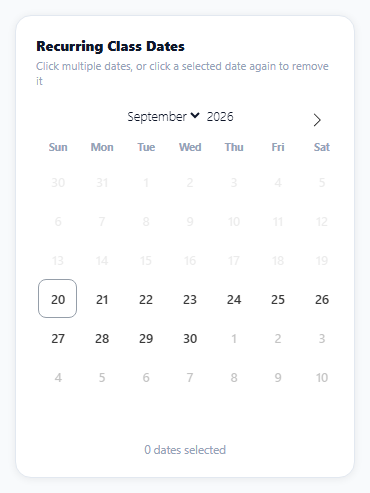
Picking several non-consecutive dates — recurring class sessions, multi-day availability, custom blackout dates — needs a calendar in multiple mode plus some way to review and adjust the full selection, since a small calendar grid alone doesn't show "which 6 dates did I pick" at a glance. This snippet pairs the calendar with a chip list, and the two are kept honest by having exactly one of them (Flatpickr's own selection) be the actual source of truth.
mode: 'multiple' is Flatpickr's built-in toggle behavior
Setting mode: 'multiple' changes click behavior so every date click adds to the selection, and clicking an already-selected date removes it — Flatpickr handles this toggle logic internally; no click-counting or manual selection-array management is needed in application code.
The chip list is a rendering of onChange's output, not independent state
Every time Flatpickr's selection changes — from a calendar click in either direction — its onChange callback fires with the full current selectedDates array, and the render function rebuilds the entire chip list from that array, sorted chronologically. The chips never hold their own separate list; they're a direct reflection of whatever Flatpickr currently considers selected.
Removing a chip goes back through Flatpickr, not around it
The tempting shortcut — just remove that one chip's DOM element — would leave the calendar still showing that date highlighted, since Flatpickr's internal selection would never have been told anything changed. Instead, the remove button filters fp.selectedDates to exclude that one date and calls fp.setDate(remaining, true), updating Flatpickr's real selection (and, via the true flag, re-triggering onChange, which redraws the chips from the now-correct list). The calendar's highlighted dates and the chip list can never show conflicting information, because only one path ever changes the actual selection.
Sorting happens at render time, not at selection time
Flatpickr's selectedDates array reflects click order, not calendar order — clicking September 20th and then September 5th would put the 20th first. Sorting a copy of the array (.slice().sort(...)) inside render is what keeps the chip list always reading left-to-right chronologically, regardless of the order dates were actually clicked in.
Reusing it
This exact pattern — a multi-select calendar with a synced chip/tag list, single source of truth, remove-through-the-library — applies to any multi-date input: recurring events, multi-day trip planning, availability blocks.
Build with AI
Build, Understand, Optimize, and Extend It With AI
You don't have to work out how to keep an external UI in sync with a library's internal selection state. Paste this snippet's HTML, CSS, and JS into an AI coding assistant like Claude and ask it to explain exactly why removing a chip has to call fp.setDate() with the filtered date list rather than just deleting that chip's DOM element, and how the onChange-driven render function ensures the chip list can never show a different selection than the calendar itself. The same assistant can help optimize it — ask whether re-rendering and re-sorting the entire chip list on every single change is efficient enough for a much larger number of selected dates, or whether a more incremental update would be worth the added complexity. It's also useful for extending the effect: ask it to add a maximum-selection limit with a friendly warning message, group the selected dates by month in the chip display, or add a "select every Monday for the next 8 weeks" quick-add pattern. Treat the code less like a finished artifact and more like a starting point for a conversation.
Prompt to recreate it
Copy this into your AI assistant of choice to build the effect from scratch, or as a jumping-off point for your own variant:
Build a multi-date selection calendar with a synchronized list of removable date chips using the Flatpickr library (load Flatpickr's CSS and JS from a CDN, no other library), in plain HTML, CSS, and JavaScript.

Requirements:
- Configure the calendar for multiple-date selection mode, rendered inline, disallowing dates before today, where clicking an unselected date adds it to the selection and clicking an already-selected date removes it, using the library's own built-in toggle behavior rather than manually tracking clicks.
- Below the calendar, render a chip (tag) for every currently selected date, sorted in chronological order regardless of the order the dates were actually clicked in, each showing a short formatted date and a small remove button.
- Clicking a chip's remove button must update the actual calendar's selection (deselecting that date so it's no longer highlighted on the calendar) by going through the same selection-setting mechanism a calendar click would use — not by only removing the chip element from the page, which would leave the calendar and the chip list showing conflicting information.
- Re-render the entire chip list from the calendar's current real selection every time that selection changes, whether the change came from clicking the calendar directly or from removing a chip, so the two views can never drift out of sync.
- Display a running count of how many dates are currently selected, with correct singular/plural wording ("1 date selected" vs. "3 dates selected").
Want to tighten it up first? Run this prompt through the AI Prompt Studio to score it across 8 quality dimensions, catch anti-patterns, and tune the wording for Claude, ChatGPT, or Gemini before you paste it in.
Source Code
<div class="md-wrap">
  <div class="md-card">
    <div class="md-title">Recurring Class Dates</div>
    <div class="md-sub">Click multiple dates, or click a selected date again to remove it</div>
    <div id="mdCalendar"></div>
    <div class="md-chips" id="mdChips"></div>
    <div class="md-count" id="mdCount">0 dates selected</div>
  </div>
</div>*{box-sizing:border-box;margin:0;padding:0}
body{font-family:system-ui,-apple-system,sans-serif;background:#f8fafc;min-height:100vh;display:flex;align-items:center;justify-content:center;padding:24px}
.md-wrap{width:100%;max-width:340px}
.md-card{background:#fff;border-radius:16px;padding:20px;box-shadow:0 1px 8px rgba(0,0,0,.07);border:1px solid #e2e8f0}
.md-title{font-size:14px;font-weight:800;color:#0f172a}
.md-sub{font-size:11px;color:#94a3b8;margin:3px 0 10px}
.md-chips{display:flex;flex-wrap:wrap;gap:6px;margin-top:12px;min-height:26px}
.md-chip{display:flex;align-items:center;gap:5px;padding:4px 8px 4px 10px;border-radius:99px;background:#eef2ff;color:#4338ca;font:700 11px system-ui}
.md-chip button{background:none;border:none;color:#4338ca;cursor:pointer;font-size:13px;line-height:1;padding:0}
.md-count{margin-top:10px;font-size:11.5px;color:#94a3b8;text-align:center}
.flatpickr-calendar{width:100%!important;box-shadow:none!important}
.flatpickr-current-month{font-size:13px!important;font-weight:800;color:#0f172a}
.flatpickr-weekday{font-size:10.5px!important;font-weight:800;color:#94a3b8!important}
.flatpickr-day{border-radius:8px!important;font-size:12.5px!important;font-weight:600}
.flatpickr-day.selected{background:#6366f1!important;border-color:#6366f1!important;color:#fff!important}var chipsEl = document.getElementById('mdChips');
var countEl = document.getElementById('mdCount');
function fmt(d) { return d.toLocaleDateString('en-US', { month: 'short', day: 'numeric' }); }
var fp = flatpickr('#mdCalendar', {
mode: 'multiple',
inline: true,
minDate: 'today',
// Flatpickr's own default multi-date behavior IS click-to-toggle -- this
// handler doesn't override that, it only keeps a separate UI (the chip
// list) in sync with whatever selection Flatpickr already produced.
onChange: function (selectedDates) {
render(selectedDates);
},
});
function render(dates) {
var sorted = dates.slice().sort(function (a, b) { return a - b; });
chipsEl.innerHTML = '';
sorted.forEach(function (d) {
var chip = document.createElement('span');
chip.className = 'md-chip';
chip.innerHTML = fmt(d) + ' <button type="button" aria-label="Remove">×</button>';
chip.querySelector('button').addEventListener('click', function () {
// Removing via the chip has to go through Flatpickr's OWN selection
// array, not just delete the chip -- otherwise the calendar would
// still show that date highlighted while the chip list disagreed.
var remaining = fp.selectedDates.filter(function (sel) { return sel.getTime() !== d.getTime(); });
fp.setDate(remaining, true);
});
chipsEl.appendChild(chip);
});
countEl.textContent = sorted.length + (sorted.length === 1 ? ' date selected' : ' dates selected');
}
render([]);Step by step
How to Use
- 1Add the Flatpickr CDNLoad flatpickr.min.css and flatpickr.min.js before the snippet's JS runs.
- 2Paste HTML, CSS, and JSAn inline calendar renders with an empty chip list below it.
- 3Click several datesEach one highlights and adds a chip in chronological order.
- 4Click a selected date againIt deselects and its chip disappears.
- 5Click a chip's remove buttonThat date deselects on the calendar too.
- 6Watch the countIt updates correctly with singular/plural wording.
Real-world uses
Common Use Cases
Got questions?
Frequently Asked Questions
Setting mode: 'multiple' changes Flatpickr's internal click handling so that clicking an unselected date adds it to the selection and clicking an already-selected date removes it — this toggle logic is built into multiple mode itself, with no manual selection-array management or click-counting needed in application code.
Flatpickr maintains its own internal record of which dates are selected, entirely independent of whatever chip elements happen to be rendered on the page. Simply removing a chip's DOM element would leave Flatpickr still believing that date is selected, so the calendar would keep showing it highlighted — calling fp.setDate() with the filtered list is what actually updates the real underlying selection that the calendar reads from.
Flatpickr's selectedDates array reflects the order dates were clicked in, not their chronological calendar order — clicking a later date before an earlier one would put them in that same order in the array. Sorting a copy of the array inside the render function every time ensures the chip list is always displayed in left-to-right date order regardless of the order the user actually clicked them in.
No — fp.setDate is called with fireChangeEvent set to true specifically so onChange fires once with the new, correct selection, which re-renders the chip list to match. This is a single, one-directional update (remove one date, recompute the full chip list from the result), not a loop, since removing a chip doesn't itself trigger another removal.
Check the length of selectedDates inside the onChange handler, and if it exceeds your desired maximum, call fp.setDate on a trimmed version of the array (for example dropping the most recently added date) to enforce the limit — the same setDate-based approach the chip removal already uses, just triggered by a length check instead of a button click.