Learn Coding Visually
Learn to code with interactive, live-preview playgrounds — HTML, CSS, JavaScript, React & more.
 HTML Playground42 lessons · Click-based · Live preview
 CSS PlaygroundLearn CSS with a live editor
 JavaScript Playground60 lessons · DOM · Async · Canvas
 React PlaygroundLearn React with a live code editor
 GSAP PlaygroundLearn GSAP animation interactively
 SVG Playground44 lessons · shapes · paths · animation
 SCSS Playground45 lessons · Sass modules · tokens
 Tailwind PlaygroundLearn Tailwind CSS with a live editor
 Bootstrap 5 Playground50 lessons · live preview
Toastify Notification Stack with Undo — Free HTML CSS JS Snippet
Toastify Notification Stack with Undo · Misc · Plain HTML, CSS & JS · Live preview
What's included
Features
About this UI Snippet
Toastify Notification Stack with Undo — Deletion That Isn't Actually Immediate
A real "undo delete" needs the delete to not actually happen yet — otherwise "undo" would need to somehow reverse a completed action, which is a much harder problem than simply not doing it in the first place. This snippet stages every delete behind a pending-state map and a toast's own timer, so Undo just means "never actually go through with it."
Deletion is staged in a pending map, not applied to the data immediately
Clicking delete adds the email's id to pendingDeletes and re-renders, which is what makes it disappear from the list right away — but the email is still sitting in the real EMAILS array the whole time. Nothing has actually been removed yet; only the render filter is currently hiding it.
Toastify's own callback is where deletion becomes real
Toastify's callback option runs when a toast's timer finishes and it's automatically dismissed — *not* when it's shown. This snippet's callback is the only place that actually splices the email out of the EMAILS array for good, which means the deletion only becomes permanent once the undo window has genuinely expired without being used.
Undo works by preventing that callback from mattering, not by reversing anything
Clicking "Undo" clears the pending flag, re-renders (bringing the email back into view), and calls toast.hideToast() to dismiss the toast early. Toastify's callback still isn't guaranteed to run in every version/path when a toast is manually hidden versus timing out naturally — but because the pending flag was already cleared and the render already restored the email, nothing else needs to happen for undo to be complete. There was never a real deletion to reverse.
A custom `node` instead of a text string is what allows a real Undo button
Toastify's basic text option only supports plain text content. Passing a pre-built node — a real DOM element containing both a message span and a button — is what makes an interactive, clickable Undo control inside the toast possible, with the button's own click listener attached directly to that node before the toast is even shown.
Reusing it
This staged-delete-plus-undo-window pattern generalizes to any reversible destructive action — archiving, removing a list item, discarding a draft — swap the specific data operations for whatever "delete" and "restore" actually mean for your data.
Build with AI
Build, Understand, Optimize, and Extend It With AI
You don't have to work out staged-deletion state management from scratch. Paste this snippet's HTML, CSS, and JS into an AI coding assistant like Claude and ask it to explain exactly why the email is only added to a pending-state tracking object rather than removed from the real data immediately, and how Toastify's callback option (tied to the toast's own timer completing) is what makes the deletion permanent only after the undo window has genuinely expired. The same assistant can help optimize it — ask whether keying pending deletions by id in a plain object scales fine for a list with hundreds of items, or whether a different data structure would be more efficient. It's also useful for extending the effect: ask it to support undoing multiple deletions with one combined "Undo all" toast if several are deleted in quick succession, persist the staged deletion across a page reload using sessionStorage, or add a real backend delete call that only fires inside the callback once the undo window has passed. Treat the code less like a finished artifact and more like a starting point for a conversation.
Prompt to recreate it
Copy this into your AI assistant of choice to build the effect from scratch, or as a jumping-off point for your own variant:
Build a list with a delete-with-undo pattern (similar to Gmail's email deletion) using the Toastify-js library (load Toastify's CSS and JS from a CDN, no other library), in plain HTML, CSS, and JavaScript.

Requirements:
- Render a list of at least five sample items (such as emails, each with a subject and sender), each with a delete button.
- Clicking an item's delete button must immediately hide that item from the visible list, but must not actually remove it from the underlying data yet — implement this as a staged/pending deletion tracked separately from the real data, not an immediate data mutation.
- Show a toast notification with a custom message naming the deleted item and a real, clickable "Undo" button (not just plain text) that stays visible for a fixed duration (such as 5 seconds).
- If the undo button is clicked before the toast's duration expires, the item must reappear in the list in its original position, and the toast should dismiss early — with no actual data ever having been deleted in the first place.
- If the undo window expires without the undo button being clicked, the item must then actually be permanently removed from the underlying data, triggered specifically by the toast's own natural dismissal (its timer completing), not by a separately managed timer duplicating that duration.
- Support deleting multiple items in quick succession, each with its own fully independent pending state, undo toast, and timer, so undoing or waiting out one deletion has no effect on any other pending deletion.
Want to tighten it up first? Run this prompt through the AI Prompt Studio to score it across 8 quality dimensions, catch anti-patterns, and tune the wording for Claude, ChatGPT, or Gemini before you paste it in.
Source Code
<div class="tn-wrap">
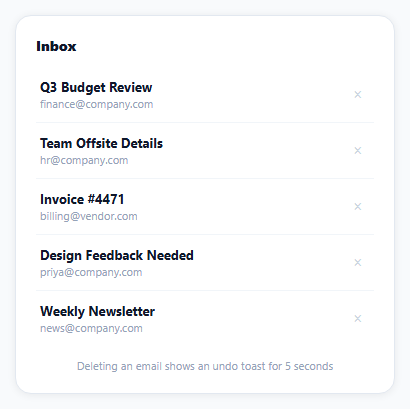
  <div class="tn-title">Inbox</div>
  <ul class="tn-list" id="tnList"></ul>
  <p class="tn-hint">Deleting an email shows an undo toast for 5 seconds</p>
</div>*{box-sizing:border-box;margin:0;padding:0}
body{font-family:system-ui,-apple-system,sans-serif;background:#f8fafc;min-height:100vh;display:flex;align-items:center;justify-content:center;padding:24px}
.tn-wrap{width:100%;max-width:380px;background:#fff;border-radius:16px;padding:20px;box-shadow:0 1px 8px rgba(0,0,0,.07);border:1px solid #e2e8f0}
.tn-title{font-size:14px;font-weight:800;color:#0f172a;margin-bottom:12px}
.tn-list{list-style:none}
.tn-item{display:flex;justify-content:space-between;align-items:center;padding:11px 4px;border-bottom:1px solid #f1f5f9}
.tn-item:last-child{border-bottom:none}
.tn-subject{font-size:13px;font-weight:700;color:#0f172a}
.tn-sender{font-size:11px;color:#94a3b8;margin-top:1px}
.tn-del{background:none;border:none;color:#cbd5e1;font-size:15px;cursor:pointer;padding:4px 8px}
.tn-del:hover{color:#dc2626}
.tn-hint{font-size:11px;color:#94a3b8;margin-top:12px;text-align:center}
.tn-toast{display:flex;align-items:center;gap:14px}
.tn-toast-undo{background:rgba(255,255,255,.2);border:none;color:#fff;font:800 11.5px system-ui;padding:5px 10px;border-radius:6px;cursor:pointer}
.tn-toast-undo:hover{background:rgba(255,255,255,.3)}var EMAILS = [
{ id: 1, subject: 'Q3 Budget Review', sender: 'finance@company.com' },
{ id: 2, subject: 'Team Offsite Details', sender: 'hr@company.com' },
{ id: 3, subject: 'Invoice #4471', sender: 'billing@vendor.com' },
{ id: 4, subject: 'Design Feedback Needed', sender: 'priya@company.com' },
{ id: 5, subject: 'Weekly Newsletter', sender: 'news@company.com' },
];
var listEl = document.getElementById('tnList');
// Deletion is staged, not instant -- a deleted email moves to this map with
// a pending timer, and only actually leaves EMAILS for good once that timer
// fires without being cancelled by Undo.
var pendingDeletes = {};
function render() {
listEl.innerHTML = '';
EMAILS.filter(function (e) { return !pendingDeletes[e.id]; }).forEach(function (email) {
var li = document.createElement('li');
li.className = 'tn-item';
li.innerHTML = '<div><div class="tn-subject">' + email.subject + '</div><div class="tn-sender">' + email.sender + '</div></div>' +
'<button class="tn-del" data-id="' + email.id + '" aria-label="Delete">×</button>';
listEl.appendChild(li);
});
}
render();
listEl.addEventListener('click', function (e) {
var btn = e.target.closest('.tn-del');
if (!btn) return;
var id = Number(btn.getAttribute('data-id'));
var email = EMAILS.find(function (e) { return e.id === id; });
deleteWithUndo(email);
});
function deleteWithUndo(email) {
render(); // the filter above already hides it once pendingDeletes is set below
var toastNode = document.createElement('div');
toastNode.className = 'tn-toast';
toastNode.innerHTML = '<span>Deleted \u201c' + email.subject + '\u201d</span>' +
'<button class="tn-toast-undo" type="button">UNDO</button>';
var toast = Toastify({
node: toastNode,
duration: 5000,
gravity: 'bottom',
position: 'left',
style: { background: '#0f172a', borderRadius: '10px' },
// onClick would fire for a click ANYWHERE on the toast -- the undo
// button needs its own listener so clicking the message text (rather
// than the button specifically) doesn't also trigger undo.
callback: function () {
// Runs when the toast's own timer finishes naturally -- this is
// where the deletion actually becomes permanent.
delete pendingDeletes[email.id];
EMAILS = EMAILS.filter(function (e) { return e.id !== email.id; });
},
});
pendingDeletes[email.id] = true;
render();
toast.showToast();
toastNode.querySelector('.tn-toast-undo').addEventListener('click', function () {
delete pendingDeletes[email.id];
render();
toast.hideToast();
});
}Step by step
How to Use
- 1Add the Toastify CDNLoad toastify.min.css and toastify.min.js before the snippet's JS runs.
- 2Paste HTML, CSS, and JSFive sample emails render in a list.
- 3Click the × on any emailIt disappears and an undo toast appears at the bottom.
- 4Click UNDO within 5 secondsThe email reappears in the list exactly where it was.
- 5Delete another email and waitAfter 5 seconds, the deletion becomes permanent.
- 6Delete several emails quicklyEach gets its own independent undo window.
Real-world uses
Common Use Cases
Got questions?
Frequently Asked Questions
No — clicking delete only adds that email's id to a pendingDeletes tracking object and re-renders the list, which filters out anything in that pending state. The email object itself remains untouched in the real EMAILS array the entire time the undo toast is showing; nothing is actually removed from the underlying data until the undo window expires.
Toastify's callback option is a function that runs specifically when a toast's own timer completes and it dismisses itself naturally (not when it's shown, and not necessarily when manually hidden early). This snippet's callback is the only code that actually filters the email out of the real EMAILS array — meaning the deletion only becomes permanent once the 5-second undo window has fully elapsed without the user clicking Undo.
Since the email was never really removed from EMAILS — only hidden via the pendingDeletes flag — undo simply clears that flag, re-renders the list (which now shows the email again, reading from the same array it was always in), and hides the toast early. There's no data to restore or reverse, because the "deletion" was staged rather than applied from the start.
Toastify's basic text option can only display a plain string — it has no mechanism for embedding an interactive element like a button inside the toast. Passing a pre-built DOM node (containing both a text span and a real button element) via the node option is what makes it possible to have an actual clickable Undo control inside the toast, with its own click event listener attached to that button before the toast is shown.
Each deletion creates its own independent entry in pendingDeletes (keyed by that email's id) and its own separate Toastify instance with its own 5-second timer. This means deleting several emails quickly gives each one its own independent undo window and its own toast, rather than one deletion's undo accidentally affecting or canceling a different email's pending deletion.