




Learn Coding Visually
Learn to code with interactive, live-preview playgrounds — HTML, CSS, JavaScript, React & more.
 HTML Playground42 lessons · Click-based · Live preview
 CSS PlaygroundLearn CSS with a live editor
 JavaScript Playground60 lessons · DOM · Async · Canvas
 React PlaygroundLearn React with a live code editor
 GSAP PlaygroundLearn GSAP animation interactively
 SVG Playground44 lessons · shapes · paths · animation
 SCSS Playground45 lessons · Sass modules · tokens
 Tailwind PlaygroundLearn Tailwind CSS with a live editor
 Bootstrap 5 Playground50 lessons · live preview
Flatpickr Inline Date Picker — Free HTML CSS JS Snippet
Flatpickr Inline Date Picker · Forms · Plain HTML, CSS & JS · Live preview
What's included
Features
About this UI Snippet
Flatpickr Inline Date Picker — Disabling by Rule, Not by List
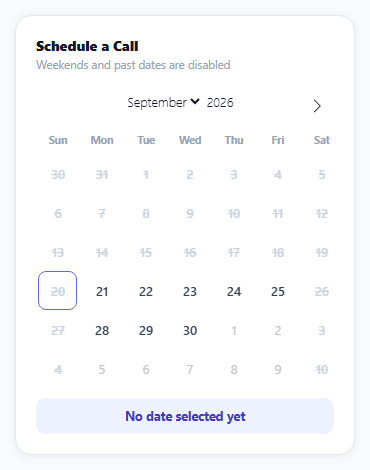
An inline calendar — always visible, no input field or popup to open first — is the right choice whenever date selection is the primary action on a screen, like booking a call or reserving a slot. Flatpickr's inline: true option renders exactly that, and its disable option is what makes "no weekends" a genuinely maintainable rule instead of a growing list of dates.
disable accepts a function, not just a date list
Flatpickr's disable array can hold literal dates, but it can also hold a function that Flatpickr calls once per candidate date, returning true to disable it. This snippet's function checks date.getDay() against 0 and 6 (Sunday and Saturday) — one rule that correctly disables every weekend forever, in any month the user navigates to, rather than a list that would need updating every time the calendar moves to a new month or year.
minDate: 'today' handles "no past dates" without manual date math
Rather than computing today's date and comparing it manually, minDate: 'today' is a Flatpickr-recognized keyword that resolves to the actual current date at render time — it stays correct every day the page is loaded, with no date object construction or timezone handling in application code.
The calendar's entire visual theme is custom CSS on Flatpickr's own classes
Flatpickr intentionally ships close to unstyled beyond layout structure — every color, radius, and weight visible here (the rounded selected-day circle, the indigo accent, the strikethrough on disabled dates) is this snippet's own CSS targeting Flatpickr's stable class names (.flatpickr-day, .selected, .flatpickr-disabled, and so on), which is the intended way to theme it rather than fighting the library's default look.
onChange reads the real Date object, not the formatted string
The callback receives both selectedDates (real JavaScript Date objects) and a pre-formatted dateStr; this snippet uses the real Date object with toLocaleDateString to produce a fuller, more readable confirmation ("Monday, September 21, 2026") than Flatpickr's own default short-format string would give.
Reusing it
Swap the weekday-based disable rule for any other availability logic — blocked-out dates from a booking API, business hours, holiday calendars — since the function form of disable can express arbitrary rules, not just a fixed weekly pattern.
Build with AI
Build, Understand, Optimize, and Extend It With AI
You don't have to work out recurring availability rules from scratch. Paste this snippet's HTML, CSS, and JS into an AI coding assistant like Claude and ask it to explain exactly how passing a function to Flatpickr's disable option lets one rule correctly disable weekends across every month the calendar can navigate to, compared to disabling a fixed list of specific dates. The same assistant can help optimize it — ask whether combining the weekday rule with a second array of specific holiday dates in the same disable array is the cleanest way to handle both kinds of unavailability together. It's also useful for extending the effect: ask it to add a way to fetch already-booked dates from an API and disable those too, support selecting a time slot after the date is chosen, or add a "next available date" quick-jump button. Treat the code less like a finished artifact and more like a starting point for a conversation.
Prompt to recreate it
Copy this into your AI assistant of choice to build the effect from scratch, or as a jumping-off point for your own variant:
Build an inline, always-visible date picker calendar using the Flatpickr library (load Flatpickr's CSS and JS from a CDN, no other library), in plain HTML, CSS, and JavaScript.

Requirements:
- Render the calendar inline (always visible on the page, not behind a text input or popup trigger).
- Prevent selecting any date before today, using the library's built-in relative-date keyword for "today" rather than manually constructing or comparing Date objects.
- Disable every Saturday and Sunday across all months the calendar can navigate to, implemented as a single reusable rule that checks a candidate date's day of the week (not a fixed, manually maintained list of specific weekend dates).
- Visually style disabled dates (for example with a strikethrough and muted color) so they're clearly distinguishable from selectable dates, and give the currently selected date a distinct highlighted appearance — achieved by writing custom CSS that targets the library's own generated class names for day cells, disabled days, and the selected day, not a separately built calendar UI.
- When a date is selected, display a confirmation message below the calendar showing the full selected date in a readable format (including the day of the week, e.g. "Monday, September 21, 2026"), derived from the real Date object the library provides in its change callback, not from any pre-formatted string.
Want to tighten it up first? Run this prompt through the AI Prompt Studio to score it across 8 quality dimensions, catch anti-patterns, and tune the wording for Claude, ChatGPT, or Gemini before you paste it in.
Source Code
<div class="fp-wrap">
  <div class="fp-card">
    <div class="fp-head">
      <div class="fp-title">Schedule a Call</div>
      <div class="fp-sub">Weekends and past dates are disabled</div>
    </div>
    <div id="fpCalendar"></div>
    <div class="fp-selected" id="fpSelected">No date selected yet</div>
  </div>
</div>*{box-sizing:border-box;margin:0;padding:0}
body{font-family:system-ui,-apple-system,sans-serif;background:#f8fafc;min-height:100vh;display:flex;align-items:center;justify-content:center;padding:24px}
.fp-wrap{width:100%;max-width:340px}
.fp-card{background:#fff;border-radius:16px;padding:20px;box-shadow:0 1px 8px rgba(0,0,0,.07);border:1px solid #e2e8f0}
.fp-head{margin-bottom:12px}
.fp-title{font-size:14px;font-weight:800;color:#0f172a}
.fp-sub{font-size:11.5px;color:#94a3b8;margin-top:2px}
.fp-selected{margin-top:12px;padding:10px;border-radius:9px;background:#eef2ff;color:#4338ca;font:700 12.5px system-ui;text-align:center}
/* Flatpickr's inline calendar ships unstyled beyond structure -- everything
visual here is this snippet's own theme layered on top of its classes. */
.flatpickr-calendar{width:100%!important;box-shadow:none!important;background:transparent!important}
.flatpickr-months{margin-bottom:6px}
.flatpickr-current-month{font-size:13px!important;font-weight:800;color:#0f172a}
.flatpickr-weekday{font-size:10.5px!important;font-weight:800;color:#94a3b8!important}
.flatpickr-day{border-radius:8px!important;font-size:12.5px!important;font-weight:600;color:#334155}
.flatpickr-day.flatpickr-disabled{color:#cbd5e1!important;text-decoration:line-through}
.flatpickr-day.today{border-color:#6366f1!important}
.flatpickr-day.selected{background:#6366f1!important;border-color:#6366f1!important;color:#fff!important}
.flatpickr-day:hover:not(.flatpickr-disabled){background:#eef2ff}var selectedEl = document.getElementById('fpSelected');
flatpickr('#fpCalendar', {
inline: true,
minDate: 'today',
// disable() accepts a function run against every candidate date -- here it
// returns true (disabled) for Saturdays (6) and Sundays (0), which is
// simpler and more maintainable than listing out every weekend date.
disable: [function (date) {
var day = date.getDay();
return day === 0 || day === 6;
}],
onChange: function (selectedDates, dateStr) {
if (!selectedDates.length) { selectedEl.textContent = 'No date selected yet'; return; }
var d = selectedDates[0];
var formatted = d.toLocaleDateString('en-US', { weekday: 'long', year: 'numeric', month: 'long', day: 'numeric' });
selectedEl.textContent = 'Selected: ' + formatted;
},
});Step by step
How to Use
- 1Add the Flatpickr CDNLoad flatpickr.min.css and flatpickr.min.js before the snippet's JS runs.
- 2Paste HTML, CSS, and JSAn inline calendar renders with today's date as the earliest option.
- 3Try clicking a weekendIt's struck through and cannot be selected.
- 4Click an available weekdayIt highlights and the confirmation text updates below.
- 5Navigate to a future monthWeekends stay disabled automatically in every month.
- 6Try a past dateDates before today are disabled by minDate.
Real-world uses
Common Use Cases
Got questions?
Frequently Asked Questions
The disable option is given a function rather than a fixed list of dates. Flatpickr calls this function once for every candidate date it renders, including dates in months the user hasn't navigated to yet, and the function returns true whenever date.getDay() is 0 (Sunday) or 6 (Saturday). Because it's a rule evaluated per-date rather than a precomputed list, it correctly disables weekends in any month, indefinitely, with no maintenance.
'today' is a special string Flatpickr recognizes and resolves internally to the actual current date whenever the calendar renders — it is always accurate for whatever day the page happens to load on. Computing and passing a literal Date object for "today" would require constructing it correctly (including handling timezones) in application code, which the built-in keyword avoids entirely.
Flatpickr ships with minimal built-in visual styling beyond layout structure, by design, so that sites can theme it to match their own design system. Every visual detail here — rounded day cells, the indigo selected-day color, the strikethrough on disabled dates — is CSS in this snippet targeting Flatpickr's own stable class names like .flatpickr-day and .selected, not a separate custom calendar implementation.
selectedDates is an array of real JavaScript Date objects representing the current selection, while dateStr is a string already formatted according to Flatpickr's own dateFormat option. This snippet uses the real Date object with the browser's toLocaleDateString method to produce a fuller, more human-readable confirmation than Flatpickr's default short-format string would give.
Add more entries to the disable array — a literal date string or Date object disables that one specific date, alongside or instead of the weekday-checking function. For dynamic availability data (like blocked-out slots from a booking API), build the disable array from that data before initializing Flatpickr, potentially combining specific blocked dates with the general weekend rule in the same array.