

Learn Coding Visually
Learn to code with interactive, live-preview playgrounds — HTML, CSS, JavaScript, React & more.
 HTML Playground42 lessons · Click-based · Live preview
 CSS PlaygroundLearn CSS with a live editor
 JavaScript Playground60 lessons · DOM · Async · Canvas
 React PlaygroundLearn React with a live code editor
 GSAP PlaygroundLearn GSAP animation interactively
 SVG Playground44 lessons · shapes · paths · animation
 SCSS Playground45 lessons · Sass modules · tokens
 Tailwind PlaygroundLearn Tailwind CSS with a live editor
 Bootstrap 5 Playground50 lessons · live preview
Scroll Canvas Generative Flow Field — Procedural Vector-Field Particles
Scroll Canvas Generative Flow Field · Scroll · Plain HTML, CSS & JS · Live preview
What's included
Features
About this UI Snippet
How to Build a Scroll-Driven Generative Flow Field With Canvas2D
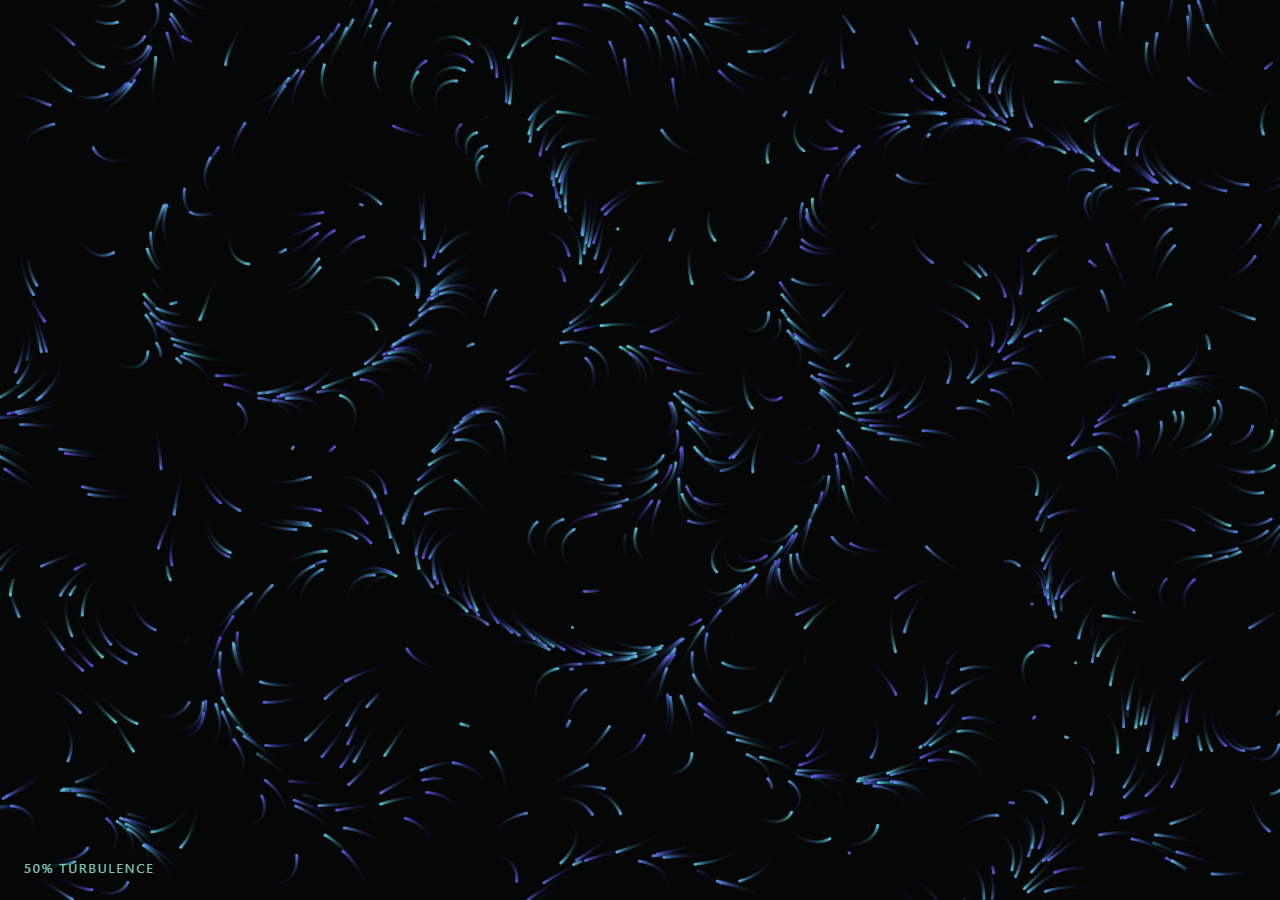
The Scroll Canvas Generative Flow Field snippet moves hundreds of particles through a procedurally computed vector field, leaving soft fading trails, with the field's turbulence and particle speed both increasing as the visitor scrolls through a pinned stage — no Perlin or simplex noise library, no Three.js, just Canvas2D and a handful of trigonometric functions.
A vector field from layered sine and cosine, not a noise texture
fieldAngle(x, y, t, turbulence) computes a single angle at any point in the plane by summing three offset sine/cosine terms at different spatial scales and phase speeds. This is a cheap, hand-rolled substitute for true Perlin noise — it doesn't have noise's statistical properties, but it produces the same essential quality a flow field needs: a direction that varies smoothly across space and drifts slowly over time, with zero external dependency.
Trails from a translucent overlay, not clearRect
Instead of calling ctx.clearRect every frame (which would erase everything back to a blank canvas), the draw loop paints a translucent rgba(5, 8, 10, 0.12) rectangle over the entire canvas each frame. Because it doesn't fully erase, every particle's previous few positions remain faintly visible underneath the newest frame, producing the classic flow-field streak-trail look for free — the same technique behind Scroll Canvas Starfield Warp Speed's motion streaks.
Zero per-frame allocation
All 900 particles' positions, remaining lifespans, and hue seeds live in flat Float32Arrays allocated once at resize() time. The animation loop only reads and writes indices into those arrays — never creates a new object or array per frame — which matters more here than in a lower-particle-count effect, since this loop also calls two trigonometric functions per particle per frame for the field itself.
Lifespan-based recycling instead of a fixed particle pool boundary check
Each particle carries a life counter that ticks down every frame; when it reaches zero (or the particle drifts off-canvas), seedParticle(i) respawns it at a fresh random position. This keeps the flow field visually replenished indefinitely without ever growing or shrinking the particle arrays.
Turbulence as one interpolated variable
A single turbulence value (0 to 1, driven by scroll) is fed into the field's spatial scale, its angle amplitude, and the particles' base speed simultaneously — so scrolling doesn't just move particles faster, it also makes the field itself spatially "tighter" and more chaotic, a richer effect than scaling speed alone.
Customizing it
Adjust the three sine/cosine terms' scale and phase-speed constants in fieldAngle for a different flow character, change the particle COUNT for a denser or sparser field, or swap the hue range for a different color story. Pair it with Scroll Canvas Starfield Warp Speed for a related Canvas2D particle technique.
Build with AI
Build, Understand, Optimize, and Extend It With AI
You don't have to derive procedural flow-field math or trail-rendering technique from scratch. Paste this snippet's HTML, CSS, and JS into an AI coding assistant like Claude and ask it to explain exactly how the three sine/cosine terms in fieldAngle combine to produce a spatially smooth, time-varying direction field without any noise library, and why painting a translucent rectangle each frame produces trails instead of calling clearRect. The same assistant is useful for extending the effect: ask it to add a second field layer at a different scale for more complex swirling, vary particle color by local field angle instead of a random hue seed, or add mouse-repulsion so particles swerve around the cursor. Treat the code as a conversation starter, not a finished artifact.
Prompt to recreate it
Copy this into your AI assistant of choice to build the effect from scratch, or as a jumping-off point for your own variant:
Build a "scroll-driven generative flow field" in plain HTML, CSS, and JavaScript using Canvas2D (no external noise library, no Three.js) plus GSAP and GSAP's ScrollTrigger plugin loaded from a CDN (no bundler, no build step).

Requirements:
- A pinned section containing a full-size canvas with a 2D rendering context, resized to match its display size and device pixel ratio.
- Several hundred particles whose live positions, remaining lifespans, and per-particle hue seeds are stored in flat Float32Arrays allocated once — never allocate new arrays or objects inside the render loop.
- A pure function that computes a flow direction (an angle) at any (x, y, time, turbulence) by summing at least three sine and cosine terms at different spatial scales and phase speeds — no Perlin, simplex, or other external noise library.
- Each animation frame, move every particle along the direction returned by that field function scaled by a speed value, decrement a per-particle lifespan counter, and respawn (reseed) any particle that runs out of lifespan or leaves the canvas bounds at a fresh random position — never removing particles from or adding particles to the arrays.
- Produce fading motion trails by painting a low-alpha translucent rectangle over the entire canvas at the start of each frame instead of calling clearRect, so recent particle positions remain faintly visible under the newest frame.
- Register a GSAP tween on a ScrollTrigger targeting the pinned section, with pin: true, start at top top, a numeric scrub, and a multi-hundred-percent end, animating a single plain turbulence value from 0 to 1 with linear easing.
- Feed that turbulence value into the field function's spatial scale and angle amplitude, and into the particles' base movement speed, so scrolling further makes the field visually tighter, more chaotic, and faster all at once — not just faster.
- Confirm scrolling back up calms the field back toward its slow, gentle resting drift.
Want to tighten it up first? Run this prompt through the AI Prompt Studio to score it across 8 quality dimensions, catch anti-patterns, and tune the wording for Claude, ChatGPT, or Gemini before you paste it in.
Source Code
<section class="gff-stage" id="gffStage">
  <div class="gff-intro-overlay"><p>Scroll ↓ to stir the current</p></div>
  <canvas id="gffCanvas"></canvas>
  <div class="gff-hud"><span id="gffPct">0</span>% turbulence</div>
</section>
<section class="gff-bottom"><p>Hundreds of particles tracing a procedural vector field, no noise library involved.</p></section>*{box-sizing:border-box;margin:0;padding:0}
html,body{background:#050608;color:#fff;font-family:system-ui,-apple-system,sans-serif}
.gff-bottom{min-height:70vh;display:flex;justify-content:center;align-items:center;color:#7fa8a0;font-size:15px;letter-spacing:.08em;text-transform:uppercase;text-align:center;padding:0 24px}
.gff-stage{height:100vh;position:relative;overflow:hidden;background:#05080a}
.gff-intro-overlay{position:absolute;inset:0;display:flex;align-items:center;justify-content:center;text-align:center;padding:24px;pointer-events:none;z-index:5;color:#bde8dd;font-size:15px;letter-spacing:.08em;text-transform:uppercase;text-shadow:0 2px 16px rgba(0,0,0,.6);transition:opacity .4s ease}
#gffCanvas{display:block;width:100%;height:100%}
.gff-hud{position:absolute;left:24px;bottom:24px;font-variant-numeric:tabular-nums;font-size:13px;letter-spacing:.14em;color:#8fe9d0;text-transform:uppercase;opacity:.85}const canvas = document.getElementById('gffCanvas');
const ctx = canvas.getContext('2d');
const pctEl = document.getElementById('gffPct');
const introEl = document.querySelector('.gff-intro-overlay');
const DPR = Math.min(window.devicePixelRatio || 1, 2);
let W = 0, H = 0;
const COUNT = 900;
// Flat, pre-allocated arrays for every particle's live state -- the render
// loop only ever reads and writes into these, never allocates.
const px = new Float32Array(COUNT);
const py = new Float32Array(COUNT);
const life = new Float32Array(COUNT);
const hueBase = new Float32Array(COUNT);
function seedParticle(i) {
px[i] = Math.random() * W;
py[i] = Math.random() * H;
life[i] = 60 + Math.random() * 160;
hueBase[i] = Math.random();
}
function resize() {
W = canvas.clientWidth; H = canvas.clientHeight;
canvas.width = Math.floor(W * DPR);
canvas.height = Math.floor(H * DPR);
ctx.setTransform(DPR, 0, 0, DPR, 0, 0);
ctx.fillStyle = '#05080a';
ctx.fillRect(0, 0, W, H);
for (let i = 0; i < COUNT; i++) seedParticle(i);
}
// Procedural vector field: layered sine/cosine functions of position (and a
// slow time term) produce a smoothly varying angle at every point in the
// plane -- no external Perlin/simplex noise library required.
function fieldAngle(x, y, t, turbulence) {
const scale = 0.006 + turbulence * 0.01;
const a =
Math.sin(x * scale + t * 0.6) * 1.4 +
Math.cos(y * scale * 1.3 - t * 0.4) * 1.1 +
Math.sin((x + y) * scale * 0.7 + t * 0.25) * 0.8;
return a * (1.4 + turbulence * 1.6);
}
gsap.registerPlugin(ScrollTrigger);
const scrollState = { t: 0 };
gsap.to(scrollState, {
t: 1,
ease: 'none',
scrollTrigger: {
trigger: '#gffStage',
start: 'top top',
end: '+=350%',
scrub: 0.6,
pin: true,
},
});
const clock = { start: performance.now() };
function draw() {
requestAnimationFrame(draw);
const t = scrollState.t;
if (introEl) introEl.style.opacity = (t > 0.03) ? '0' : '1';
const elapsed = (performance.now() - clock.start) / 1000;
const turbulence = t; // 0 (calm drift) to 1 (chaotic storm)
const baseSpeed = 0.6 + turbulence * 2.6;
// Translucent overlay instead of clearRect -- this is what leaves the
// fading motion trails behind each particle.
ctx.fillStyle = 'rgba(5, 8, 10, ' + (0.12 + turbulence * 0.06).toFixed(3) + ')';
ctx.fillRect(0, 0, W, H);
for (let i = 0; i < COUNT; i++) {
const angle = fieldAngle(px[i], py[i], elapsed, turbulence);
px[i] += Math.cos(angle) * baseSpeed;
py[i] += Math.sin(angle) * baseSpeed;
life[i] -= 1;
if (px[i] < 0 || px[i] > W || py[i] < 0 || py[i] > H || life[i] <= 0) {
seedParticle(i);
continue;
}
const hue = 165 + hueBase[i] * 60 + turbulence * 40;
ctx.beginPath();
ctx.fillStyle = 'hsla(' + hue.toFixed(0) + ', 75%, ' + (55 + turbulence * 15).toFixed(0) + '%, 0.85)';
ctx.arc(px[i], py[i], 1.3 + turbulence * 0.6, 0, Math.PI * 2);
ctx.fill();
}
pctEl.textContent = Math.round(turbulence * 100);
}
resize();
window.addEventListener('resize', resize);
draw();Step by step
How to Use
- 1Load the CDN scriptsAdd gsap.min.js and ScrollTrigger.min.js from the CDN panel, in that order.
- 2Paste HTML, CSS, and JSA calm drifting particle field renders inside a pinned canvas stage with a live "% turbulence" read-out.
- 3Scroll downThe field grows more turbulent and particles speed up and streak, driven by a single turbulence value.
- 4Scroll back upThe field calms back to a slow, gentle drift exactly in reverse.
- 5Retune the flowAdjust the scale and phase-speed constants inside fieldAngle for a different current pattern.
- 6Change particle densityIncrease or decrease COUNT for a denser or sparser field (watch frame rate on lower-end devices).
Real-world uses
Common Use Cases
Got questions?
Frequently Asked Questions
fieldAngle sums three sine/cosine terms at different spatial scales and phase speeds to compute a direction at any point. It lacks true noise’s statistical guarantees, but produces the same essential quality a flow field needs — a direction that varies smoothly in space and drifts slowly over time — with no external library dependency.
Each frame paints a translucent dark rectangle (rgba with a low alpha) over the whole canvas instead of fully clearing it. Because previous frames are only partially erased, particles’ recent past positions remain faintly visible, producing streak-like trails for free rather than requiring a separate trail-drawing pass.
A fixed lifespan counter that ticks down each frame, combined with an off-canvas check, lets particles respawn at fresh random positions periodically even if they never leave the visible area — keeping the field looking continuously replenished rather than settling into a static repeating pattern.
A single 0-to-1 turbulence value (driven by scroll) is fed into three places at once: the field’s spatial scale (making the pattern spatially tighter), the field’s angle amplitude (making direction changes more extreme), and the particles’ base speed — so higher turbulence looks qualitatively more chaotic, not just faster.
With 900 particles updated every frame, an array of plain JS objects would mean 900 property lookups and potential hidden-class deoptimization per frame. Flat typed arrays indexed numerically avoid per-particle object overhead and never trigger garbage collection from the render loop itself.