
Learn Coding Visually
Learn to code with interactive, live-preview playgrounds — HTML, CSS, JavaScript, React & more.
 HTML Playground42 lessons · Click-based · Live preview
 CSS PlaygroundLearn CSS with a live editor
 JavaScript Playground60 lessons · DOM · Async · Canvas
 React PlaygroundLearn React with a live code editor
 GSAP PlaygroundLearn GSAP animation interactively
 SVG Playground44 lessons · shapes · paths · animation
 SCSS Playground45 lessons · Sass modules · tokens
 Tailwind PlaygroundLearn Tailwind CSS with a live editor
 Bootstrap 5 Playground50 lessons · live preview
Scroll Crossword Fill Reveal — Free HTML CSS JS Snippet
Scroll Crossword Fill Reveal · Scroll · Plain HTML, CSS & JS · Live preview
What's included
Features
About this UI Snippet
Scroll Crossword Fill Reveal — Staggered Grid Reveal with a Scrubbed Timeline
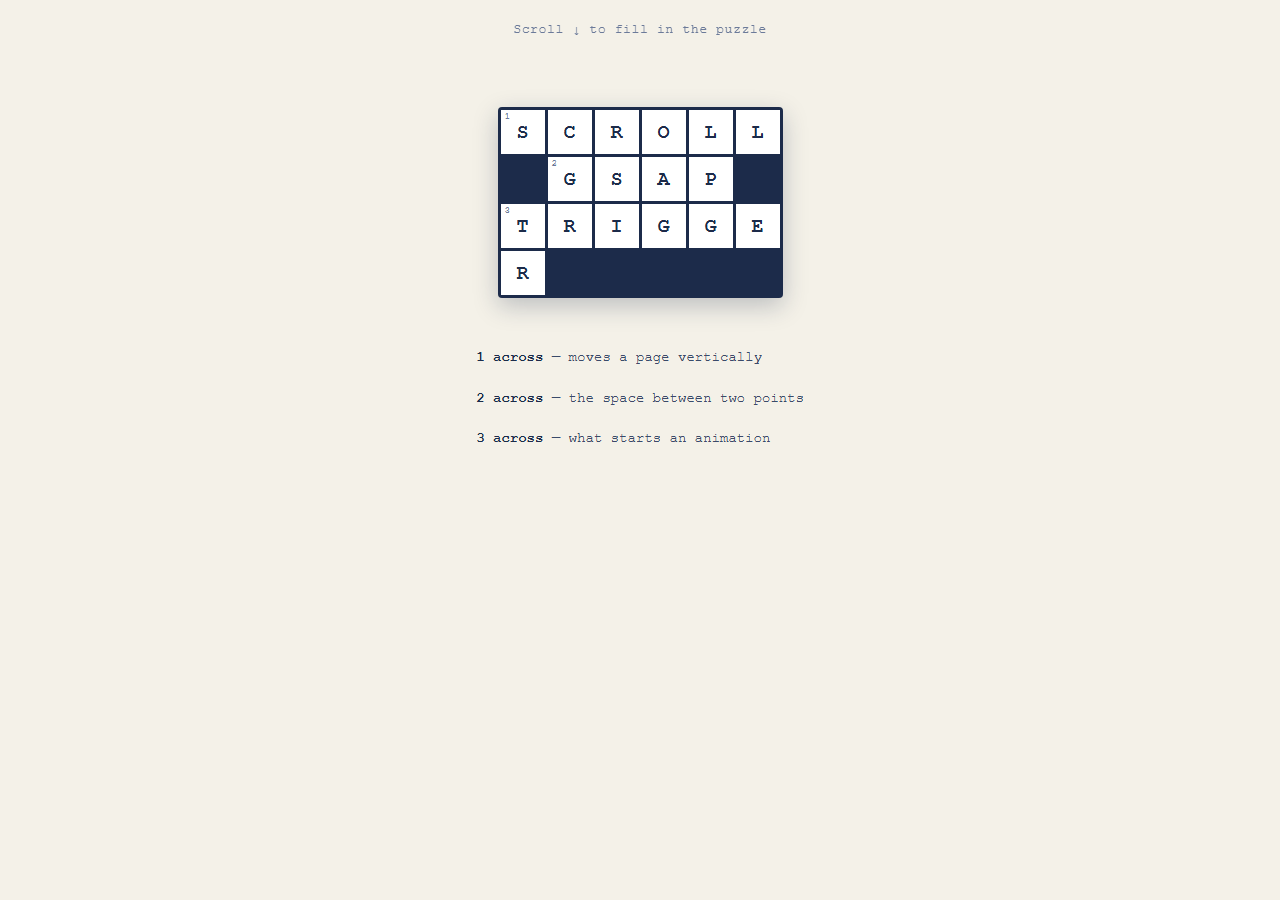
A puzzle-style scroll reveal where a CSS grid of crossword cells fills in one at a time as the section scrolls into view, each cell popping into place and briefly flashing a highlight color like a pen just wrote it in. Pair with Scroll Text Clip Reveal for a complementary letter-driven effect, or Scroll Reveal Grid patterns for a simpler staggered reveal.
A CSS grid, not a canvas
The puzzle is a plain display: grid of .cell divs with grid-template-columns: repeat(6, 44px). Filled black squares between words are separate .cell.blank divs that stay opaque from the start — no JavaScript needed to distinguish playable cells from blocked ones, it's a CSS class.
One scrubbed timeline, one tween per cell
gsap.utils.toArray('.cell:not(.blank)') collects every playable cell in document order. A single timeline loops over them, giving cell i a start position of i * 0.06 on the shared timeline. Each cell gets a fromTo popping it from scale(0.5)/opacity:0 to full size with a back.out(2) ease for a slight overshoot, like a letter snapping into its box.
The "just filled in" flash
Right after each cell's pop-in tween, two more tweens at the same and nearby timeline positions animate backgroundColor from white to a pale blue and back to white — a quick highlight flash that reads as "this cell was just written," independent of the scale/opacity pop.
Why start/end target only the grid's entrance
The ScrollTrigger's start: 'top 75%' / end: 'top 5%' window is deliberately short — just the distance it takes the grid to scroll from mostly-below-viewport to near the top. Because it's all one scrubbed timeline, scrolling back down below the start point resets every cell back to invisible/unscaled, and scrolling past the end point leaves the completed grid fully filled.
Reversibility for free
Because every letter's appearance is driven by scroll-mapped timeline position rather than a one-shot trigger, scrolling up "erases" the puzzle in the same staggered order it filled in, which is what makes this feel fundamentally different from a fire-once IntersectionObserver reveal.
Build with AI
Build, Understand, Optimize, and Extend It With AI
This snippet's core idea — mapping array index to timeline position (i * constant) inside one scrubbed GSAP timeline — is a reusable pattern for any staggered, scroll-reversible reveal, not just crosswords. Ask an AI assistant to explain why this produces a *reversible* stagger where a CSS animation-delay-based stagger would not, and to walk through what would need to change to make the stagger diagonal (by grid row+column) instead of purely index-based. It's also useful for extending the effect: ask for a version where each cell's letter is typed in character-by-character, or one that adds a celebratory pulse across the whole grid once the last cell fills in. Use it as a working reference to adapt, not a finished puzzle game.
Prompt to recreate it
Copy this into your AI assistant of choice to build the effect from scratch, or as a jumping-off point for your own variant:
Build a scroll-scrubbed "crossword fill-in" animation in plain HTML, CSS, and JavaScript using GSAP and ScrollTrigger — a real CSS grid, no canvas.

Requirements:
- Create a CSS grid of square cells representing a small crossword (display: grid, fixed cell size, small gap, dark grid-line background showing through the gaps).
- Give some cells a "blank/blocked" class with a solid dark background and full opacity from the start — these should NOT be part of the animated reveal.
- Give the remaining "letter" cells a single centered letter character each, and start them fully transparent and scaled down (opacity: 0, transform: scale(0.5)).
- In JavaScript, collect only the non-blank letter cells (e.g. via a ":not(.blank)" selector) in their document order.
- Create one GSAP timeline attached to a ScrollTrigger with a numeric scrub value and a start/end range tied to the puzzle section scrolling from mostly below the viewport up to near the top (e.g. start: "top 75%", end: "top 5%") — do not pin the section.
- Loop over the collected cells and, for each one at index i, add a fromTo tween to the shared timeline at position (i multiplied by a small constant like 0.06) that animates opacity from 0 to 1 and scale from 0.5 to 1, using a back-out easing curve for a slight overshoot pop.
- At the same or a slightly later timeline position for each cell, add one or two more short tweens that animate the cell's background-color from white to a pale highlight color and back to white, simulating a "just filled in" flash independent of the pop-in motion.
- Confirm that scrolling back up reverses the whole sequence — cells shrink back to invisible in reverse order — since it's all driven by one scrubbed timeline's playhead position.
- Style it with a classic crossword palette: white cells, navy or black grid lines, and a pale blue highlight flash color.
Want to tighten it up first? Run this prompt through the AI Prompt Studio to score it across 8 quality dimensions, catch anti-patterns, and tune the wording for Claude, ChatGPT, or Gemini before you paste it in.
Source Code
<div class="hint">Scroll ↓ to fill in the puzzle</div>
<section class="puzzle-section">
  <div class="grid" id="grid">
    <div class="cell" data-n="1"><span class="num">1</span><span class="letter">S</span></div>
    <div class="cell" data-n="2"><span class="letter">C</span></div>
    <div class="cell" data-n="3"><span class="letter">R</span></div>
    <div class="cell" data-n="4"><span class="letter">O</span></div>
    <div class="cell" data-n="5"><span class="letter">L</span></div>
    <div class="cell" data-n="6"><span class="letter">L</span></div>
    <div class="cell blank"></div>
    <div class="cell" data-n="7"><span class="num">2</span><span class="letter">G</span></div>
    <div class="cell" data-n="8"><span class="letter">S</span></div>
    <div class="cell" data-n="9"><span class="letter">A</span></div>
    <div class="cell" data-n="10"><span class="letter">P</span></div>
    <div class="cell blank"></div>
    <div class="cell" data-n="11"><span class="num">3</span><span class="letter">T</span></div>
    <div class="cell" data-n="12"><span class="letter">R</span></div>
    <div class="cell" data-n="13"><span class="letter">I</span></div>
    <div class="cell" data-n="14"><span class="letter">G</span></div>
    <div class="cell" data-n="15"><span class="letter">G</span></div>
    <div class="cell" data-n="16"><span class="letter">E</span></div>
    <div class="cell" data-n="17"><span class="letter">R</span></div>
  </div>
  <div class="clues">
    <p><strong>1 across</strong> — moves a page vertically</p>
    <p><strong>2 across</strong> — the space between two points</p>
    <p><strong>3 across</strong> — what starts an animation</p>
  </div>
</section>
* { box-sizing: border-box; }
body { margin: 0; font-family: 'Courier New', monospace; background: #f4f1e8; color: #1c2b4a; }
.hint { position: sticky; top: 12px; text-align: center; font-size: 13px; letter-spacing: 0.05em; color: #6b7a99; z-index: 4; padding: 10px; }
.puzzle-section { min-height: 130vh; display: flex; flex-direction: column; align-items: center; padding: 8vh 20px 20vh; gap: 32px; }
.grid { display: grid; grid-template-columns: repeat(6, 44px); grid-auto-rows: 44px; gap: 3px; background: #1c2b4a; padding: 3px; border-radius: 4px; box-shadow: 0 8px 24px rgba(28,43,74,0.25); }
.cell { position: relative; background: #fff; display: flex; align-items: center; justify-content: center; opacity: 0; transform: scale(0.5); }
.cell.blank { background: #1c2b4a; opacity: 1; }
.num { position: absolute; top: 2px; left: 4px; font-size: 9px; color: #6b7a99; }
.letter { font-size: 20px; font-weight: 700; color: #1c2b4a; }
.cell.filled { background: #dbe8ff; }
.clues { max-width: 340px; font-size: 14px; line-height: 1.9; color: #3a4a6a; }
.clues strong { color: #1c2b4a; }gsap.registerPlugin(ScrollTrigger);
var cells = gsap.utils.toArray('.cell:not(.blank)');
var tl = gsap.timeline({
scrollTrigger: {
trigger: '.puzzle-section',
start: 'top 75%',
end: 'top 5%',
scrub: 0.4,
},
});
cells.forEach(function (cell, i) {
var pos = i * 0.06;
tl.fromTo(cell,
{ opacity: 0, scale: 0.5 },
{ opacity: 1, scale: 1, duration: 0.3, ease: 'back.out(2)' },
pos
).to(cell, { backgroundColor: '#dbe8ff', duration: 0.15 }, pos)
.to(cell, { backgroundColor: '#ffffff', duration: 0.25 }, pos + 0.2);
});Step by step
How to Use
- 1Scroll the grid into viewScroll down until the crossword grid enters the upper part of the viewport — cells pop in one by one with a brief blue highlight flash.
- 2Scroll back upThe grid empties out in the same staggered order, confirming the effect is fully reversible.
- 3Change the puzzle contentEdit the letters inside each .letter span and the data-n clue numbers in the HTML panel to spell a different word or phrase.
- 4Adjust the grid shapeChange grid-template-columns (currently repeat(6, 44px)) in the CSS panel to make a wider, narrower, or differently-sized grid.
- 5Tune the stagger speedChange the 0.06 multiplier in pos = i * 0.06 in the JS panel to make cells fill in faster or slower relative to each other.
- 6Export in your formatClick "HTML" for a standalone file, "JSX" for React, or "Tailwind" for a React + Tailwind version.
Real-world uses
Common Use Cases
Got questions?
Frequently Asked Questions
Blank squares use an extra .blank CSS class that sets opacity: 1 and a dark background from the start. The JS collects animated cells with gsap.utils.toArray(".cell:not(.blank)"), so blanks are simply skipped by the query selector.
They are two separate tweens placed at the same (or a slightly offset) timeline position: one animates scale/opacity for the "appearing" motion, another animates backgroundColor for the "just written in" highlight. Layering simple tweens like this is easier to tune than one complex keyframe animation.
Every cell's appearance is a tween inside one scrubbed timeline mapped to a specific scroll range. Scrubbing the timeline backward runs those tweens in reverse, so cells shrink back to invisible in the same order they appeared.
Yes — add more .cell divs to the grid and increase grid-template-columns' repeat count in the CSS. The JS automatically staggers however many non-blank cells exist, no changes needed there.
The reveal is meant to complete quickly as the grid scrolls into the upper viewport, similar to a staggered card-grid reveal — pinning isn't needed because the grid doesn't need to hold the viewport's attention beyond its own entrance.