
Learn Coding Visually
Learn to code with interactive, live-preview playgrounds — HTML, CSS, JavaScript, React & more.
 HTML Playground42 lessons · Click-based · Live preview
 CSS PlaygroundLearn CSS with a live editor
 JavaScript Playground60 lessons · DOM · Async · Canvas
 React PlaygroundLearn React with a live code editor
 GSAP PlaygroundLearn GSAP animation interactively
 SVG Playground44 lessons · shapes · paths · animation
 SCSS Playground45 lessons · Sass modules · tokens
 Tailwind PlaygroundLearn Tailwind CSS with a live editor
 Bootstrap 5 Playground50 lessons · live preview
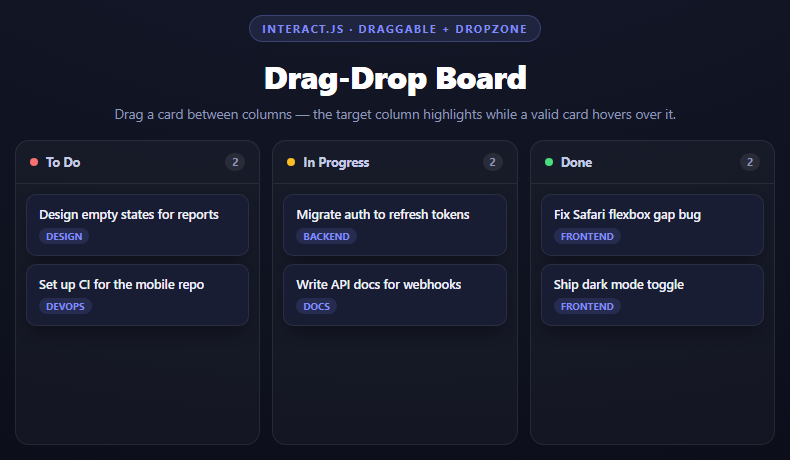
SortableJS Draggable Task Board — Trello-Style Kanban Snippet
SortableJS Draggable Task Board · Dashboards · Plain HTML, CSS & JS · Live preview
What's included
Features
About this UI Snippet
SortableJS Draggable Task Board — What group Actually Unlocks
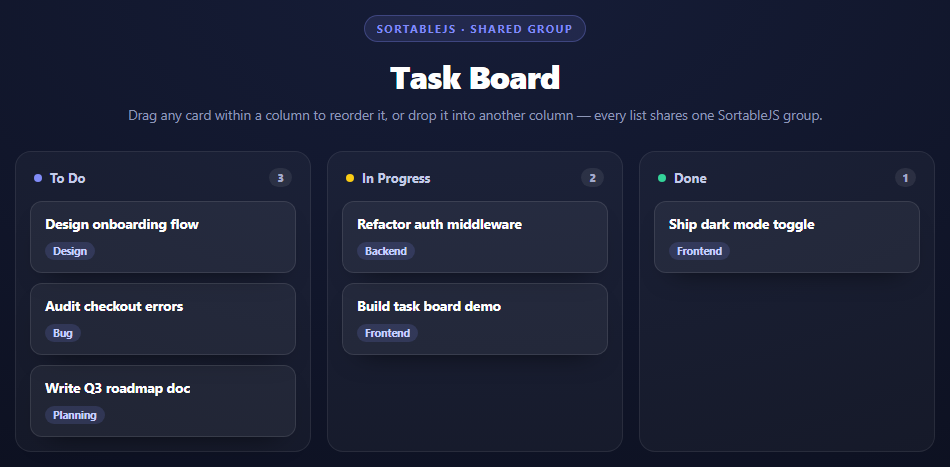
A single new Sortable(list, {...}) call makes one list's items reorderable within themselves — that part is the library's default behavior with zero extra configuration. This task board needs more than that: a card started in "To Do" has to be droppable into "In Progress" or "Done." That specific capability, drag *between* separate DOM containers, comes from exactly one option: group.
Why a shared group string, not a shared instance
js
document.querySelectorAll('.stb-list').forEach(function (list) {
  new Sortable(list, { group: 'tasks', ... });
});
Each column gets its own Sortable instance — there's no single object managing all three lists together. What ties them into one drag surface is that every instance is configured with the identical string 'tasks' for group. SortableJS checks this value at drag time: when a card is picked up from one list, it looks at every *other* Sortable-managed list on the page and asks "does your group match mine?" Only lists with a matching group become valid drop targets; a fourth list configured with group: 'archive' would visually sit right next to these columns but refuse every drop from them. This is what makes group a genuinely different mechanism from just calling Sortable on a parent wrapping all three columns — SortableJS is explicitly designed around independent instances that opt into cross-container dragging by name, not a single instance spanning multiple lists.
animation: 150 and the reflow
animation: 150 is what makes the *other* cards in a list slide smoothly out of the way as a dragged card passes over or lands among them, rather than snapping instantly to their new positions. It's measured in milliseconds and applies to every reflow SortableJS triggers — both within a list during reorder and across lists when a card arrives from elsewhere.
The class hooks: ghost, chosen, drag
Three separate classes cover three separate moments of a drag, and mixing them up is a common source of "why does my board look wrong while dragging" bugs: - `ghostClass` styles the placeholder left behind in the original position while dragging — this snippet dims it to 35% opacity so it reads as "the space this card used to occupy." - `chosenClass` styles the card the instant it's picked up, for the whole duration of the drag, including after it's dropped in its animation-in — this snippet gives it a glowing outline. - `dragClass` styles the actual element following the cursor/touch point during the drag itself.
onSort and keeping counts honest
SortableJS fires onSort on the list the drop landed in whenever its child order changes — from a drag *or* a drop arriving from elsewhere. This snippet uses it to re-run updateCounts(), which just re-reads each column's live .children.length rather than maintaining a separate count variable that could drift out of sync with the actual DOM. Because SortableJS moves the real DOM node on drop (it doesn't clone and destroy), the moved card carries all of its original content and listeners with it automatically — there's no re-render step needed after a drop.
Build with AI
Build, Understand, Optimize, and Extend It With AI
This snippet is a good one to pressure-test an AI's understanding of a single option's scope: paste it into an assistant like Claude and ask it to explain precisely what would happen if the "In Progress" column's Sortable instance were configured with group: 'other-tasks' while the remaining two kept group: 'tasks' — the correct answer is that cards could still move between To Do and Done, but neither could exchange cards with In Progress in either direction. Then ask it to distinguish the exact visual moment each of ghostClass, chosenClass, and dragClass applies to, since those three are easy to blur together without seeing them side by side. To extend it: ask for a version that persists the board's state to localStorage using onSort or onEnd, a WIP column limit that visually warns (or blocks drops) past a maximum card count, or a version that adds a "add task" input per column that appends a new draggable card without re-initializing Sortable.
Prompt to recreate it
Copy this into your AI assistant of choice to build the effect from scratch, or as a jumping-off point for your own variant:
Build a 3-column Trello-style task board using SortableJS (v1.15.2, from a CDN) in plain HTML, CSS, and JavaScript.

Requirements:
- Three columns (To Do, In Progress, Done), each rendered from a JS array of task objects ({ title, tag }) into card elements, with a live count badge per column header.
- Initialize a SEPARATE new Sortable(listElement, { ... }) instance for EACH column's list — not one instance wrapping all three — but give every instance the identical group: 'tasks' option. Add a comment explaining that group is the specific mechanism that allows a card dragged from one independently-managed list to be dropped into another, and that without a matching group value on every list, SortableJS would only allow reordering within each list, never across them.
- Configure animation: 150 for a smooth reflow of neighboring cards, plus three distinct classes: ghostClass (styles the placeholder left behind at the origin), chosenClass (styles the card for its full selected duration), and dragClass (styles the element actively following the pointer) — style all three differently enough in CSS that their distinct roles are visible.
- Use the onSort callback (fired on any list whose children change) to re-run a function that recalculates and displays each column's card count by reading list.children.length directly, rather than maintaining a separate counter variable.
- Style it as a dark, premium Kanban board with rounded card panels, colored column-status dots, and small tag pills per card, responsive down to a single stacked column on narrow viewports.
Want to tighten it up first? Run this prompt through the AI Prompt Studio to score it across 8 quality dimensions, catch anti-patterns, and tune the wording for Claude, ChatGPT, or Gemini before you paste it in.
Source Code
<div class="stb-stage">
  <div class="stb-head">
    <span class="stb-tag">SortableJS · shared group</span>
    <h2>Task Board</h2>
    <p>Drag any card within a column to reorder it, or drop it into another column — every list shares one SortableJS group.</p>
  </div>
  <div class="stb-board">
    <div class="stb-col">
      <div class="stb-col-head"><span class="stb-dot stb-dot-todo"></span>To Do<span class="stb-count" id="countTodo">0</span></div>
      <div class="stb-list" id="colTodo" data-col="todo"></div>
    </div>
    <div class="stb-col">
      <div class="stb-col-head"><span class="stb-dot stb-dot-progress"></span>In Progress<span class="stb-count" id="countProgress">0</span></div>
      <div class="stb-list" id="colProgress" data-col="progress"></div>
    </div>
    <div class="stb-col">
      <div class="stb-col-head"><span class="stb-dot stb-dot-done"></span>Done<span class="stb-count" id="countDone">0</span></div>
      <div class="stb-list" id="colDone" data-col="done"></div>
    </div>
  </div>
</div>*{box-sizing:border-box;margin:0;padding:0}
body{font-family:system-ui,-apple-system,sans-serif;background:radial-gradient(120% 100% at 50% 0%,#161d38,#080a14);color:#fff;min-height:100vh;padding:40px 24px}
.stb-stage{max-width:920px;margin:0 auto;display:flex;flex-direction:column;gap:28px}
.stb-head{text-align:center}
.stb-tag{display:inline-block;font-size:11px;font-weight:700;letter-spacing:.14em;text-transform:uppercase;color:#818cf8;background:rgba(129,140,248,.12);border:1px solid rgba(129,140,248,.3);padding:5px 12px;border-radius:99px;margin-bottom:12px}
.stb-head h2{font-size:clamp(24px,4.4vw,32px);font-weight:800;letter-spacing:-.02em}
.stb-head p{font-size:13.5px;color:#8e97b8;margin-top:8px}
.stb-board{display:grid;grid-template-columns:repeat(3,1fr);gap:16px}
@media(max-width:720px){.stb-board{grid-template-columns:1fr}}
.stb-col{background:rgba(255,255,255,.035);border:1px solid rgba(255,255,255,.08);border-radius:16px;padding:14px;display:flex;flex-direction:column;gap:12px;min-height:120px}
.stb-col-head{display:flex;align-items:center;gap:8px;font-size:13px;font-weight:700;color:#c3cbe8;padding:2px 4px}
.stb-count{margin-left:auto;background:rgba(255,255,255,.08);color:#a3aacb;font-size:11px;font-weight:800;padding:2px 8px;border-radius:99px}
.stb-dot{width:8px;height:8px;border-radius:50%}
.stb-dot-todo{background:#818cf8}
.stb-dot-progress{background:#facc15}
.stb-dot-done{background:#34d399}
.stb-list{display:flex;flex-direction:column;gap:10px;min-height:60px;flex:1}
.stb-card{background:rgba(255,255,255,.05);border:1px solid rgba(255,255,255,.1);border-radius:12px;padding:12px 14px;cursor:grab;box-shadow:0 14px 28px -18px rgba(0,0,0,.7)}
.stb-card:active{cursor:grabbing}
.stb-card-title{font-size:13.5px;font-weight:700;margin-bottom:6px}
.stb-card-tag{display:inline-block;font-size:10.5px;font-weight:700;padding:2px 8px;border-radius:99px;background:rgba(129,140,248,.16);color:#c7d0ff}
.stb-ghost{opacity:.35}
.stb-chosen{box-shadow:0 0 0 2px #818cf8,0 18px 34px -18px rgba(0,0,0,.8)}
.stb-drag{cursor:grabbing !important}var COLUMNS = {
todo: [
{ title: 'Design onboarding flow', tag: 'Design' },
{ title: 'Audit checkout errors', tag: 'Bug' },
{ title: 'Write Q3 roadmap doc', tag: 'Planning' }
],
progress: [
{ title: 'Refactor auth middleware', tag: 'Backend' },
{ title: 'Build task board demo', tag: 'Frontend' }
],
done: [
{ title: 'Ship dark mode toggle', tag: 'Frontend' }
]
};
function renderCard(task) {
var card = document.createElement('div');
card.className = 'stb-card';
card.innerHTML =
'<div class="stb-card-title">' + task.title + '</div>' +
'<span class="stb-card-tag">' + task.tag + '</span>';
return card;
}
Object.keys(COLUMNS).forEach(function (key) {
var list = document.getElementById('col' + key.charAt(0).toUpperCase() + key.slice(1));
COLUMNS[key].forEach(function (task) {
list.appendChild(renderCard(task));
});
});
function updateCounts() {
['Todo', 'Progress', 'Done'].forEach(function (name) {
var list = document.getElementById('col' + name);
var count = document.getElementById('count' + name);
count.textContent = list.children.length;
});
}
// A single shared "group" name is what lets SortableJS treat three separate lists as
// one drag-and-drop surface: a card picked up from any list can be dropped into any
// other list carrying the same group value, not just reordered within its own list.
// Without a matching group on every list, SortableJS would only allow reordering
// inside each list individually and refuse cross-list drops.
document.querySelectorAll('.stb-list').forEach(function (list) {
new Sortable(list, {
group: 'tasks',
animation: 150,
ghostClass: 'stb-ghost',
chosenClass: 'stb-chosen',
dragClass: 'stb-drag',
onSort: updateCounts
});
});
updateCounts();Step by step
How to Use
- 1Add the SortableJS CDN scriptOne script tag — no companion CSS is shipped by the library.
- 2Give every column list the same group valuegroup: "tasks" on all three Sortable instances is what enables cross-column drops.
- 3Create one Sortable instance per listEach column gets its own new Sortable() call, not one shared instance for the whole board.
- 4Set animation for a smooth reflowanimation: 150 makes other cards slide out of the way instead of snapping instantly.
- 5Style the three drag-state classesghostClass, chosenClass, and dragClass each cover a different moment of the drag.
- 6Use onSort to keep derived state in syncRe-read live DOM counts rather than maintaining a separate counter that can drift.
Real-world uses
Common Use Cases
Got questions?
Frequently Asked Questions
It tells SortableJS which lists are allowed to exchange dragged items with each other. Every list configured with the same group value becomes a valid drop target for cards dragged from any other list sharing that value; lists with a different or missing group refuse those drops.
SortableJS is designed around one instance per draggable container, with group being the mechanism that connects otherwise-independent instances for cross-container drags. There is no single-instance API for "one Sortable spanning three columns" — group is how the library solves that instead.
ghostClass styles the placeholder left in the original position during a drag. chosenClass styles the card itself for the whole time it is selected, including drop animation. dragClass styles specifically the element actively following the cursor or touch point. They cover three different visual moments and can be styled independently.
No. SortableJS moves the actual DOM node from one list to another on drop rather than destroying and recreating it, so anything attached to that element — event listeners, data attributes, content — survives the move automatically.
onSort fires whenever a list's children change due to a drag, whether that's a reorder or an arrival from another column. Re-reading list.children.length directly from the DOM inside that callback guarantees the displayed count always matches reality, instead of relying on a separate counter that could get out of sync if an update path is missed.
It sets, in milliseconds, how long SortableJS takes to animate other items sliding into their new positions as a drag moves through or lands in a list. Without it, neighboring cards would jump to new positions instantly with no transition.