

Learn Coding Visually
Learn to code with interactive, live-preview playgrounds — HTML, CSS, JavaScript, React & more.
 HTML Playground42 lessons · Click-based · Live preview
 CSS PlaygroundLearn CSS with a live editor
 JavaScript Playground60 lessons · DOM · Async · Canvas
 React PlaygroundLearn React with a live code editor
 GSAP PlaygroundLearn GSAP animation interactively
 SVG Playground44 lessons · shapes · paths · animation
 SCSS Playground45 lessons · Sass modules · tokens
 Tailwind PlaygroundLearn Tailwind CSS with a live editor
 Bootstrap 5 Playground50 lessons · live preview
Interact.js Drag-Drop Kanban — Cross-Column Card Board Snippet
Interact.js Drag-Drop Kanban · Dashboards · Plain HTML, CSS & JS · Live preview
What's included
Features
About this UI Snippet
Interact.js Drag-Drop Kanban — Draggable and Dropzone Working Together
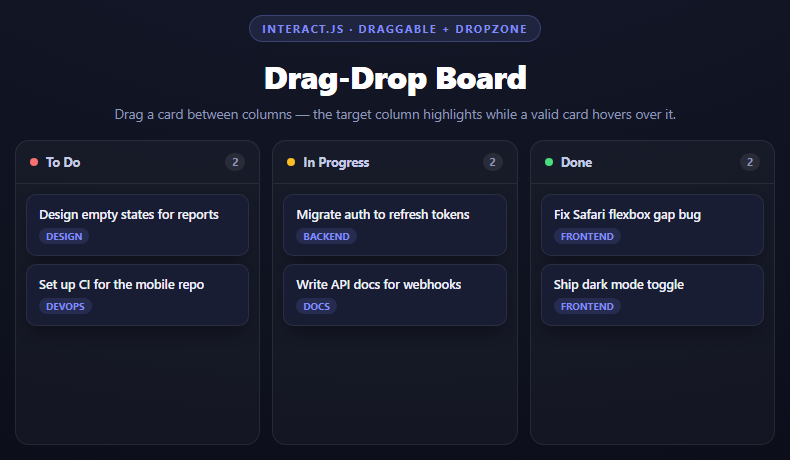
A kanban board needs two interact.js concerns to cooperate: the card itself must be draggable, and each column must be a dropzone that knows when a valid card is hovering over it and what to do when one lands. Neither API knows about the other directly — they communicate entirely through events interact.js fires on both sides of the interaction.
The card side: draggable with a transform-only move
Each card gets the same data-x/data-y accumulation pattern used for free-floating drag: event.dx/event.dy deltas are added onto attributes and applied via transform, never touching layout properties. Two listeners bracket the drag:
start: function (event) { event.target.classList.add('idk-dragging'); event.target.style.zIndex = 50; }
raises the card above its siblings and dims it slightly so it's visually clear which card is being moved, and
end: function (event) { ...; target.style.transform = ''; target.setAttribute('data-x', 0); target.setAttribute('data-y', 0); }
resets the drag transform to zero regardless of whether the drop succeeded. This matters because a successful drop re-parents the actual DOM node into the new column (see below) rather than rebuilding the board — if the transform offset weren't cleared, the card would land in its new column visually shifted by however far it had been dragged.
The column side: dropzone and its three events
interact('.idk-drop').dropzone({ accept: '.idk-card', overlap: 0.4, ondragenter, ondragleave, ondrop }) turns every column's drop area into a target that reacts to draggables matching accept. overlap: 0.4 means a card must overlap a dropzone by at least 40% of its area before interact.js considers it "over" that zone — this avoids ambiguous flickering between two adjacent columns when a card is only barely crossing a boundary.
ondragenter and ondragleave fire purely for the highlight, independent of whether the card is ultimately dropped there:
ondragenter: function (event) { event.target.classList.add('idk-over'); } ondragleave: function (event) { event.target.classList.remove('idk-over'); }
event.target inside a dropzone listener is the dropzone element (the column), not the card — this is the opposite of what draggable's listeners give you, and is the detail most likely to trip someone up moving between the two APIs.
The actual drop: event.relatedTarget
ondrop is where the move is committed:
var card = event.relatedTarget; var col = event.target.dataset.col; ...; dropEl.appendChild(card);
event.relatedTarget is the draggable element — the card — while event.target remains the dropzone it was dropped on. Rather than rebuilding the whole board from the CARDS array, this snippet re-parents the *actual existing card element* with a plain appendChild. That's a deliberate choice: the card already has interact(el).draggable(...) wired up on it, so moving the real node preserves that wiring — rebuilding it from scratch would mean re-attaching interact.js listeners to a brand-new element every time.
Why the data model still gets updated
Even though the DOM move is what the user sees, data.col = col updates the underlying CARDS array so the count badges (updateCounts()) and any future full re-render stay consistent with what's actually in each column — the DOM and the data are kept in sync deliberately, not left to drift.
Reusing it
This draggable-card-plus-dropzone-column pattern is the backbone of any cross-container drag interaction: kanban boards, playlist-to-playlist track drags, file-to-folder drops. Pair it with an Interact.js Resizable Panel to see the same library's data-x/data-y idiom applied to free positioning and resizing instead.
Build with AI
Build, Understand, Optimize, and Extend It With AI
This snippet is a solid way to get precise about how interact.js's two most-used APIs, draggable and dropzone, communicate with each other purely through events, without either one directly referencing the other. Paste the code into an AI assistant like Claude and ask it to trace, event by event, what event.target and event.relatedTarget refer to throughout a full drag-drop cycle, starting from the draggable's start event through to the dropzone's ondrop. Then ask what would happen if ondrop rebuilt the entire board's HTML from the CARDS array instead of calling appendChild on the existing card node (the answer: the draggable behavior would be lost on the new nodes unless every card were re-wired with interact() again). To extend it: ask it to add a WIP (work-in-progress) limit per column that visually blocks drops once a column is full, add drag-and-drop reordering WITHIN a column in addition to between columns, or persist card positions to localStorage so the board survives a page reload.
Prompt to recreate it
Copy this into your AI assistant of choice to build the effect from scratch, or as a jumping-off point for your own variant:
Build a three-column kanban board with drag-and-drop cards between columns using interact.js (from a CDN, global function interact) in plain HTML, CSS, and JavaScript.

Requirements:
- Maintain an array of card objects (id, title, tag, col) where col is one of three column ids ("todo", "doing", "done"). Render three columns, each with a header showing a live count and a drop-area <div> containing that column's matching cards as absolutely-flowed card elements.
- Make every card draggable with interact(cardEl).draggable({ listeners: { start, move, end } }). In the move listener, use the standard data-x/data-y attribute pattern (add event.dx/event.dy to stored attribute values, apply via CSS transform, write the new values back) rather than reading getBoundingClientRect(). In the start listener, visually elevate the dragged card (raised z-index, reduced opacity). In the end listener, always reset the transform and data-x/data-y back to zero regardless of whether the drop succeeded.
- Make every column's drop-area a dropzone with interact('.drop-area-selector').dropzone({ accept: '.card-selector', overlap: 0.4, ondragenter, ondragleave, ondrop }).
- In ondragenter, add a clear visual highlight class to the dropzone (event.target). In ondragleave, remove it. These must only reflect hover state, independent of whether a drop actually happens.
- In ondrop, get the dragged card via event.relatedTarget and the target column via event.target's data attribute. Update that card's col field in your data array, remove the highlight class, and move the ACTUAL card DOM element into the new column's drop-area using appendChild (do not destroy and recreate the card element) so its existing draggable wiring is preserved. Update the column count badges afterward.
- Style it as a dark three-column board (stacking to one column under 640px) with colored dot indicators per column, rounded cards with a subtle shadow, and a clearly distinct highlighted background/border state for a column currently being dragged over.
Want to tighten it up first? Run this prompt through the AI Prompt Studio to score it across 8 quality dimensions, catch anti-patterns, and tune the wording for Claude, ChatGPT, or Gemini before you paste it in.
Source Code
<div class="idk-stage">
  <div class="idk-head">
    <span class="idk-tag">interact.js · draggable + dropzone</span>
    <h2>Drag-Drop Board</h2>
    <p>Drag a card between columns — the target column highlights while a valid card hovers over it.</p>
  </div>
  <div class="idk-board" id="idkBoard">
    <div class="idk-col" data-col="todo">
      <div class="idk-col-head"><span class="idk-dot" style="background:#f87171"></span>To Do<span class="idk-count"></span></div>
      <div class="idk-drop" data-col="todo"></div>
    </div>
    <div class="idk-col" data-col="doing">
      <div class="idk-col-head"><span class="idk-dot" style="background:#fbbf24"></span>In Progress<span class="idk-count"></span></div>
      <div class="idk-drop" data-col="doing"></div>
    </div>
    <div class="idk-col" data-col="done">
      <div class="idk-col-head"><span class="idk-dot" style="background:#4ade80"></span>Done<span class="idk-count"></span></div>
      <div class="idk-drop" data-col="done"></div>
    </div>
  </div>
</div>*{box-sizing:border-box;margin:0;padding:0}
body{font-family:system-ui,-apple-system,sans-serif;background:radial-gradient(120% 100% at 50% 0%,#151a2c,#0a0c16);color:#fff;min-height:100vh;display:flex;align-items:center;justify-content:center;padding:24px}
.idk-stage{width:min(760px,96vw);display:flex;flex-direction:column;align-items:center;gap:18px}
.idk-head{text-align:center}
.idk-tag{display:inline-block;font-size:11px;font-weight:700;letter-spacing:.14em;text-transform:uppercase;color:#818cf8;background:rgba(129,140,248,.12);border:1px solid rgba(129,140,248,.3);padding:5px 12px;border-radius:99px;margin-bottom:12px}
.idk-head h2{font-size:clamp(24px,5vw,32px);font-weight:800;letter-spacing:-.02em}
.idk-head p{font-size:13.5px;color:#8e97b8;margin-top:7px}
.idk-board{display:grid;grid-template-columns:repeat(3,1fr);gap:12px;width:100%}
@media (max-width:640px){.idk-board{grid-template-columns:1fr}}
.idk-col{background:rgba(255,255,255,.03);border:1px solid rgba(255,255,255,.08);border-radius:14px;display:flex;flex-direction:column;overflow:hidden}
.idk-col-head{display:flex;align-items:center;gap:8px;padding:12px 14px;font-size:12.5px;font-weight:700;color:#c3cbe8;border-bottom:1px solid rgba(255,255,255,.08)}
.idk-dot{width:8px;height:8px;border-radius:50%}
.idk-count{margin-left:auto;background:rgba(255,255,255,.08);color:#8e97b8;font-size:10.5px;font-weight:700;padding:2px 7px;border-radius:99px}
.idk-drop{position:relative;flex:1;min-height:260px;padding:10px;display:flex;flex-direction:column;gap:8px;transition:background .15s,box-shadow .15s;border-radius:0 0 14px 14px}
.idk-drop.idk-over{background:rgba(129,140,248,.1);box-shadow:inset 0 0 0 2px rgba(129,140,248,.55)}
.idk-card{background:#181d34;border:1px solid rgba(255,255,255,.08);border-radius:10px;padding:11px 12px;font-size:12.5px;font-weight:600;color:#eef0fb;cursor:grab;touch-action:none;box-shadow:0 8px 18px -8px rgba(0,0,0,.6)}
.idk-card:active{cursor:grabbing}
.idk-card.idk-dragging{opacity:.35}
.idk-card.idk-drop-anim{transition:transform .18s ease-out}
.idk-card-tag{display:inline-block;margin-top:6px;font-size:9.5px;font-weight:700;letter-spacing:.03em;text-transform:uppercase;color:#818cf8;background:rgba(129,140,248,.14);padding:2px 7px;border-radius:99px}var CARDS = [
{ id: 1, title: 'Design empty states for reports', tag: 'Design', col: 'todo' },
{ id: 2, title: 'Set up CI for the mobile repo', tag: 'DevOps', col: 'todo' },
{ id: 3, title: 'Migrate auth to refresh tokens', tag: 'Backend', col: 'doing' },
{ id: 4, title: 'Write API docs for webhooks', tag: 'Docs', col: 'doing' },
{ id: 5, title: 'Fix Safari flexbox gap bug', tag: 'Frontend', col: 'done' },
{ id: 6, title: 'Ship dark mode toggle', tag: 'Frontend', col: 'done' },
];
var board = document.getElementById('idkBoard');
function cardEl(card) {
var el = document.createElement('div');
el.className = 'idk-card';
el.dataset.id = card.id;
el.setAttribute('data-x', 0);
el.setAttribute('data-y', 0);
el.innerHTML = card.title + '<br><span class="idk-card-tag">' + card.tag + '</span>';
return el;
}
function renderBoard() {
['todo', 'doing', 'done'].forEach(function (col) {
var dropEl = board.querySelector('.idk-drop[data-col="' + col + '"]');
dropEl.innerHTML = '';
var count = 0;
CARDS.forEach(function (card) {
if (card.col !== col) return;
count++;
var el = cardEl(card);
dropEl.appendChild(el);
wireCard(el);
});
board.querySelector('.idk-col[data-col="' + col + '"] .idk-count').textContent = count;
});
}
function wireCard(el) {
interact(el).draggable({
inertia: false,
listeners: {
start: function (event) {
event.target.classList.add('idk-dragging');
event.target.style.zIndex = 50;
},
move: function (event) {
var target = event.target;
// Standard interact.js pattern: accumulate position in data-x/data-y
// and apply it as a transform, rather than re-measuring the card's
// rect on every move event.
var x = (parseFloat(target.getAttribute('data-x')) || 0) + event.dx;
var y = (parseFloat(target.getAttribute('data-y')) || 0) + event.dy;
target.style.transform = 'translate(' + x + 'px,' + y + 'px)';
target.setAttribute('data-x', x);
target.setAttribute('data-y', y);
},
end: function (event) {
var target = event.target;
target.classList.remove('idk-dragging');
target.style.zIndex = '';
// Whether or not the card was dropped on a valid dropzone, reset the
// drag transform -- a successful drop instead re-parents the actual
// DOM node (see ondrop below), so the translate offset must not
// persist onto the card's new resting position in its new column.
target.style.transform = '';
target.setAttribute('data-x', 0);
target.setAttribute('data-y', 0);
},
},
});
}
interact('.idk-drop').dropzone({
// accept restricts which draggables this dropzone reacts to -- here every
// card matches, but in a board with multiple draggable types this is what
// would keep, say, a comment chip from being dropped into a card column.
accept: '.idk-card',
overlap: 0.4,
ondragenter: function (event) {
event.target.classList.add('idk-over');
},
ondragleave: function (event) {
event.target.classList.remove('idk-over');
},
ondrop: function (event) {
var dropEl = event.target;
var card = event.relatedTarget;
dropEl.classList.remove('idk-over');
var id = Number(card.dataset.id);
var col = dropEl.dataset.col;
var data = CARDS.find(function (c) { return c.id === id; });
if (data) data.col = col;
// Re-parent the actual card node into the new column instead of
// rebuilding the whole board, so interact.js's own draggable listeners
// already attached to this element keep working without re-wiring.
card.classList.add('idk-drop-anim');
dropEl.appendChild(card);
requestAnimationFrame(function () { card.classList.remove('idk-drop-anim'); });
updateCounts();
},
});
function updateCounts() {
['todo', 'doing', 'done'].forEach(function (col) {
var dropEl = board.querySelector('.idk-drop[data-col="' + col + '"]');
board.querySelector('.idk-col[data-col="' + col + '"] .idk-count').textContent = dropEl.children.length;
});
}
renderBoard();Step by step
How to Use
- 1Add the interact.js CDNInclude the interact.min.js UMD build for the global interact function.
- 2Paste HTML, CSS, and JSA three-column board renders with cards distributed across To Do, In Progress, and Done.
- 3Drag a cardIts position tracks the pointer via the data-x/data-y plus transform pattern.
- 4Hover it over another columnondragenter/ondragleave toggle a highlight the instant overlap crosses the configured threshold.
- 5Release to dropondrop re-parents the actual card element into the new column and updates its data record.
- 6Watch the count badgesEach column header shows a live count that updates immediately after every drop.
Real-world uses
Common Use Cases
Got questions?
Frequently Asked Questions
Inside dropzone listeners (ondragenter, ondragleave, ondrop), event.target is the DROPZONE element -- here, the column's drop area. Inside draggable listeners (start, move, end), event.target is the DRAGGABLE element -- the card. This is the single most common point of confusion switching between the two APIs, and ondrop specifically also gives you event.relatedTarget for the card being dropped.
The card element already has interact(el).draggable(...) attached to it. Rebuilding the DOM from scratch on every drop would mean creating a brand-new element and having to re-run wireCard() on it to reattach that draggable behavior. Moving the actual existing node with appendChild preserves its interact.js wiring for free, since interact.js binds to the DOM node itself, not to a position in a list.
It sets the minimum fraction of the draggable's area that must overlap a dropzone's area before interact.js considers the draggable "over" it and fires ondragenter/triggers a valid drop. Without a reasonable threshold, a card only barely crossing into a neighboring column could flicker between both columns' highlighted states as the pointer moves.
The visual drag offset is a temporary transform applied only during the gesture. A successful drop moves the actual card element into a new parent via appendChild, where it should sit at that column's normal flow position -- if the old transform offset were left in place, the card would appear shifted away from where it visually landed, since the offset was relative to its OLD position in the OLD column.
Give cards a data attribute for their allowed columns, and inside ondrop check dropEl.dataset.col against that before committing the move -- if disallowed, simply do not update data.col or appendChild the card, leaving it to visually snap back (its transform was already reset in the draggable end listener, so it will render at its original DOM position on the next paint).
Keep the CARDS array in component state for the source of truth, but let interact.js manage the live DOM transform during dragging exactly as in vanilla JS -- do not update React/Vue state on every move event. In ondrop, update state (card.col) and let the framework re-render the column lists normally; interact.js's draggable bindings need to be reattached to newly rendered card elements via a ref callback or effect that runs after each render.