Learn Coding Visually
Learn to code with interactive, live-preview playgrounds — HTML, CSS, JavaScript, React & more.
 HTML Playground42 lessons · Click-based · Live preview
 CSS PlaygroundLearn CSS with a live editor
 JavaScript Playground60 lessons · DOM · Async · Canvas
 React PlaygroundLearn React with a live code editor
 GSAP PlaygroundLearn GSAP animation interactively
 SVG Playground44 lessons · shapes · paths · animation
 SCSS Playground45 lessons · Sass modules · tokens
 Tailwind PlaygroundLearn Tailwind CSS with a live editor
 Bootstrap 5 Playground50 lessons · live preview
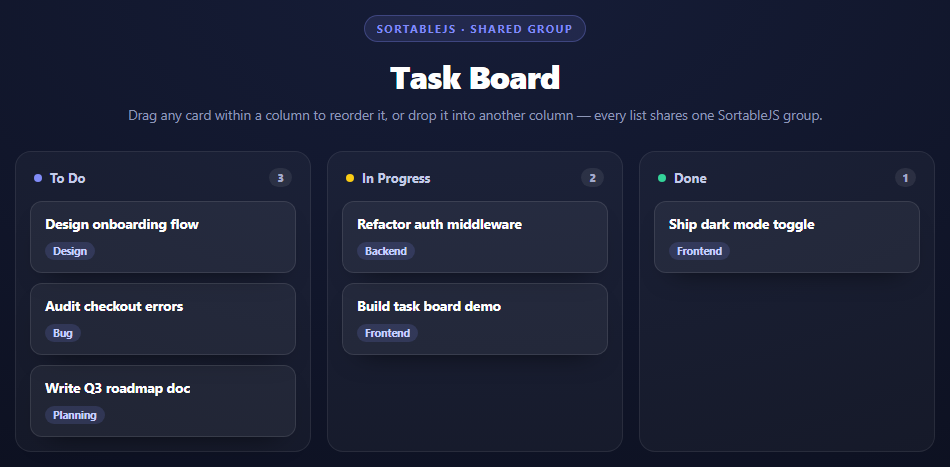
SortableJS Multi-Column Drag — Kanban Board Snippet
SortableJS Multi-Column Drag · Dashboards · Plain HTML, CSS & JS · Live preview
What's included
Features
About this UI Snippet
SortableJS Multi-Column Drag — How a Shared Group Enables Cross-List Dragging
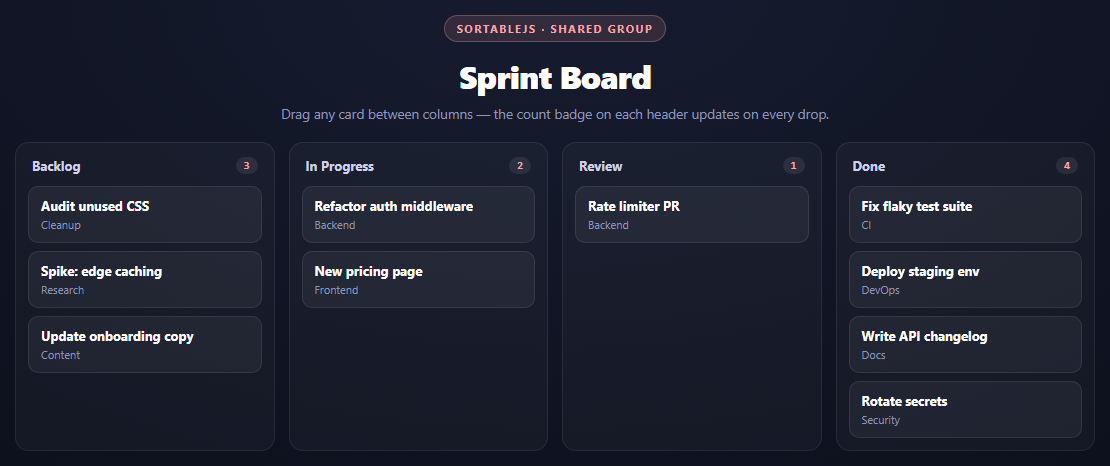
A single drag-and-drop list is one Sortable instance reordering itself. A kanban board is four (or more) *separate* DOM lists that a card needs to move *between* — and by default, SortableJS instances know nothing about each other. Dragging a card out of one list and over another does nothing unless they're explicitly linked.
The group option is what links the columns
new Sortable(list, { group: 'board', ... })
Every column's list gets its own Sortable instance, but all four are constructed with the same string value for group. Internally, SortableJS keeps a registry of every active instance and checks, on every drag-over event, whether the instance under the pointer shares a group name with the instance the drag started in. If they match, the target list accepts a drop; if not, the drag is rejected and the card snaps back. This is the entire mechanism — there's no shared state object to wire up, no manual "which list am I hovering over" tracking. A single matching string on four independent constructor calls is sufficient to make cards move freely across all of them.
group can also be an object ({ name: 'board', pull: true, put: true }) when you need asymmetric rules — for example a "Done" column that accepts drops but doesn't allow dragging back out — but the plain string form used here means every column both pulls from and puts into every other column equally.
Why counts need three hooks, not one
The single-list ranked snippet only needs onEnd because every drag starts and ends in the same list — nothing is added or removed, only reordered. A cross-list drag is different: the list the card *leaves* needs to update its count, and the list it *lands in* needs to update its count, and those are two different Sortable instances receiving two different events.
onRemove fires on the *source* list's instance when one of its items is dragged into a different list. onAdd fires on the *destination* list's instance when it receives an item from elsewhere. onEnd fires on whichever instance the drag started in, regardless of where it ended, and is kept here as a catch-all for same-column reorders (which fire neither onAdd nor onRemove, since nothing crossed a list boundary). All three point at the same updateCounts() function, which — like the ranked-list snippet — recomputes every column's badge from scratch by counting .mcd-card children, rather than incrementing or decrementing counters. That avoids any bookkeeping bugs where a fast double-drag could leave a badge off by one.
What actually moves in the DOM
SortableJS doesn't clone or recreate the dragged card — it physically moves the same DOM node from one <div class="mcd-list"> to another during the drag, so any event listeners or data attributes on the card survive the move untouched. This is also why updateCounts() can just re-query querySelectorAll('.mcd-card') on each list after any drop: the DOM is already the ground truth.
Reusing it
Add a fifth column by giving it the same group: 'board' value and it joins the shared pool automatically. Restrict flow with group: { name: 'board', put: false } on a column that should only ever lose cards, never receive them — useful for an "Archived" column fed only by a button, not drag. Pair this with the ranked list reorder snippet when you need same-list dragging with derived numbering instead of cross-list movement.
Build with AI
Build, Understand, Optimize, and Extend It With AI
The core idea here — a shared group string linking otherwise-independent Sortable instances — is worth interrogating directly. Ask an AI assistant like Claude to explain what happens internally when two Sortable instances have different group values and you try to drag between them, and why a plain string is enough versus when you'd need the object form with pull/put. Then have it walk through why onAdd, onRemove, and onEnd are all wired to the same updateCounts() function rather than three different ones. Good extensions to try: add drag handles so only a specific part of the card starts a drag, add a WIP limit that visually warns when a column exceeds N cards (checked inside onAdd), or persist board state to localStorage so a refresh keeps the last arrangement. Pair it with the ranked list snippet's onEnd-only renumbering to see the same-list vs. cross-list cases side by side.
Prompt to recreate it
Copy this into your AI assistant of choice to build the effect from scratch, or as a jumping-off point for your own variant:
Build a 4-column drag-and-drop kanban board using SortableJS (v1.15, from a CDN) in plain HTML, CSS, and JavaScript.

Requirements:
- Render four columns — Backlog, In Progress, Review, Done — each with a header showing the column name and a count badge, and a list of card elements below it (each card has a title and a short tag/category line). Seed each column with a few cards so the board starts non-empty and unevenly distributed.
- Create a separate SortableJS instance for each column's list, but construct all four with the SAME group option value (e.g. group: 'board') so that cards can be dragged freely from any column into any other column — explain that this shared string is what SortableJS checks internally to decide whether a drop target will accept a card from a given drag source.
- Wire up onAdd, onRemove, and onEnd callbacks on every instance, all calling one shared updateCounts() function. That function should recompute every column's badge from scratch by counting how many card elements are currently inside each column's list — do not increment/decrement counters manually, since cross-column events (add on the destination, remove on the source) fire on different instances and manual counting risks drift.
- Style it as a dark, responsive board: a CSS grid of 4 equal columns that collapses to 2 columns then 1 column at narrower widths, with each column visually distinct via a bordered rounded panel, and cards styled as small rounded tiles with a chosen-state highlight and a ghost-state fade using SortableJS's chosenClass/ghostClass options.
- Keep all JavaScript in var/function style, no ES modules, and call updateCounts() once on load so the initial badges are correct before any drag happens.
Want to tighten it up first? Run this prompt through the AI Prompt Studio to score it across 8 quality dimensions, catch anti-patterns, and tune the wording for Claude, ChatGPT, or Gemini before you paste it in.
Source Code
<div class="mcd-stage">
  <div class="mcd-head">
    <span class="mcd-tag">SortableJS · shared group</span>
    <h2>Sprint Board</h2>
    <p>Drag any card between columns — the count badge on each header updates on every drop.</p>
  </div>
  <div class="mcd-board" id="mcdBoard">
    <div class="mcd-col" data-col="backlog">
      <div class="mcd-col-head"><span>Backlog</span><span class="mcd-count" id="count-backlog">0</span></div>
      <div class="mcd-list" id="list-backlog">
        <div class="mcd-card"><strong>Audit unused CSS</strong><span>Cleanup</span></div>
        <div class="mcd-card"><strong>Spike: edge caching</strong><span>Research</span></div>
        <div class="mcd-card"><strong>Update onboarding copy</strong><span>Content</span></div>
      </div>
    </div>
    <div class="mcd-col" data-col="progress">
      <div class="mcd-col-head"><span>In Progress</span><span class="mcd-count" id="count-progress">0</span></div>
      <div class="mcd-list" id="list-progress">
        <div class="mcd-card"><strong>Refactor auth middleware</strong><span>Backend</span></div>
        <div class="mcd-card"><strong>New pricing page</strong><span>Frontend</span></div>
      </div>
    </div>
    <div class="mcd-col" data-col="review">
      <div class="mcd-col-head"><span>Review</span><span class="mcd-count" id="count-review">0</span></div>
      <div class="mcd-list" id="list-review">
        <div class="mcd-card"><strong>Rate limiter PR</strong><span>Backend</span></div>
      </div>
    </div>
    <div class="mcd-col" data-col="done">
      <div class="mcd-col-head"><span>Done</span><span class="mcd-count" id="count-done">0</span></div>
      <div class="mcd-list" id="list-done">
        <div class="mcd-card"><strong>Fix flaky test suite</strong><span>CI</span></div>
        <div class="mcd-card"><strong>Deploy staging env</strong><span>DevOps</span></div>
        <div class="mcd-card"><strong>Write API changelog</strong><span>Docs</span></div>
        <div class="mcd-card"><strong>Rotate secrets</strong><span>Security</span></div>
      </div>
    </div>
  </div>
</div>*{box-sizing:border-box;margin:0;padding:0}
body{font-family:system-ui,-apple-system,sans-serif;background:radial-gradient(120% 100% at 50% 0%,#161c30,#080a12);color:#fff;min-height:100vh;padding:32px 24px}
.mcd-stage{width:min(1080px,96vw);margin:0 auto;display:flex;flex-direction:column;gap:20px}
.mcd-head{text-align:center}
.mcd-tag{display:inline-block;font-size:11px;font-weight:700;letter-spacing:.14em;text-transform:uppercase;color:#fca5a5;background:rgba(252,165,165,.12);border:1px solid rgba(252,165,165,.3);padding:5px 12px;border-radius:99px;margin-bottom:12px}
.mcd-head h2{font-size:clamp(24px,5vw,32px);font-weight:800;letter-spacing:-.02em}
.mcd-head p{font-size:13.5px;color:#8e97b8;margin-top:7px}
.mcd-board{display:grid;grid-template-columns:repeat(4,minmax(0,1fr));gap:14px}
.mcd-col{background:rgba(255,255,255,.03);border:1px solid rgba(255,255,255,.08);border-radius:14px;padding:12px;display:flex;flex-direction:column;gap:10px;min-height:260px}
.mcd-col-head{display:flex;align-items:center;justify-content:space-between;font-size:13px;font-weight:700;color:#cdd3ea;padding:2px 4px}
.mcd-count{font:800 11px ui-monospace,monospace;background:rgba(255,255,255,.08);color:#fca5a5;border-radius:99px;min-width:22px;text-align:center;padding:2px 7px}
.mcd-list{display:flex;flex-direction:column;gap:8px;min-height:60px;flex:1}
.mcd-card{background:rgba(255,255,255,.05);border:1px solid rgba(255,255,255,.09);border-radius:10px;padding:10px 12px;display:flex;flex-direction:column;gap:3px;cursor:grab}
.mcd-card:active{cursor:grabbing}
.mcd-card strong{font-size:13px}
.mcd-card span{font-size:11px;color:#8e97b8}
.mcd-card.sortable-chosen{border-color:#fca5a5;box-shadow:0 8px 22px -10px rgba(252,165,165,.5)}
.mcd-card.sortable-ghost{opacity:.3}
.mcd-list.mcd-drag-over{background:rgba(252,165,165,.05);border-radius:10px}
@media (max-width:760px){.mcd-board{grid-template-columns:1fr 1fr}}
@media (max-width:460px){.mcd-board{grid-template-columns:1fr}}var columns = ['backlog', 'progress', 'review', 'done'];
function updateCounts() {
columns.forEach(function (col) {
var list = document.getElementById('list-' + col);
var count = list.querySelectorAll('.mcd-card').length;
document.getElementById('count-' + col).textContent = count;
});
}
columns.forEach(function (col) {
var list = document.getElementById('list-' + col);
new Sortable(list, {
group: 'board',
animation: 150,
chosenClass: 'sortable-chosen',
ghostClass: 'sortable-ghost',
onAdd: updateCounts,
onRemove: updateCounts,
onEnd: updateCounts,
});
});
updateCounts();Step by step
How to Use
- 1Add the SortableJS CDNInclude Sortable.min.js from the CDN panel — a single script tag, no build step.
- 2Paste HTML, CSS, and JSA 4-column board renders with Backlog, In Progress, Review, and Done.
- 3Drag a card to another columnThe group: 'board' option shared across all four instances lets cards cross freely.
- 4Watch the header badgesonAdd, onRemove, and onEnd all call updateCounts() so every badge stays accurate.
- 5Reorder within a columnDragging inside one list fires onEnd only, still triggering a recount.
- 6Add or restrict columnsGive a new column the same group value to include it, or set put: false to make it drop-only.
Real-world uses
Common Use Cases
Got questions?
Frequently Asked Questions
Every Sortable instance is constructed with group: 'board'. On drag-over, SortableJS checks whether the instance under the pointer shares that group name with the instance the drag started in — if the strings match, the drop is accepted. No manual list-to-list wiring is needed beyond giving them the same group value.
onEnd only fires on the instance where the drag started, so a cross-column move needs more: onRemove fires on the source list when a card leaves it, and onAdd fires on the destination list when a card arrives. Using all three ensures every column's count is recomputed regardless of which list the drag started or ended in.
No. SortableJS moves the actual DOM node from one list's children to another's during the drag. This means any data attributes, event listeners, or nested markup on the card are preserved automatically — nothing needs to be re-created or re-bound after the move.
Replace the plain string group value on that column's instance with an object: group: { name: 'board', pull: false }. pull: false stops cards from being dragged out of it while still allowing other columns (which still pull: true by default) to drop cards into it.
A fast drag involves multiple events firing in quick succession, and manually incrementing counters risks double-counting or missing an update if event order is unexpected. Recomputing with querySelectorAll('.mcd-card').length after every relevant event is cheap for a board this size and is guaranteed correct regardless of event ordering.
Inside onAdd (and onEnd for same-column reorders), read evt.to.id for the destination column and Array.from(evt.to.children).map(el => el.dataset.id) for the new order, then send both to your API. Store a stable id on each card via a data attribute so the server can match it back to a record.