Learn Coding Visually
Learn to code with interactive, live-preview playgrounds — HTML, CSS, JavaScript, React & more.
 HTML Playground42 lessons · Click-based · Live preview
 CSS PlaygroundLearn CSS with a live editor
 JavaScript Playground60 lessons · DOM · Async · Canvas
 React PlaygroundLearn React with a live code editor
 GSAP PlaygroundLearn GSAP animation interactively
 SVG Playground44 lessons · shapes · paths · animation
 SCSS Playground45 lessons · Sass modules · tokens
 Tailwind PlaygroundLearn Tailwind CSS with a live editor
 Bootstrap 5 Playground50 lessons · live preview
WOW.js Scroll Reveal Cards — Scroll-Triggered Animation Snippet
WOW.js Scroll Reveal Cards · Cards · Plain HTML, CSS & JS · Live preview
What's included
Features
About this UI Snippet
WOW.js Scroll Reveal Cards — What WOW.js Actually Does
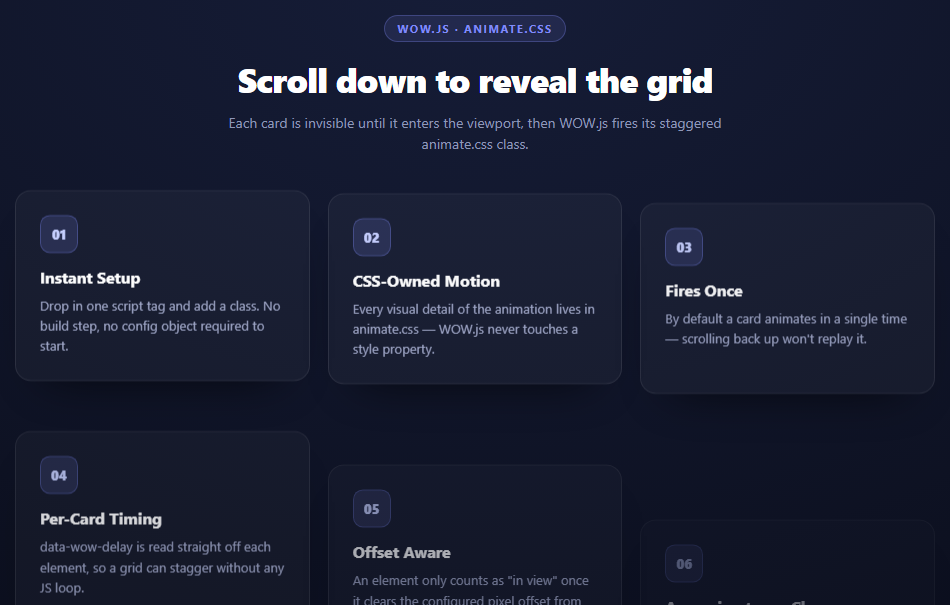
WOW.js is one of the smallest libraries you'll ever wire up, and that's the whole point of studying it: it does not animate anything. Every keyframe, every easing curve, every timing value in this snippet comes from animate.css. WOW.js's entire job is watching the page scroll and deciding, element by element, *when* to let those keyframes run.
The class-toggle trick
animate.css ships a rule that any element with both .animate__animated and a specific animation class (like .animate__fadeInUp) starts playing immediately on paint. That's a problem for scroll reveals — you don't want the animation to fire the moment the page loads, you want it to fire when the element scrolls into view.
WOW.js solves this the same way animate.css itself recommends: it ships a modifier class, .wow, that pairs with a CSS rule setting visibility: hidden on anything still carrying it. Every card in this grid starts as class="wow animate__animated animate__fadeInUp" — the animation classes are present from the start, but .wow keeps the element invisible and the animation un-started. When WOW.js's scroll listener detects the card has crossed into the viewport, it simply removes .wow. Visibility flips to visible, animate.css's animation rule (now unobstructed) starts playing, and the card fades and slides in exactly as animate.css defines it. WOW.js never touched transform, opacity, or a single style property — it flipped one class.
Predating IntersectionObserver
WOW.js was written in 2013, years before IntersectionObserver existed as a browser API. To know when an element enters the viewport it does the manual version of the same job: on scroll (throttled with requestAnimationFrame) it walks every .wow element still being watched, reads getBoundingClientRect(), and compares the element's top edge against window.innerHeight minus the configured offset. Cross that line and the element gets .wow removed and is dropped from the watch list (unless configured to fire repeatedly). It is, functionally, a hand-rolled visibility observer — which is exactly why modern code reaches for IntersectionObserver directly, and why WOW.js is worth understanding as a stepping stone rather than a first choice for new projects.
Where the stagger actually comes from
Nothing in the JavaScript orchestrates the 0.15s gaps between cards. Each card carries its own data-wow-delay="0.15s" attribute, and WOW.js reads that attribute off the element the moment it decides to reveal it, applying it as an inline animation-delay before removing .wow. Because the delay is baked onto the markup rather than computed in a loop, the stagger survives cards being added, removed, or reordered with no JS changes at all — it's a pure HTML-authoring concern.
The live option and dynamic content
live: true (the default) makes WOW.js re-scan the DOM with a MutationObserver so cards injected after init() — from an AJAX call or a "load more" button — are picked up automatically. Set it to false in performance-sensitive pages where you know the reveal set is fixed at load time.
Build with AI
Build, Understand, Optimize, and Extend It With AI
This snippet is a good one to interrogate about the boundary between "what the JS library does" and "what the CSS library does," since that split is exactly where WOW.js's whole design lives. Paste the code into an AI assistant like Claude and ask it to trace, step by step, what happens between the page loading and a card's entrance animation completing — where visibility is controlled, where the delay value is read, and which library owns which part. Then ask what would happen if you removed animate__animated from a card but left .wow and animate__fadeInUp — a good way to understand why all three classes are required together. To extend it: ask for a version that re-reveals cards every time they scroll back into view, one that computes data-wow-delay automatically from each card's grid column and row instead of hand-writing it, or a version ported to plain IntersectionObserver with no WOW.js dependency at all, so the comparison is concrete rather than theoretical.
Prompt to recreate it
Copy this into your AI assistant of choice to build the effect from scratch, or as a jumping-off point for your own variant:
Build a scroll-reveal card grid using WOW.js (v1.1.2, from a CDN) and animate.css (v4, from a CDN) in plain HTML, CSS, and JavaScript.

Requirements:
- Lay out a responsive grid of at least 6 cards, each with a short heading and description, styled as a dark premium panel.
- Each card's HTML must carry three classes together: wow (WOW.js's hide-until-revealed marker), animate__animated (animate.css's base class), and an animate.css effect class such as animate__fadeInUp.
- Each card must also carry its own data-wow-delay attribute (e.g. "0.15s", "0.3s", "0.45s") so the cards reveal in a staggered sequence purely from markup, with no JavaScript computing the stagger.
- Initialize WOW.js with new WOW({ boxClass: 'wow', animateClass: 'animate__animated', offset: 0, mobile: true, live: true }).init() and explain in a comment that WOW.js does not animate anything itself — it only removes the .wow class (which keeps elements hidden via a visibility: hidden rule) when an element's bounding rect crosses into the viewport, letting the already-present animate.css classes run their own @keyframes.
- Make the page tall enough (extra bottom padding) that the cards start below the fold and must be scrolled to, so the reveal is actually demonstrated.
- Keep the JS to library initialization only — no manual scroll listeners or IntersectionObserver code, since WOW.js already handles that internally.
Want to tighten it up first? Run this prompt through the AI Prompt Studio to score it across 8 quality dimensions, catch anti-patterns, and tune the wording for Claude, ChatGPT, or Gemini before you paste it in.
Source Code
<div class="wsr-stage">
  <div class="wsr-head">
    <span class="wsr-tag">WOW.js · animate.css</span>
    <h2>Scroll down to reveal the grid</h2>
    <p>Each card is invisible until it enters the viewport, then WOW.js fires its staggered animate.css class.</p>
  </div>
  <div class="wsr-grid">
    <div class="wsr-card wow animate__animated animate__fadeInUp" data-wow-delay="0s">
      <div class="wsr-icon">01</div>
      <h3>Instant Setup</h3>
      <p>Drop in one script tag and add a class. No build step, no config object required to start.</p>
    </div>
    <div class="wsr-card wow animate__animated animate__fadeInUp" data-wow-delay="0.15s">
      <div class="wsr-icon">02</div>
      <h3>CSS-Owned Motion</h3>
      <p>Every visual detail of the animation lives in animate.css — WOW.js never touches a style property.</p>
    </div>
    <div class="wsr-card wow animate__animated animate__fadeInUp" data-wow-delay="0.3s">
      <div class="wsr-icon">03</div>
      <h3>Fires Once</h3>
      <p>By default a card animates in a single time — scrolling back up won't replay it.</p>
    </div>
    <div class="wsr-card wow animate__animated animate__fadeInUp" data-wow-delay="0.45s">
      <div class="wsr-icon">04</div>
      <h3>Per-Card Timing</h3>
      <p>data-wow-delay is read straight off each element, so a grid can stagger without any JS loop.</p>
    </div>
    <div class="wsr-card wow animate__animated animate__fadeInUp" data-wow-delay="0.6s">
      <div class="wsr-icon">05</div>
      <h3>Offset Aware</h3>
      <p>An element only counts as "in view" once it clears the configured pixel offset from the bottom edge.</p>
    </div>
    <div class="wsr-card wow animate__animated animate__fadeInUp" data-wow-delay="0.75s">
      <div class="wsr-icon">06</div>
      <h3>Any animate.css Class</h3>
      <p>Swap animate__fadeInUp for animate__zoomIn or animate__flipInX — WOW.js doesn't care which one.</p>
    </div>
  </div>
</div>*{box-sizing:border-box;margin:0;padding:0}
body{font-family:system-ui,-apple-system,sans-serif;background:radial-gradient(120% 100% at 50% 0%,#161d38,#080a14);color:#fff;min-height:100vh;padding:48px 24px 400px}
.wsr-stage{max-width:920px;margin:0 auto;display:flex;flex-direction:column;gap:36px}
.wsr-head{text-align:center;max-width:520px;margin:0 auto}
.wsr-tag{display:inline-block;font-size:11px;font-weight:700;letter-spacing:.14em;text-transform:uppercase;color:#818cf8;background:rgba(129,140,248,.12);border:1px solid rgba(129,140,248,.3);padding:5px 12px;border-radius:99px;margin-bottom:14px}
.wsr-head h2{font-size:clamp(24px,4.4vw,34px);font-weight:800;letter-spacing:-.02em}
.wsr-head p{font-size:14px;color:#8e97b8;margin-top:10px;line-height:1.5}
.wsr-grid{display:grid;grid-template-columns:repeat(3,1fr);gap:18px}
@media(max-width:720px){.wsr-grid{grid-template-columns:repeat(2,1fr)}}
@media(max-width:520px){.wsr-grid{grid-template-columns:1fr}}
.wsr-card{background:rgba(255,255,255,.04);border:1px solid rgba(255,255,255,.09);border-radius:16px;padding:24px;box-shadow:0 24px 50px -30px rgba(0,0,0,.8)}
.wsr-icon{width:38px;height:38px;border-radius:10px;background:rgba(129,140,248,.16);border:1px solid rgba(129,140,248,.32);color:#c7d0ff;display:flex;align-items:center;justify-content:center;font-weight:800;font-size:13px;margin-bottom:14px}
.wsr-card h3{font-size:16px;font-weight:700;margin-bottom:8px}
.wsr-card p{font-size:13px;color:#a3aacb;line-height:1.55}// WOW.js does no animating of its own. It watches each ".wow" element with a scroll
// listener, and the instant that element crosses into the viewport it removes the class
// that keeps animate.css paused and lets animate.css run the actual keyframes.
var wow = new WOW({
boxClass: 'wow',
animateClass: 'animate__animated',
offset: 0,
mobile: true,
live: true
});
wow.init();Step by step
How to Use
- 1Add both CDN fileswow.min.js for the JS, animate.min.css for the keyframes — WOW.js needs animate.css to have anything to trigger.
- 2Mark elements as wow + animate.cssGive each card class="wow animate__animated animate__fadeInUp" — all three classes are required.
- 3Stagger with data-wow-delayAdd data-wow-delay="0.15s" per card; WOW.js reads it and applies it as the animation-delay.
- 4Call new WOW().init()One line, run after the DOM is ready — it starts the scroll watch immediately.
- 5Scroll to triggerCards stay hidden until their top edge crosses into the viewport, then reveal once.
- 6Swap the animation classReplace animate__fadeInUp with any other animate.css class to change the reveal style per card.
Real-world uses
Common Use Cases
Got questions?
Frequently Asked Questions
No. WOW.js only adds and removes CSS classes. Every visual property — opacity, transform, timing — comes from animate.css's own @keyframes rules. WOW.js's job is purely deciding when an element has scrolled into view.
WOW.js ships a small stylesheet rule setting visibility: hidden on any element still carrying .wow. Since the animate.css classes are already present on the element, removing .wow is the only thing standing between the card and its entrance animation.
Each card has its own data-wow-delay attribute. When WOW.js reveals a card it reads that attribute and applies it as an inline animation-delay before removing .wow, so the stagger is authored in HTML, not computed in JavaScript.
For new code, IntersectionObserver is usually the better choice — it is more efficient and native to the browser. WOW.js predates it and re-implements the same idea with scroll-position math, which makes it a useful library to study but a legacy choice for production.
Not by default. WOW.js reveals each element once and stops watching it. Passing iteration or removing the once-only tracking via a custom callback is required to make it repeat.
Yes — swap the animation class in the HTML (animate__fadeInUp, animate__zoomIn, animate__flipInX, etc). WOW.js doesn't read or care which animate.css class is present, it only toggles .wow.