
Learn Coding Visually
Learn to code with interactive, live-preview playgrounds — HTML, CSS, JavaScript, React & more.
 HTML Playground42 lessons · Click-based · Live preview
 CSS PlaygroundLearn CSS with a live editor
 JavaScript Playground60 lessons · DOM · Async · Canvas
 React PlaygroundLearn React with a live code editor
 GSAP PlaygroundLearn GSAP animation interactively
 SVG Playground44 lessons · shapes · paths · animation
 SCSS Playground45 lessons · Sass modules · tokens
 Tailwind PlaygroundLearn Tailwind CSS with a live editor
 Bootstrap 5 Playground50 lessons · live preview
CountUp.js Stat Cards — Scroll-Triggered Counter Snippet
CountUp.js Stat Cards · Cards · Plain HTML, CSS & JS · Live preview
What's included
Features
About this UI Snippet
CountUp.js Stat Cards — Scroll Triggering and Per-Card Formatting, Explained
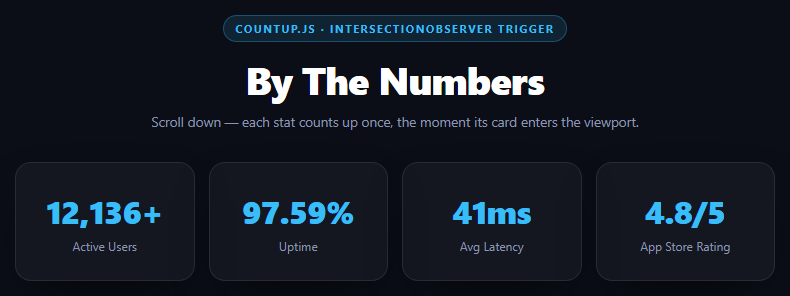
CountUp.js itself has no idea about scrolling — it just animates a number from a start value to an end value over a duration. Making that count-up feel like a reveal, rather than something that already finished by the time the user scrolls down to see it, is entirely the job of wiring it to visibility, which is what this snippet does with a single shared IntersectionObserver.
One observer, four targets, fire-once bookkeeping
js
var observer = new IntersectionObserver(function (entries) {
  entries.forEach(function (entry) {
    if (!entry.isIntersecting) return;
    var id = entry.target.id;
    if (started[id]) return;
    started[id] = true;
    ...
    observer.unobserve(entry.target);
  });
}, { threshold: 0.4 });
A single observer watches all four stat cards rather than creating one observer per card — cheaper, and it's the idiomatic pattern since IntersectionObserver is designed to batch multiple targets under one callback. The started object is the guard against double-counting: without it, a card that crosses the 40% visibility threshold, briefly dips below it during a fast scroll, and crosses back would restart its animation from zero and count up a second time, which looks broken. observer.unobserve(entry.target) is a second, belt-and-suspenders safeguard that removes the element from observation entirely once it has counted, so the callback won't even fire again for it.
Why threshold: 0.4 and not 0 or 1
threshold: 0 fires the instant a single pixel is visible, which can trigger the count-up before the card is meaningfully "in view" (e.g. one row peeking at the very bottom edge). threshold: 1 requires the entire element visible, which fails for cards taller than the viewport or ones near the page edges. 0.4 is a practical middle ground: the card has to be almost half visible, which in practice means the user is actually looking at it.
Per-card formatting via CountUp's options object
js
new countUp.CountUp(id, cfg.end, Object.assign({ duration: 2 }, cfg.options))
Each stat carries its own options — separator: ',' for the thousands-grouped user count, decimalPlaces: 2 for a precise uptime percentage, a plain suffix: 'ms' for latency, decimalPlaces: 1 and suffix: '/5' for a rating. CountUp.js parses these once at construction and handles the number formatting (locale separators, decimal rounding, prefix/suffix concatenation) internally on every animation frame — you never touch toFixed() or manual string building. counter.error is checked before calling .start() because CountUp validates its inputs at construction and sets .error to a message string (rather than throwing) if, say, the target element doesn't exist — checking it is a cheap guard against a silently-broken counter.
Reusing it
Add a fifth card by appending one object to statConfig and one matching id/span pair in the HTML — the observer setup loop and the formatting all generalize automatically.
Build with AI
Build, Understand, Optimize, and Extend It With AI
This snippet is a solid template for the general "animate something once, when it becomes visible" pattern, of which count-up stats are just one instance. Paste it into an AI assistant like Claude and ask it to explain why both the started guard object and the observer.unobserve() call exist even though they seem redundant — walk through the specific fast-scroll scenario (crossing the threshold, dipping back below it, crossing again) that would double-count without both. Then ask how threshold: 0.4 was likely chosen and what tradeoffs 0 or 1 would introduce. For extension, ask it to add a subtle card entrance animation (fade/scale) that plays in sync with the count starting, make one stat re-animate on a manual refresh button press (bypassing the fire-once guard deliberately), or convert the shared observer pattern into a small reusable function that takes an element and a callback.
Prompt to recreate it
Copy this into your AI assistant of choice to build the effect from scratch, or as a jumping-off point for your own variant:
Build a "scroll-triggered stat cards" row using CountUp.js (v2, from a CDN, global countUp.CountUp) in plain HTML, CSS, and JavaScript.

Requirements:
- A responsive 4-column grid (collapsing to 2 columns on narrow screens) of stat cards, each with a large number and a label beneath it (e.g. Active Users, Uptime, Avg Latency, App Store Rating), all starting at 0.
- Define the stats as a JavaScript array of config objects, each with a target element id, an end value, and a CountUp options object (varying: one uses a thousands separator and a "+" suffix, one uses decimalPlaces: 2 and a "%" suffix, one uses a plain unit suffix like "ms", one uses decimalPlaces: 1 and a "/5" suffix).
- Use a SINGLE shared IntersectionObserver instance (not one observer per card) with threshold: 0.4 to detect when each card scrolls into view.
- Guard against double-counting with two mechanisms: a plain object tracking which card ids have already started, checked and set before starting a counter, AND calling observer.unobserve() on the element once it starts — explain in a comment why relying on only one of the two is riskier on a fast scroll that could cross the threshold boundary twice in quick succession.
- Check counter.error before calling counter.start() on each CountUp instance.
- Make the page tall enough (min-height: 150vh on body) with the cards below the fold so the scroll-trigger behavior is demonstrable on load.
- Style it as a dark theme with a cyan/blue accent color on the numbers, rounded bordered cards, and soft shadows.
Want to tighten it up first? Run this prompt through the AI Prompt Studio to score it across 8 quality dimensions, catch anti-patterns, and tune the wording for Claude, ChatGPT, or Gemini before you paste it in.
Source Code
<div class="csc-stage">
  <div class="csc-head">
    <span class="csc-tag">countup.js · IntersectionObserver trigger</span>
    <h2>By The Numbers</h2>
    <p>Scroll down — each stat counts up once, the moment its card enters the viewport.</p>
  </div>
  <div class="csc-grid">
    <div class="csc-card"><span class="csc-val" id="statUsers">0</span><span class="csc-lbl">Active Users</span></div>
    <div class="csc-card"><span class="csc-val" id="statUptime">0</span><span class="csc-lbl">Uptime</span></div>
    <div class="csc-card"><span class="csc-val" id="statLatency">0</span><span class="csc-lbl">Avg Latency</span></div>
    <div class="csc-card"><span class="csc-val" id="statRating">0</span><span class="csc-lbl">App Store Rating</span></div>
  </div>
</div>*{box-sizing:border-box;margin:0;padding:0}
body{font-family:system-ui,-apple-system,sans-serif;background:#0b0e17;color:#fff;min-height:150vh;padding:70px 24px}
.csc-stage{max-width:760px;margin:0 auto;display:flex;flex-direction:column;align-items:center;gap:32px}
.csc-head{text-align:center}
.csc-tag{display:inline-block;font-size:11px;font-weight:700;letter-spacing:.14em;text-transform:uppercase;color:#38bdf8;background:rgba(56,189,248,.12);border:1px solid rgba(56,189,248,.3);padding:5px 12px;border-radius:99px;margin-bottom:12px}
.csc-head h2{font-size:clamp(26px,5vw,38px);font-weight:800;letter-spacing:-.02em}
.csc-head p{font-size:13.5px;color:#8b96b0;margin-top:7px}
.csc-grid{display:grid;grid-template-columns:repeat(4,1fr);gap:14px;width:100%}
@media (max-width:680px){.csc-grid{grid-template-columns:repeat(2,1fr)}}
.csc-card{background:rgba(255,255,255,.04);border:1px solid rgba(255,255,255,.09);border-radius:16px;padding:26px 16px;display:flex;flex-direction:column;align-items:center;gap:6px;box-shadow:0 20px 50px -20px rgba(0,0,0,.7)}
.csc-val{font-size:clamp(24px,4vw,32px);font-weight:800;letter-spacing:-.02em;color:#38bdf8}
.csc-lbl{font-size:12px;color:#8b96b0;text-align:center}var statConfig = [
{ id: 'statUsers', end: 12400, options: { separator: ',', suffix: '+' } },
{ id: 'statUptime', end: 99.98, options: { decimalPlaces: 2, suffix: '%' } },
{ id: 'statLatency', end: 42, options: { suffix: 'ms' } },
{ id: 'statRating', end: 4.9, options: { decimalPlaces: 1, suffix: '/5' } },
];
var started = {};
var observer = new IntersectionObserver(function (entries) {
entries.forEach(function (entry) {
if (!entry.isIntersecting) return;
var id = entry.target.id;
if (started[id]) return; // fire once per card, never restart on re-scroll
started[id] = true;
var cfg = statConfig.filter(function (c) { return c.id === id; })[0];
var counter = new countUp.CountUp(id, cfg.end, Object.assign({ duration: 2 }, cfg.options));
if (!counter.error) counter.start();
observer.unobserve(entry.target);
});
}, { threshold: 0.4 });
statConfig.forEach(function (cfg) {
observer.observe(document.getElementById(cfg.id));
});Step by step
How to Use
- 1Add the CountUp.js CDNInclude the countUp.umd.js build from the CDN panel — it exposes the global countUp.CountUp.
- 2Paste HTML, CSS, and JSFour stat cards render with all values at 0, below a tall spacer.
- 3Scroll the cards into viewEach number animates from 0 to its target once it crosses 40% visibility, with its own formatting.
- 4Scroll away and backNumbers stay at their final value — the started guard and unobserve() prevent a re-count.
- 5Add a new statAppend one entry to statConfig and one matching span with that id in the HTML.
- 6Adjust the trigger pointChange threshold (currently 0.4) to fire earlier or later relative to scroll position.
Real-world uses
Common Use Cases
Got questions?
Frequently Asked Questions
IntersectionObserver is designed to batch multiple targets under a single callback efficiently — creating four separate observer instances would work but adds overhead for no benefit, since the callback already receives an entries array you can iterate and branch on by target.
Two layers: a started object keyed by element id that the callback checks first and sets before doing anything else, and observer.unobserve(entry.target) called right after starting the count, which removes that element from observation entirely so the callback can't even fire for it again.
It's a practical middle ground. threshold: 0 fires the instant even one pixel is visible, which can trigger a card that's barely peeking at the viewport edge; threshold: 1 requires full visibility, which fails for any card near the top/bottom edge or taller than the viewport. 0.4 means roughly half the card must be visible, which in practice matches when a user is actually looking at it.
Each entry in statConfig carries its own options object (separator, decimalPlaces, prefix, suffix) that gets merged with a shared duration and passed straight to CountUp's constructor. CountUp handles all the formatting internally on every animation frame, so there's no manual toFixed() or string concatenation anywhere in this code.
CountUp validates its constructor arguments (like confirming the target element id actually exists in the DOM) and, instead of throwing, sets an .error string property when something is wrong. Checking !counter.error before calling .start() is a cheap way to avoid silently animating nothing if a card's id is ever mistyped or missing.
Create the CountUp instance inside a useEffect (React) or onMounted (Vue) once the ref'd DOM node exists, and set up the IntersectionObserver in the same lifecycle hook, disconnecting it in the cleanup function. Keep the started guard as component-level state or a ref so it survives re-renders without restarting the count.