

Learn Coding Visually
Learn to code with interactive, live-preview playgrounds — HTML, CSS, JavaScript, React & more.
 HTML Playground42 lessons · Click-based · Live preview
 CSS PlaygroundLearn CSS with a live editor
 JavaScript Playground60 lessons · DOM · Async · Canvas
 React PlaygroundLearn React with a live code editor
 GSAP PlaygroundLearn GSAP animation interactively
 SVG Playground44 lessons · shapes · paths · animation
 SCSS Playground45 lessons · Sass modules · tokens
 Tailwind PlaygroundLearn Tailwind CSS with a live editor
 Bootstrap 5 Playground50 lessons · live preview
Vertical Content Carousel — HTML CSS JS Snippet
Vertical Content Carousel · Cards · Plain HTML, CSS & JS · Live preview
What's included
Features
About this UI Snippet
Vertical Content Carousel — Every Axis Swapped, Same Underlying Mechanic
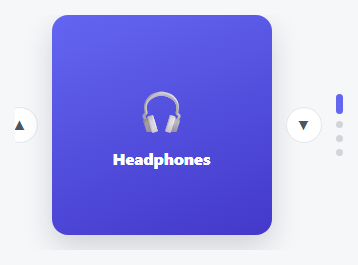
This is the same offset-driven slide mechanic used throughout this library's horizontal carousels, with every axis consistently swapped: translateX becomes translateY, the track is a flex-direction: column instead of a row, the up/down buttons replace left/right arrows, and even the indicator dots rotate to stack vertically and grow in *height* (not width) when active, so the whole visual language stays internally consistent with the vertical motion rather than just reusing horizontal styling with the transform swapped.
Why this needed a genuinely new snippet, not a CSS-only reskin
Swapping translateX for translateY in isolation is trivial — but the *drag/swipe direction* has to change too. A horizontal carousel's swipe logic compares clientX deltas; this one compares clientY deltas instead, since a vertical carousel should respond to an up/down finger or mouse drag, not a left/right one. Get that mismatched (vertical slides, horizontal swipe detection) and the carousel would visually move the wrong way relative to the gesture, which is a subtle, easy-to-miss bug when adapting a horizontal component rather than building the vertical version from its own first principles.
Dots that grow taller, not wider
The active dot indicator grows to height: 20px rather than width: 20px — a small but deliberate detail, since a horizontal pill-shaped active dot in a *vertical* stack of dots would look visually disconnected from the rest of the column, while a vertically-elongated one reads immediately as "this dot, in this vertical list, is the active one."
Build with AI
Build, Understand, Optimize, and Extend It With AI
Paste this snippet's HTML, CSS, and JS into an AI coding assistant like Claude and ask it to list every single change that was required to turn a horizontal slide carousel into this vertical one — not just the obvious translateX-to-translateY swap, but the track's flex-direction, the dots' growth axis, and the swipe gesture's axis — and why missing any one of them would produce inconsistent or confusing motion. It's also worth asking the assistant to add momentum-based drag (similar to the Momentum Drag Carousel snippet) adapted to the vertical axis, or to make the viewport height responsive to the container's available space.
Prompt to recreate it
Copy this into your AI assistant of choice to build the effect from scratch, or as a jumping-off point for your own variant:
Build a vertically-sliding content carousel in plain HTML, CSS, and vanilla JavaScript, where every aspect of the interaction (not just the visual transform) is correctly adapted to a vertical orientation rather than reusing horizontal logic with only the transform axis changed — no library.

Requirements:
- A fixed-height viewport with overflow hidden containing a vertically-stacked track (flex-direction: column) of full-height slide elements, moved via a translateY transform (not translateX) with a smooth CSS transition, offset as a percentage of the track's total height based on the current slide index.
- Up and down arrow buttons (not left/right) that step the current slide index within bounds (wrapping is acceptable), triggering the vertical transform update.
- A column of indicator dots (stacked vertically, not horizontally) generated dynamically to match the slide count, where the dot corresponding to the active slide grows in HEIGHT (not width) to visually distinguish it within its vertical column, and clicking any dot jumps directly to that slide.
- Drag and swipe gesture support using pointer events with a touch fallback, where the relevant gesture axis is vertical (comparing the pointer's vertical/Y position, not horizontal/X) — swiping upward must advance to the next slide and swiping downward must go to the previous slide, matching the vertical slide direction, with a minimum distance threshold required before a swipe is treated as a deliberate navigation gesture rather than incidental movement.
- Up/Down arrow key support (not Left/Right) performing the same next/previous navigation as the buttons, consistent with the vertical orientation.
Want to tighten it up first? Run this prompt through the AI Prompt Studio to score it across 8 quality dimensions, catch anti-patterns, and tune the wording for Claude, ChatGPT, or Gemini before you paste it in.
Source Code
<div class="vcc-wrap">
  <button class="vcc-btn vcc-up" id="vccUp" aria-label="Previous">▲</button>
  <div class="vcc-viewport">
    <div class="vcc-track" id="vccTrack">
      <div class="vcc-slide" style="background:linear-gradient(160deg,#6366f1,#4338ca)"><span>🎧</span><h3>Headphones</h3></div>
      <div class="vcc-slide" style="background:linear-gradient(160deg,#0ea5e9,#0369a1)"><span>📷</span><h3>Camera</h3></div>
      <div class="vcc-slide" style="background:linear-gradient(160deg,#ec4899,#9d174d)"><span>⌚</span><h3>Watch</h3></div>
      <div class="vcc-slide" style="background:linear-gradient(160deg,#10b981,#047857)"><span>🎮</span><h3>Console</h3></div>
    </div>
  </div>
  <button class="vcc-btn vcc-down" id="vccDown" aria-label="Next">▼</button>
  <div class="vcc-dots" id="vccDots"></div>
</div>*{box-sizing:border-box;margin:0;padding:0}
body{font-family:system-ui,-apple-system,sans-serif;background:#f6f7f9;min-height:100vh;display:flex;align-items:center;justify-content:center;padding:24px}
.vcc-wrap{display:flex;align-items:center;gap:14px}
.vcc-viewport{width:220px;height:220px;overflow:hidden;border-radius:16px;box-shadow:0 12px 30px rgba(15,23,42,.16)}
.vcc-track{display:flex;flex-direction:column;transition:transform .4s cubic-bezier(.4,0,.2,1)}
.vcc-slide{flex:0 0 220px;height:220px;display:flex;flex-direction:column;align-items:center;justify-content:center;gap:10px;color:#fff}
.vcc-slide span{font-size:42px}
.vcc-slide h3{font-size:16px;font-weight:800}
.vcc-btn{width:36px;height:36px;border-radius:50%;background:#fff;border:1.5px solid #e3e5ea;color:#4b5563;font-size:14px;cursor:pointer;display:flex;align-items:center;justify-content:center;transition:border-color .15s,color .15s}
.vcc-btn:hover{border-color:#6366f1;color:#6366f1}
.vcc-dots{display:flex;flex-direction:column;gap:7px}
.vcc-dot{width:7px;height:7px;border-radius:50%;background:#d1d5db;border:none;cursor:pointer;transition:background .2s,height .2s}
.vcc-dot.active{background:#6366f1;height:20px;border-radius:4px}var track = document.getElementById('vccTrack');
var slides = document.querySelectorAll('.vcc-slide');
var dotsWrap = document.getElementById('vccDots');
var current = 0;
slides.forEach(function (s, i) {
var d = document.createElement('button');
d.className = 'vcc-dot';
d.setAttribute('aria-label', 'Go to slide ' + (i + 1));
d.addEventListener('click', function () { goTo(i); });
dotsWrap.appendChild(d);
});
var dots = document.querySelectorAll('.vcc-dot');
function render() {
track.style.transform = 'translateY(' + (-current * 100) + '%)';
dots.forEach(function (d, i) { d.classList.toggle('active', i === current); });
}
function goTo(i) { current = i; render(); }
function next() { goTo((current + 1) % slides.length); }
function prev() { goTo((current - 1 + slides.length) % slides.length); }
document.getElementById('vccDown').addEventListener('click', next);
document.getElementById('vccUp').addEventListener('click', prev);
document.addEventListener('keydown', function (e) {
if (e.key === 'ArrowDown') next();
else if (e.key === 'ArrowUp') prev();
});
// Vertical drag/swipe support
var dragging = false;
var startY = 0;
var viewport = document.querySelector('.vcc-viewport');
viewport.addEventListener('pointerdown', function (e) { dragging = true; startY = e.clientY; });
window.addEventListener('pointerup', function (e) {
if (!dragging) return;
dragging = false;
var dy = e.clientY - startY;
if (Math.abs(dy) > 30) { dy < 0 ? next() : prev(); }
});
viewport.addEventListener('touchstart', function (e) { startY = e.touches[0].clientY; }, { passive: true });
viewport.addEventListener('touchend', function (e) {
var dy = e.changedTouches[0].clientY - startY;
if (Math.abs(dy) > 30) { dy < 0 ? next() : prev(); }
});
render();Step by step
How to Use
- 1Paste HTML, CSS, and JSA vertical carousel appears with up/down buttons and a column of dots beside it.
- 2Click the down arrowThe content slides upward to reveal the next item — motion runs vertically, not sideways.
- 3Click a dotJump directly to that slide; the active dot grows taller to mark its position in the column.
- 4Drag or swipe verticallySwipe up to advance, down to go back — gesture direction matches the slide direction.
- 5Use Up/Down arrow keysFull keyboard control, matching the carousel's vertical orientation.
Real-world uses
Common Use Cases
Got questions?
Frequently Asked Questions
More than just the transform axis — the track's flex-direction, the indicator dots' growth axis, and critically the swipe/drag gesture detection (comparing clientY instead of clientX) all need to change together, or the carousel will visually move inconsistently with the gesture driving it.
Change .vcc-viewport's fixed height and each .vcc-slide's matching flex-basis/height together — they must stay equal or slides will show partial neighbors or leave gaps.
Not directly — auto-height measures and animates the container's height to fit content, which conflicts with this snippet's fixed-height vertical viewport. For variable-height vertical slides, you'd need a hybrid that measures height while still tracking translateY offsets carefully.
Without a minimum distance threshold, a small accidental mouse movement or a light tap could unintentionally trigger a slide change — the threshold distinguishes a deliberate swipe gesture from incidental pointer movement.
Up/down buttons are real labeled buttons, dots are labeled and clickable, and Up/Down arrow keys provide full keyboard navigation matching the visual orientation.