


Learn Coding Visually
Learn to code with interactive, live-preview playgrounds — HTML, CSS, JavaScript, React & more.
 HTML Playground42 lessons · Click-based · Live preview
 CSS PlaygroundLearn CSS with a live editor
 JavaScript Playground60 lessons · DOM · Async · Canvas
 React PlaygroundLearn React with a live code editor
 GSAP PlaygroundLearn GSAP animation interactively
 SVG Playground44 lessons · shapes · paths · animation
 SCSS Playground45 lessons · Sass modules · tokens
 Tailwind PlaygroundLearn Tailwind CSS with a live editor
 Bootstrap 5 Playground50 lessons · live preview
Elastic Bounce-Back Range Slider — HTML CSS JS Snippet
Elastic Bounce-Back Range Slider · Forms · Plain HTML, CSS & JS · Live preview
What's included
Features
About this UI Snippet
Elastic Bounce-Back Range Slider — The Track Deforms, Not Just the Thumb
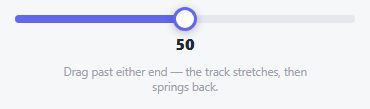
Every other slider in this collection clamps hard at its min and max — the thumb simply can't go further. This one deliberately lets you *feel* that boundary instead: drag past either end and the value keeps moving, but scaled down by a RESISTANCE factor of 0.35, so it takes roughly three pixels of extra drag to move the value one further unit past the edge. At the same time, the track itself visibly stretches — a small scaleX anchored at whichever end is being pulled — so the *whole control* looks like it's being tugged, not just the thumb sliding past an invisible wall.
Resistance applied to the value, stretch applied to the track — same input, two outputs
One piece of state, the overshoot distance, drives both effects independently: value grows past MAX by only a fraction of the real drag distance (the resistance), while stretchTrack() separately converts that same overshoot into a small scaleX on the track element (the visual deformation). They're computed from the same numbers but serve different purposes — one keeps the *displayed value* from running away, the other gives *visual feedback* that something is being resisted.
A spring easing curve, not a linear snap-back
On release, both the thumb's left and the track's scaleX transition back using cubic-bezier(.34, 1.56, .64, 1) — a curve whose middle control point exceeds 1, which makes the transition briefly overshoot its target before settling, reading as a genuine spring bounce rather than a mechanical ease-out.
Build with AI
Build, Understand, Optimize, and Extend It With AI
Paste this snippet's HTML, CSS, and JS into an AI coding assistant like Claude and ask it to explain exactly how the RESISTANCE factor is applied to the value calculation while a separate scaleX calculation handles the track's visual stretch, and why using a cubic-bezier curve with a control point above 1 produces a genuine spring-overshoot effect rather than just a fast ease-out. It's also worth asking the assistant to add a subtle haptic-style visual pulse the moment the drag crosses from normal range into the resisted overshoot zone, or to make the resistance progressively stiffen the further past the boundary the drag goes, rather than staying at one constant factor.
Prompt to recreate it
Copy this into your AI assistant of choice to build the effect from scratch, or as a jumping-off point for your own variant:
Build a range slider with elastic resistance and a spring bounce-back at its boundaries, in plain HTML, CSS, and vanilla JavaScript — no library, no physics engine.

Requirements:
- A standard slider track and draggable thumb representing a value within a configurable min/max range, working like an ordinary slider when dragged within that valid range.
- When the thumb is dragged past the minimum or maximum boundary, the underlying value must continue changing in that direction but scaled down by a fixed resistance factor (a constant less than 1) applied to the raw overshoot distance, so it takes noticeably more drag distance to move the value further past the boundary than it does within the normal range — this resistance calculation must happen continuously during the drag, not only at release.
- Simultaneously, while the value is in this overshoot state, the track element itself must visibly deform using a CSS transform-based scale (not a width change) anchored at whichever end is currently being pulled, so the whole control appears to stretch toward the drag direction, not just the thumb moving past an invisible boundary.
- On pointer or touch release, the value must be immediately clamped back to the true valid min/max range, and both the thumb's position and the track's stretch transform must animate back to their normal resting state using an easing curve that produces a visible spring-like overshoot-then-settle motion, not a linear or purely decelerating snap-back.
- While actively dragging within the normal (non-overshoot) range, no stretch or resistance effects should apply at all — the slider must behave exactly like an ordinary drag slider in that case.
- Keyboard support (Left/Right/Up/Down arrow keys, with a modifier key producing a larger step) must move the value normally within the valid range and must not be affected by or trigger any of the elastic overshoot behavior, which only applies to pointer/touch dragging.
- The thumb must carry correct ARIA slider role and value attributes.
Want to tighten it up first? Run this prompt through the AI Prompt Studio to score it across 8 quality dimensions, catch anti-patterns, and tune the wording for Claude, ChatGPT, or Gemini before you paste it in.
Source Code
<div class="ebr-wrap">
  <div class="ebr-track" id="ebrTrack">
    <div class="ebr-fill" id="ebrFill"></div>
    <div class="ebr-thumb" id="ebrThumb" tabindex="0" role="slider" aria-label="Value" aria-valuemin="0" aria-valuemax="100" aria-valuenow="50"></div>
  </div>
  <div class="ebr-readout" id="ebrReadout">50</div>
  <p class="ebr-hint">Drag past either end — the track stretches, then springs back.</p>
</div>*{box-sizing:border-box;margin:0;padding:0}
body{font-family:system-ui,-apple-system,sans-serif;background:#f6f7f9;min-height:100vh;display:flex;align-items:center;justify-content:center;padding:24px}
.ebr-wrap{width:100%;max-width:340px;display:flex;flex-direction:column;align-items:center;gap:10px}
.ebr-track{position:relative;width:100%;height:8px;border-radius:8px;background:#e5e7eb;transform-origin:center;will-change:transform}
.ebr-fill{position:absolute;top:0;left:0;height:100%;border-radius:8px;background:#6366f1;width:50%}
.ebr-thumb{position:absolute;top:50%;left:50%;width:24px;height:24px;border-radius:50%;background:#fff;border:3px solid #6366f1;box-shadow:0 2px 8px rgba(15,23,42,.25);transform:translate(-50%,-50%);cursor:grab;touch-action:none}
.ebr-thumb:active{cursor:grabbing}
.ebr-thumb:focus-visible{outline:2px solid #6366f1;outline-offset:3px}
.ebr-readout{font:800 16px system-ui,sans-serif;color:#1f2937}
.ebr-hint{font-size:11.5px;color:#9ca3af;text-align:center;max-width:260px}var track = document.getElementById('ebrTrack');
var fill = document.getElementById('ebrFill');
var thumb = document.getElementById('ebrThumb');
var readout = document.getElementById('ebrReadout');
var MIN = 0, MAX = 100;
var value = 50;
var RESISTANCE = 0.35;
function clampedPct() {
return Math.max(0, Math.min(100, ((value - MIN) / (MAX - MIN)) * 100));
}
function render() {
var pct = clampedPct();
fill.style.width = pct + '%';
thumb.style.left = pct + '%';
readout.textContent = Math.round(Math.max(MIN, Math.min(MAX, value)));
thumb.setAttribute('aria-valuenow', readout.textContent);
}
function stretchTrack(overshootPx) {
// A small skew/scale so the whole track itself visibly deforms toward the
// overshoot direction, not just the thumb sliding past a hard boundary.
var scale = 1 + Math.min(0.06, Math.abs(overshootPx) / 900);
var originX = overshootPx > 0 ? '100%' : '0%';
track.style.transformOrigin = originX;
track.style.transform = 'scaleX(' + scale + ')';
}
function resetTrack(animated) {
track.style.transition = animated ? 'transform .4s cubic-bezier(.34,1.56,.64,1)' : 'none';
track.style.transform = 'scaleX(1)';
}
function rawValueFromClientX(clientX) {
var rect = track.getBoundingClientRect();
var x = clientX - rect.left;
return MIN + (x / rect.width) * (MAX - MIN);
}
var dragging = false;
function onMove(e) {
if (!dragging) return;
var clientX = e.touches ? e.touches[0].clientX : e.clientX;
var raw = rawValueFromClientX(clientX);
if (raw < MIN) {
value = MIN - (MIN - raw) * RESISTANCE;
stretchTrack(-(MIN - raw));
} else if (raw > MAX) {
value = MAX + (raw - MAX) * RESISTANCE;
stretchTrack(raw - MAX);
} else {
value = raw;
resetTrack(false);
}
render();
}
function onUp() {
if (!dragging) return;
dragging = false;
thumb.style.transition = 'left .3s cubic-bezier(.34,1.56,.64,1)';
value = Math.max(MIN, Math.min(MAX, value));
render();
resetTrack(true);
setTimeout(function () { thumb.style.transition = ''; }, 320);
}
thumb.addEventListener('pointerdown', function () { dragging = true; thumb.style.transition = 'none'; });
window.addEventListener('pointermove', onMove);
window.addEventListener('pointerup', onUp);
thumb.addEventListener('touchstart', function () { dragging = true; }, { passive: true });
window.addEventListener('touchmove', onMove, { passive: true });
window.addEventListener('touchend', onUp);
thumb.addEventListener('keydown', function (e) {
var step = e.shiftKey ? 10 : 1;
if (e.key === 'ArrowRight' || e.key === 'ArrowUp') { value = Math.min(MAX, value + step); render(); e.preventDefault(); }
else if (e.key === 'ArrowLeft' || e.key === 'ArrowDown') { value = Math.max(MIN, value - step); render(); e.preventDefault(); }
});
render();Step by step
How to Use
- 1Paste HTML, CSS, and JSA slider appears at 50, centered, with a hint about dragging past the ends.
- 2Drag within the normal rangeIt behaves like a completely ordinary slider — no resistance, no stretch.
- 3Drag past either endThe value keeps creeping (slowly) and the track visibly stretches toward that side.
- 4ReleaseBoth the thumb and the track spring back to the true boundary with a bouncy overshoot.
- 5Tune the feelAdjust the RESISTANCE constant to make the overshoot drag feel stiffer or looser.
Real-world uses
Common Use Cases
Got questions?
Frequently Asked Questions
Change the RESISTANCE constant (0 to 1) — a smaller number means the value barely moves at all when dragged past the edge (stiffer resistance), a larger number lets it move almost as freely as within the normal range (looser resistance).
Adjust the cubic-bezier values used in both the thumb's left transition and resetTrack()'s transform transition — increasing the second control point's y-value (currently 1.56) exaggerates the overshoot; bringing it closer to 1 produces a gentler settle.
transform: scaleX is a compositor-only property that animates smoothly without triggering layout, unlike animating width directly — important since the stretch effect updates on every pointermove during an active drag.
No — value is always clamped back into the true MIN/MAX range the instant the pointer is released, so the elastic overshoot is purely a drag-time visual and tactile effect, never a value the slider can actually end up holding.
The thumb carries role="slider" with proper aria-valuemin/max/now, and is fully operable via Left/Right/Up/Down (plus Shift for larger steps) without a mouse — keyboard interaction is entirely unaffected by the elastic drag behavior, which only applies to pointer/touch dragging.