

Learn Coding Visually
Learn to code with interactive, live-preview playgrounds — HTML, CSS, JavaScript, React & more.
 HTML Playground42 lessons · Click-based · Live preview
 CSS PlaygroundLearn CSS with a live editor
 JavaScript Playground60 lessons · DOM · Async · Canvas
 React PlaygroundLearn React with a live code editor
 GSAP PlaygroundLearn GSAP animation interactively
 SVG Playground44 lessons · shapes · paths · animation
 SCSS Playground45 lessons · Sass modules · tokens
 Tailwind PlaygroundLearn Tailwind CSS with a live editor
 Bootstrap 5 Playground50 lessons · live preview
Draggable Timeline Range Slider — HTML CSS JS Snippet
Draggable Timeline Range Slider · Forms · Plain HTML, CSS & JS · Live preview
What's included
Features
About this UI Snippet
Draggable Timeline Range Slider — A Real Axis, Not a Calendar Grid
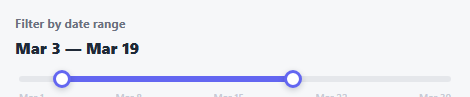
A calendar-grid date picker asks you to click two individual dates out of a 30-cell grid. This is a different mental model entirely: the whole month is one continuous *axis*, with two handles you slide along it — closer to how you'd pick a range on a physical ruler than fill in two separate form fields.
Days are the unit, not pixels
Every handle holds a plain integer day-of-month (start, end), and pct(day) = (day / DAYS) * 100 is the only place a day number becomes a screen percentage. Dragging does the reverse: a pointer's clientX becomes a fraction of the track's width, multiplied by DAYS and rounded to the nearest whole day. Because both directions go through the same two formulas, the readout, the handle positions, and the fill bar can never disagree about what day a handle is actually on.
The 1-day gap enforced on both ends
Just like the vertical dual-range slider, start and end clamp against each other — start can't reach or pass end - 1, and vice versa — so the range always has at least one real day of width and the two handles can never land on the exact same day or swap order.
Month tick labels for orientation, independent of the handles
A static row of day labels (1, 8, 15, 22, 30) sits above the track purely for visual reference — it's generated once and never touched again, giving a sense of "where in the month" without being part of the interactive range logic at all.
Build with AI
Build, Understand, Optimize, and Extend It With AI
Paste this snippet's HTML, CSS, and JS into an AI coding assistant like Claude and ask it to explain why day-of-month is kept as the single source of truth with pixel position always derived from it via pct(), rather than tracking pixel positions directly and converting to days only when needed. It's also worth asking the assistant to extend this to real Date objects spanning multiple months (using a proper date library), or to add a tooltip that follows each handle during drag showing the exact date being hovered before release.
Prompt to recreate it
Copy this into your AI assistant of choice to build the effect from scratch, or as a jumping-off point for your own variant:
Build a draggable date-range slider in plain HTML, CSS, and vanilla JavaScript where two handles slide along a continuous track representing days of a month — no calendar grid, no library.

Requirements:
- A horizontal track representing a fixed number of days (e.g. 30), with two independently draggable handle elements representing a range start and range end, plus a fill bar spanning exactly the segment between them.
- The single source of truth for each handle's position must be an integer day-of-month value, not a pixel or percentage value — all visual positioning (handle placement, fill bar width) must be calculated FROM these day integers via one shared formula, and dragging must convert pointer position back into a day integer using the inverse of that same formula, so a day number and its screen position can never disagree.
- The start handle must be prevented from reaching or passing the end handle's current day minus one, and the end handle must be prevented from reaching or passing the start handle's current day plus one — enforced live during dragging, guaranteeing the range always spans at least one real day and the handles can never cross or land on the same day.
- A live, human-readable text readout above the track (e.g. "Mar 3 — Mar 19") that regenerates from the same day integers driving the handles, updating in real time as either handle moves.
- A row of static reference tick labels above or below the track marking several days for visual orientation, generated once and independent of the interactive range state.
- Dragging must work via unified pointer events with a touch event fallback, with touch-action set appropriately to prevent scroll interference during a drag.
- Keyboard support: each handle independently focusable, responding to Left/Right arrow keys to move by one day (respecting the same never-cross constraint as dragging).
Want to tighten it up first? Run this prompt through the AI Prompt Studio to score it across 8 quality dimensions, catch anti-patterns, and tune the wording for Claude, ChatGPT, or Gemini before you paste it in.
Source Code
<div class="dtr-wrap">
  <label class="dtr-label">Filter by date range</label>
  <div class="dtr-readout"><span id="dtrStart">Mar 3</span> — <span id="dtrEnd">Mar 19</span></div>
  <div class="dtr-track" id="dtrTrack">
    <div class="dtr-months" id="dtrMonths"></div>
    <div class="dtr-fill" id="dtrFill"></div>
    <div class="dtr-handle" id="dtrHandleStart" tabindex="0" role="slider" aria-label="Range start"></div>
    <div class="dtr-handle" id="dtrHandleEnd" tabindex="0" role="slider" aria-label="Range end"></div>
  </div>
</div>*{box-sizing:border-box;margin:0;padding:0}
body{font-family:system-ui,-apple-system,sans-serif;background:#f6f7f9;min-height:100vh;display:flex;align-items:center;justify-content:center;padding:24px}
.dtr-wrap{width:100%;max-width:440px}
.dtr-label{display:block;font-size:12px;font-weight:700;color:#6b7080;margin-bottom:6px}
.dtr-readout{font:800 16px system-ui,sans-serif;color:#1f2937;margin-bottom:18px}
.dtr-track{position:relative;height:6px;border-radius:6px;background:#e5e7eb;margin:0 4px}
.dtr-months{position:absolute;top:14px;left:0;right:0;display:flex;justify-content:space-between;font:600 10px system-ui,sans-serif;color:#c7cad4}
.dtr-fill{position:absolute;top:0;height:100%;border-radius:6px;background:#6366f1}
.dtr-handle{position:absolute;top:50%;width:18px;height:18px;border-radius:50%;background:#fff;border:3px solid #6366f1;box-shadow:0 2px 6px rgba(15,23,42,.2);transform:translate(-50%,-50%);cursor:grab;touch-action:none}
.dtr-handle:active{cursor:grabbing}
.dtr-handle:focus-visible{outline:2px solid #6366f1;outline-offset:3px}var DAYS = 30;
var MONTH_LABEL = 'March';
var track = document.getElementById('dtrTrack');
var fill = document.getElementById('dtrFill');
var handleStart = document.getElementById('dtrHandleStart');
var handleEnd = document.getElementById('dtrHandleEnd');
var readoutStart = document.getElementById('dtrStart');
var readoutEnd = document.getElementById('dtrEnd');
var monthsWrap = document.getElementById('dtrMonths');
['1', '8', '15', '22', '30'].forEach(function (d) {
var span = document.createElement('span');
span.textContent = MONTH_LABEL.slice(0, 3) + ' ' + d;
monthsWrap.appendChild(span);
});
var start = 3, end = 19;
function fmt(day) { return MONTH_LABEL.slice(0, 3) + ' ' + day; }
function pct(day) { return (day / DAYS) * 100; }
function render() {
handleStart.style.left = pct(start) + '%';
handleEnd.style.left = pct(end) + '%';
fill.style.left = pct(start) + '%';
fill.style.width = (pct(end) - pct(start)) + '%';
readoutStart.textContent = fmt(start);
readoutEnd.textContent = fmt(end);
handleStart.setAttribute('aria-valuetext', fmt(start));
handleEnd.setAttribute('aria-valuetext', fmt(end));
}
function dayFromClientX(clientX) {
var rect = track.getBoundingClientRect();
var x = Math.max(0, Math.min(rect.width, clientX - rect.left));
return Math.round((x / rect.width) * DAYS);
}
var activeHandle = null;
function onMove(e) {
if (!activeHandle) return;
var clientX = e.touches ? e.touches[0].clientX : e.clientX;
var d = dayFromClientX(clientX);
if (activeHandle === handleStart) start = Math.max(1, Math.min(end - 1, d));
else end = Math.min(DAYS, Math.max(start + 1, d));
render();
}
function attachDrag(handle) {
handle.addEventListener('pointerdown', function () { activeHandle = handle; });
handle.addEventListener('touchstart', function () { activeHandle = handle; }, { passive: true });
}
attachDrag(handleStart);
attachDrag(handleEnd);
window.addEventListener('pointermove', onMove);
window.addEventListener('pointerup', function () { activeHandle = null; });
window.addEventListener('touchmove', onMove, { passive: true });
window.addEventListener('touchend', function () { activeHandle = null; });
function keyHandler(isStart) {
return function (e) {
if (e.key !== 'ArrowLeft' && e.key !== 'ArrowRight') return;
var dir = e.key === 'ArrowRight' ? 1 : -1;
if (isStart) start = Math.max(1, Math.min(end - 1, start + dir));
else end = Math.min(DAYS, Math.max(start + 1, end + dir));
render();
e.preventDefault();
};
}
handleStart.addEventListener('keydown', keyHandler(true));
handleEnd.addEventListener('keydown', keyHandler(false));
render();Step by step
How to Use
- 1Paste HTML, CSS, and JSA track appears spanning a full month, with two handles set to March 3 and March 19.
- 2Drag either handleIt slides along the axis and clamps a day short of the other handle — never crossing it.
- 3Watch the readoutThe "Mar 3 — Mar 19" text above the track updates live as you drag.
- 4Use arrow keysFocus a handle and press Left/Right to nudge it one day at a time.
- 5Adapt the monthChange DAYS and MONTH_LABEL in the JS to represent any month or any numeric range at all.
Real-world uses
Common Use Cases
Got questions?
Frequently Asked Questions
Change the DAYS constant to match, and update the tick label array passed into the month-label generation loop to reflect that month's actual day count.
Keep start/end as day-of-month integers internally (all the range math depends on this), and only convert them to real Date objects or formatted strings at the point where fmt() currently builds the readout string, using your date library or Intl.DateTimeFormat of choice.
Yes — change DAYS to the total number of days across the full span (e.g. 90 for a rolling quarter) and adjust the month tick labels to mark month boundaries instead of just day-of-month numbers.
Without it, both handles could land on the identical day, producing a zero-length "range" that's ambiguous to interpret — clamping start below end (and vice versa) by at least one day guarantees every selection is a real, non-empty range.
Both handles carry role="slider" with a descriptive aria-label and a live aria-valuetext reflecting the human-readable date, and are independently focusable and operable via Left/Right arrow keys without a mouse.