
Learn Coding Visually
Learn to code with interactive, live-preview playgrounds — HTML, CSS, JavaScript, React & more.
 HTML Playground42 lessons · Click-based · Live preview
 CSS PlaygroundLearn CSS with a live editor
 JavaScript Playground60 lessons · DOM · Async · Canvas
 React PlaygroundLearn React with a live code editor
 GSAP PlaygroundLearn GSAP animation interactively
 SVG Playground44 lessons · shapes · paths · animation
 SCSS Playground45 lessons · Sass modules · tokens
 Tailwind PlaygroundLearn Tailwind CSS with a live editor
 Bootstrap 5 Playground50 lessons · live preview
Multi-Range Price Slider — Free HTML CSS JS Snippet
Multi-Range Price Slider · Forms · Plain HTML, CSS & JS · Live preview
What's included
Features
(value - MIN) / (MAX - MIN) * 100 maps domain values to CSS left percentages. The fill track left and width derive directly from the two handle positions.mousemove/mouseup attach to document on drag start, not the handle — prevents losing the cursor when moving faster than the element boundary.minVal = Math.min(v, maxVal - 10) prevents handles crossing or coinciding, keeping the fill track and ARIA values always valid.role="slider", aria-valuemin, aria-valuemax, and aria-valuenow that update on every drag move — fully usable with screen readers.touchstart/touchmove/touchend handlers mirror the mouse events with e.touches[0].clientX — works on mobile without conflicts.About this UI Snippet
Multi-Range Slider — Dual Handle Position Math, Live Product Filter & Pointer/Touch Events
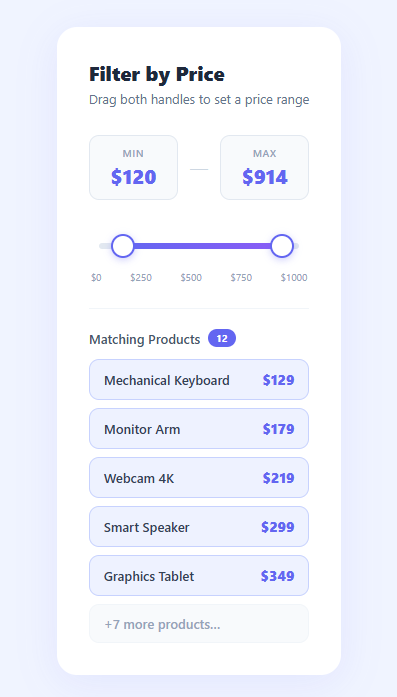
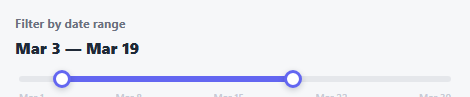
A dual-handle range slider for price filtering is one of the most common interactive controls in e-commerce and search interfaces — yet it is notoriously tricky to implement correctly. This snippet builds a production-quality multi-range slider from scratch: two draggable handles with precise percentage-based positioning math, an animated fill track that updates in real time, keyboard arrow key support, full touch event handling, ARIA role and value attributes, and a live product list that filters to show only items within the selected range.
The dual-handle slider pattern appears everywhere — Airbnb's price filter, Amazon's price range, Booking.com's review score slider, job boards filtering by salary. The challenge is that the two handles must be aware of each other (min handle cannot exceed max and vice versa), the fill track must connect exactly between the two handles, and the whole thing must work with mouse, touch, and keyboard.
Handle position as percentage math
Each handle's position is stored as a value in the [MIN, MAX] domain (0–1000 for price). Converting to a CSS left percentage is (value - MIN) / (MAX - MIN) * 100 — a standard linear interpolation. The fill track's left equals the min handle percentage and its width equals the difference between max and min percentages. All three DOM updates (left handle, right handle, fill) run in a single render() function that also updates the price display boxes and tooltips — one source of truth, one render pass.
Drag event handling without global pointer lock
Each handle's mousedown / touchstart attaches mousemove/mouseup listeners to the document (not the handle element) and removes them on mouseup. This prevents the handle from "losing" the cursor if the pointer moves fast — a common bug in slider implementations. The position within the track is computed from (clientX - trackRect.left) / trackRect.width — a ratio clamped to [0, 1] before conversion to a domain value.
Mutual constraint: min/max guard
On every drag move, a 10-unit gap is enforced: minVal = Math.min(value, maxVal - 10) and maxVal = Math.max(value, minVal + 10). This prevents the handles from crossing or overlapping, which would make the fill track invert and the ARIA values nonsensical.
Keyboard accessibility
Each handle is a role="slider" button with tabindex="0", aria-valuemin, aria-valuemax, and aria-valuenow attributes kept in sync with the current values. Arrow key listeners move the value by 10 units (or 50 with Shift), making the slider fully operable without a pointer. Pair with a search box for complete product filtering UI.
Build with AI
Build, Understand, Optimize, and Extend It With AI
Instead of tracing the drag math by hand, paste this snippet's HTML, CSS, and JS into an AI coding assistant like Claude and ask it to explain exactly why makeDraggable attaches mousemove and mouseup to the document rather than the handle element, and what visible bug would appear during a fast drag if it attached them to the handle instead. The same assistant can help optimize it, for example checking whether recomputing the full filtered product list and rebuilding its DOM on every single pixel of drag movement is excessive compared to throttling the render, or whether the 10-unit minimum gap between handles should scale with the overall MIN to MAX range. It's also useful for extending the slider: ask it to sync minVal and maxVal to the URL query string so filtered views are shareable links, add a histogram of product density behind the track, or support typing an exact number directly into the price display boxes. Treat the code less like a finished artifact and more like a starting point for a conversation.
Prompt to recreate it
Copy this into your AI assistant of choice to build the effect from scratch, or as a jumping-off point for your own variant:
Build a "dual-handle range slider" price filter in plain HTML, CSS, and JavaScript using only pointer/touch events and percentage-based positioning math — no slider library.

Requirements:
- A track with two circular draggable handles, a gradient fill segment between them, and a numeric domain (e.g. 0 to 1000) with fixed MIN and MAX constants that all positioning math derives from.
- Each handle's on-screen position must be computed as a percentage: (value - MIN) / (MAX - MIN) * 100, applied as a CSS left percentage; the fill segment's left and width must derive directly from the two handle percentages so it always spans exactly between them.
- Dragging a handle must compute the new value from the pointer's horizontal position relative to the track's bounding rectangle (clamped to the track's edges), rounding to a whole unit, and must enforce a minimum gap (e.g. 10 units) so the two handles can never cross or land on the same value.
- Drag listeners (mousemove/mouseup and touchmove/touchend) must be attached to the document when a drag starts and removed when it ends, not attached permanently to the handle, so a fast drag that outruns the handle's bounding box doesn't lose tracking.
- Each handle must be a real, keyboard-operable slider (role="slider", tabindex, aria-valuemin/max/now kept live) where arrow keys move it by a normal step and Shift+arrow moves it by a larger step, still respecting the minimum gap and domain bounds.
- Below the slider, filter and render a fixed product list to only items whose price falls within the current [min, max] range, updating a visible count badge, every time either handle moves — whether by drag or keyboard.
- Show a floating tooltip above each handle with its current formatted value, visible on hover and continuously while dragging.
Want to tighten it up first? Run this prompt through the AI Prompt Studio to score it across 8 quality dimensions, catch anti-patterns, and tune the wording for Claude, ChatGPT, or Gemini before you paste it in.
Source Code
<div class="page">
  <div class="card">
    <h2 class="card-title">Filter by Price</h2>
    <p class="card-sub">Drag both handles to set a price range</p>

    <div class="price-display">
      <div class="price-box">
        <span class="price-label">Min</span>
        <span class="price-val" id="minDisplay">$120</span>
      </div>
      <div class="price-sep">—</div>
      <div class="price-box">
        <span class="price-label">Max</span>
        <span class="price-val" id="maxDisplay">$480</span>
      </div>
    </div>

    <div class="slider-wrap" id="sliderWrap">
      <div class="track-bg"></div>
      <div class="track-fill" id="trackFill"></div>
      <div class="handle" id="handleMin" role="slider" tabindex="0"
        aria-label="Minimum price" aria-valuemin="0" aria-valuemax="1000" aria-valuenow="120">
        <div class="handle-inner"></div>
        <div class="handle-tooltip" id="ttMin">$120</div>
      </div>
      <div class="handle" id="handleMax" role="slider" tabindex="0"
        aria-label="Maximum price" aria-valuemin="0" aria-valuemax="1000" aria-valuenow="480">
        <div class="handle-inner"></div>
        <div class="handle-tooltip" id="ttMax">$480</div>
      </div>
    </div>

    <div class="ticks">
      <span>$0</span><span>$250</span><span>$500</span><span>$750</span><span>$1000</span>
    </div>

    <div class="results" id="results">
      <p class="results-title">Matching Products <span class="results-count" id="count">14</span></p>
      <div class="product-list" id="productList"></div>
    </div>
  </div>
</div>*{box-sizing:border-box;margin:0;padding:0}
body{font-family:system-ui,sans-serif;background:#f0f4ff;min-height:100vh;display:flex;align-items:center;justify-content:center;padding:20px}
.card{background:#fff;border-radius:20px;padding:32px;width:100%;max-width:480px;box-shadow:0 8px 40px rgba(99,102,241,.1)}
.card-title{font-size:20px;font-weight:800;color:#1e293b;margin-bottom:4px}
.card-sub{font-size:13px;color:#64748b;margin-bottom:28px}
.price-display{display:flex;align-items:center;gap:12px;margin-bottom:32px}
.price-box{flex:1;background:#f8fafc;border:1.5px solid #e2e8f0;border-radius:10px;padding:10px 14px;text-align:center}
.price-label{display:block;font-size:10px;font-weight:600;text-transform:uppercase;letter-spacing:.06em;color:#94a3b8;margin-bottom:2px}
.price-val{font-size:20px;font-weight:800;color:#6366f1}
.price-sep{font-size:18px;color:#cbd5e1;font-weight:300}
.slider-wrap{position:relative;height:28px;margin:0 10px 10px;user-select:none}
.track-bg{position:absolute;top:50%;transform:translateY(-50%);left:0;right:0;height:6px;background:#e2e8f0;border-radius:3px}
.track-fill{position:absolute;top:50%;transform:translateY(-50%);height:6px;background:linear-gradient(90deg,#6366f1,#8b5cf6);border-radius:3px;pointer-events:none}
.handle{position:absolute;top:50%;transform:translate(-50%,-50%);width:24px;height:24px;cursor:grab;touch-action:none;z-index:3}
.handle:active{cursor:grabbing;z-index:4}
.handle-inner{width:24px;height:24px;background:#fff;border:2.5px solid #6366f1;border-radius:50%;box-shadow:0 2px 8px rgba(99,102,241,.35);transition:transform .15s,box-shadow .15s}
.handle:hover .handle-inner,.handle:focus .handle-inner{transform:scale(1.2);box-shadow:0 0 0 6px rgba(99,102,241,.15)}
.handle:focus{outline:none}
.handle-tooltip{position:absolute;bottom:calc(100% + 8px);left:50%;transform:translateX(-50%);background:#1e293b;color:#fff;font-size:11px;font-weight:700;padding:3px 8px;border-radius:6px;white-space:nowrap;opacity:0;transition:opacity .15s;pointer-events:none}
.handle-tooltip::after{content:'';position:absolute;top:100%;left:50%;transform:translateX(-50%);border:4px solid transparent;border-top-color:#1e293b}
.handle:hover .handle-tooltip,.handle.dragging .handle-tooltip{opacity:1}
.ticks{display:flex;justify-content:space-between;font-size:10px;color:#94a3b8;margin-bottom:24px;padding:0 2px}
.results{border-top:1px solid #f1f5f9;padding-top:20px}
.results-title{font-size:13px;font-weight:600;color:#475569;margin-bottom:12px;display:flex;align-items:center;gap:8px}
.results-count{background:#6366f1;color:#fff;font-size:10px;font-weight:700;padding:2px 8px;border-radius:20px}
.product-list{display:flex;flex-direction:column;gap:8px}
.product-item{display:flex;align-items:center;justify-content:space-between;padding:10px 14px;background:#f8fafc;border-radius:10px;border:1px solid #f1f5f9;transition:border-color .2s,background .2s}
.product-item.highlight{background:#eef2ff;border-color:#c7d2fe}
.prod-name{font-size:13px;font-weight:600;color:#334155}
.prod-price{font-size:14px;font-weight:800;color:#6366f1}const PRODUCTS = [
{name:'Wireless Earbuds',price:89},{name:'Laptop Stand',price:45},
{name:'Mechanical Keyboard',price:129},{name:'USB-C Hub',price:59},
{name:'Monitor Arm',price:179},{name:'Webcam 4K',price:219},
{name:'Desk Lamp LED',price:74},{name:'Mouse Pad XL',price:32},
{name:'SSD External 1TB',price:118},{name:'Cable Management Kit',price:28},
{name:'Smart Speaker',price:299},{name:'Graphics Tablet',price:349},
{name:'Ring Light',price:95},{name:'Ergonomic Chair',price:449},
{name:'Standing Desk',price:689},{name:'NAS Drive',price:520},
{name:'Thunderbolt Dock',price:399},{name:'Noise Cancelling Headphones',price:379},
{name:'USB Microphone',price:149},{name:'4K Monitor',price:599},
];
const MIN = 0, MAX = 1000;
let minVal = 120, maxVal = 480;
const wrap = document.getElementById('sliderWrap');
const hMin = document.getElementById('handleMin');
const hMax = document.getElementById('handleMax');
const fill = document.getElementById('trackFill');
const minDisplay = document.getElementById('minDisplay');
const maxDisplay = document.getElementById('maxDisplay');
const ttMin = document.getElementById('ttMin');
const ttMax = document.getElementById('ttMax');
const productList = document.getElementById('productList');
const countEl = document.getElementById('count');
function pct(v){ return (v - MIN) / (MAX - MIN) * 100; }
function render(){
const lo = pct(minVal), hi = pct(maxVal);
hMin.style.left = lo + '%';
hMax.style.left = hi + '%';
fill.style.left = lo + '%';
fill.style.width = (hi - lo) + '%';
minDisplay.textContent = '$' + minVal;
maxDisplay.textContent = '$' + maxVal;
ttMin.textContent = '$' + minVal;
ttMax.textContent = '$' + maxVal;
hMin.setAttribute('aria-valuenow', minVal);
hMax.setAttribute('aria-valuenow', maxVal);
const matched = PRODUCTS.filter(p => p.price >= minVal && p.price <= maxVal);
countEl.textContent = matched.length;
productList.innerHTML = '';
matched.slice(0,5).forEach(p => {
const el = document.createElement('div');
el.className = 'product-item highlight';
el.innerHTML = `<span class="prod-name">${p.name}</span><span class="prod-price">$${p.price}</span>`;
productList.appendChild(el);
});
if(matched.length > 5){
const more = document.createElement('div');
more.className = 'product-item';
more.innerHTML = `<span class="prod-name" style="color:#94a3b8">+${matched.length-5} more products…</span>`;
productList.appendChild(more);
}
}
function makeDraggable(handle, isMin){
let dragging = false;
function onMove(e){
if(!dragging) return;
const rect = wrap.getBoundingClientRect();
const clientX = e.touches ? e.touches[0].clientX : e.clientX;
let p = (clientX - rect.left) / rect.width;
p = Math.max(0, Math.min(1, p));
let v = Math.round(MIN + p * (MAX - MIN));
if(isMin){ minVal = Math.min(v, maxVal - 10); }
else { maxVal = Math.max(v, minVal + 10); }
render();
}
function onUp(){ dragging=false; handle.classList.remove('dragging'); document.removeEventListener('mousemove',onMove); document.removeEventListener('mouseup',onUp); document.removeEventListener('touchmove',onMove); document.removeEventListener('touchend',onUp); }
handle.addEventListener('mousedown', e=>{ e.preventDefault(); dragging=true; handle.classList.add('dragging'); document.addEventListener('mousemove',onMove); document.addEventListener('mouseup',onUp); });
handle.addEventListener('touchstart', e=>{ e.preventDefault(); dragging=true; handle.classList.add('dragging'); document.addEventListener('touchmove',onMove,{passive:false}); document.addEventListener('touchend',onUp); },{passive:false});
handle.addEventListener('keydown', e=>{
const step = e.shiftKey ? 50 : 10;
if(e.key==='ArrowRight'||e.key==='ArrowUp'){ isMin ? (minVal=Math.min(minVal+step,maxVal-10)) : (maxVal=Math.min(maxVal+step,MAX)); render(); e.preventDefault(); }
if(e.key==='ArrowLeft'||e.key==='ArrowDown'){ isMin ? (minVal=Math.max(minVal-step,MIN)) : (maxVal=Math.max(maxVal-step,minVal+10)); render(); e.preventDefault(); }
});
}
makeDraggable(hMin, true);
makeDraggable(hMax, false);
render();Step by step
How to Use
- 1Paste HTML, CSS, and JSA price filter card appears with two draggable handles on a gradient track, price display boxes, tick labels, and a live product list below.
- 2Drag the left handle (min)The minimum price updates in real time. The fill track shrinks/expands from the left. A tooltip shows the current value above the handle while dragging.
- 3Drag the right handle (max)The maximum price updates. The product list below instantly filters to show only items within the selected price range, with a count badge.
- 4Use keyboard navigationTab to either handle and use arrow keys to adjust. Left/Right arrows move by $10. Hold Shift for $50 increments. ARIA values update for screen readers.
- 5Test on touch devicesTouch-drag either handle on a phone or tablet. Touch events are handled separately from mouse events to support both simultaneously.
- 6Connect your product dataReplace the
PRODUCTSarray in JS with your real data. The filter logic isprice >= minVal && price <= maxVal— adapt the field name to match your data shape.
Real-world uses
Common Use Cases
?min=100&max=500) for shareable filtered searches.Got questions?
Frequently Asked Questions
Change the MIN and MAX constants at the top of the JS. Update the tick labels in HTML to match. The percentage math is relative to these constants, so all handle positions, fill, and keyboard steps scale automatically.
Remove the Math.round() around the value calculation and set the step in the keyboard handler to 0.5. Update the display format: '$' + v.toFixed(2).
Store [minVal, maxVal] as state with useState([120, 480]). The drag handlers update state via setMinVal/setMaxVal. Use useRef for the track element to compute getBoundingClientRect(). The product list renders from a useMemo that filters the PRODUCTS array on every state change.
On every render, call history.replaceState({}, '', ?min=${minVal}&max=${maxVal}). On page load, read the params: const params = new URLSearchParams(location.search); minVal = +params.get('min') || MIN.