
Learn Coding Visually
Learn to code with interactive, live-preview playgrounds — HTML, CSS, JavaScript, React & more.
 HTML Playground42 lessons · Click-based · Live preview
 CSS PlaygroundLearn CSS with a live editor
 JavaScript Playground60 lessons · DOM · Async · Canvas
 React PlaygroundLearn React with a live code editor
 GSAP PlaygroundLearn GSAP animation interactively
 SVG Playground44 lessons · shapes · paths · animation
 SCSS Playground45 lessons · Sass modules · tokens
 Tailwind PlaygroundLearn Tailwind CSS with a live editor
 Bootstrap 5 Playground50 lessons · live preview
Vertical Story-Style Slider — HTML CSS JS Snippet
Vertical Story-Style Slider · Mobile · Plain HTML, CSS & JS · Live preview
What's included
Features
About this UI Snippet
Vertical Story-Style Slider — Segmented Progress Bars & Tap-to-Advance
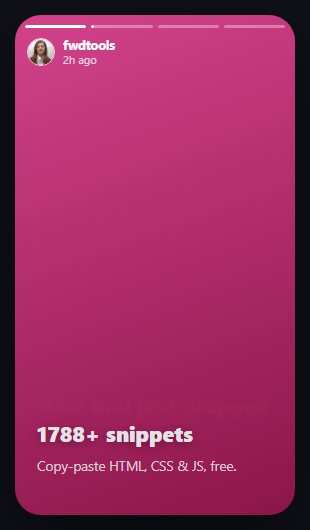
Stories replaced the carousel on every social app for one reason: the segmented bar at the top *shows you the pacing* before you even interact — how many slides remain, and roughly how much time is left on this one. This snippet rebuilds that exact mechanic from scratch: one thin bar per slide, the active one fills left-to-right over a fixed duration via a CSS width transition, and finishing a fill auto-advances to the next slide.
A CSS transition doing the timer's job
Instead of animating the fill with requestAnimationFrame on every tick, each active bar's fill gets transition: width 4000ms linear and then its width is set to 100% — the browser handles the actual animation, and a plain setTimeout matching that same duration handles advancing to the next slide. Re-visiting an already-finished slide resets its bar to full instantly (no transition), and resetting to a not-yet-reached slide snaps it back to empty — so scrubbing back and forth always shows an accurate state, not leftover animation frames.
Two invisible tap zones, not visible buttons
The left/right third of the phone frame are full-height, borderless buttons — tapping the right side advances, the left side goes back, exactly like every native stories implementation. Arrow keys do the same on desktop, so the pattern works with a keyboard too, not just a thumb.
Build with AI
Build, Understand, Optimize, and Extend It With AI
Paste this snippet's HTML, CSS, and JS into an AI coding assistant like Claude and ask it to explain why the active bar's fill has to force a reflow (void fill.offsetWidth) before its transition is re-applied — what happens if that line is removed, and why the browser needs it to notice the width has changed from a previous run. It's also worth asking the assistant to add a hold-to-pause gesture (pausing the fill and timer on pointerdown, resuming on pointerup) since that's the one core stories behavior this snippet doesn't yet implement, or to make it swipeable vertically to dismiss the whole story stack.
Prompt to recreate it
Copy this into your AI assistant of choice to build the effect from scratch, or as a jumping-off point for your own variant:
Build a full-screen vertical story slider in plain HTML, CSS, and vanilla JavaScript, modeled on Instagram/Snapchat stories — no library.

Requirements:
- A phone-shaped frame containing several full-bleed slides stacked absolutely on top of each other, with only the active one visible (opacity/z-index controlled by JavaScript, not display:none, so a crossfade is possible).
- A row of thin segmented progress bar elements at the top, one generated dynamically per slide (not hardcoded) — the bar for the active slide fills from empty to full over a fixed duration using a CSS width transition (not a JavaScript animation loop), bars for already-passed slides show fully filled, and bars for upcoming slides show empty.
- When the active slide's bar finishes filling, automatically advance to the next slide and begin filling its bar, unless it is the last slide.
- Two invisible, full-height tap zones on the left and right thirds of the frame (real button elements, not divs) — tapping right advances immediately to the next slide and restarts that slide's timer, tapping left goes back one slide and restarts its timer.
- Left/Right arrow key support that performs the same next/previous action as the tap zones.
- Revisiting a slide (via tap, arrow key, or going back) must correctly reset its progress bar state — no transition should carry over from a previous run, and bars for slides that are not the current one must snap instantly to fully filled or fully empty depending on whether they are before or after the current index.
Want to tighten it up first? Run this prompt through the AI Prompt Studio to score it across 8 quality dimensions, catch anti-patterns, and tune the wording for Claude, ChatGPT, or Gemini before you paste it in.
Source Code
<div class="vst-phone" id="vstPhone">
<div class="vst-bars" id="vstBars"></div>
<div class="vst-header">
<img class="vst-avatar" src="https://i.pravatar.cc/60?img=32" alt="">
<div class="vst-who"><strong>fwdtools</strong><span>2h ago</span></div>
</div>
<div class="vst-slides" id="vstSlides">
<div class="vst-slide" style="background:linear-gradient(160deg,#6366f1,#4338ca)"><h2>New tool just dropped 🚀</h2><p>Build sitemaps in one click.</p></div>
<div class="vst-slide" style="background:linear-gradient(160deg,#ec4899,#9d174d)"><h2>1788+ snippets</h2><p>Copy-paste HTML, CSS & JS, free.</p></div>
<div class="vst-slide" style="background:linear-gradient(160deg,#0ea5e9,#0369a1)"><h2>Export anywhere</h2><p>React, Vue, Angular & Tailwind.</p></div>
<div class="vst-slide" style="background:linear-gradient(160deg,#10b981,#047857)"><h2>Swipe to see more</h2><p>Tap the sides to move — try it.</p></div>
</div>
<button class="vst-tap vst-tap-left" id="vstPrev" aria-label="Previous story"></button>
<button class="vst-tap vst-tap-right" id="vstNext" aria-label="Next story"></button>
</div>*{box-sizing:border-box;margin:0;padding:0}
body{font-family:system-ui,-apple-system,sans-serif;background:#0f1117;min-height:100vh;display:flex;align-items:center;justify-content:center;padding:24px}
.vst-phone{position:relative;width:280px;height:500px;border-radius:26px;overflow:hidden;box-shadow:0 24px 60px rgba(0,0,0,.5)}
.vst-bars{position:absolute;top:10px;left:10px;right:10px;display:flex;gap:5px;z-index:3}
.vst-bar{flex:1;height:3px;border-radius:3px;background:rgba(255,255,255,.35);overflow:hidden}
.vst-bar-fill{height:100%;width:0%;background:#fff;border-radius:3px}
.vst-bar.done .vst-bar-fill{width:100%}
.vst-bar.active .vst-bar-fill{transition:width linear}
.vst-header{position:absolute;top:22px;left:12px;right:12px;display:flex;align-items:center;gap:8px;z-index:3}
.vst-avatar{width:28px;height:28px;border-radius:50%;border:1.5px solid rgba(255,255,255,.8)}
.vst-who{display:flex;flex-direction:column;color:#fff;font-size:11px;line-height:1.3}
.vst-who strong{font-size:12.5px}
.vst-who span{opacity:.75}
.vst-slides{position:relative;width:100%;height:100%}
.vst-slide{position:absolute;inset:0;display:flex;flex-direction:column;justify-content:flex-end;padding:28px 22px 40px;opacity:0;transition:opacity .25s ease}
.vst-slide.active{opacity:1;z-index:1}
.vst-slide h2{color:#fff;font-size:21px;font-weight:800;margin-bottom:8px;text-shadow:0 2px 8px rgba(0,0,0,.3)}
.vst-slide p{color:rgba(255,255,255,.88);font-size:13.5px;line-height:1.5}
.vst-tap{position:absolute;top:0;bottom:0;width:34%;border:none;background:transparent;cursor:pointer;z-index:2}
.vst-tap-left{left:0}
.vst-tap-right{right:0}var slides = document.querySelectorAll('.vst-slide');
var barsWrap = document.getElementById('vstBars');
var current = 0;
var DURATION = 4000;
var timer = null;
slides.forEach(function () {
var bar = document.createElement('div');
bar.className = 'vst-bar';
bar.innerHTML = '<div class="vst-bar-fill"></div>';
barsWrap.appendChild(bar);
});
var bars = document.querySelectorAll('.vst-bar');
function render() {
slides.forEach(function (s, i) { s.classList.toggle('active', i === current); });
bars.forEach(function (b, i) {
var fill = b.querySelector('.vst-bar-fill');
fill.style.transition = 'none';
b.classList.toggle('done', i < current);
b.classList.toggle('active', i === current);
if (i < current) { fill.style.width = '100%'; }
else if (i > current) { fill.style.width = '0%'; }
else {
fill.style.width = '0%';
// force reflow so the transition restarts cleanly on repeated visits
void fill.offsetWidth;
fill.style.transition = 'width ' + DURATION + 'ms linear';
requestAnimationFrame(function () { fill.style.width = '100%'; });
}
});
}
function goTo(i) {
if (i < 0) i = 0;
if (i >= slides.length) { current = slides.length - 1; render(); return; }
current = i;
render();
restart();
}
function next() { if (current < slides.length - 1) goTo(current + 1); }
function prev() { if (current > 0) goTo(current - 1); }
function restart() {
clearTimeout(timer);
timer = setTimeout(function () {
if (current < slides.length - 1) next();
}, DURATION);
}
document.getElementById('vstNext').addEventListener('click', next);
document.getElementById('vstPrev').addEventListener('click', prev);
document.addEventListener('keydown', function (e) {
if (e.key === 'ArrowRight') next();
else if (e.key === 'ArrowLeft') prev();
});
render();
restart();Step by step
How to Use
- 1Paste HTML, CSS, and JSA phone-framed story starts playing automatically — watch the first progress bar fill.
- 2Tap the right edgeAdvances to the next slide immediately and resets the timer for the new one.
- 3Tap the left edgeGoes back one slide — its bar refills from the start.
- 4Wait it outEach slide auto-advances when its bar finishes filling, just like a native story.
- 5Add a fifth slideAdd one more .vst-slide div — a matching progress bar segment is generated automatically.
Real-world uses
Common Use Cases
Got questions?
Frequently Asked Questions
Change the DURATION constant (in milliseconds) at the top of the JS. It drives both the progress bar's fill transition and the setTimeout that triggers auto-advance, so they always stay in sync.
Tapping either side or pressing an arrow key immediately jumps to a slide and restarts its timer via restart() — so interacting always resets the pacing rather than fighting the running timer.
Listen for pointerdown on the phone frame and clearTimeout(timer) plus pause the active bar's fill (set its width to its current computed value and remove the transition); on pointerup, resume by re-triggering the transition for the remaining width.
Yes — .vst-slide is just a flex container; replace the background gradient with a background-image, or add an <img>/<video> as its first child sized with object-fit: cover.
Yes — Left/Right arrow keys navigate exactly like the tap zones, and the tap zones themselves are real <button> elements with aria-labels.