You Might Also Like
Learn Coding Visually
Learn to code with interactive, live-preview playgrounds — HTML, CSS, JavaScript, React & more.
 HTML Playground42 lessons · Click-based · Live preview
 CSS PlaygroundLearn CSS with a live editor
 JavaScript Playground60 lessons · DOM · Async · Canvas
 React PlaygroundLearn React with a live code editor
 GSAP PlaygroundLearn GSAP animation interactively
 SVG Playground44 lessons · shapes · paths · animation
 SCSS Playground45 lessons · Sass modules · tokens
 Tailwind PlaygroundLearn Tailwind CSS with a live editor
 Bootstrap 5 Playground50 lessons · live preview
Voice Message Bubble — Free HTML CSS JS Chat Snippet
Voice Message Bubble · Mobile · Plain HTML, CSS & JS · Live preview
What's included
Features
About this UI Snippet
Voice Message Bubble — Animated Waveform Playback with Drag Scrubbing in Vanilla JS
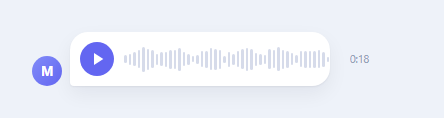
Every major chat app — WhatsApp, iMessage, Telegram, Signal — renders voice notes the same way: a row of thin bars whose heights look like a real audio waveform, with a moving line or color sweep showing how much has played. Building that convincingly requires answering two separate questions correctly: where do realistic-looking bar heights come from without an actual decoded audio buffer, and how does the "played" portion stay perfectly in sync with a playback clock while still being draggable. This snippet answers both with plain JavaScript, a seeded pseudo-random generator, and requestAnimationFrame, with no audio file and no Web Audio API involved — it simulates the timeline the same way a design mockup or a demo needs to.
Generating the waveform once, not per frame
The tempting-but-wrong approach is to calculate bar heights inside the render loop, which would make the waveform flicker to a new random shape on every animation frame. Instead, generateBarHeights(count, seed) runs exactly once, immediately when the script loads, and returns a plain array of 46 height ratios that is cached in the barHeights variable for the lifetime of the component. The values are not pure noise — each bar's height starts from Math.abs(Math.sin(i * 0.42)) * 0.5 + 0.3, a slow sine wave that gives the waveform gentle rises and falls like real speech, then a small seeded jitter is layered on top so adjacent bars are not identical. The seed is a plain linear congruential generator (s = (s * 9301 + 49297) % 233280) rather than Math.random(), specifically so the exact same waveform shape renders every time the component mounts — a real recording's waveform does not change shape between plays, and neither should this one.
Playback clock: requestAnimationFrame, not setInterval
Elapsed time is tracked with requestAnimationFrame rather than setInterval. Each frame computes dt, the delta in seconds since the previous frame timestamp, and adds it to elapsed — this makes the timer resilient to dropped frames or background-tab throttling, because it is driven by actual elapsed wall-clock time between frames rather than assuming each tick represents a fixed interval. setInterval timers drift under load; a dt-based rAF loop stays accurate even if the browser skips frames.
Progress-based recoloring: percentage maps to bar count
The core visual trick is in updateUi(): elapsed / DURATION gives a 0-to-1 playback percentage, which is multiplied by the total bar count and rounded to get playedCount — the number of bars, counting from the left, that should show the "played" indigo color. A single loop over all .bar elements toggles the .played class on any bar whose index is less than playedCount. This is deliberately class-based rather than inline-style-based so the actual color transition is handled by a CSS transition: background 0.08s linear rule, keeping the JavaScript responsible only for deciding which bars are played, not for animating the color change itself.
Drag-to-seek with Pointer Events
Scrubbing uses the unified Pointer Events API (pointerdown, pointermove, pointerup) instead of separate mouse and touch handlers, which means the same code handles a mouse drag on desktop and a finger drag on a touchscreen without branching. On pointerdown, setPointerCapture is called so that pointermove keeps firing on the waveform element even if the pointer moves outside its bounding box mid-drag — without capture, a fast drag past the edge of the element would silently stop updating. seekFromClientX converts the pointer's horizontal client coordinate into a 0-to-1 fraction of the waveform's width using getBoundingClientRect(), multiplies by DURATION to get the new elapsed time, and calls the same updateUi() function playback uses — so dragging and automatic playback both funnel through one rendering path, guaranteeing the bars never fall out of sync with the displayed time.
Build with AI
Build, Understand, Optimize, and Extend It With AI
Share this snippet's code with an AI assistant like Claude and ask it to explain exactly why generateBarHeights() is called once at load time instead of inside the render or animation loop — understanding that distinction is the difference between a stable waveform and a flickering one. From there, ask for a version wired to a real <audio> element and Web Audio API AnalyserNode for genuine amplitude data, a variant that shows a live recording indicator while capturing from the microphone, or support for multiple voice bubbles in one thread where only one can play at a time.
Prompt to recreate it
Copy this into your AI assistant of choice to build the effect from scratch, or as a jumping-off point for your own variant:
Build a chat-app voice message bubble in plain HTML, CSS, and JavaScript — no frameworks, no real audio file required.

Requirements:
- A rounded chat bubble containing a circular play/pause button and an inline waveform made of many thin vertical bars with varying heights.
- Generate the bar heights exactly once using a seeded pseudo-random function (not Math.random, so the shape is identical every time the page loads) combined with a slow sine-wave curve so the pattern looks like real speech rather than random noise, and cache the resulting array — never regenerate it inside an animation loop.
- Drive playback with a requestAnimationFrame loop that accumulates real delta-time between frames (not a fixed-interval setInterval) into an elapsed-seconds variable.
- On every frame, compute the percentage played (elapsed divided by total duration), convert it to a count of bars, and toggle a "played" class on that many bars from the left so they visibly recolor as playback advances, letting CSS handle the actual color transition.
- Support seeking by clicking anywhere on the waveform, and support continuous scrubbing by dragging across it, both implemented with Pointer Events (pointerdown/pointermove/pointerup) and setPointerCapture so a fast drag keeps tracking even past the element's edges.
- Show a duration/elapsed time label that counts down or up in sync with the same elapsed variable used for the waveform recoloring, and correctly stop playback (reverting the icon to "play") when the end of the duration is reached.
Want to tighten it up first? Run this prompt through the AI Prompt Studio to score it across 8 quality dimensions, catch anti-patterns, and tune the wording for Claude, ChatGPT, or Gemini before you paste it in.
Step by step
How to Use
- 1Click the circular play buttonThe play icon swaps to a pause icon, and a set of thin gray bars — the waveform — begins filling in with indigo color from the left edge as playback proceeds.
- 2Watch the bars recolor in sync with the timerThe number of indigo "played" bars grows smoothly, matching the exact percentage of the message that has played, while the countdown label on the right ticks down.
- 3Click anywhere on the waveform to seekClicking a point partway through the bars immediately jumps playback to that position — bars to the left of the click turn indigo, bars to the right turn back to gray.
- 4Press and drag across the waveform to scrubHolding the pointer down and dragging left or right continuously updates the played position in real time, exactly like scrubbing a native audio player, using pointer capture so the drag keeps working even past the bar edges.
- 5Let it play to the endWhen elapsed time reaches the full duration, playback stops automatically, the icon reverts to play, and clicking play again restarts the message from the beginning.
Real-world uses
Common Use Cases
Got questions?
Frequently Asked Questions
The waveform and playback timer are fully simulated with requestAnimationFrame and a fixed DURATION constant — no <audio> element or real audio file is involved. To wire it to real audio, create an Audio object, read its actual duration once metadata loads, and drive elapsed from its currentTime property inside a timeupdate listener instead of the manual dt accumulation, then call audio.currentTime = pct * audio.duration inside seekFromClientX for real seeking.
generateBarHeights() runs once and combines a slow sine wave (Math.sin(i * 0.42)) for gentle rise-and-fall shape with a seeded pseudo-random jitter for natural variation between adjacent bars. The seed uses a small linear congruential generator formula rather than Math.random(), so the exact same waveform pattern renders on every mount — a real recording does not change shape between plays, so the fake one should not either.
Edit the BAR_COUNT and DURATION constants at the top of the script. BAR_COUNT controls both how many <div class="bar"> elements are created in buildWaveform() and the resolution of the playedCount calculation, so more bars means finer-grained recoloring. DURATION is in seconds and is used both for the countdown label and for converting drag position into elapsed time in seekFromClientX.
Yes. Compute barHeights once with useMemo (React), as a computed value outside reactive state (Vue), or in ngOnInit (Angular) so it is never regenerated on re-render. The requestAnimationFrame loop should start in useEffect / onMounted / ngAfterViewInit and must be explicitly stopped with cancelAnimationFrame in the cleanup function (React's effect cleanup, onUnmounted, or ngOnDestroy) — leaving a rAF loop running after the component unmounts is a common source of "cannot update state on unmounted component" errors and wasted CPU.
Pointer Events (pointerdown/pointermove/pointerup) unify mouse, touch, and stylus input into a single event model, so the same seekFromClientX logic handles a mouse drag on desktop and a finger swipe on mobile without any device detection or duplicated code paths. Combined with setPointerCapture, the drag also keeps receiving move events even if the pointer temporarily leaves the waveform element, which touch-specific or mouse-specific handlers do not guarantee on their own.