Source Code
<div class="demo">
  <div class="player">
    <button class="play-btn" type="button" aria-label="Play">
      <svg class="icon-play" viewBox="0 0 24 24" width="20" height="20" fill="currentColor"><path d="M8 5v14l11-7z"/></svg>
      <svg class="icon-pause" viewBox="0 0 24 24" width="20" height="20" fill="currentColor" style="display:none"><path d="M6 5h4v14H6zM14 5h4v14h-4z"/></svg>
    </button>
    <div class="meta">
      <span class="track">Midnight Drive — Lo-fi Mix</span>
      <span class="time"><span class="elapsed">0:00</span> / 2:48</span>
    </div>
  </div>
  <canvas class="wave-canvas" width="640" height="160"></canvas>
</div>
.demo {
font-family: 'Segoe UI', system-ui, sans-serif;
display: flex;
flex-direction: column;
gap: 16px;
padding: 28px;
background: linear-gradient(160deg, #0f172a, #1e293b);
}
.player {
display: flex;
align-items: center;
gap: 14px;
}
.play-btn {
width: 44px;
height: 44px;
border-radius: 50%;
border: none;
background: linear-gradient(135deg, #22d3ee, #6366f1);
color: #0f172a;
display: flex;
align-items: center;
justify-content: center;
cursor: pointer;
box-shadow: 0 8px 22px rgba(99,102,241,0.45);
transition: transform 0.15s ease;
}
.play-btn:active { transform: scale(0.92); }
.meta {
display: flex;
flex-direction: column;
gap: 3px;
color: #e2e8f0;
}
.meta .track {
font-size: 14px;
font-weight: 600;
}
.meta .time {
font-size: 12px;
color: #94a3b8;
font-variant-numeric: tabular-nums;
}
.wave-canvas {
width: 100%;
height: 160px;
border-radius: 14px;
background: rgba(15,23,42,0.55);
border: 1px solid rgba(148,163,184,0.18);
}const canvas = document.querySelector('.wave-canvas');
const ctx = canvas.getContext('2d');
const playBtn = document.querySelector('.play-btn');
const iconPlay = document.querySelector('.icon-play');
const iconPause = document.querySelector('.icon-pause');
const elapsedEl = document.querySelector('.elapsed');
const ratio = window.devicePixelRatio || 1;
canvas.width = canvas.clientWidth * ratio || 640;
canvas.height = 160 * ratio;
ctx.scale(ratio, ratio);
const BAR_COUNT = 64;
const TOTAL_SECONDS = 168;
let playing = false;
let elapsed = 0;
let lastTime = null;
let raf = null;
function formatTime(sec) {
const m = Math.floor(sec / 60);
const s = Math.floor(sec % 60);
return m + ':' + String(s).padStart(2, '0');
}
function barHeight(i, t) {
const base = Math.sin(i * 0.4 + t * 1.6) * 0.5 + 0.5;
const detail = Math.sin(i * 1.3 - t * 2.4) * 0.5 + 0.5;
const energy = playing ? 1 : 0.25;
return (0.18 + base * 0.5 + detail * 0.32) * energy;
}
function draw(t) {
const w = canvas.clientWidth;
const h = 160;
ctx.clearRect(0, 0, w, h);
const gap = 4;
const barWidth = (w - gap * (BAR_COUNT - 1)) / BAR_COUNT;
const mid = h / 2;
for (let i = 0; i < BAR_COUNT; i++) {
const norm = barHeight(i, t);
const barH = Math.max(4, norm * (h * 0.44));
const x = i * (barWidth + gap);
const grad = ctx.createLinearGradient(0, mid - barH, 0, mid + barH);
grad.addColorStop(0, '#22d3ee');
grad.addColorStop(1, '#6366f1');
ctx.fillStyle = grad;
ctx.beginPath();
const r = barWidth / 2;
ctx.roundRect(x, mid - barH, barWidth, barH * 2, r);
ctx.fill();
}
const progress = Math.min(elapsed / TOTAL_SECONDS, 1);
ctx.fillStyle = 'rgba(34,211,238,0.12)';
ctx.fillRect(0, h - 4, w * progress, 4);
}
function tick(now) {
if (lastTime === null) lastTime = now;
const dt = (now - lastTime) / 1000;
lastTime = now;
if (playing) {
elapsed = Math.min(elapsed + dt, TOTAL_SECONDS);
elapsedEl.textContent = formatTime(elapsed);
if (elapsed >= TOTAL_SECONDS) {
playing = false;
togglePlayUI(false);
}
}
draw(now / 1000);
raf = requestAnimationFrame(tick);
}
function togglePlayUI(isPlaying) {
iconPlay.style.display = isPlaying ? 'none' : '';
iconPause.style.display = isPlaying ? '' : 'none';
playBtn.setAttribute('aria-label', isPlaying ? 'Pause' : 'Play');
}
playBtn.addEventListener('click', () => {
playing = !playing;
togglePlayUI(playing);
lastTime = null;
});
raf = requestAnimationFrame(tick);Learn Coding Visually
Learn to code with interactive, live-preview playgrounds — HTML, CSS, JavaScript, React & more.
 HTML Playground42 lessons · Click-based · Live preview
 CSS PlaygroundLearn CSS with a live editor
 JavaScript Playground60 lessons · DOM · Async · Canvas
 React PlaygroundLearn React with a live code editor
 GSAP PlaygroundLearn GSAP animation interactively
 SVG Playground44 lessons · shapes · paths · animation
 SCSS Playground45 lessons · Sass modules · tokens
 Tailwind PlaygroundLearn Tailwind CSS with a live editor
 Bootstrap 5 Playground50 lessons · live preview
Audio Waveform Visualizer — Free HTML CSS JS Snippet
Audio Waveform Visualizer · Animations · Plain HTML, CSS & JS · Live preview
What's included
Features
Math.sin() waves, so the visualizer "just works" with zero loading, decoding, or playback setuprequestAnimationFrame loop drives drawing and the clock together — delta-time-based elapsed tracking means pause/resume is just a boolean flip, with no separate timers to keep in syncctx.roundRect() plus a cyan-to-indigo createLinearGradient gives the visualizer a polished, branded look with very little drawing codem:ss elapsed readout, and a thin canvas-bottom progress bar that fills with playback progresswindow.devicePixelRatio so bars stay sharp on Retina displays instead of rendering softAbout this UI Snippet
How this audio waveform visualizer was built — layered sine waves and a single animation loop
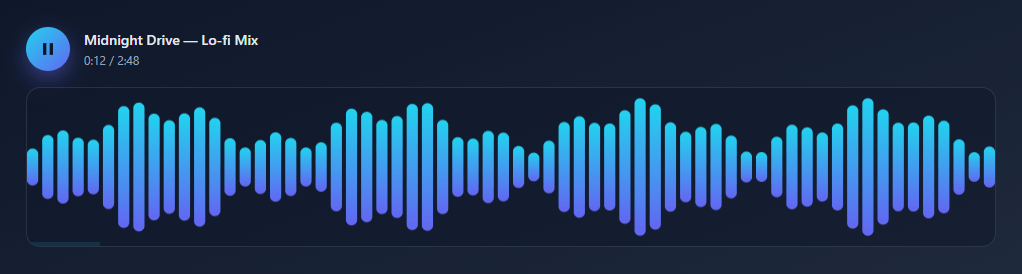
This snippet recreates the bar-style waveform visualizer you see on music streaming players, podcast embeds, and audio-product landing pages — a row of bars pulses in sync with a "now playing" track, complete with a play/pause toggle and a live elapsed-time readout. The twist: there is no actual audio file, no Web Audio API analyser, and no external library. Every bar height comes from pure math, animated with requestAnimationFrame on a single <canvas>.
Faking "audio reactivity" with layered sine waves
Real audio visualizers sample frequency data from a Web Audio AnalyserNode — but that requires a loaded audio file and introduces a dependency on the browser's audio pipeline. This snippet sidesteps all of that with barHeight(i, t): it combines two sine waves at different frequencies and phase speeds — Math.sin(i * 0.4 + t * 1.6) for a slow "base" undulation and Math.sin(i * 1.3 - t * 2.4) for faster "detail" — and blends them together. Because the two waves drift in and out of phase with each other and with time t, the combined pattern never repeats in an obviously mechanical way, producing a convincingly organic, music-like pulse with zero audio data. The same layered-sine technique appears in our Aurora Background and Liquid Blob snippets — it's a versatile trick any time you want movement that feels alive rather than looped.
Drawing rounded bars with a gradient
Each animation frame clears the canvas and loops over BAR_COUNT (64) bars, computing a width that fills the available space with a fixed gap, then drawing a rounded rectangle (ctx.roundRect) for each one — mirrored above and below a horizontal centerline so the bars look like a classic stereo waveform. Every bar gets its own createLinearGradient from cyan (#22d3ee) to indigo (#6366f1), giving the whole visualizer a cohesive, glowing colour identity that shifts subtly as bar heights change.
One requestAnimationFrame loop drives everything
A single tick(now) function is both the animation engine and the clock: it computes dt (delta time in seconds) from the timestamp requestAnimationFrame provides, advances elapsed only while playing is true, formats it into an m:ss readout, redraws the bars for the current frame, and re-queues itself. This is the canonical structure for any canvas animation that needs to track real elapsed time rather than just "frame count" — pause/resume becomes a simple boolean flip, because the loop keeps running and simply stops advancing the clock when paused.
A believable player UI without any audio
The play/pause button swaps between two inline SVG icons (rather than loading icon fonts), and a thin progress bar at the canvas's bottom edge fills proportionally to elapsed / TOTAL_SECONDS — small touches that, combined with the moving bars and ticking clock, make the whole thing read as a real, working player at a glance.
Build with AI
Build, Understand, Optimize, and Extend It With AI
You don't need to reverse-engineer the sine-wave blend by hand to understand it. Paste this snippet's HTML, CSS, and JS into an AI coding assistant like Claude and ask it to explain exactly why barHeight combines two Math.sin calls at different frequencies and phase speeds rather than one, or how the tick function's delta-time calculation keeps the elapsed clock accurate regardless of frame rate. The same assistant can help you optimize it — ask whether redrawing all 64 bars and rebuilding a linear gradient per bar every frame is wasteful compared to caching a shared gradient, or whether the canvas could skip full clears in favor of a cheaper redraw strategy on low-end devices. It's also a strong partner for extending the effect: ask it to swap the fake sine data for real Web Audio API AnalyserNode frequency data, add a scrubbable seek bar tied to the elapsed clock, or drive bar colors from a per-track theme. Treat the code less like a finished artifact and more like a starting point for a conversation.
Prompt to recreate it
Copy this into your AI assistant of choice to build the effect from scratch, or as a jumping-off point for your own variant:
Build a "fake audio waveform visualizer" music player UI in plain HTML, CSS, and JavaScript using only the Canvas 2D API and requestAnimationFrame — no Web Audio API, no audio file, no libraries.

Requirements:
- A player row with a circular play/pause button that swaps between two inline SVG icons, a track name, and an elapsed/total time readout, plus a canvas below it sized for the device pixel ratio so bars render sharp on high-DPI screens.
- Generate each bar's height purely from math: write a function that takes a bar index and the current time and combines at least two sine waves at different frequencies and phase speeds (one slow, one fast) into a single normalized 0-1 value, so the pattern never looks like an obvious repeating loop.
- Multiply the computed bar height by a lower "energy" multiplier when paused versus playing, so the bars visibly settle down without the animation loop itself ever stopping.
- Draw a fixed number of evenly spaced, gap-separated rounded bars mirrored above and below a horizontal centerline using ctx.roundRect, each filled with its own linear gradient between two brand colors.
- Drive the whole animation from a single requestAnimationFrame loop that computes delta time from the timestamp argument (not a fixed increment), advances an elapsed-seconds counter only while playing is true, formats that counter into an m:ss string, and redraws the bars for the current timestamp every frame.
- Add a thin progress bar along the bottom edge of the canvas that fills proportionally to elapsed time divided by the total track duration, and stop advancing the clock (auto-pausing playback) once elapsed reaches the total.
Want to tighten it up first? Run this prompt through the AI Prompt Studio to score it across 8 quality dimensions, catch anti-patterns, and tune the wording for Claude, ChatGPT, or Gemini before you paste it in.
Step by step
How to Use
- 1Set up a high-DPI canvasScale the canvas by
window.devicePixelRatioand callctx.scale(ratio, ratio)so the bars render crisply on Retina and high-density mobile screens. - 2Compute fake bar heights from layered sine wavesWrite a
barHeight(i, t)function that blends twoMath.sin()calls at different frequencies and phase speeds — one slow "base" wave, one faster "detail" wave — so the combined pattern looks organic instead of mechanically looped. - 3Draw rounded, gradient-filled barsLoop over a fixed
BAR_COUNT, compute each bar's width and x-position to fill the canvas with even gaps, and draw actx.roundRect()mirrored above and below a horizontal centerline, filled with acreateLinearGradient. - 4Drive everything from one requestAnimationFrame loopIn a
tick(now)function, compute delta time from the timestamp, advance anelapsedcounter only whileplayingis true, redraw the bars for the currentt, and callrequestAnimationFrame(tick)again to continue. - 5Format and display elapsed timeConvert
elapsedseconds into anm:ssstring withMath.floor(sec / 60)andString(s).padStart(2, "0"), and update a<span class="elapsed">on every frame while playing. - 6Wire the play/pause toggleOn click, flip a
playingboolean, swap the visibility of two inline play/pause SVG icons, update the button'saria-label, and resetlastTimetonullso the next frame's delta calculation starts clean.
Real-world uses
Common Use Cases
tick(now) delta-time pattern here is the same structure used by any canvas animation that needs an accurate elapsed-time clock — copy it as a starting point for timers, progress animations, or game loops.Got questions?
Frequently Asked Questions
No — there is no audio file, Web Audio API, or analyser node involved. Each bar's height comes from barHeight(i, t), a function that blends two Math.sin() waves running at different frequencies and phase speeds. Because the waves drift in and out of phase with each other over time, the combined pattern looks convincingly organic and "music-like" without any real audio data behind it.
Replace barHeight() with frequency data from the Web Audio API: create an AudioContext, route your <audio> element through an AnalyserNode via createMediaElementSource, and call analyser.getByteFrequencyData() each frame to get real amplitude values per frequency bin — then map those values to bar heights instead of the sine-wave formula. The drawing loop (draw()) and the rounded-bar rendering can stay exactly the same; only the data source changes.
A single sine wave produces an obviously periodic, robotic-looking ripple. Combining a slow "base" wave (Math.sin(i * 0.4 + t * 1.6)) with a faster "detail" wave (Math.sin(i * 1.3 - t * 2.4)) means the two patterns constantly shift relative to each other — the combined result almost never repeats in a way the eye can predict, which is what makes it feel alive rather than looped. The same layered-wave idea drives the Aurora Background and Liquid Blob snippets, just applied to gradients and shapes instead of bars.
The canvas redraw loop (tick) keeps running continuously regardless of the playing state — only the elapsed clock advancement is gated on it. When paused, barHeight() also multiplies its output by a much smaller energy factor (0.25 instead of 1), so the bars visibly settle into a calmer, lower-amplitude state — giving a clear visual cue that playback has stopped, even though the animation loop technically never stops drawing.
requestAnimationFrame does not guarantee a fixed interval between calls — frame timing varies with device performance and browser load. By computing dt = (now - lastTime) / 1000 from the high-resolution timestamp the callback receives, the elapsed-time counter advances at the same real-world rate regardless of frame rate, so the m:ss readout stays accurate on both a fast desktop and a throttled mobile browser.
Yes — copy the HTML, CSS, and JS with the buttons on this page and use them anywhere, including commercial products, with no attribution required. It is built entirely with the native Canvas 2D API, requestAnimationFrame, and vanilla JavaScript math — no third-party libraries or licenses to track.