You Might Also Like
Learn Coding Visually
Learn to code with interactive, live-preview playgrounds — HTML, CSS, JavaScript, React & more.
 HTML Playground42 lessons · Click-based · Live preview
 CSS PlaygroundLearn CSS with a live editor
 JavaScript Playground60 lessons · DOM · Async · Canvas
 React PlaygroundLearn React with a live code editor
 GSAP PlaygroundLearn GSAP animation interactively
 SVG Playground44 lessons · shapes · paths · animation
 SCSS Playground45 lessons · Sass modules · tokens
 Tailwind PlaygroundLearn Tailwind CSS with a live editor
 Bootstrap 5 Playground50 lessons · live preview
Bloom Filter Visualizer — Free HTML CSS JS Snippet
Bloom Filter Visualizer · Animations · Plain HTML, CSS & JS · Live preview
What's included
Features
About this UI Snippet
Bloom Filter Visualizer — Animated Bit Array, Triple Hash Functions & a Genuine False Positive in Vanilla JS
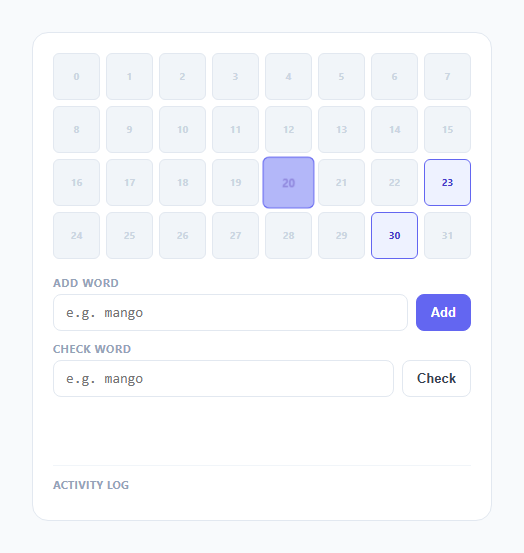
A Bloom filter is almost always explained with the caveat "it can have false positives" tacked on as an afterthought, as if that were a minor footnote rather than the entire reason the data structure exists. This snippet does not just claim a false positive is possible — it seeds the filter with three specific words, chosen because they provably collide with a fourth word that was never added, so checking that fourth word produces a real, reproducible false positive every single time you load the page.
The bit array: 32 boxes, all starting at zero
The filter's entire state is a plain JavaScript array, bits = new Array(32).fill(0), rendered as 32 small boxes in an 8-column grid. Nothing else backs the filter — no list of added words is consulted when answering "might this be in the set," only these 32 bits. (A separate addedWords Set does exist in the code, but it is used only to label results for teaching purposes — a real Bloom filter has no such ground truth to check against, which is exactly why false positives are invisible to the filter itself.)
Three small, genuinely distinct hash functions
hash1 sums each character code multiplied by 7 and takes the result mod 32 on every step. hash2 is a djb2-style rolling hash (h = h * 33 + charCode, mod 32 each iteration to keep numbers small). hash3 multiplies the running total by 131 and adds both the character code and its index, mod 32. Because each function combines character codes differently — different multiplier, different accumulation order, one of them index-sensitive — they produce different-looking bit positions for the same word, which is the entire point of using more than one hash function: three independent chances to distinguish two different words, instead of one.
Adding a word: three bits, flipped one at a time
addWord(word) computes all three hash positions up front, then flips each corresponding bit from 0 to 1 with a short pulse animation and a 260ms pause between them, so you can watch each hash function fire in sequence rather than all three positions lighting up simultaneously. Once a bit is set to 1 it never goes back to 0 in this snippet — standard Bloom filters cannot support deletion without additional structure (like a counting Bloom filter), because a single bit can be shared by multiple words' hash positions, and this snippet's bit array makes that sharing directly visible.
Checking a word: all three must be 1, or it's a guaranteed no
checkWord(word) computes the same three hash positions and checks each one's current bit value in order, stopping the moment it finds a 0. If any of the three positions is unset, the result is "definitely NOT in the set" — a Bloom filter can say this with total certainty, because a word that was genuinely added would have set all three of its bits, and bits are never cleared. If all three positions are 1, the result is only "possibly in the set," never "definitely" — and this snippet distinguishes the two ways that can happen: the word really was added (checked against the internal addedWords set purely for the demo's benefit), or it was never added and just happens to hash to three positions that other words already filled in.
The guaranteed false positive: apple, banana, cherry, and mango
On load, this snippet automatically adds three words — apple, banana, cherry — which between them set bit positions 30, 23, 20, 7, 6, 24, 27, 18, and 12. The word "mango" was deliberately chosen because, run through the exact same three hash functions, it also lands on positions 30, 23, and 20 — precisely the three bits that "apple" already set. Check "mango" and every one of its three required bits reads 1, so the filter reports "possibly in the set," even though mango was never added. This is not a scripted animation faking a false positive; it is the real output of the real hash functions on real input, which is why checking "kiwi" (hash positions 12, 25, 26) correctly returns "definitely NOT in the set" instead — position 12 is set from "cherry," but 25 and 26 are still zero, and one unset bit is all it takes to rule a word out with certainty.
Build with AI
Build, Understand, Optimize, and Extend It With AI
Hand this snippet's JavaScript to an AI assistant like Claude and ask it to verify by hand, character by character, why "apple" and "mango" land on the same three hash positions under hash1, hash2, and hash3 — walking through the actual arithmetic is the fastest way to really trust the false-positive claim instead of just believing it. Worth asking for as extensions: a live false-positive-rate estimator that samples random words against the current bit array, a larger bit array with a slider to watch the false-positive rate drop as size increases, or a second filter running side by side with only one hash function to show how much more collision-prone a single-hash design is.
Prompt to recreate it
Copy this into your AI assistant of choice to build the effect from scratch, or as a jumping-off point for your own variant:
Build an animated Bloom filter visualizer in plain HTML, CSS, and JavaScript, no libraries or frameworks.

Requirements:
- A fixed-size bit array (24-32 bits) rendered as a grid of small boxes, all starting unset, backed by a plain JavaScript array of 0s and 1s as the filter's only real state.
- Implement 2-3 small, genuinely distinct hash functions (different multiplier, seed, or character-index sensitivity from each other) that each map a string to a position within the bit array, all computed live in plain JavaScript with no external hashing library.
- An "Add" input that, on submit, computes all hash positions for the typed word and animates each corresponding bit flipping from 0 to 1 in sequence (a brief pulse per bit, not all at once), leaving the bits permanently set afterward.
- A "Check" input that, on submit, computes the same hash positions for a typed word and reports "possibly in the set" only if every one of those bit positions is currently 1, or "definitely NOT in the set" the moment it finds any one of them still 0.
- Choose your specific hash functions and a specific set of words to add such that checking a different word — one that was deliberately never added — produces a genuine false positive, where all of its hash positions happen to already be set by the other added words; verify this collision actually occurs given your exact hash function implementations rather than assuming it will.
- Track internally which words were actually added (for the demo's own labeling purposes only, not as part of the filter's real logic) so the check result can explicitly tell the user whether a "possibly in the set" answer was a true positive or a genuine false positive, making the false-positive-but-never-false-negative property directly demonstrable rather than merely claimed.
Want to tighten it up first? Run this prompt through the AI Prompt Studio to score it across 8 quality dimensions, catch anti-patterns, and tune the wording for Claude, ChatGPT, or Gemini before you paste it in.
Step by step
How to Use
- 1Watch the filter seed itself on loadApple, banana, and cherry are added automatically, one at a time — for each word, three bits pulse and light up indigo in sequence as the three hash functions fire.
- 2Type "mango" into Check word and click CheckMango was never added, but watch all three of its hash positions turn green as hits. The result banner reports a possibly-in-the-set result and explicitly flags it as a genuine false positive.
- 3Read which exact bits mango collided onThe result text names the three bit positions that mango shares with apple — the same positions light up green during the check, so you can see precisely which prior word is responsible for the collision.
- 4Type "kiwi" into Check word and click CheckKiwi's first hash position is already set (shared with cherry), but the check stops the moment it reaches an unset bit and turns it red, reporting "definitely NOT in the set" — a correct negative.
- 5Add a few of your own wordsType any word into Add word and click Add to watch its own three bits pulse and set. More added words mean more filled bits, which raises the odds of future false positives — you can watch the bit array fill up as you go.
- 6Check a word you just added yourselfThe result banner distinguishes this from mango's case explicitly, confirming it as a true positive rather than a coincidental collision, since the filter tracks what was really added purely for this teaching display.
Real-world uses
Common Use Cases
Got questions?
Frequently Asked Questions
Yes. Move the three hash functions and the bits array into a plain utility module — they are pure functions with no DOM access. The async addWord() and checkWord() functions use await wait(ms) between animation steps rather than a persistent interval, so in React run them from a click handler and guard each awaited step with a mounted ref (check ref.current before touching state after each await) so a check in progress does not try to update state after unmount. In Vue, use a local "cancelled" flag set in onUnmounted and check it after each await. In Angular, use an isDestroyed flag set in ngOnDestroy. There is no setInterval or requestAnimationFrame loop to clear — the only cleanup concern is an in-flight chain of awaited setTimeout delays.
Because mango, run through the exact same three hash functions used to add apple, banana, and cherry, happens to land on the identical three bit positions (30, 23, and 20) that adding "apple" already set. The Bloom filter has no way to distinguish "these bits are set because mango was added" from "these bits are set because some other word that hashes identically was added" — it only ever sees 1s and 0s in the bit array, never the original words. This is not a rare edge case unique to this demo; any Bloom filter with a small enough bit array relative to the number of items inserted will eventually produce collisions like this.
Because bits are only ever set to 1, never cleared back to 0, when a word is added — every bit that was set by a real addWord() call stays set forever. So if a word really was added, all three of its hash positions are guaranteed to still read 1 whenever it is checked later, meaning the check can never wrongly report "definitely NOT in the set" for something that truly was added. The only uncertainty runs in one direction: bits being 1 does not guarantee the checked word caused them.
Each added word sets up to three more bits (fewer if some were already set by earlier words). As more of the 32 bits fill up with 1s, the odds that a random unrelated word's three hash positions all happen to already be set goes up, meaning the false-positive rate rises. This is the real, general trade-off behind Bloom filter sizing: a larger bit array relative to the number of items inserted keeps the false-positive rate low, while a small array like this 32-bit demo makes collisions easy to trigger on purpose.
A single hash function means any word that happens to collide on that one position with a previously-added word gets a false positive immediately. Requiring all three independent hash functions to agree makes an accidental collision on every single one much less likely for arbitrary words, which is why real Bloom filters almost always use multiple hash functions — this snippet's apple/mango collision is a deliberately engineered example of exactly the rare case three independent hashes are meant to make uncommon.