You Might Also Like
Learn Coding Visually
Learn to code with interactive, live-preview playgrounds — HTML, CSS, JavaScript, React & more.
 HTML Playground42 lessons · Click-based · Live preview
 CSS PlaygroundLearn CSS with a live editor
 JavaScript Playground60 lessons · DOM · Async · Canvas
 React PlaygroundLearn React with a live code editor
 GSAP PlaygroundLearn GSAP animation interactively
 SVG Playground44 lessons · shapes · paths · animation
 SCSS Playground45 lessons · Sass modules · tokens
 Tailwind PlaygroundLearn Tailwind CSS with a live editor
 Bootstrap 5 Playground50 lessons · live preview
Web Animations API (WAAPI) Playground — Free JS Snippet
Web Animations API (WAAPI) Playground · Animations · Plain HTML, CSS & JS · Live preview
What's included
Features
About this UI Snippet
Web Animations API (WAAPI) — element.animate(), Animation Objects, and Programmatic Motion Control
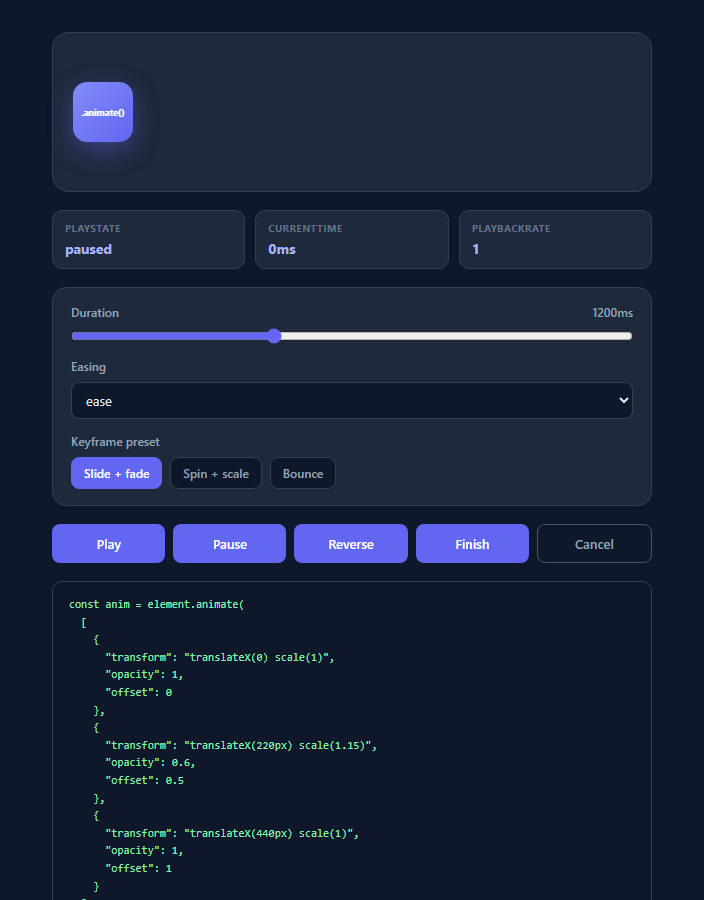
Most CSS animation on the web is declarative and static: you write an @keyframes block, attach it via animation-name, and the browser runs it start to finish with limited runtime control. The Web Animations API (WAAPI) inverts this — it exposes animation as a first-class JavaScript object you construct, inspect, and control frame-by-frame, using the exact same underlying compositor engine that powers native CSS animations. This snippet is a working playground built entirely around the real Element.animate() method, not CSS classes toggled by JS, so every control you touch maps directly to an actual WAAPI call.
The animate() method signature
Calling element.animate(keyframes, options) returns an Animation object immediately and begins running the animation (unless paused). The first argument is an array of keyframe objects — each one a plain JS object of CSS property/value pairs, optionally with an explicit offset between 0 and 1 to pin a keyframe at a specific point in the timeline (used here in the "Bounce" preset to place an overshoot at 85% through the animation rather than relying on even spacing). The second argument is an options object or plain number (shorthand for duration): this demo passes { duration, easing, fill: 'forwards' }, where fill: 'forwards' tells the browser to retain the final keyframe's computed styles after the animation completes, rather than snapping back to the pre-animation state — the single most common source of "my WAAPI animation flickers back to start" bugs when omitted.
The Animation object's playback control surface
The object returned by animate() exposes a genuine transport control API that mirrors <video> or <audio>: .play() resumes or starts playback, .pause() freezes it at the current time, .reverse() flips the effective playback direction (WAAPI internally negates playbackRate), .finish() jumps immediately to the animation's end state and fires the finish event, and .cancel() aborts the animation and removes all applied effects, returning the element to its pre-animation styling. This demo wires all five directly to buttons — clicking Reverse mid-flight doesn't restart anything, it genuinely reverses the in-progress motion from wherever it currently is, which is something @keyframes-based CSS animations cannot do without manual class-swapping hacks.
playState and currentTime: real introspection, not guesswork
Unlike CSS animations, where JS can only detect state via animationstart/animationend events, WAAPI exposes animation.playState (one of idle, running, paused, finished) and animation.currentTime (the elapsed time in milliseconds along the timeline, settable and readable at any moment) as live, synchronously readable properties. This demo polls both every 100ms with setInterval and displays them in the status bar, because WAAPI does not fire a continuous "tick" event — reading currentTime is the correct pattern for building a scrub bar or progress indicator, the same technique underlying custom video-timeline UIs.
Why WAAPI matters for 2025/2026 UI work
As interfaces get more interactive — drag-to-dismiss cards, scroll-linked reveals, gesture-driven transitions — animations increasingly need to respond to real-time input rather than run ballistically to completion. WAAPI's ability to construct an animation once and then scrub, reverse, or interrupt it based on pointer position (setting animation.currentTime directly from a drag delta) is the mechanism behind many modern interruptible-gesture interfaces, and it composes cleanly with the browser's compositor thread for the same off-main-thread performance CSS animations get, when animating compositor-friendly properties like transform and opacity.
Browser support
WAAPI's core animate() method, the Animation interface, and all playback controls used in this demo have been supported in Chrome, Edge, Firefox, and Safari since 2020, making it fully safe for production use without polyfills as of 2025/2026. Advanced features like ScrollTimeline (scroll-driven WAAPI animations) have narrower, more recent support and are a natural next step once the fundamentals here — keyframes, options, and the transport controls — are solid.
Build with AI
Build, Understand, Optimize, and Extend It With AI
Paste this snippet into an AI coding assistant like Claude and ask it to walk through what happens internally when you click Reverse mid-animation versus clicking Cancel then Play again — the distinction between manipulating an existing Animation object's playbackRate versus discarding and recreating one is easy to get wrong in real code. You could also ask it to add a progress scrub bar that lets you drag to set animation.currentTime directly, turning this from a playback demo into a true timeline editor, or to add a .finished promise chain that plays the "Bounce" preset automatically after "Slide + fade" completes, demonstrating sequenced animation composition. It's also worth asking whether a given keyframe set would benefit from being restructured as a CSS @keyframes animation instead, since the assistant can reason about the tradeoffs between declarative and WAAPI-driven approaches for your specific use case.
Prompt to recreate it
Copy this into your AI assistant of choice to build the effect from scratch, or as a jumping-off point for your own variant:
Build an interactive Web Animations API (WAAPI) playground in plain HTML, CSS, and JavaScript, using the real element.animate() method — no CSS @keyframes classes toggled by JS.

Requirements:
- A visual stage containing one animatable box, animated exclusively via calls to element.animate(keyframesArray, optionsObject), storing the returned Animation object in a variable so it can be controlled afterward.
- At least 3 distinct keyframe presets (selectable via buttons) with visually different motion paths, with at least one preset using explicit offset values on individual keyframes to pin a specific state at a non-even point in the timeline.
- A duration slider (in milliseconds) and an easing dropdown (including at least one keyword like ease-in-out and one custom cubic-bezier() value) that rebuild the animation with new options whenever changed.
- Five transport buttons wired to the real Animation object methods: play(), pause(), reverse(), finish(), and cancel() — each must visibly and correctly affect the in-progress animation, including reverse() working correctly when clicked mid-animation rather than only from a stopped state.
- A live status readout showing the Animation object's current playState and currentTime (in milliseconds), updated on an interval since WAAPI does not provide a continuous progress event.
- Use fill: 'forwards' in the animation options so the box retains its final position after the animation completes instead of snapping back, and explain in a comment why this is necessary.
- A read-only code output panel that reflects the actual keyframes array and options object currently being used, so the underlying API call is always visible alongside its visual result.
Want to tighten it up first? Run this prompt through the AI Prompt Studio to score it across 8 quality dimensions, catch anti-patterns, and tune the wording for Claude, ChatGPT, or Gemini before you paste it in.
Step by step
How to Use
- 1Play the default animationClick Play to run the "Slide + fade" preset. Watch the playState readout move from idle to running, and currentTime climb from 0ms toward the configured duration, both read directly off the live Animation object returned by box.animate().
- 2Pause and inspect mid-flightClick Pause while the box is moving. playState immediately reports paused and currentTime freezes at whatever millisecond it was interrupted at — this is animation.pause() being called on the real Animation instance, not a CSS class removal.
- 3Reverse the in-progress motionClick Reverse at any point, including mid-animation. The box genuinely reverses direction from its current position rather than restarting, because animation.reverse() flips the effective playbackRate rather than replaying from offset 0.
- 4Swap easing and duration liveMove the Duration slider or change the Easing dropdown to rebuild the animation with new options — including a cubic-bezier() easing that produces an overshoot "back" effect. The code output panel updates to show the exact element.animate() call being constructed, including the raw keyframe array.
- 5Switch keyframe presetsClick "Spin + scale" or "Bounce" to swap the KEYFRAME_PRESETS array passed to animate(). Notice the Bounce preset uses explicit offset values (0, 0.3, 0.6, 0.85, 1) on each keyframe object to place the overshoot precisely, instead of relying on even spacing.
- 6Export and adapt the patternClick JSX or Vue to export. In your app, replace box with a ref to any DOM node, define your own keyframe array, and call .play()/.pause()/.reverse() from gesture handlers (pointermove, drag) instead of buttons for interruptible, input-driven motion.
Real-world uses
Common Use Cases
Got questions?
Frequently Asked Questions
By default, a Web Animations API animation's visual effect is removed the instant it reaches the finished state, and the element snaps back to whatever its styles compute to without the animation — this is the fill mode "none". Setting fill: 'forwards' in the options object tells the browser to keep applying the final keyframe's computed styles after the animation finishes, so a box you animated to translateX(440px) stays at 440px instead of visibly jumping back to 0. This demo sets it explicitly on every animate() call for exactly that reason.
reverse() does not restart the animation or swap the keyframe array — it flips the sign of the Animation's effective playbackRate and, if the animation was idle, first plays it forward to establish a starting point. Called mid-flight, it continues from the current currentTime value but now counting down instead of up, which is why clicking Reverse in this demo visibly changes the box's direction from wherever it currently sits rather than jumping back to the start.
The Web Animations API deliberately does not fire a per-frame "tick" event for performance reasons — animations can run on the compositor thread independent of main-thread JavaScript. To display live progress (a scrub bar, a percentage, or the currentTime readout in this demo), the standard pattern is polling animation.currentTime on an interval (this demo uses 100ms) or reading it inside a requestAnimationFrame loop for smoother visual updates.
Yes — animate() accepts any animatable CSS property in its keyframe objects, including color, width, or border-radius, exactly like @keyframes CSS. However, only transform and opacity (and a few others like filter) can typically run on the compositor thread without triggering layout or paint on every frame, so for the smoothest performance, especially on lower-powered devices, prefer transform-based keyframes as this demo does, reserving other properties for less performance-critical animations.
Yes, as of 2025/2026. Element.animate(), the Animation interface, and all playback controls (.play, .pause, .reverse, .finish, .cancel) used in this demo have shipped in Chrome, Edge, Firefox, and Safari since roughly 2020, giving essentially universal support among evergreen browsers. Only newer additions like ScrollTimeline-driven animations have narrower support and would need feature detection.