You Might Also Like
Learn Coding Visually
Learn to code with interactive, live-preview playgrounds — HTML, CSS, JavaScript, React & more.
 HTML Playground42 lessons · Click-based · Live preview
 CSS PlaygroundLearn CSS with a live editor
 JavaScript Playground60 lessons · DOM · Async · Canvas
 React PlaygroundLearn React with a live code editor
 GSAP PlaygroundLearn GSAP animation interactively
 SVG Playground44 lessons · shapes · paths · animation
 SCSS Playground45 lessons · Sass modules · tokens
 Tailwind PlaygroundLearn Tailwind CSS with a live editor
 Bootstrap 5 Playground50 lessons · live preview
XP Level-Up Progress Bar — Free HTML CSS JS Snippet
XP Level-Up Progress Bar · Animations · Plain HTML, CSS & JS · Live preview
What's included
Features
About this UI Snippet
XP Level-Up Progress Bar — Overflow Carry-Over, Flash Burst & Badge Pop Animation
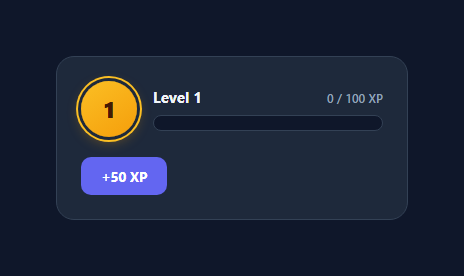
Gamified progress bars are one of the most effective retention patterns borrowed from video games — Duolingo streaks, LinkedIn profile completeness, and countless SaaS onboarding checklists all lean on the same psychological hook an XP bar delivers natively: visible, incremental progress toward a rewarding threshold. This snippet builds a genuine game-style level-up bar, not just a static progress indicator — clicking the "+50 XP" button animates the fill, and crossing 100% triggers a real level-up sequence with a flash burst, a scale-pop on the level badge, and a toast notification, all while correctly carrying the XP remainder forward instead of losing it.
The core bug most XP bar implementations get wrong
The naive implementation of an XP bar resets to 0 the instant XP crosses the threshold, silently discarding whatever XP was earned past 100%. This snippet's addXp() function does the arithmetic correctly: when xp >= XP_PER_LEVEL, it computes const remainder = xp - XP_PER_LEVEL *before* resetting anything, temporarily clamps the visible bar to exactly 100 so the viewer sees the bar genuinely fill and overflow, and only after the level-up animation sequence completes does it set xp = remainder and level += 1. If a player earns 50 XP twice in a row starting from 70/100, the sequence correctly ends at Level 2 with 20/100 XP (70 + 50 + 50 = 170, minus 100 for the level gained), never at Level 2 with 0/100.
Sequencing the level-up animation with setTimeout
The level-up isn't a single CSS transition — it's a short choreographed sequence, and the JavaScript uses a setTimeout to stage it in two beats. First, render() is called immediately with xp clamped to 100, so the bar's existing transition: width 0.5s visibly finishes filling to the edge. After a 420ms delay (timed to land just after that fill transition completes), the actual level increment happens: flashBurst() retriggers a CSS animation on a .bar-flash overlay element by removing and re-adding its .burst class (with a void element.offsetWidth forced-reflow trick in between, which is necessary because browsers batch class changes and won't restart an already-playing CSS animation without a synchronous style read forcing the browser to acknowledge the removal first), popBadge() does the identical retrigger trick on the level number badge for its squash-and-pop @keyframes, and showLevelUpToast() adds a .show class to slide the "LEVEL UP!" toast into view before auto-hiding it after 1.4 seconds.
Resetting the bar without a backwards sweep
After the level increments, the bar needs to visually reset to the carried-over remainder — but simply setting width to the new lower percentage would trigger the existing CSS transition and animate the fill sweeping *backwards*, which reads as a bug, not a level-up. The fix is a classic instant-reset pattern: set barFill.style.transition = 'none', set the width to 0%, force a synchronous reflow with void barFill.offsetWidth, then clear the inline transition override so the *next* fill (on the following click) animates normally again. This three-step dance — disable transition, mutate the property, force reflow, re-enable transition — is the standard technique whenever you need to jump a CSS-transitioned property to a new value without animating the jump itself.
Visual polish: shimmer, badge glow, and toast
The bar fill has a continuous diagonal shimmer animation layered on top via a ::after pseudo-element with a translucent gradient sweeping left to right on a 2.2s loop, giving the bar a subtle "energized" look even at rest. The level badge uses a radial gold gradient (#fbbf24 to #f59e0b) with a layered box-shadow ring effect to separate it from the dark card background, reserving the richer gold palette specifically for this gamification element per the visual convention that XP and level indicators read as more premium in warm colors, while the fill bar itself stays on the neutral indigo accent used throughout the rest of the interface.
Build with AI
Build, Understand, Optimize, and Extend It With AI
Paste this snippet's HTML, CSS, and JS into an AI coding assistant like Claude and ask it to walk through exactly why the remainder = xp - XP_PER_LEVEL calculation has to happen before the level increments — that overflow-carry arithmetic is the one detail that's easy to get subtly wrong. It's also worth asking the assistant to explain the void barFill.offsetWidth forced-reflow trick used both for retriggering the flash/badge animations and for resetting the bar without a backwards sweep — it's a genuinely non-obvious browser behavior worth understanding rather than just copying. For extension, ask it to add a scaling XP-per-level curve, a queue system so rapid consecutive addXp() calls during an in-progress level-up don't visually collide, or a multi-level jump (e.g. one huge XP grant that should level up twice in a row with two toasts in sequence).
Prompt to recreate it
Copy this into your AI assistant of choice to build the effect from scratch, or as a jumping-off point for your own variant:
Build a game-style XP level-up progress bar in plain HTML, CSS, and JavaScript with a level badge, a fill bar, and a button that adds XP.

Requirements:
- Display the current level number in a badge and the current XP as "current / required" text next to an animated horizontal fill bar.
- A button that adds a fixed amount of XP per click, animating the bar's fill width smoothly via a CSS transition rather than snapping instantly.
- When added XP would push the total past the required threshold for the current level, correctly carry the overflow amount forward as the starting XP for the new level — never discard XP earned past the threshold, and never silently reset to a smaller amount than was actually earned.
- On level-up, play a short choreographed sequence: the bar should first visibly finish filling to 100%, then (after a brief delay so the fill reads clearly) trigger a flash or glow burst effect, increment the level number with a scale-pop animation on the badge, and show a temporary "LEVEL UP!" toast notification that appears and then auto-dismisses after roughly 1-1.5 seconds.
- After the level increments, the bar must reset to display the carried-over remainder without animating a visible backwards sweep from the old fill position — explain the specific CSS/JS technique you use to jump the width instantly while keeping the transition intact for subsequent normal fills.
- Ensure CSS animations that need to play again on a second consecutive level-up (the flash burst, the badge pop) actually restart each time rather than silently not playing because the class was never removed, or was removed and re-added in the same synchronous tick.
Want to tighten it up first? Run this prompt through the AI Prompt Studio to score it across 8 quality dimensions, catch anti-patterns, and tune the wording for Claude, ChatGPT, or Gemini before you paste it in.
Step by step
How to Use
- 1Click +50 XP to add experienceEach click calls addXp(50), which adds to the xp variable and calls render() to animate bar-fill's width via its existing CSS transition. The xp-count label updates to show the new "X / 100 XP" value with tabular-nums so digits do not jitter horizontally.
- 2Watch the level-up sequence trigger on overflowWhen xp reaches or exceeds 100, the bar first animates to a full 100% fill, then after a 420ms delay the level increments, a gold flash-burst plays across the bar, the level badge does a squash-pop animation, and a "LEVEL UP!" toast slides in above the card before auto-hiding.
- 3Verify the remainder carries forward correctlyClick +50 XP repeatedly from a fresh 0/100 state — after the third click (150 total), the bar should land on Level 2 at 50/100 XP, not 0/100. The remainder = xp - XP_PER_LEVEL calculation in addXp() is what preserves that overflow instead of discarding it.
- 4Change the XP-per-level curveEdit the XP_PER_LEVEL constant to change how much XP is required per level, or make it scale with level by replacing the constant with a function like getXpForLevel(level) that returns e.g. 100 + (level - 1) * 25 for a classic RPG-style increasing curve, then use that return value everywhere XP_PER_LEVEL currently appears.
- 5Wire addXp() to real user actionsCall addXp(amount) from any real event in your app — completing a task, finishing a quiz question, hitting a daily streak — instead of only the demo button. Pass different amounts for different actions to reward bigger accomplishments with bigger XP gains.
- 6Export and persist progress across sessionsClick JSX to export a React component, replace the module-level level/xp variables with useState, and persist them to localStorage or your backend on every addXp call so a returning user resumes at their actual level and XP instead of restarting at Level 1.
Real-world uses
Common Use Cases
Got questions?
Frequently Asked Questions
The addXp() function deliberately clamps the visible xp to XP_PER_LEVEL and calls render() immediately so the existing 0.5s CSS width transition plays out and visually fills the bar completely — this reads as "you filled the bar" before the level-up effects (flash, badge pop, toast) fire 420ms later. Skipping this step and jumping straight to the new lower percentage would make the overflow invisible and the level-up feel abrupt rather than earned.
Before resetting anything, addXp() computes const remainder = xp - XP_PER_LEVEL while xp still holds the full overflowed total. That remainder value — not zero — is what gets assigned to xp once the level increments, so any XP earned beyond the threshold correctly becomes the starting XP for the new level. A naive implementation that just sets xp = 0 on overflow silently discards that excess.
Browsers batch CSS class and style changes and will not restart a CSS animation that is still (or was just) applied to an element — removing and immediately re-adding the same class in the same synchronous JavaScript task gets coalesced into a no-op. Reading element.offsetWidth (or any layout-triggering property) between the removal and the re-addition forces the browser to synchronously flush pending style changes and recompute layout, which "commits" the removal before the class is re-added, allowing the @keyframes animation to genuinely restart from frame zero.
Replace the flat XP_PER_LEVEL constant with a function, e.g. function xpForLevel(lvl) { return Math.round(100 * Math.pow(1.15, lvl - 1)); }, which returns a growing threshold per level. Use xpForLevel(level) everywhere the code currently references XP_PER_LEVEL — in the percentage calculation in render(), the overflow check in addXp(), and the remainder calculation — so the bar's denominator scales correctly as the player levels up.
Yes, within reason — each click calls addXp() synchronously and the remainder math correctly accumulates across calls since xp is a shared module-level variable. However, if a click lands during the 420ms level-up delay window from a previous click, the two setTimeout callbacks could interleave; for production use with very rapid or bulk XP grants, batch the additions (sum them, then call addXp once) or add a small isLevelingUp guard flag that queues additional XP until the current level-up sequence finishes.