Learn Coding Visually
Learn to code with interactive, live-preview playgrounds — HTML, CSS, JavaScript, React & more.
 HTML Playground42 lessons · Click-based · Live preview
 CSS PlaygroundLearn CSS with a live editor
 JavaScript Playground60 lessons · DOM · Async · Canvas
 React PlaygroundLearn React with a live code editor
 GSAP PlaygroundLearn GSAP animation interactively
 SVG Playground44 lessons · shapes · paths · animation
 SCSS Playground45 lessons · Sass modules · tokens
 Tailwind PlaygroundLearn Tailwind CSS with a live editor
 Bootstrap 5 Playground50 lessons · live preview
Liquid Swipe Page Transition — Free HTML CSS JS Snippet
Liquid Swipe Page Transition · Animations · Plain HTML, CSS & JS · Live preview
What's included
Features
About this UI Snippet
Liquid Swipe Page Transition — Animated Blob-Shaped SVG Path Wipe Between Panels
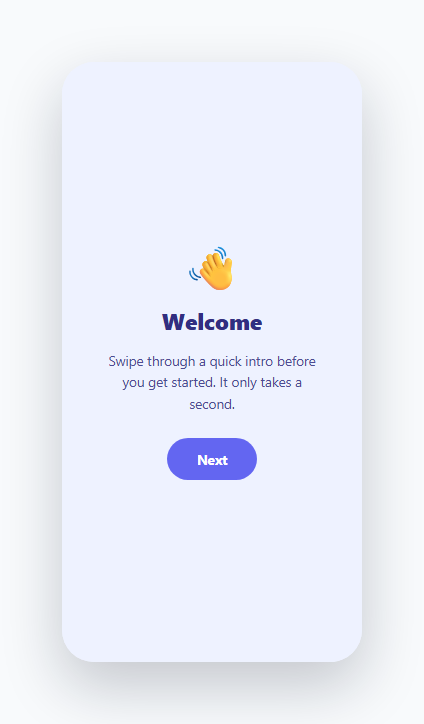
A plain slide or fade between two screens is the default transition every framework gives you for free, which is exactly why it reads as generic. The "liquid swipe" pattern popularized by mobile onboarding flows replaces that flat wipe with an organic, blob-shaped edge that bulges and settles as it sweeps across the screen — a genuinely more advanced technique that most developers recognize on sight but don't know how to actually build. This snippet implements it with a real animated SVG <path>, not a video or a third-party animation library.
Why a straight clip-path wipe looks cheap, and what a blob path fixes
A basic wipe transition animates a straight-edged clip-path: polygon(...) or a rectangular <path> sweeping left to right — functional, but visually flat, because a perfectly straight line has zero organic quality; it reads as mechanical. The liquid swipe technique instead defines the wiping shape as an SVG path built from Bezier curve commands (C — cubic bezier) whose control points bulge outward and inward as the path animates across several keyframes, so the boundary between the two panels is always a wavy, asymmetric curve rather than a hard vertical or diagonal line. It's the same visual family as a lava-lamp blob or a liquid pour, which is where the name comes from.
How the path data is constructed
The covering shape lives in a single SVG <path id="blob-path"> positioned absolutely over both panels, sized to a fixed 300x600 viewBox matching the demo's phone-frame dimensions. Its d attribute starts as a zero-width sliver pinned to the left edge (M0,0 L0,0 L0,600 L0,600 Z — a path with no visible area) and is swapped, frame by frame via setAttribute('d', ...), through a small hand-authored sequence of path strings that each describe the *same* four-point shape (top-left, a curved right edge built from two C cubic-bezier segments meeting at a mid-height control point, bottom-left, and back to start) but at progressively wider extents and with the bezier control points offset by different amounts on each frame. Because the middle two C control points aren't perfectly aligned with the frame's leading edge, the curve bulges rightward more in the vertical center than at the top and bottom corners on the way through — that offset, changing frame to frame, is what produces the "liquid" wobble rather than a shape that just grows uniformly like a rectangle.
Why plain JS frame-swapping instead of native SVG/CSS animation
Native SVG <animate> or CSS @keyframes can interpolate simple properties, but interpolating between two arbitrary d path strings with a *different number or shape of control points* isn't something the browser does automatically — path morphing between dissimilar path data requires either a matched-point-count path interpolation library, or (the approach used here) hand-authoring a short sequence of intermediate path strings that already share the same command structure, and stepping through them on a plain setTimeout loop. playFrames() walks an array of five path strings, applying each to the d attribute roughly every 90ms, which reads as a smooth, five-beat morph despite involving zero interpolation math — the illusion of fluid motion comes entirely from choosing path shapes that visually flow into one another when swapped in quick succession.
Layering the covered panel underneath the blob
The destination panel (.panel-b) starts with its own inert clip-path: polygon(0 0, 0 0, 0 100%, 0 100%), collapsing it to nothing so it's invisible before the transition starts, avoiding any flash-of-unclipped-content. When "Next" is clicked, the panel's own clip-path is set to none exactly as the blob path animation starts sweeping across — so the user perceives the blob's wobbling edge "revealing" panel B as it advances, while the blob's fill color matches panel B's background, blending the wipe seamlessly into the destination screen the instant it fully covers the frame.
Reversing the transition
The "Back" button plays a mirrored FRAMES_BACKWARD sequence — the same technique with control points and start position flipped to the right edge — and on completion resets panel-b's clip-path back to its collapsed state and the blob path back to its zero-width sliver, so the component returns to a clean, transition-ready initial state.
Build with AI
Build, Understand, Optimize, and Extend It With AI
Paste this snippet's HTML, CSS, and JS into an AI coding assistant like Claude and ask it to explain exactly why the frame path strings share an identical M/C/C/L/Z command structure and what would visually break if a frame used a different number of curve segments — that constraint is the whole reason the naive setAttribute swap works smoothly here. It's also worth asking the assistant to help you design a custom blob shape for your own brand by describing the silhouette you want in words and having it propose bezier control-point coordinates, since hand-tuning SVG path curves by pure trial and error is slow. For extension, ask it to generalize the two-panel version into an N-panel carousel, convert the setTimeout frame stepping into a requestAnimationFrame-driven interpolation for smoother in-between motion, or add a draggable/swipe-gesture trigger instead of only button clicks.
Prompt to recreate it
Copy this into your AI assistant of choice to build the effect from scratch, or as a jumping-off point for your own variant:
Build a two-panel liquid swipe transition in plain HTML, CSS, and JavaScript using an animated SVG path — not a flat CSS slide or a straight clip-path wipe.

Requirements:
- Two full-size panels stacked in the same container (a "welcome" panel and a "content" panel), with Next and Back buttons to transition between them.
- The transition between panels must be an organic, blob-shaped wipe rendered as a single animated SVG <path> element whose "d" attribute is stepped through a short hand-authored sequence of path strings (using cubic-bezier C curve commands with offset control points) so the wipe edge visibly bulges and wobbles as it sweeps across the screen, rather than moving as a straight vertical or diagonal line.
- Explain in code comments why the path strings across the animation frames need to share the same command structure (same commands in the same order) for the direct "d" attribute swap technique to look smooth, since the browser cannot automatically interpolate between arbitrarily different path shapes.
- The destination panel must be fully hidden before its transition begins (using a collapsed clip-path or equivalent) and only become visible in sync with the blob animation actually sweeping across it, with no flash of unclipped content beforehand.
- Support both a forward transition and a mirrored backward/reverse transition, and correctly reset all clip-path and path-data state after a backward transition completes so the component is ready to play again from a clean starting state.
- Guard against overlapping transitions if a user clicks Next or Back again while an animation is already in progress.
Want to tighten it up first? Run this prompt through the AI Prompt Studio to score it across 8 quality dimensions, catch anti-patterns, and tune the wording for Claude, ChatGPT, or Gemini before you paste it in.
Source Code
<div class="liquid-app">
<div class="phone-frame">
<div class="panel panel-a" id="panel-a">
<div class="panel-icon">👋</div>
<h2>Welcome</h2>
<p>Swipe through a quick intro before you get started. It only takes a second.</p>
<button class="panel-btn" id="btn-next">Next</button>
</div>
<div class="panel panel-b" id="panel-b">
<div class="panel-icon">✨</div>
<h2>You're all set</h2>
<p>Your workspace is ready. Jump in and start exploring the dashboard right away.</p>
<button class="panel-btn panel-btn-alt" id="btn-prev">Back</button>
</div>
<svg class="blob-svg" id="blob-svg" viewBox="0 0 300 600" preserveAspectRatio="none">
<path id="blob-path" d="M0,0 L0,0 L0,600 L0,600 Z" fill="#6366f1"></path>
</svg>
</div>
</div>* { box-sizing: border-box; margin: 0; padding: 0; }
body { font-family: system-ui, sans-serif; background: #f8fafc; min-height: 100vh; display: flex; align-items: center; justify-content: center; }
.liquid-app { padding: 30px; }
.phone-frame {
position: relative;
width: 300px; height: 600px;
border-radius: 32px;
overflow: hidden;
box-shadow: 0 24px 60px rgba(15,23,42,0.22);
background: #eef2ff;
}
.panel {
position: absolute; inset: 0;
display: flex; flex-direction: column; align-items: center; justify-content: center;
text-align: center; padding: 40px 32px;
gap: 14px;
}
.panel-a { background: #eef2ff; color: #312e81; }
.panel-b {
background: #6366f1; color: #fff;
clip-path: polygon(0 0, 0 0, 0 100%, 0 100%);
}
.panel-icon { font-size: 44px; line-height: 1; margin-bottom: 4px; }
.panel h2 { font-size: 22px; font-weight: 800; }
.panel p { font-size: 13.5px; line-height: 1.6; opacity: 0.85; max-width: 220px; }
.panel-btn {
margin-top: 10px;
background: #6366f1; color: #fff; border: none;
font-size: 13.5px; font-weight: 700; font-family: inherit;
padding: 12px 30px; border-radius: 999px; cursor: pointer;
transition: background 0.15s, transform 0.1s;
}
.panel-btn:hover { background: #4f46e5; }
.panel-btn:active { transform: scale(0.96); }
.panel-btn-alt { background: #fff; color: #4338ca; }
.panel-btn-alt:hover { background: #eef2ff; }
.blob-svg {
position: absolute; inset: 0; width: 100%; height: 100%;
pointer-events: none;
}const panelB = document.getElementById('panel-b');
const blobPath = document.getElementById('blob-path');
const btnNext = document.getElementById('btn-next');
const btnPrev = document.getElementById('btn-prev');
// Each frame is an SVG path "d" string across a 300x600 viewBox.
// The wobbling mid-control-points are what give the wipe its organic,
// liquid feel instead of a flat straight-edge slide.
const FRAMES_FORWARD = [
'M0,0 L0,0 L0,600 L0,600 Z',
'M0,0 C120,40 40,180 90,300 C40,420 120,560 0,600 L0,600 L0,0 Z',
'M0,0 C220,60 160,260 190,300 C160,340 220,540 0,600 L0,600 L0,0 Z',
'M0,0 C300,30 260,260 300,300 C260,340 300,570 0,600 L0,600 L0,0 Z',
'M0,0 L300,0 L300,600 L0,600 Z',
];
const FRAMES_BACKWARD = [
'M300,0 L300,0 L300,600 L300,600 Z',
'M300,0 C180,40 260,180 210,300 C260,420 180,560 300,600 L300,600 L300,0 Z',
'M300,0 C80,60 140,260 110,300 C140,340 80,540 300,600 L300,600 L300,0 Z',
'M300,0 C0,30 40,260 0,300 C40,340 0,570 300,600 L300,600 L300,0 Z',
'M300,0 L0,0 L0,600 L300,600 Z',
];
let animating = false;
function playFrames(frames, onDone) {
if (animating) return;
animating = true;
let i = 0;
function step() {
blobPath.setAttribute('d', frames[i]);
i += 1;
if (i < frames.length) {
setTimeout(step, 90);
} else {
animating = false;
if (onDone) onDone();
}
}
step();
}
btnNext.addEventListener('click', () => {
if (animating) return;
panelB.style.clipPath = 'none';
playFrames(FRAMES_FORWARD);
});
btnPrev.addEventListener('click', () => {
if (animating) return;
playFrames(FRAMES_BACKWARD, () => {
panelB.classList.remove('active');
panelB.style.clipPath = 'polygon(0 0, 0 0, 0 100%, 0 100%)';
blobPath.setAttribute('d', 'M0,0 L0,0 L0,600 L0,600 Z');
});
});Step by step
How to Use
- 1Click Next to trigger the forward liquid wipeplayFrames(FRAMES_FORWARD) steps through five hand-authored SVG path strings on the #blob-path element roughly every 90ms, sweeping an organic, bulging curve left to right across the phone frame while panel-b's clip-path is set to none so it becomes visible underneath the advancing blob.
- 2Click Back to reverse itplayFrames(FRAMES_BACKWARD) plays the mirrored sequence starting from the right edge. On completion, panel-b's clip-path is reset to its collapsed polygon and the blob path resets to its zero-width sliver, returning the component to a clean state ready to replay.
- 3Design your own blob frame sequenceEach frame string uses the same M...C...C...L...Z structure (start point, two cubic-bezier curve segments forming the wavy edge, close). Keep the command structure identical across frames and only change the numeric coordinates and control-point offsets between frames — this is what allows swapping the d attribute directly without a path-morphing library.
- 4Adjust the transition speed and frame countChange the setTimeout(step, 90) delay in playFrames() to speed up or slow the sweep, and add more entries to FRAMES_FORWARD/FRAMES_BACKWARD for a smoother, more gradual morph, or fewer for a snappier one. More frames means more hand-authored path strings to design.
- 5Match the blob fill to your destination panelThe #blob-path fill attribute should match panel-b's background color exactly so the wipe visually blends into the destination screen the instant it finishes covering the frame, rather than showing a visible color seam between the SVG shape and the panel underneath it.
- 6Export and adapt to a full-page route transitionClick JSX to export a React component, then trigger playFrames() from a route change handler (e.g. Next.js router events or a page transition library hook) instead of a button click, using the same overlay-blob-over-incoming-page technique for a full liquid page transition.
Real-world uses
Common Use Cases
Got questions?
Frequently Asked Questions
Native CSS and SVG animation can smoothly interpolate simple numeric properties, but morphing between two arbitrary path "d" strings is only automatically smooth if both paths have the exact same number and type of commands in the exact same order — otherwise the browser either refuses to interpolate or produces a visually broken jump. This snippet sidesteps that limitation entirely by hand-authoring every intermediate frame's path string with an identical command structure (M, two C curves, L, Z) and simply swapping the d attribute directly via JavaScript on a timer, which works reliably in every browser without needing matched path topology.
The illusion comes from the cubic-bezier control points in each frame's C commands not scaling uniformly with the shape's overall width — the vertical-center control point is offset further from the leading edge than the top and bottom corners are, and that offset amount changes slightly from frame to frame. That asymmetric, changing bulge is what your eye reads as an organic wobble rather than a rectangle or triangle simply expanding — a straight-edged shape growing at a constant rate looks mechanical no matter how many frames you use.
Replace the fill="#6366f1" attribute on #blob-path with fill="url(#myGradient)", then define a <linearGradient id="myGradient"> or <radialGradient> inside a <defs> block within the same SVG. Because the path only changes its d attribute during animation, any fill (solid color, gradient, or even a pattern) applies correctly across every frame without additional changes to the JavaScript.
Yes — extend the pattern by giving each panel its own collapsed clip-path state, tracking a currentIndex, and defining a directional frame sequence (forward and backward) reused for each transition between adjacent panels rather than hard-coded panel-a/panel-b references. On each Next/Back click, animate the blob over the currently-hidden next or previous panel and reveal it exactly as this snippet does for its two panels, then update currentIndex once the animation completes.
Yes for occasional use — swapping an SVG path's d attribute on a five-step timer is cheap; the browser only needs to re-rasterize the path shape, not recompute layout for the rest of the page. For very frequent transitions (e.g. many rapid route changes), consider reducing the frame count or using requestAnimationFrame instead of setTimeout for tighter frame timing, though the current setTimeout(step, 90) approach is smooth enough for typical one-off onboarding or section-reveal transitions.