Source Code
<div class="wrap">
  <div class="stage">
    <svg viewBox="0 0 64 64" width="72" height="72">
      <path id="morphPath" fill="none" stroke="#6366f1" stroke-width="5" stroke-linecap="round" stroke-linejoin="round" d=""></path>
    </svg>
  </div>

  <div class="picker" id="picker">
    <button class="opt active" data-shape="heart">Heart</button>
    <button class="opt" data-shape="star">Star</button>
    <button class="opt" data-shape="circle">Circle</button>
    <button class="opt" data-shape="square">Square</button>
  </div>
</div>
* { box-sizing: border-box; }
body { font-family: system-ui, sans-serif; background: #f8fafc; display: flex; justify-content: center; align-items: center; min-height: 100vh; padding: 40px 20px; }
.wrap { width: 100%; max-width: 320px; text-align: center; }
.stage {
display: flex; align-items: center; justify-content: center;
height: 160px; background: #fff; border: 1px solid #e2e8f0; border-radius: 18px; margin-bottom: 18px;
}
.picker { display: flex; flex-wrap: wrap; gap: 8px; justify-content: center; }
.opt {
padding: 8px 14px; border-radius: 999px; border: 1.5px solid #e2e8f0;
background: #fff; color: #64748b; font-size: 12.5px; font-weight: 700;
font-family: inherit; cursor: pointer; transition: border-color 0.2s, color 0.2s, background 0.2s;
}
.opt:hover { border-color: #cbd5e1; }
.opt.active { background: #6366f1; border-color: #6366f1; color: #fff; }/* A tiny, dependency-free SVG morph "engine": every shape below is a
closed 12-point outline in a shared 0-64 viewBox. Because every shape
has the same vertex count and roughly the same winding order, any shape
can morph directly into any other shape using nothing but linear
interpolation of matched coordinate pairs. */
const SHAPES = {
heart: [
[32, 18], [26, 8], [14, 8], [8, 18], [8, 28], [20, 44],
[32, 56], [44, 44], [56, 28], [56, 18], [50, 8], [38, 8],
],
star: [
[32, 4], [38, 24], [59, 24], [42, 37], [48, 58], [32, 46],
[16, 58], [22, 37], [5, 24], [26, 24], [32, 4], [32, 4],
],
circle: [
[32, 4], [48, 9], [58, 24], [58, 40], [48, 55], [32, 60],
[16, 55], [6, 40], [6, 24], [16, 9], [32, 4], [32, 4],
],
square: [
[10, 10], [32, 10], [54, 10], [54, 32], [54, 54], [32, 54],
[10, 54], [10, 32], [10, 10], [10, 10], [10, 10], [10, 10],
],
};
function pointsToPath(pts) {
return pts.map((p, i) => (i === 0 ? 'M' : 'L') + p[0].toFixed(2) + ',' + p[1].toFixed(2)).join(' ') + ' Z';
}
function lerpPoints(a, b, t) {
return a.map((p, i) => [p[0] + (b[i][0] - p[0]) * t, p[1] + (b[i][1] - p[1]) * t]);
}
const pathEl = document.getElementById('morphPath');
let currentPts = SHAPES.heart;
pathEl.setAttribute('d', pointsToPath(currentPts));
let rafId = null;
function morphTo(name) {
const targetPts = SHAPES[name];
if (!targetPts || rafId) return;
const fromPts = currentPts;
const start = performance.now();
const duration = 500;
function frame(now) {
const t = Math.min(1, (now - start) / duration);
const eased = t < 0.5 ? 4 * t * t * t : 1 - Math.pow(-2 * t + 2, 3) / 2; // easeInOutCubic
pathEl.setAttribute('d', pointsToPath(lerpPoints(fromPts, targetPts, eased)));
if (t < 1) {
rafId = requestAnimationFrame(frame);
} else {
currentPts = targetPts;
rafId = null;
}
}
rafId = requestAnimationFrame(frame);
}
document.querySelectorAll('.opt').forEach(btn => {
btn.addEventListener('click', () => {
document.querySelectorAll('.opt').forEach(b => b.classList.remove('active'));
btn.classList.add('active');
morphTo(btn.dataset.shape);
});
});Learn Coding Visually
Learn to code with interactive, live-preview playgrounds — HTML, CSS, JavaScript, React & more.
 HTML Playground42 lessons · Click-based · Live preview
 CSS PlaygroundLearn CSS with a live editor
 JavaScript Playground60 lessons · DOM · Async · Canvas
 React PlaygroundLearn React with a live code editor
 GSAP PlaygroundLearn GSAP animation interactively
 SVG Playground44 lessons · shapes · paths · animation
 SCSS Playground45 lessons · Sass modules · tokens
 Tailwind PlaygroundLearn Tailwind CSS with a live editor
 Bootstrap 5 Playground50 lessons · live preview
SVG Icon Morph Vanilla JavaScript — No Library
Vanilla SVG Icon Morph (No Library) · Animations · Plain HTML, CSS & JS · Live preview
What's included
Features
About this UI Snippet
Vanilla JavaScript SVG Icon Morph — A Zero-Dependency Point-Interpolation Engine
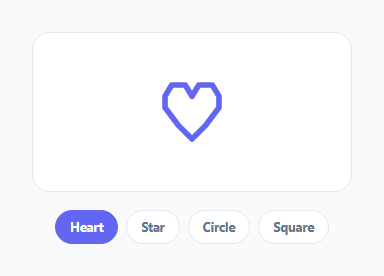
SVG shape morphing is usually reached for through a library — GSAP's MorphSVG plugin or KUTE.js are the two most common choices, and both do real, valuable work automatically matching up paths with different point counts. This snippet takes the opposite approach: it builds the smallest possible morphing engine by hand, in plain JavaScript, for the common case where you control all your shapes and can design them with matching vertex counts from the start.
The core idea: matched-vertex shape data
SHAPES is a plain object mapping names (heart, star, circle, square) to arrays of exactly 12 [x, y] coordinate pairs each, all in a shared 0–64 viewBox. Because every shape has the same point count, lerpPoints(a, b, t) can blend *any* shape into *any other* shape with one identical function — there is no special-casing per pair of shapes, unlike a crossfade approach that would need a separate transition asset for every combination.
Padding simple shapes to match a complex one
A square only needs 4 real corners, but it is stored with 8 duplicate corner points ([10, 10] repeated) to reach 12 vertices, matching the heart and star. A circle's 10 points naturally trace an even ring, with the last point duplicated to round out to 12. This "pad with duplicate or near-duplicate points" approach is the standard hand-rolled technique for point-matching simple shapes to more complex ones without distorting how the simple shape actually looks.
pointsToPath and lerpPoints
pointsToPath(pts) walks a point array and produces a closed SVG path string (M x0,y0 L x1,y1 ... Z). lerpPoints(a, b, t) returns a *new* array of points, each linearly interpolated between the corresponding points in a and b at progress t — it does not touch the DOM at all, which keeps it trivially testable and reusable outside of an animation context (you could use it to render a single static in-between frame too).
The morph loop
morphTo(name) looks up the target shape, then runs a requestAnimationFrame loop measuring elapsed time against performance.now(), applying an easeInOutCubic curve (slow start, fast middle, slow end) to the raw 0–1 progress, and writing a fresh d attribute every frame via pointsToPath(lerpPoints(fromPts, targetPts, eased)). A simple rafId guard prevents a second morph from starting while one is already in flight, and currentPts is only updated to the new shape once the animation actually finishes, so fromPts inside any concurrent call always reflects a real, settled shape rather than a mid-flight approximation.
When to write this by hand vs. reach for a library
This hand-rolled engine is a strong fit when you own every shape in the set and can design them with equal vertex counts up front, as shown here. Reach for GSAP MorphSVG or KUTE.js instead when you need to morph between arbitrary, pre-existing SVG paths (like real icon-set glyphs) that were not designed together and have wildly different point counts and structures — those libraries include point-matching algorithms this ~20-line engine intentionally does not attempt to replicate.
Extending the shape set
Because every shape is just an array conforming to one convention (12 points, same viewBox, roughly matching winding order), adding a new icon to the picker is entirely a design exercise — trace or hand-pick 12 coordinate pairs for the new shape — with zero changes required to pointsToPath, lerpPoints, or morphTo.
Build with AI
Build, Understand, Optimize, and Extend It With AI
Paste this snippet into an AI coding assistant like Claude and ask it to explain why every shape needs the same vertex count for lerpPoints to work, and how the duplicate-point padding trick lets a simple 4-corner square match a 12-point heart without visibly changing its shape — that is the one concept this whole engine is built around. It is also a great jumping-off point: ask the assistant to help you trace your own custom icon into a 12-point (or more) coordinate array, or to extend morphTo() to support a queue of pending morphs instead of dropping clicks while one is in flight.
Prompt to recreate it
Copy this into your AI assistant of choice to build the effect from scratch, or as a jumping-off point for your own variant:
Build a tiny, dependency-free SVG icon morphing engine in plain HTML, CSS, and JavaScript that smoothly morphs a single SVG path between several named shapes (for example heart, star, circle, square) selected by buttons — no GSAP, no KUTE.js, no external library.

Requirements:
- Define at least four shapes as arrays of [x, y] coordinate pairs, all with exactly the same number of points and in a shared SVG viewBox, padding simpler shapes with duplicate/near-duplicate corner points where needed so every shape has a matching vertex count.
- Write a pure function that converts a point array into a closed SVG path "d" string (M for the first point, L for the rest, Z to close), and a pure function that linearly interpolates every coordinate between two same-length point arrays at a given progress value between 0 and 1.
- Write a morph function that, given a target shape name, runs a requestAnimationFrame loop using performance.now() for timing, applies an ease-in-out cubic easing curve to the raw progress, and updates the SVG path's "d" attribute every frame with the interpolated shape.
- Guard against starting a new morph while one is still animating, and only update the "current shape" reference once a morph fully completes.
- Add a row of buttons, one per shape, that trigger a morph to that shape when clicked and visually indicate which shape is currently active.
Want to tighten it up first? Run this prompt through the AI Prompt Studio to score it across 8 quality dimensions, catch anti-patterns, and tune the wording for Claude, ChatGPT, or Gemini before you paste it in.
Step by step
How to Use
- 1Click any shape buttonThe icon morphs smoothly from whatever shape it currently is into the newly selected one.
- 2Click through several shapes quicklyThe rafId guard means a morph must finish before the next one starts — try it and observe the queued-feeling behavior.
- 3Add a new shapeAdd a new entry to the SHAPES object with exactly 12 [x, y] points in the same 0-64 viewBox, and a matching button with data-shape set to its key.
- 4Change the morph speedEdit the duration constant (500ms) inside morphTo().
- 5Change the easing curveSwap the easeInOutCubic formula for a different easing function — linear, ease-out, or a custom curve.
- 6Export in your formatClick "HTML" for a standalone file, "JSX" for a React component, or "Tailwind" for a React + Tailwind version.
Real-world uses
Common Use Cases
Got questions?
Frequently Asked Questions
Not if you control every shape in the set and can design them with matching vertex counts up front, as this snippet does. Those libraries earn their keep when you need to morph between arbitrary pre-existing SVG paths that were not designed together and have very different point counts — they include automatic point-matching algorithms this hand-written engine does not attempt.
Every shape needs the same vertex count (12 here) for lerpPoints to interpolate cleanly between any pair. A square naturally only has 4 corners, so it is padded with duplicate corner coordinates to reach 12 points without changing its visible shape, since duplicate consecutive points add no extra geometry.
The rafId guard inside morphTo() causes the click to be ignored until the current morph finishes, because currentPts (the source for the next morph) is only updated once an animation completes. This keeps every morph starting from a real, settled shape instead of an unpredictable mid-flight one.
Yes — both are pure functions that take point arrays and return values with no DOM interaction, so you can call lerpPoints(a, b, 0.5) directly to get a static halfway shape, or reuse pointsToPath for any point array you construct yourself.
Any number — SHAPES is just an object of named point arrays, and morphTo(name) looks up whichever key is passed. Add as many designed shapes as you want, as long as each has the same point count as the others.
Yes — remove fill="none" and set a fill color on the path; the same interpolated path data will render as a solid filled shape instead of an outline.