Source Code
<div class="container py-5 d-flex justify-content-center">
<div class="card bs2fa-card">
<div class="card-body p-4 text-center">
<h5 class="fw-bold mb-1">Enter verification code</h5>
<p class="text-muted small mb-4">We sent a 6-digit code to your email.</p>
<div class="d-flex gap-2 justify-content-center mb-3" id="bs2faDigits">
<input type="text" inputmode="numeric" maxlength="1" class="form-control text-center bs2fa-box">
<input type="text" inputmode="numeric" maxlength="1" class="form-control text-center bs2fa-box">
<input type="text" inputmode="numeric" maxlength="1" class="form-control text-center bs2fa-box">
<input type="text" inputmode="numeric" maxlength="1" class="form-control text-center bs2fa-box">
<input type="text" inputmode="numeric" maxlength="1" class="form-control text-center bs2fa-box">
<input type="text" inputmode="numeric" maxlength="1" class="form-control text-center bs2fa-box">
</div>
<p class="small mb-3" id="bs2faStatus"> </p>
<button class="btn btn-dark w-100 fw-bold" id="bs2faVerify" disabled>Verify</button>
<p class="small text-muted mt-3 mb-0">Didn't get it? <a href="javascript:void(0)" id="bs2faResend">Resend code</a></p>
</div>
</div>
</div>.bs2fa-card { width: 380px; border: 1px solid #eceef1; border-radius: 14px; }
.bs2fa-box { width: 44px; height: 52px; font-size: 20px; font-weight: 700; padding: 0; }const CORRECT = '482913';
const boxes = Array.from(document.querySelectorAll('.bs2fa-box'));
const verifyBtn = document.getElementById('bs2faVerify');
const status = document.getElementById('bs2faStatus');
const resend = document.getElementById('bs2faResend');
function currentCode() { return boxes.map(b => b.value).join(''); }
function checkComplete() {
verifyBtn.disabled = currentCode().length !== 6;
}
boxes.forEach((box, i) => {
box.addEventListener('input', () => {
box.value = box.value.replace(/[^0-9]/g, '').slice(0, 1);
if (box.value && i < boxes.length - 1) boxes[i + 1].focus();
checkComplete();
});
box.addEventListener('keydown', e => {
if (e.key === 'Backspace' && !box.value && i > 0) boxes[i - 1].focus();
});
// Pasting the whole 6-digit code into any box distributes it across all
// six inputs at once, instead of only filling the box that was clicked.
box.addEventListener('paste', e => {
const text = (e.clipboardData || window.clipboardData).getData('text').replace(/[^0-9]/g, '');
if (text.length < 2) return;
e.preventDefault();
text.slice(0, 6).split('').forEach((ch, idx) => { if (boxes[idx]) boxes[idx].value = ch; });
checkComplete();
boxes[Math.min(text.length, 6) - 1].focus();
});
});
verifyBtn.addEventListener('click', () => {
const ok = currentCode() === CORRECT;
status.textContent = ok ? 'Verified successfully.' : 'Incorrect code — try again.';
status.className = 'small mb-3 ' + (ok ? 'text-success' : 'text-danger');
boxes.forEach(b => b.classList.toggle('is-invalid', !ok));
});
resend.addEventListener('click', () => {
boxes.forEach(b => { b.value = ''; b.classList.remove('is-invalid'); });
boxes[0].focus();
status.textContent = 'A new code was sent.';
status.className = 'small mb-3 text-muted';
checkComplete();
});Learn Coding Visually
Learn to code with interactive, live-preview playgrounds — HTML, CSS, JavaScript, React & more.
 HTML Playground42 lessons · Click-based · Live preview
 CSS PlaygroundLearn CSS with a live editor
 JavaScript Playground60 lessons · DOM · Async · Canvas
 React PlaygroundLearn React with a live code editor
 GSAP PlaygroundLearn GSAP animation interactively
 SVG Playground44 lessons · shapes · paths · animation
 SCSS Playground45 lessons · Sass modules · tokens
 Tailwind PlaygroundLearn Tailwind CSS with a live editor
 Bootstrap 5 Playground50 lessons · live preview
Bootstrap Two-Factor Verification Code Form — Free Snippet
Bootstrap Two-Factor Verification Code Form · Forms · Plain HTML, CSS & JS · Live preview
What's included
Features
About this UI Snippet
Bootstrap Two-Factor Verification Code Form — HTML, CSS & JavaScript
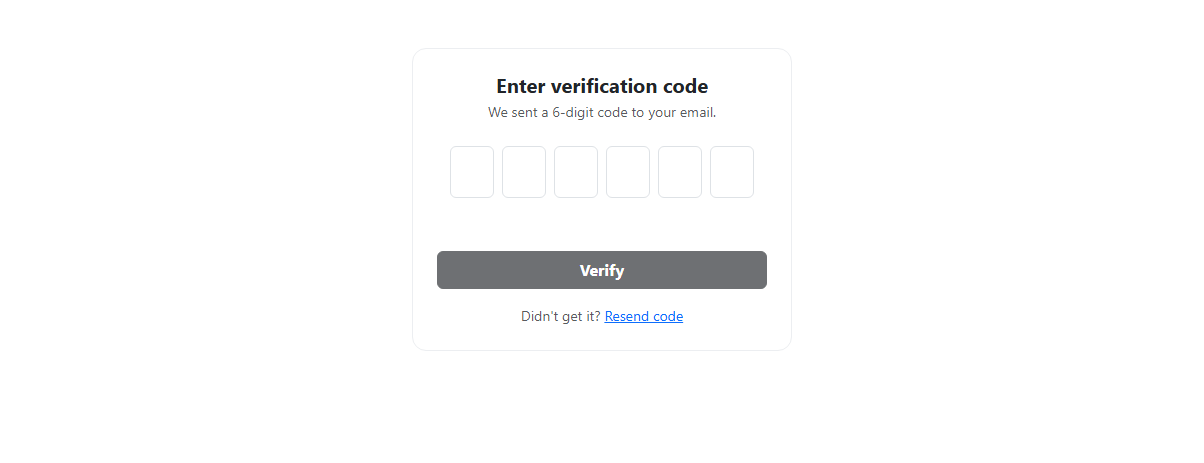
A six-box verification code input needs to feel like typing one number, not managing six separate fields — this snippet implements the three behaviors that make that true, on top of real Bootstrap 5.3 form-control inputs. Typing a digit auto-advances focus to the next box; pressing Backspace on an empty box moves focus back to the previous one, so deleting feels continuous in both directions; and pasting a full code into any box — the way a password manager or a copied SMS code actually arrives — distributes all six digits across the boxes at once via the paste event, rather than dumping the whole string into a single maxlength="1" field.
The Verify button stays disabled until all six boxes are filled, and comparing against a fixed CORRECT code demonstrates both the success and failure paths, including marking every box is-invalid on a wrong code.
Build with AI
Build, Understand, Optimize, and Extend It With AI
Hand this snippet's HTML, CSS, and JS to an AI coding assistant like Claude and ask it to add a countdown timer with a disabled "Resend code" link until it expires, or to add a shake animation on the boxes when an incorrect code is submitted. It's also a good exercise to ask the assistant to wire the Verify button to a real API call with a loading state.
Prompt to recreate it
Copy this into your AI assistant of choice to build the effect from scratch, or as a jumping-off point for your own variant:
Build a Bootstrap 5.3 six-digit two-factor verification code input, using the real Bootstrap CDN framework (bootstrap.min.css and bootstrap.bundle.min.js), not custom CSS made to resemble Bootstrap.

Requirements:
- Six individual real Bootstrap form-control inputs, each accepting a single digit, laid out in a row.
- Typing a digit in a box must automatically move focus to the next box. Pressing Backspace on an empty box must move focus back to the previous box.
- Pasting a multi-digit string into any of the boxes must distribute the digits across all six boxes correctly (starting from the first box), not just insert the whole string into one box — intercept the paste event to implement this.
- Non-digit characters must never be allowed into a box, whether typed or pasted.
- A Verify button must remain disabled until all six boxes have a digit, and on click must compare the entered code against a known correct value, showing a distinct success or error state (including marking all boxes invalid on failure).
Want to tighten it up first? Run this prompt through the AI Prompt Studio to score it across 8 quality dimensions, catch anti-patterns, and tune the wording for Claude, ChatGPT, or Gemini before you paste it in.
Step by step
How to Use
- 1Load the snippetClick the snippet in the sidebar Library tab. The preview loads six empty digit boxes.
- 2Type digits one at a timeFocus auto-advances to the next box after each digit — no clicking required between boxes.
- 3Press Backspace on an empty boxFocus moves back to the previous box, letting you delete continuously across boxes.
- 4Paste "482913"Copy that number and paste it into any box — all six digits distribute correctly across the six boxes at once.
- 5Click VerifyA correct code shows a green success message; any other 6 digits show a red error and mark every box invalid.
Real-world uses
Common Use Cases
Got questions?
Frequently Asked Questions
Yes — a paste event listener intercepts the pasted text, strips non-digit characters, and distributes up to six digits across the six boxes in order, rather than the browser's default behavior of dropping the whole string into whichever single box was focused.
The distribution always starts from the first box (index 0), regardless of which box you pasted into — this matches how most real 2FA inputs behave, since a full code paste is meant to fill the whole sequence.
If a box is empty and Backspace is pressed, a keydown listener moves focus to the previous box — pressing Backspace again there deletes its digit, so repeated backspacing clears the code right-to-left continuously.
Yes, for this front-end demo (482913) — replace the comparison in the Verify handler with a real API call validating the code server-side.
No — each input event strips anything that isn't a digit, so only 0–9 ever ends up in a box regardless of what's typed or pasted.