Source Code
<div class="container-fluid py-4">
  <div class="row bei-shell mx-auto g-0 border rounded-3 overflow-hidden">
    <div class="col-3 border-end bg-light p-3" id="beiFolders">
      <div class="list-group list-group-flush">
        <button class="list-group-item list-group-item-action active d-flex justify-content-between align-items-center" data-folder="inbox">
          Inbox <span class="badge text-bg-dark rounded-pill" id="beiInboxBadge"></span>
        </button>
        <button class="list-group-item list-group-item-action d-flex justify-content-between align-items-center" data-folder="sent">
          Sent <span class="badge text-bg-dark rounded-pill" id="beiSentBadge"></span>
        </button>
        <button class="list-group-item list-group-item-action d-flex justify-content-between align-items-center" data-folder="drafts">
          Drafts <span class="badge text-bg-dark rounded-pill" id="beiDraftsBadge"></span>
        </button>
      </div>
    </div>

    <div class="col-4 border-end p-0 bei-list-col" id="beiList"></div>

    <div class="col-5 p-4" id="beiReadingPane">
      <p class="text-muted">Select an email to read it here.</p>
    </div>
  </div>
</div>
.bei-shell { max-width: 960px; min-height: 460px; }
.bei-list-col { max-height: 460px; overflow-y: auto; }
.bei-email-item { cursor: pointer; border-bottom: 1px solid #eceef1; padding: 12px 16px; }
.bei-email-item:hover { background: #f8f9fa; }
.bei-email-item.bei-unread .bei-email-subject { font-weight: 700; }
.bei-email-item.bei-selected { background: #f1f3f5; }const DATA = {
inbox: [
{ id: 1, from: 'Alicia Chen', subject: 'Q3 roadmap review', preview: 'Can we sync before Friday on the...', body: 'Hi team,\n\nCan we sync before Friday on the Q3 roadmap? I want to walk through the prioritization before it goes to leadership.\n\nThanks,\nAlicia', unread: true },
{ id: 2, from: 'GitHub', subject: 'Your weekly digest', preview: '3 pull requests were merged this week', body: 'Your weekly digest:\n\n3 pull requests were merged this week across your repositories. Check your dashboard for details.', unread: true },
{ id: 3, from: 'Marcus Lee', subject: 'Re: Invoice #4521', preview: 'Thanks, this looks correct. Approving now.', body: 'Thanks, this looks correct. Approving now.\n\n— Marcus', unread: false },
{ id: 4, from: 'Priya Nair', subject: 'Design handoff files', preview: 'Attached are the final Figma exports for...', body: 'Attached are the final Figma exports for the checkout redesign. Let me know if anything is missing.\n\nPriya', unread: true },
],
sent: [
{ id: 5, from: 'Me', subject: 'Re: Q3 roadmap review', preview: 'Works for me, sending an invite now.', body: 'Works for me, sending an invite now.', unread: false },
],
drafts: [
{ id: 6, from: '(Draft)', subject: 'Follow up with vendor', preview: 'Hey, just checking in on the...', body: 'Hey, just checking in on the shipment timeline for next month...', unread: false },
],
};
let currentFolder = 'inbox';
let selectedId = null;
const listEl = document.getElementById('beiList');
const readingPane = document.getElementById('beiReadingPane');
const folderButtons = Array.from(document.querySelectorAll('#beiFolders button'));
function unreadCount(folder) {
return DATA[folder].filter(e => e.unread).length;
}
function updateBadges() {
document.getElementById('beiInboxBadge').textContent = unreadCount('inbox') || '';
document.getElementById('beiSentBadge').textContent = unreadCount('sent') || '';
document.getElementById('beiDraftsBadge').textContent = unreadCount('drafts') || '';
}
function renderList() {
listEl.innerHTML = '';
DATA[currentFolder].forEach(email => {
const item = document.createElement('div');
item.className = 'bei-email-item' + (email.unread ? ' bei-unread' : '') + (email.id === selectedId ? ' bei-selected' : '');
item.innerHTML = '<div class="d-flex justify-content-between"><span class="small">' + email.from + '</span></div>' +
'<div class="bei-email-subject small">' + email.subject + '</div>' +
'<div class="text-muted small text-truncate">' + email.preview + '</div>';
item.addEventListener('click', () => selectEmail(email.id));
listEl.appendChild(item);
});
}
function selectEmail(id) {
selectedId = id;
const email = DATA[currentFolder].find(e => e.id === id);
if (!email) return;
if (email.unread) {
email.unread = false;
updateBadges();
}
renderList();
readingPane.innerHTML = '<h5 class="fw-bold mb-1">' + email.subject + '</h5>' +
'<div class="text-muted small mb-3">From ' + email.from + '</div>' +
'<p style="white-space: pre-line;">' + email.body + '</p>';
}
folderButtons.forEach(btn => {
btn.addEventListener('click', () => {
folderButtons.forEach(b => b.classList.remove('active'));
btn.classList.add('active');
currentFolder = btn.getAttribute('data-folder');
selectedId = null;
readingPane.innerHTML = '<p class="text-muted">Select an email to read it here.</p>';
renderList();
});
});
updateBadges();
renderList();Learn Coding Visually
Learn to code with interactive, live-preview playgrounds — HTML, CSS, JavaScript, React & more.
 HTML Playground42 lessons · Click-based · Live preview
 CSS PlaygroundLearn CSS with a live editor
 JavaScript Playground60 lessons · DOM · Async · Canvas
 React PlaygroundLearn React with a live code editor
 GSAP PlaygroundLearn GSAP animation interactively
 SVG Playground44 lessons · shapes · paths · animation
 SCSS Playground45 lessons · Sass modules · tokens
 Tailwind PlaygroundLearn Tailwind CSS with a live editor
 Bootstrap 5 Playground50 lessons · live preview
Bootstrap Email Inbox Layout — Free HTML CSS Snippet
Bootstrap Email Inbox Layout · Layouts · Plain HTML, CSS & JS · Live preview
What's included
Features
About this UI Snippet
Bootstrap Email Inbox Layout — HTML, CSS & JavaScript
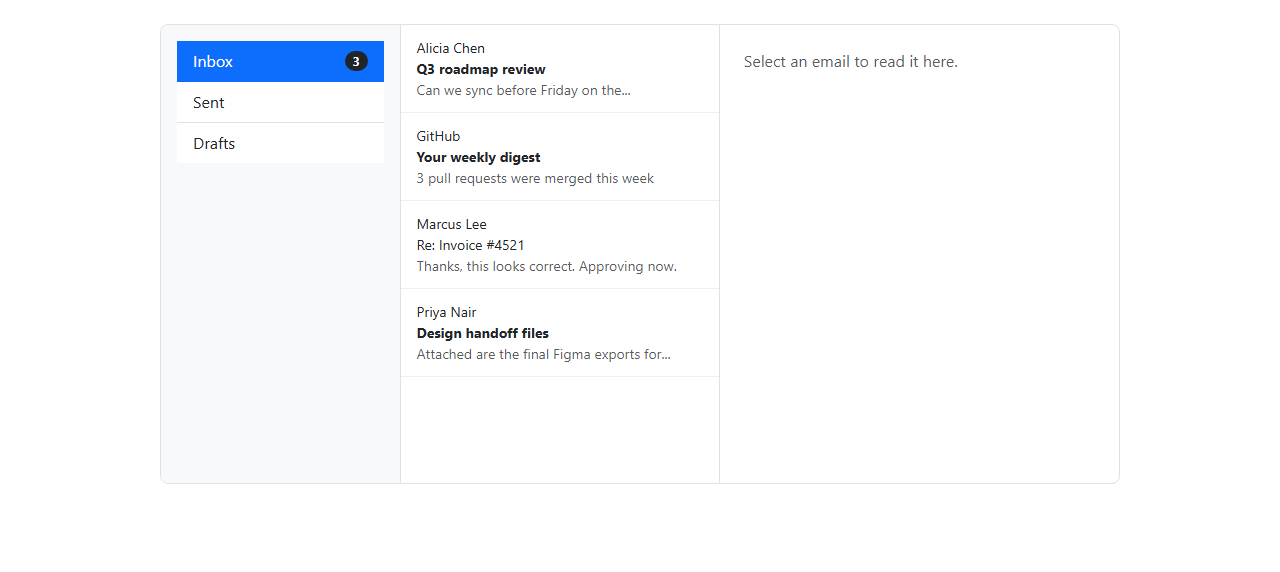
An inbox UI is really three views onto the same data: a folder count, a message list, and a reading pane, and this snippet keeps all three perfectly in sync by driving them from a single DATA object rather than three independently maintained pieces of markup. DATA has one array per folder (inbox, sent, drafts), and each email object carries from, subject, preview, body, and an unread boolean — that boolean is the entire state machine behind the bold/unbold behavior and the badge counts.
The layout itself is a real Bootstrap row split into three columns with g-0 (no gutter, so the borders between columns sit flush): a col-3 folder sidebar built from a real list-group, a col-4 scrollable message list, and a col-5 reading pane. Each folder button carries a rounded-pill badge text-bg-dark; updateBadges() recomputes each folder's unread count with DATA[folder].filter(e => e.unread).length and writes it into the matching badge, using the empty string instead of 0 when a folder has no unread mail so an empty badge pill does not render as a hollow dot.
Switching folders (clicking Inbox/Sent/Drafts) toggles Bootstrap's active class between the sidebar buttons, updates currentFolder, resets selectedId to null, resets the reading pane's placeholder text, and calls renderList() — which clears and rebuilds #beiList from DATA[currentFolder] alone, so switching folders can never show stale messages from a previous folder. Each list row conditionally gets a .bei-unread class, which is what makes the subject line font-weight: 700 in CSS — a plain CSS rule, not per-row inline styling — and a .bei-selected class if its id matches selectedId, so the currently open message stays visibly highlighted in the list even after other state changes trigger a re-render.
The read behavior lives in selectEmail(id): it looks up the email by id in the current folder's array, and if it was unread, flips unread to false and calls updateBadges() immediately — the non-obvious detail here is the order of operations: the unread flag is mutated on the underlying data object *before* renderList() runs, so the subject immediately loses its bold weight in the same render pass that shows the row as selected, rather than needing a second click or a delayed update. The reading pane is then filled with the subject, sender, and body, using white-space: pre-line in the inline style so the \n characters embedded in each email's body string render as real line breaks instead of collapsing into one line.
Because every view is a pure function of DATA, currentFolder, and selectedId, this structure ports directly to React/Vue/Angular state management — the three variables become state, and renderList/reading-pane markup become derived JSX or template output instead of manual innerHTML writes.
Build with AI
Build, Understand, Optimize, and Extend It With AI
Ask an AI coding assistant like Claude to add a search box that filters the visible message list by subject or sender, or to add a "mark all as read" button per folder. It's also worth asking it to add swipe-to-archive gestures for a mobile-friendly version.
Prompt to recreate it
Copy this into your AI assistant of choice to build the effect from scratch, or as a jumping-off point for your own variant:
Build a three-column Bootstrap 5.3 email inbox layout using the real Bootstrap CDN (bootstrap.min.css and bootstrap.bundle.min.js), not custom CSS made to resemble Bootstrap.

Requirements:
- A folder sidebar (Inbox, Sent, Drafts) built from a real Bootstrap list-group, each folder showing a rounded-pill badge with its live unread-message count.
- A middle message list for the currently selected folder, where unread messages render with a bold subject line.
- Clicking a message in the list marks it as read (removing the bold, decrementing that folder's unread badge) and displays its full content in a right-hand reading pane.
- Switching folders swaps the message list entirely and resets the reading pane, without losing read/unread state when you switch back.
- Drive all three views (badges, list, reading pane) from one shared in-memory data structure so they always stay consistent with each other.
Want to tighten it up first? Run this prompt through the AI Prompt Studio to score it across 8 quality dimensions, catch anti-patterns, and tune the wording for Claude, ChatGPT, or Gemini before you paste it in.
Step by step
How to Use
- 1Load the snippetThe Inbox folder is selected by default, showing four messages, three of them bold (unread), and a "Select an email" placeholder in the reading pane.
- 2Click a bold (unread) messageIt immediately loses its bold weight in the list, the Inbox badge count decreases by one, and the full email body appears in the right-hand reading pane.
- 3Click a message you already readIt opens in the reading pane again without changing any badge count, since it was already marked read.
- 4Switch to the Sent folderThe message list swaps entirely to sent messages, the reading pane resets to the placeholder text, and the sidebar highlights Sent as active.
- 5Switch back to InboxThe previously read messages remain unbold and the badge count reflects only the mail still unread, proving the read state persisted across folder switches.
Real-world uses
Common Use Cases
Got questions?
Frequently Asked Questions
Yes — selectEmail() checks the email's unread flag, sets it to false if true, and immediately calls updateBadges() and renderList(), so the bold subject and the folder's unread badge count both update in the same click.
No — the unread flag is mutated directly on the email object inside the shared DATA structure, not on a copy, so it persists correctly when you navigate away to another folder and back to Inbox.
Yes — move DATA into component state grouped by folder, derive unread counts with a memoized selector or computed property, and replace the innerHTML-based renderList() with JSX/template list rendering bound to the same currentFolder and selectedId state, updating them in useEffect/onMounted only for any initial data fetch.
Yes — the list-group, badge, and row/col grid classes are purely presentational; replace them with Tailwind's flex/grid utilities on the same markup, since all the read/unread and selection logic operates on plain classes and data, not on Bootstrap-specific behavior.
updateBadges() writes unreadCount(folder) || '' into each badge's textContent, so a zero count evaluates to the empty string and the badge pill renders visually empty rather than showing a literal zero, matching how most real inbox UIs handle a fully-read folder.
Replace the DATA object with data fetched from your backend on load (keeping the same {id, from, subject, preview, body, unread} shape per email, grouped by folder key), and call renderList() and updateBadges() once the fetch resolves.