Source Code
<div class="container py-5">
  <div class="row bst-shell mx-auto">
    <div class="col-3">
      <div class="nav flex-column nav-pills" id="bstTabs" role="tablist" aria-orientation="vertical">
        <button class="nav-link active text-start" data-bs-toggle="pill" data-bs-target="#bstProfile" type="button" role="tab">Profile</button>
        <button class="nav-link text-start" data-bs-toggle="pill" data-bs-target="#bstSecurity" type="button" role="tab">Security</button>
        <button class="nav-link text-start" data-bs-toggle="pill" data-bs-target="#bstNotifications" type="button" role="tab">Notifications</button>
        <button class="nav-link text-start" data-bs-toggle="pill" data-bs-target="#bstBilling" type="button" role="tab">Billing</button>
      </div>
    </div>

    <div class="col-9">
      <div class="tab-content card bst-card">
        <div class="card-body p-4">
          <div class="tab-pane fade show active" id="bstProfile" role="tabpanel">
            <h5 class="fw-bold mb-3">Profile</h5>
            <div class="mb-3">
              <label class="form-label small">Display name</label>
              <input type="text" class="form-control" value="Jordan Blake">
            </div>
            <div class="mb-2">
              <label class="form-label small d-flex justify-content-between">
                <span>Bio</span>
                <span class="text-muted" id="bstBioCount">0 / 160</span>
              </label>
              <textarea class="form-control" id="bstBio" rows="3" maxlength="160" placeholder="Tell us about yourself..."></textarea>
            </div>
          </div>

          <div class="tab-pane fade" id="bstSecurity" role="tabpanel">
            <h5 class="fw-bold mb-3">Security</h5>
            <div class="mb-3">
              <label class="form-label small">Current password</label>
              <input type="password" class="form-control" placeholder="••••••••">
            </div>
            <div class="mb-3">
              <label class="form-label small">New password</label>
              <input type="password" class="form-control" placeholder="New password">
            </div>
            <button class="btn btn-dark btn-sm">Update password</button>
          </div>

          <div class="tab-pane fade" id="bstNotifications" role="tabpanel">
            <h5 class="fw-bold mb-3">Notifications</h5>
            <div class="form-check form-switch mb-3">
              <input class="form-check-input" type="checkbox" role="switch" id="bstNotifyEmail" checked>
              <label class="form-check-label" for="bstNotifyEmail">Email notifications</label>
            </div>
            <div class="form-check form-switch mb-3">
              <input class="form-check-input" type="checkbox" role="switch" id="bstNotifySms">
              <label class="form-check-label" for="bstNotifySms">SMS alerts</label>
            </div>
            <div class="form-check form-switch mb-3">
              <input class="form-check-input" type="checkbox" role="switch" id="bstNotifyMarketing" checked>
              <label class="form-check-label" for="bstNotifyMarketing">Marketing emails</label>
            </div>
            <p class="small text-muted mb-0" id="bstNotifySummary"></p>
          </div>

          <div class="tab-pane fade" id="bstBilling" role="tabpanel">
            <h5 class="fw-bold mb-3">Billing</h5>
            <p class="text-muted small">Current plan: <strong>Pro — $29/mo</strong></p>
            <button class="btn btn-outline-dark btn-sm">Manage subscription</button>
          </div>
        </div>
      </div>
    </div>
  </div>
</div>
.bst-shell { max-width: 760px; }
.bst-card { border: 1px solid #eceef1; border-radius: 14px; min-height: 320px; }
#bstTabs .nav-link { color: #495057; border-radius: 8px; margin-bottom: 4px; }
#bstTabs .nav-link.active { background: #212529; color: #fff; }const bio = document.getElementById('bstBio');
const bioCount = document.getElementById('bstBioCount');
const MAX_BIO = 160;
bio.addEventListener('input', () => {
bioCount.textContent = bio.value.length + ' / ' + MAX_BIO;
});
const emailSwitch = document.getElementById('bstNotifyEmail');
const smsSwitch = document.getElementById('bstNotifySms');
const marketingSwitch = document.getElementById('bstNotifyMarketing');
const summary = document.getElementById('bstNotifySummary');
function updateSummary() {
const on = [];
if (emailSwitch.checked) on.push('email');
if (smsSwitch.checked) on.push('SMS');
if (marketingSwitch.checked) on.push('marketing');
summary.textContent = on.length ? ('You will receive: ' + on.join(', ') + '.') : 'All notifications are turned off.';
}
[emailSwitch, smsSwitch, marketingSwitch].forEach(sw => sw.addEventListener('change', updateSummary));
updateSummary();Learn Coding Visually
Learn to code with interactive, live-preview playgrounds — HTML, CSS, JavaScript, React & more.
 HTML Playground42 lessons · Click-based · Live preview
 CSS PlaygroundLearn CSS with a live editor
 JavaScript Playground60 lessons · DOM · Async · Canvas
 React PlaygroundLearn React with a live code editor
 GSAP PlaygroundLearn GSAP animation interactively
 SVG Playground44 lessons · shapes · paths · animation
 SCSS Playground45 lessons · Sass modules · tokens
 Tailwind PlaygroundLearn Tailwind CSS with a live editor
 Bootstrap 5 Playground50 lessons · live preview
Bootstrap Settings Page with Tabs — Free Snippet
Bootstrap Settings Page with Tabs · Dashboards · Plain HTML, CSS & JS · Live preview
What's included
Features
About this UI Snippet
Bootstrap Settings Page with Tabs — HTML, CSS & JavaScript
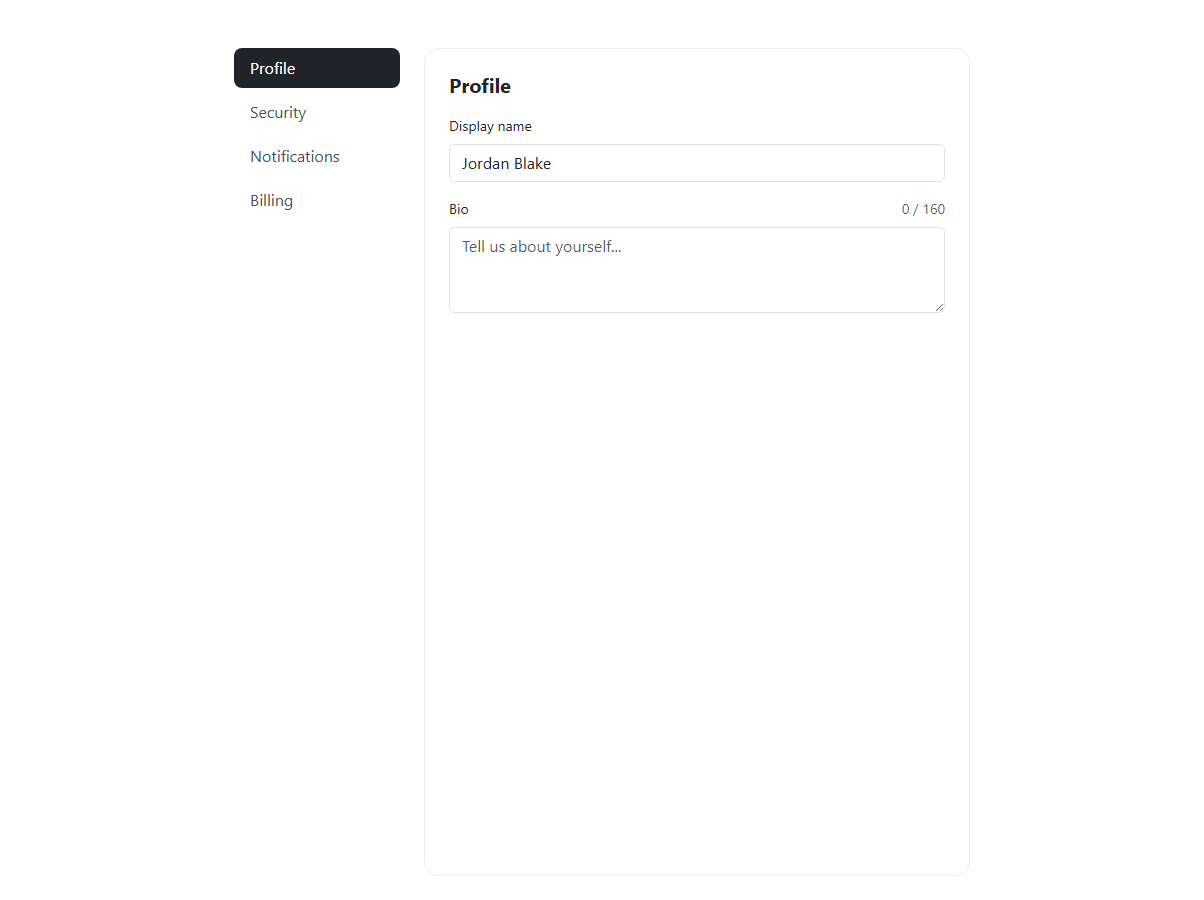
Settings pages live or die on whether the tab switching actually feels native, and this snippet uses Bootstrap's own tab machinery rather than hand-rolled show/hide logic — every pill button carries data-bs-toggle="pill" and a data-bs-target pointing at its matching .tab-pane, and Bootstrap's bundled JS (bootstrap.bundle.min.js, which includes Popper and the Tab plugin) handles the fade show active class choreography, ARIA role="tab"/role="tabpanel" wiring, and keyboard behavior automatically. The nav itself is a real nav flex-column nav-pills with aria-orientation="vertical", styled with a small additive .bst-card/#bstTabs .nav-link.active layer on top rather than a custom-built tab system.
The two pieces of actual custom JavaScript live inside two of the four panes. In Profile, a <textarea> with a real maxlength="160" attribute (so the browser itself enforces the hard limit) is paired with a live counter: an input event listener reads bio.value.length on every keystroke and writes "N / 160" into #bstBioCount, giving the user constant feedback on how much room is left without ever letting the count exceed the MAX_BIO constant, since the native maxlength attribute stops further typing at exactly 160 characters regardless of what the counter displays.
In Notifications, three real Bootstrap form-check form-switch toggles (Email, SMS, Marketing) each fire a change event that calls a shared updateSummary() function. That function checks each switch's .checked state, pushes a matching label into an on array, and joins it into a sentence like "You will receive: email, marketing." — or, when every switch is off, an explicit "All notifications are turned off" message rather than an empty or broken-looking string, which is the small edge case that a naive on.join(', ') alone would render as just a bare period.
The Security pane demonstrates plain password fields and an update button with no extra JS wired (deliberately left as a static form, since password changes belong behind a real backend call), and the Billing pane shows a static current-plan summary — both included to round out a realistic four-tab settings page rather than over-engineering panes that do not need dynamic behavior.
Because the tab switching is handled entirely by Bootstrap's own JS plugin rather than custom code, there is nothing to reimplement when porting to React, Vue, or Angular beyond re-initializing the Bootstrap Tab/Pill component (or using a framework-native tabs pattern instead); the bio counter and notification summary, being plain event listeners over a fixed set of ids, drop straight into a useEffect/onMounted/ngAfterViewInit block with refs replacing the getElementById calls.
Build with AI
Build, Understand, Optimize, and Extend It With AI
Ask an AI coding assistant like Claude to add a "Save changes" sticky footer that only enables once a field has been edited, or to persist the active tab in the URL hash so refreshing the page keeps the same tab open. It's also worth asking it to add form validation to the password fields.
Prompt to recreate it
Copy this into your AI assistant of choice to build the effect from scratch, or as a jumping-off point for your own variant:
Build a Bootstrap 5.3 settings page using the real Bootstrap CDN (bootstrap.min.css and bootstrap.bundle.min.js), not custom CSS made to resemble Bootstrap.

Requirements:
- A vertical Bootstrap nav-pills sidebar (Profile, Security, Notifications, Billing) wired to tab-content panes using real data-bs-toggle="pill" and data-bs-target attributes, relying on Bootstrap's own Tab plugin for switching, not custom JS.
- The Profile pane needs a bio textarea with a native maxlength of 160 characters and a live counter showing "current length / 160" that updates on every keystroke.
- The Notifications pane needs at least three Bootstrap form-switch toggles, with a summary sentence below them that updates live to list which notification types are currently enabled, and shows an explicit "all off" message when none are.
- Security and Billing panes should show realistic static content for those sections.
- All tab, textarea, and switch behavior should work with plain vanilla JavaScript beyond Bootstrap's own bundled plugin.
Want to tighten it up first? Run this prompt through the AI Prompt Studio to score it across 8 quality dimensions, catch anti-patterns, and tune the wording for Claude, ChatGPT, or Gemini before you paste it in.
Step by step
How to Use
- 1Load the snippetThe Profile tab is active and highlighted dark in the vertical pill nav, showing a display-name field and an empty bio textarea with a "0 / 160" counter.
- 2Type in the bio textareaThe counter next to "Bio" updates on every keystroke, and typing stops accepting new characters once you reach 160.
- 3Click the Security tabThe pane swaps with Bootstrap's fade transition to show password fields, and the Security pill becomes the highlighted active tab.
- 4Click the Notifications tab and toggle a switchThe summary sentence below the three switches updates immediately to reflect exactly which notification types are currently enabled.
- 5Turn all three notification switches offThe summary changes to "All notifications are turned off" instead of showing an empty or malformed sentence.
Real-world uses
Common Use Cases
Got questions?
Frequently Asked Questions
Each pill button has data-bs-toggle="pill" and a data-bs-target matching a .tab-pane id; Bootstrap's bundled JavaScript (which includes the Tab plugin) listens for clicks on those attributes and handles adding/removing the fade, show, and active classes and ARIA state — no custom tab-switching code was written.
No — the textarea has a native HTML maxlength="160" attribute, so the browser itself prevents typing or pasting beyond that limit; the JavaScript counter is purely a readout of the current length, not the enforcement mechanism.
It explicitly reads "All notifications are turned off" — the updateSummary() function checks for this case and returns that fixed message instead of joining an empty array, which would otherwise produce a blank or malformed sentence.
Yes — for the tabs, either keep Bootstrap's JS and initialize it in useEffect/onMounted/ngAfterViewInit, or replace it with your framework's native tab state; for the bio counter and notification summary, move the input/change listeners into the same lifecycle hooks using refs instead of getElementById, and clean up listeners on unmount if you attach them manually.
The nav-pills, tab-content, and form-switch classes are visual — you can restyle them with Tailwind, but you would need to either keep Bootstrap's JS loaded just for the Tab plugin's behavior or reimplement pane switching yourself, since Tailwind has no equivalent JS component.
No — the Security pane is intentionally left as static markup with no JavaScript wired to the Update password button, since a real implementation needs a server-side call; wire your own fetch/axios request to that button's click event.