Source Code
<div class="container py-5 d-flex justify-content-center">
  <div class="card bscp-card">
    <div class="card-body p-4">
      <h5 class="fw-bold mb-3">Choose a color</h5>

      <div class="d-flex flex-wrap gap-2 mb-3" id="bscpSwatches">
        <button type="button" class="bscp-swatch" style="background:#dc3545" data-color="#dc3545" aria-label="Red"></button>
        <button type="button" class="bscp-swatch" style="background:#fd7e14" data-color="#fd7e14" aria-label="Orange"></button>
        <button type="button" class="bscp-swatch" style="background:#ffc107" data-color="#ffc107" aria-label="Yellow"></button>
        <button type="button" class="bscp-swatch" style="background:#198754" data-color="#198754" aria-label="Green"></button>
        <button type="button" class="bscp-swatch" style="background:#0dcaf0" data-color="#0dcaf0" aria-label="Cyan"></button>
        <button type="button" class="bscp-swatch" style="background:#0d6efd" data-color="#0d6efd" aria-label="Blue"></button>
        <button type="button" class="bscp-swatch" style="background:#6f42c1" data-color="#6f42c1" aria-label="Purple"></button>
        <button type="button" class="bscp-swatch" style="background:#212529" data-color="#212529" aria-label="Black"></button>
        <label class="bscp-swatch bscp-custom" title="Custom color">
          <input type="color" id="bscpCustom" class="visually-hidden" value="#dc3545">
        </label>
      </div>

      <div class="bscp-preview mb-3" id="bscpPreview"></div>

      <div class="input-group">
        <span class="input-group-text">HEX</span>
        <input type="text" class="form-control" id="bscpHex" value="#DC3545" readonly>
        <button class="btn btn-outline-secondary" type="button" id="bscpCopy">Copy</button>
      </div>
    </div>
  </div>
</div>
.bscp-card { width: 380px; max-width: 100%; border: 1px solid #eceef1; border-radius: 14px; }
.bscp-swatch { width: 36px; height: 36px; border-radius: 8px; border: 2px solid transparent; padding: 0; cursor: pointer; }
.bscp-swatch.active { border-color: #212529; box-shadow: 0 0 0 2px #fff inset; }
.bscp-custom { background: conic-gradient(red, yellow, lime, cyan, blue, magenta, red); display: flex; align-items: center; justify-content: center; }
.bscp-preview { height: 90px; border-radius: 10px; border: 1px solid #eceef1; transition: background-color .15s ease; }const swatches = Array.from(document.querySelectorAll('.bscp-swatch[data-color]'));
const customInput = document.getElementById('bscpCustom');
const preview = document.getElementById('bscpPreview');
const hexField = document.getElementById('bscpHex');
const copyBtn = document.getElementById('bscpCopy');
function setColor(hex) {
const upper = hex.toUpperCase();
preview.style.backgroundColor = upper;
hexField.value = upper;
swatches.forEach(s => s.classList.toggle('active', s.dataset.color.toUpperCase() === upper));
}
swatches.forEach(swatch => {
swatch.addEventListener('click', () => {
setColor(swatch.dataset.color);
customInput.value = swatch.dataset.color;
});
});
customInput.addEventListener('input', () => {
setColor(customInput.value);
});
copyBtn.addEventListener('click', async () => {
const original = copyBtn.textContent;
try {
await navigator.clipboard.writeText(hexField.value);
copyBtn.textContent = 'Copied!';
} catch (err) {
// Clipboard API can throw in insecure contexts or without permission;
// fall back to a visible message instead of a silent failure.
copyBtn.textContent = 'Failed';
}
setTimeout(() => { copyBtn.textContent = original; }, 1500);
});
setColor('#dc3545');Learn Coding Visually
Learn to code with interactive, live-preview playgrounds — HTML, CSS, JavaScript, React & more.
 HTML Playground42 lessons · Click-based · Live preview
 CSS PlaygroundLearn CSS with a live editor
 JavaScript Playground60 lessons · DOM · Async · Canvas
 React PlaygroundLearn React with a live code editor
 GSAP PlaygroundLearn GSAP animation interactively
 SVG Playground44 lessons · shapes · paths · animation
 SCSS Playground45 lessons · Sass modules · tokens
 Tailwind PlaygroundLearn Tailwind CSS with a live editor
 Bootstrap 5 Playground50 lessons · live preview
Bootstrap Color Picker with Swatches — Free Snippet
Bootstrap Color Picker with Swatches · Forms · Plain HTML, CSS & JS · Live preview
What's included
Features
About this UI Snippet
Bootstrap Color Picker with Swatches — HTML, CSS & JavaScript
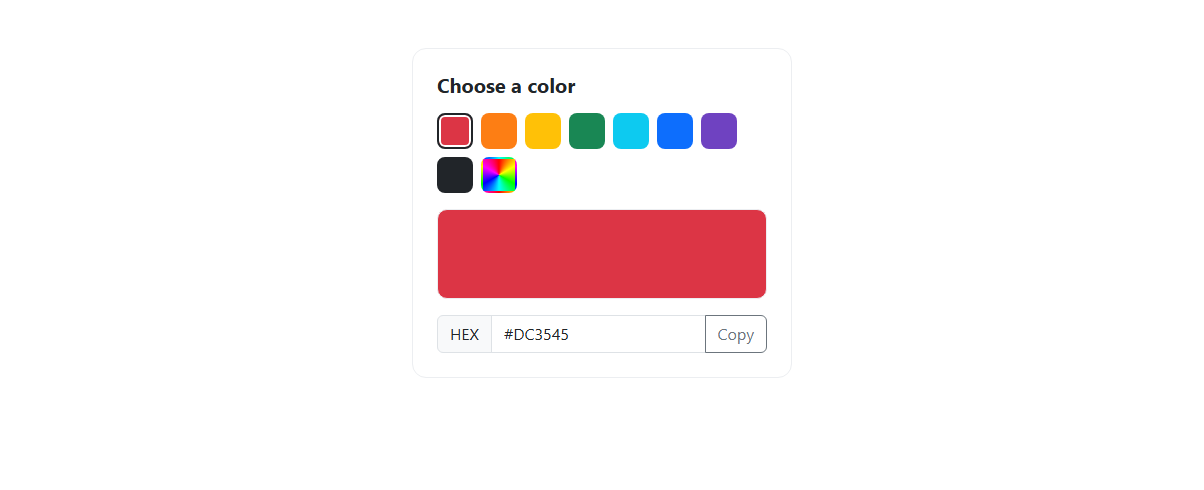
A color picker that only shows a native <input type="color"> forces users through the browser's own (often clunky) color dialog for every pick, even when they just want one of a handful of brand colors. This snippet solves that by putting eight preset .bscp-swatch buttons in front of a real <input type="color" id="bscpCustom">, so a single click covers the common case while the native picker stays available for anything outside the preset palette — both paths converge on the same setColor() function, so the preview box, the hex field, and the active-swatch highlight always stay in sync regardless of which input triggered the change.
Each swatch button carries its color in a data-color attribute rather than duplicating it in JavaScript; clicking a swatch reads that attribute, calls setColor(swatch.dataset.color), and also writes the value into the hidden customInput so the native color input's internal state doesn't silently drift out of sync with what's visually selected. The custom swatch itself is styled with a CSS conic-gradient(red, yellow, lime, cyan, blue, magenta, red) rainbow background so it visually reads as "pick anything" rather than looking like an eighth flat preset. Bootstrap's own visually-hidden utility class hides the raw <input type="color"> element while keeping it in the accessibility tree and fully clickable underneath its label, which is the standard accessible way to restyle a native color input without losing keyboard and screen-reader support.
setColor(hex) does three things every time it runs: it sets preview.style.backgroundColor, writes the uppercased hex string into the read-only #bscpHex field, and loops over every swatch toggling an active class based on a case-insensitive match against data-color — so the active border only appears on a swatch when its exact color is currently selected, and correctly disappears when a custom color is picked that doesn't match any preset.
The Copy button uses the real async Clipboard API (navigator.clipboard.writeText) wrapped in a try/catch, since that call can throw in an insecure (non-HTTPS) context or when clipboard permission is denied — a case a lot of copy-button implementations forget to handle. On success the button label swaps to "Copied!" and a setTimeout resets it back to "Copy" after 1.5 seconds; on failure it shows "Failed" instead, so the user always gets accurate feedback rather than a button that silently claims success.
A final call at the bottom of the script, setColor('#dc3545'), deliberately initializes the whole widget to a known state on load rather than leaving the preview box, hex field, and active-swatch highlight relying on whatever the browser happens to default an unset element to — the red swatch's button is marked active and the hex field reads "#DC3545" from the very first render, matching the initial inline styles already present in the markup so there's no flash of mismatched state between HTML and JavaScript.
Build with AI
Build, Understand, Optimize, and Extend It With AI
Ask an AI coding assistant like Claude to add a recently-used colors row that remembers the last five picks in localStorage, or to add RGB and HSL value displays alongside the hex field. It's also worth asking it to validate a manually typed hex value if you make the hex field editable.
Prompt to recreate it
Copy this into your AI assistant of choice to build the effect from scratch, or as a jumping-off point for your own variant:
Build a Bootstrap 5.3 color picker with preset swatches using the real Bootstrap CDN framework (bootstrap.min.css and bootstrap.bundle.min.js), not custom CSS made to resemble Bootstrap.

Requirements:
- A grid of at least eight preset color swatch buttons, each storing its color in a data-color attribute, plus one additional swatch that wraps a native input type="color" for custom color selection.
- Clicking any preset swatch or choosing a custom color must update a large preview box's background color and a read-only hex code text field, and must toggle an "active" highlight so only the matching swatch (if any) appears selected.
- A Copy button next to the hex field must copy the current hex value using the real async Clipboard API, wrapped in error handling, and show a temporary "Copied!" (or "Failed") label that reverts to "Copy" after roughly 1.5 seconds via setTimeout.
- The custom color swatch must be visually distinguishable from the flat preset swatches (e.g. a gradient background) so it reads as "pick any color."
Want to tighten it up first? Run this prompt through the AI Prompt Studio to score it across 8 quality dimensions, catch anti-patterns, and tune the wording for Claude, ChatGPT, or Gemini before you paste it in.
Step by step
How to Use
- 1Load the snippetA grid of eight color swatches plus a rainbow-gradient custom swatch appears above a preview box already showing red.
- 2Click the blue swatchThe preview box fills with blue, the hex field updates to "#0D6EFD", and a dark border highlights the blue swatch as active.
- 3Click the rainbow custom swatchThe browser's native color picker opens; choosing any color updates the preview and hex field instantly and removes the active border from every preset swatch.
- 4Click CopyThe button label changes to "Copied!" for 1.5 seconds, then reverts to "Copy" automatically.
- 5Check the hex fieldIt stays read-only and always mirrors exactly what is shown in the preview box, whichever input last changed the color.
Real-world uses
Common Use Cases
Got questions?
Frequently Asked Questions
Native color inputs render very differently across browsers and are hard to restyle consistently. Wrapping a visually-hidden input in a styled label lets the label carry the gradient swatch look while clicking it still opens the real native color picker.
Yes — track the selected hex value in component state (useState in React, a ref in Vue with onMounted, or a signal in Angular) instead of relying on DOM classList toggles, and bind each swatch's click and the color input's change event to update that state directly.
The writeText() call is wrapped in a try/catch specifically for this — if it throws, the button shows "Failed" for 1.5 seconds instead of silently doing nothing or throwing an uncaught error in the console.
Add another button.bscp-swatch element with a data-color attribute and matching background style inside #bscpSwatches — the existing click listener is attached via a loop over that selector, so no other JavaScript changes are needed.
Yes — replace the input-group, form-control, and card classes with Tailwind utilities, keep the inline data-color-driven swatch styling as-is, and the setColor() and clipboard logic need zero changes since neither depends on Bootstrap.
No, it is intentionally read-only — it exists to display and copy the currently selected color, not to accept typed hex input; add a text-input parsing path separately if you want users to type a hex code directly.