Source Code
<section class="bshero-section">
  <div class="container py-5">
    <div class="row align-items-center gy-4">
      <div class="col-lg-6 text-center text-lg-start">
        <span class="badge rounded-pill bshero-badge mb-3">New · v2.4 launched</span>
        <h1 class="bshero-title">Ship your product page in an afternoon.</h1>
        <p class="bshero-sub">A Bootstrap 5 hero section with a real, working email capture form — type an address, submit, and watch it get validated and added to the list below, no page reload.</p>
        <form id="bsheroForm" class="row g-2 justify-content-center justify-content-lg-start bshero-form" novalidate>
          <div class="col-sm-7">
            <input type="email" class="form-control form-control-lg" id="bsheroEmail" placeholder="you@company.com" required>
            <div class="invalid-feedback" id="bsheroError">Enter a valid email address.</div>
          </div>
          <div class="col-sm-auto">
            <button class="btn btn-light btn-lg fw-bold text-nowrap" type="submit">Get early access</button>
          </div>
        </form>
        <div class="bshero-signups" id="bsheroSignups">
          <span class="text-white-50 small">No signups yet — be the first.</span>
        </div>
      </div>
      <div class="col-lg-6">
        <div class="bshero-card">
          <div class="bshero-card-dots"><span></span><span></span><span></span></div>
          <div class="bshero-card-body">
            <div class="bshero-stat">
              <div class="bshero-stat-label">Weekly signups</div>
              <div class="bshero-stat-value" id="bsheroCount">0</div>
            </div>
            <div class="bshero-bars">
              <div class="bshero-bar" style="--h:40%"></div>
              <div class="bshero-bar" style="--h:65%"></div>
              <div class="bshero-bar" style="--h:52%"></div>
              <div class="bshero-bar" style="--h:80%"></div>
              <div class="bshero-bar bshero-bar-active" style="--h:95%"></div>
            </div>
          </div>
        </div>
      </div>
    </div>
  </div>
</section>
body { margin: 0; }
.bshero-section {
background: linear-gradient(135deg, #4f46e5 0%, #7c3aed 50%, #db2777 100%);
color: #fff;
}
.bshero-badge {
background: rgba(255,255,255,.16);
color: #fff;
font-size: 12px;
font-weight: 600;
padding: 6px 14px;
}
.bshero-title {
font-size: clamp(1.8rem, 1.4rem + 1.5vw, 2.6rem);
font-weight: 800;
letter-spacing: -0.02em;
line-height: 1.15;
margin-bottom: 14px;
}
.bshero-sub {
color: rgba(255,255,255,.85);
font-size: 15px;
line-height: 1.65;
margin-bottom: 22px;
max-width: 480px;
}
.bshero-form .form-control {
border: none;
}
.bshero-form .form-control.is-invalid { box-shadow: 0 0 0 3px rgba(220,38,38,.35); }
.bshero-signups {
margin-top: 14px;
min-height: 20px;
font-size: 13px;
}
.bshero-signups .badge { margin-right: 6px; }
.bshero-card {
background: rgba(255,255,255,.1);
border: 1px solid rgba(255,255,255,.18);
border-radius: 16px;
backdrop-filter: blur(6px);
overflow: hidden;
}
.bshero-card-dots {
display: flex;
gap: 6px;
padding: 12px 16px;
border-bottom: 1px solid rgba(255,255,255,.14);
}
.bshero-card-dots span {
width: 9px; height: 9px; border-radius: 50%;
background: rgba(255,255,255,.35);
}
.bshero-card-body { padding: 26px; }
.bshero-stat-label { font-size: 12px; color: rgba(255,255,255,.7); margin-bottom: 4px; }
.bshero-stat-value { font-size: 32px; font-weight: 800; margin-bottom: 20px; transition: transform .15s ease; }
.bshero-stat-value.bshero-pop { transform: scale(1.12); }
.bshero-bars {
display: flex;
align-items: flex-end;
gap: 10px;
height: 100px;
}
.bshero-bar {
flex: 1;
height: var(--h);
background: rgba(255,255,255,.28);
border-radius: 5px 5px 0 0;
transition: height .3s ease, background .3s ease;
}
.bshero-bar-active { background: #fff; }const form = document.getElementById('bsheroForm');
const emailInput = document.getElementById('bsheroEmail');
const signupsEl = document.getElementById('bsheroSignups');
const countEl = document.getElementById('bsheroCount');
const lastBar = document.querySelector('.bshero-bar-active');
let count = 0;
const added = [];
form.addEventListener('submit', e => {
e.preventDefault();
const value = emailInput.value.trim();
if (!emailInput.checkValidity()) {
emailInput.classList.add('is-invalid');
return;
}
emailInput.classList.remove('is-invalid');
count++;
added.unshift(value);
countEl.textContent = count;
countEl.classList.add('bshero-pop');
setTimeout(() => countEl.classList.remove('bshero-pop'), 200);
// Grow the live bar a little with each signup, capped so it never
// overflows the chart — a small visual payoff tied to a real action.
const currentH = parseFloat(lastBar.style.getPropertyValue('--h'));
lastBar.style.setProperty('--h', Math.min(100, currentH + 3) + '%');
signupsEl.innerHTML = added.slice(0, 4).map(e =>
'<span class="badge bg-light text-dark">' + e + '</span>'
).join('');
form.reset();
});
emailInput.addEventListener('input', () => emailInput.classList.remove('is-invalid'));Learn Coding Visually
Learn to code with interactive, live-preview playgrounds — HTML, CSS, JavaScript, React & more.
 HTML Playground42 lessons · Click-based · Live preview
 CSS PlaygroundLearn CSS with a live editor
 JavaScript Playground60 lessons · DOM · Async · Canvas
 React PlaygroundLearn React with a live code editor
 GSAP PlaygroundLearn GSAP animation interactively
 SVG Playground44 lessons · shapes · paths · animation
 SCSS Playground45 lessons · Sass modules · tokens
 Tailwind PlaygroundLearn Tailwind CSS with a live editor
 Bootstrap 5 Playground50 lessons · live preview
Bootstrap Hero Section with Gradient Background — Free Snippet
Bootstrap Hero Section with Gradient Background · Heroes · Plain HTML, CSS & JS · Live preview
What's included
Features
About this UI Snippet
Bootstrap Hero Section with Gradient Background — HTML, CSS & JavaScript
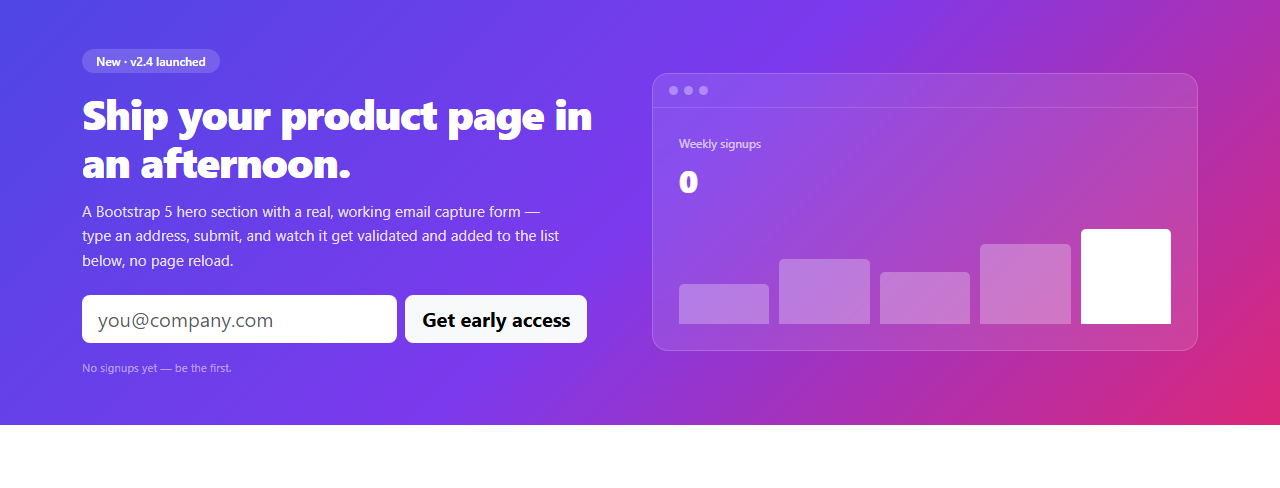
A landing page hero has one job: get a visitor to take the first step, usually entering an email address or clicking a primary CTA. This snippet builds that hero as a real Bootstrap 5.3 layout — a two-column row/col-lg-6 grid, Bootstrap's own form controls and validation classes, loaded from the actual Bootstrap CDN — with a genuinely working email capture form on the left and a live, animating stat card on the right, instead of static placeholder numbers.
Real validation, not a decorative form
The form is a real <form> with an email input marked required. On submit, emailInput.checkValidity() runs Bootstrap-compatible native HTML5 validation — an invalid or empty address adds Bootstrap's .is-invalid class (which drives both a red focus ring and, if you add a sibling .invalid-feedback, an inline error message) and the submission stops there. A valid address clears any error state, gets added to a running list rendered as badges under the form, and bumps a signup counter with a small scale "pop" animation — a genuine confirmation that something happened, not just an emptied input box.
The stat card is driven by the same submit event
Rather than a chart library, the bar chart on the right is five plain divs sized with a CSS custom property (--h) controlling height via inline style. Each successful signup nudges the last (highlighted) bar's height up slightly, capped at 100% — a small, honest piece of "your action changed something" feedback rather than a chart that's purely decorative.
The gradient and glass card
The background is a three-stop linear-gradient (indigo → violet → pink) applied to the whole <section>, and the stat card on the right uses backdrop-filter: blur(6px) over a translucent white background — a common combination for making a card read as "floating" above a colored gradient rather than sitting flatly on top of it.
Build with AI
Build, Understand, Optimize, and Extend It With AI
Hand this snippet's HTML, CSS, and JS to an AI coding assistant like Claude and ask it to wire the form's submit handler to a real API endpoint with fetch(), including a loading state on the button and an error state for a failed request — versus the current front-end-only array. It's also a good snippet to ask the assistant to extract the five-bar chart into its own reusable component that accepts a live data array, or to add localStorage persistence so the signup list and counter survive a page reload.
Prompt to recreate it
Copy this into your AI assistant of choice to build the effect from scratch, or as a jumping-off point for your own variant:
Build a Bootstrap 5.3 hero section for a SaaS landing page, using the real Bootstrap CDN framework (bootstrap.min.css and bootstrap.bundle.min.js), not custom CSS made to resemble Bootstrap.

Requirements:
- A two-column layout using Bootstrap's grid (row / col-lg-6) with a colorful CSS linear-gradient background across the full section, white text, a headline, a supporting paragraph, and an email-capture form on the left; a glassmorphism-style stat card with a small bar chart on the right.
- The email form must use a real HTML5 email input with the required attribute, and its submit handler must call the input's native checkValidity() — an invalid or empty submission should add Bootstrap's is-invalid class and stop, not silently succeed.
- A valid, successful submission must: add the submitted email to a visible list rendered as Bootstrap badges, increment a counter with a brief scale animation, and slightly grow the tallest bar in the stat card's chart (implemented with plain divs sized by a CSS custom property, not a charting library).
- The stat card should use backdrop-filter for a frosted-glass effect over the gradient background.
- The whole section must be responsive, stacking to a single column below Bootstrap's lg breakpoint using Bootstrap's grid classes alone (no custom media queries needed for the stacking behavior).
Want to tighten it up first? Run this prompt through the AI Prompt Studio to score it across 8 quality dimensions, catch anti-patterns, and tune the wording for Claude, ChatGPT, or Gemini before you paste it in.
Step by step
How to Use
- 1Load the snippetClick "Bootstrap Hero Section with Gradient Background" in the sidebar Library tab. The preview loads with a zero-signup stat card.
- 2Submit an invalid emailType something that isn't a valid email (or leave it blank) and click "Get early access" — the input gets a red Bootstrap invalid state and the form does not submit.
- 3Submit a real emailType a properly formatted address and submit — it appears as a badge below the form, the counter increments with a pop animation, and the highlighted bar in the stat card grows slightly.
- 4Submit a few moreRepeat with different addresses to watch the signup list, counter, and bar chart all update live from real form submissions.
- 5Restyle the gradientIn the CSS panel, edit the linear-gradient on .bshero-section to swap in your own brand colors.
- 6Export in your formatClick "HTML" for a standalone file, "JSX" for React, or "Tailwind" for React + Tailwind CSS.
Real-world uses
Common Use Cases
Got questions?
Frequently Asked Questions
It's real. The submit handler calls the input's native checkValidity(), which enforces the browser's built-in email format rules. An invalid or empty address is rejected with Bootstrap's is-invalid styling; only a properly formatted address is accepted and added to the signup list.
Nowhere outside the page — this is a front-end demo, so submissions are held in a plain JavaScript array and rendered as badges. Wire the submit handler to your own API endpoint (fetch/POST) to actually collect signups.
Each bar is a div whose height is set via a CSS custom property (--h) read by its own height: var(--h) rule. The highlighted bar's --h value is nudged upward by a few percent on each successful signup, with a CSS transition producing the smooth grow animation.
Yes — edit the linear-gradient() value on .bshero-section in the CSS panel. Any valid CSS gradient works; keep at least two stops with enough contrast for the white text to stay readable.
Yes — it uses Bootstrap's standard row/col-lg-6 grid, so the two columns stack vertically on screens narrower than Bootstrap's lg breakpoint (992px), with the copy and form centered.
Yes — add a second Bootstrap button (e.g. btn btn-outline-light) inside or beside the form row; it won't interfere with the existing submit handler as long as it doesn't have type="submit" unless you want it to trigger the same validation.