Source Code
<div class="bscs-wrap d-flex flex-column align-items-center justify-content-center text-center text-white py-5">
  <span class="badge bg-light text-dark mb-3">Launching Soon</span>
  <h1 class="fw-bold mb-2">Something great is on the way</h1>
  <p class="text-white-50 mb-4">Be the first to know when we launch. Leave your email below.</p>

  <div class="d-flex gap-3 mb-4" id="bscsBoxes">
    <div class="text-center">
      <div class="bscs-box" id="bscsDays">00</div>
      <div class="small text-white-50">Days</div>
    </div>
    <div class="text-center">
      <div class="bscs-box" id="bscsHours">00</div>
      <div class="small text-white-50">Hours</div>
    </div>
    <div class="text-center">
      <div class="bscs-box" id="bscsMinutes">00</div>
      <div class="small text-white-50">Minutes</div>
    </div>
    <div class="text-center">
      <div class="bscs-box" id="bscsSeconds">00</div>
      <div class="small text-white-50">Seconds</div>
    </div>
  </div>

  <form class="bscs-form w-100" id="bscsForm">
    <div class="input-group">
      <input type="email" class="form-control" id="bscsEmail" placeholder="you@example.com" required>
      <button class="btn btn-primary" type="submit">Notify Me</button>
    </div>
    <div class="small text-danger mt-2 d-none" id="bscsError">Please enter a valid email address.</div>
  </form>

  <div class="alert alert-success bscs-form w-100 d-none" id="bscsSuccess">You're on the list! We'll email you at launch.</div>
</div>
.bscs-wrap { min-height: 480px; background: linear-gradient(135deg, #1e1b4b, #4c1d95, #0f172a); border-radius: 14px; padding-left: 20px; padding-right: 20px; }
.bscs-box { min-width: 60px; padding: 10px 6px; background: rgba(255,255,255,.12); border-radius: 8px; font-weight: 700; font-size: 1.3rem; font-variant-numeric: tabular-nums; }
.bscs-form { max-width: 380px; }const TARGET = new Date(Date.now() + (12 * 24 * 60 * 60 + 6 * 60 * 60) * 1000).getTime();
const boxes = {
days: document.getElementById('bscsDays'),
hours: document.getElementById('bscsHours'),
minutes: document.getElementById('bscsMinutes'),
seconds: document.getElementById('bscsSeconds'),
};
function pad(n) {
return String(n).padStart(2, '0');
}
function tick() {
const remaining = Math.max(0, TARGET - Date.now());
const totalSeconds = Math.floor(remaining / 1000);
boxes.days.textContent = pad(Math.floor(totalSeconds / 86400));
boxes.hours.textContent = pad(Math.floor((totalSeconds % 86400) / 3600));
boxes.minutes.textContent = pad(Math.floor((totalSeconds % 3600) / 60));
boxes.seconds.textContent = pad(totalSeconds % 60);
if (remaining <= 0) clearInterval(intervalId);
}
tick();
const intervalId = setInterval(tick, 1000);
const form = document.getElementById('bscsForm');
const emailInput = document.getElementById('bscsEmail');
const errorMsg = document.getElementById('bscsError');
const success = document.getElementById('bscsSuccess');
function isValidEmail(value) {
return /^[^\s@]+@[^\s@]+\.[^\s@]+$/.test(value);
}
form.addEventListener('submit', e => {
e.preventDefault();
const value = emailInput.value.trim();
if (!isValidEmail(value)) {
errorMsg.classList.remove('d-none');
emailInput.classList.add('is-invalid');
return;
}
errorMsg.classList.add('d-none');
emailInput.classList.remove('is-invalid');
form.classList.add('d-none');
success.classList.remove('d-none');
});
emailInput.addEventListener('input', () => {
if (emailInput.classList.contains('is-invalid') && isValidEmail(emailInput.value.trim())) {
emailInput.classList.remove('is-invalid');
errorMsg.classList.add('d-none');
}
});Learn Coding Visually
Learn to code with interactive, live-preview playgrounds — HTML, CSS, JavaScript, React & more.
 HTML Playground42 lessons · Click-based · Live preview
 CSS PlaygroundLearn CSS with a live editor
 JavaScript Playground60 lessons · DOM · Async · Canvas
 React PlaygroundLearn React with a live code editor
 GSAP PlaygroundLearn GSAP animation interactively
 SVG Playground44 lessons · shapes · paths · animation
 SCSS Playground45 lessons · Sass modules · tokens
 Tailwind PlaygroundLearn Tailwind CSS with a live editor
 Bootstrap 5 Playground50 lessons · live preview
Bootstrap Coming Soon Page — Free HTML CSS JS Snippet
Bootstrap Coming Soon Page · Layouts · Plain HTML, CSS & JS · Live preview
What's included
Features
About this UI Snippet
Bootstrap Coming Soon Page — HTML, CSS & JavaScript
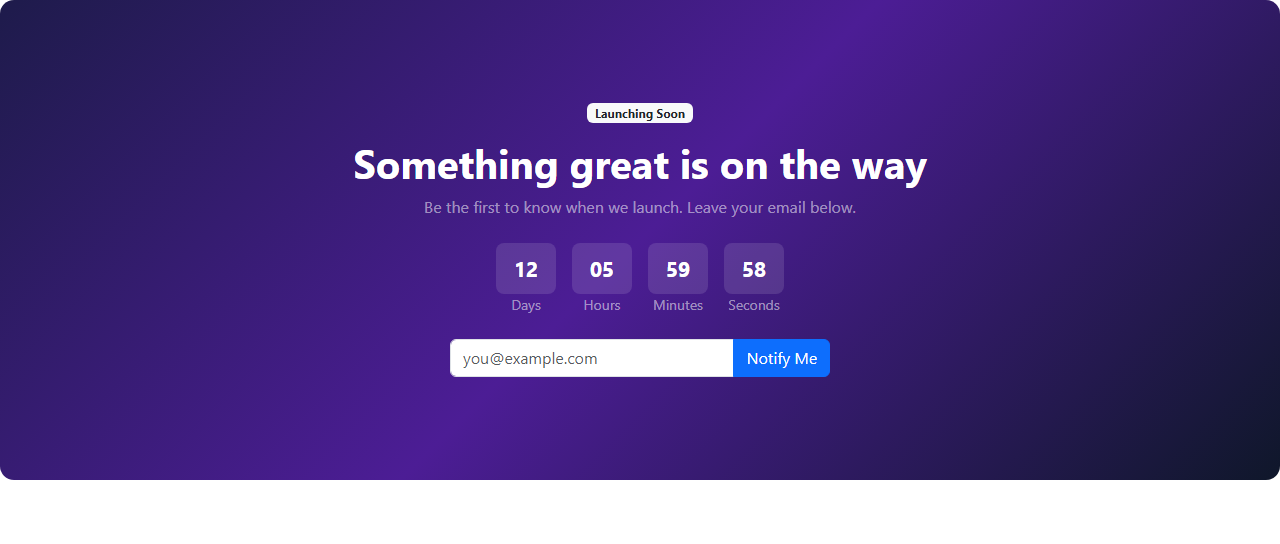
A coming-soon page needs to do two independent jobs correctly at once: count down accurately, and turn a raw email submission into confirmed interest without a real backend to lean on for validation. This snippet's .bscs-wrap sets the tone with a CSS linear-gradient(135deg, #1e1b4b, #4c1d95, #0f172a) sweeping from deep indigo through violet to near-black, layered under real Bootstrap text and flex utilities (d-flex flex-column align-items-center justify-content-center text-center text-white) so the dark background and white text stay correctly paired without fighting Bootstrap's default text colors.
The countdown reuses the drift-free pattern of computing a fixed TARGET timestamp once, then having tick() recalculate remaining as Math.max(0, TARGET - Date.now()) every second via setInterval. The Math.max(0, ...) clamp is a deliberate small addition here: it guarantees the four .bscs-box numbers never display a negative time value in the brief window after the target passes but before the interval is cleared, instead settling cleanly at 00 across all four units. Each unit is zero-padded with padStart(2, '0') and styled with font-variant-numeric: tabular-nums so the digits hold a fixed width and don't visibly jitter as they tick down once per second.
Email validation is handled by a small isValidEmail() regular expression — /^[^\s@]+@[^\s@]+\.[^\s@]+$/ — checking for a non-whitespace, non-@ local part, an @ symbol, a domain, a literal dot, and a top-level domain segment. It's intentionally a pragmatic check rather than a fully RFC-5322-compliant one, which is the right tradeoff for a client-side pre-check whose real job is to catch obviously malformed input (like a missing @ or domain) before form submission, not to be the final authority on email validity. On an invalid submission, the input gets Bootstrap's is-invalid class and a red error message is revealed; a live input listener then clears both the moment the email becomes valid, so the error doesn't linger after the user has already fixed their mistake — a common rough edge in forms that only re-validate on submit.
On a valid submission, the entire #bscsForm element is hidden and a real Bootstrap alert alert-success confirmation swaps into its place, sharing the same .bscs-form max-width class so the layout doesn't visibly shift width during the transition — a small but easy-to-miss detail when swapping between two differently-shaped elements in the same slot.
The live re-validation listener on emailInput only removes the error state — it deliberately never re-adds is-invalid while the user is still typing. Errors are only ever (re)introduced on an actual form submit, so a user isn't shown a red outline mid-keystroke for a partially typed address that simply hasn't reached a valid shape yet.
Build with AI
Build, Understand, Optimize, and Extend It With AI
Ask an AI coding assistant like Claude to add social share buttons beneath the confirmation message, or to persist the submitted state in localStorage so a returning visitor sees the confirmation immediately instead of the form again. It's also worth asking it to add a subtle particle or gradient animation to the background.
Prompt to recreate it
Copy this into your AI assistant of choice to build the effect from scratch, or as a jumping-off point for your own variant:
Build a Bootstrap 5.3 coming-soon page using the real Bootstrap CDN framework (bootstrap.min.css and bootstrap.bundle.min.js), not custom CSS made to resemble Bootstrap.

Requirements:
- A centered dark-gradient background panel with a badge, headline, subtext, a four-box live countdown (Days/Hours/Minutes/Seconds) counting down to a fixed target timestamp, and an email capture form with a real Bootstrap input-group.
- The countdown must be recalculated every second from the current time versus a fixed target (not decremented from a stored counter) so it cannot drift, and must clamp at zero rather than showing negative values once the target passes.
- The email form must validate the entered address with a reasonable regular expression on submit, showing a Bootstrap is-invalid state and an inline error message for a malformed address, and must clear that error live as soon as the user corrects it (not only on the next submit).
- On a valid submission, the form must be replaced by a real Bootstrap alert-success confirmation message, matching the form's width so the layout doesn't visibly shift.
Want to tighten it up first? Run this prompt through the AI Prompt Studio to score it across 8 quality dimensions, catch anti-patterns, and tune the wording for Claude, ChatGPT, or Gemini before you paste it in.
Step by step
How to Use
- 1Load the snippetA dark gradient panel appears with a "Launching Soon" badge, a headline, four countdown boxes (~12 days), and an email input with a "Notify Me" button.
- 2Watch the Seconds boxIt ticks down once per second in real time, rolling Minutes down whenever it wraps past zero.
- 3Submit the form with an invalid email like "test"The input outlines in red and a message reads "Please enter a valid email address" directly beneath the form.
- 4Start typing a valid domain, like "test@example.com"The red outline and error message disappear automatically as soon as the email becomes valid, without needing to resubmit.
- 5Submit the now-valid emailThe entire form disappears and is replaced by a green confirmation box reading "You're on the list! We'll email you at launch."
Real-world uses
Common Use Cases
Got questions?
Frequently Asked Questions
No, this is a front-end-only demo — submitting a valid email just swaps the form for a confirmation message in the browser. Wire the form's submit handler to a real API call (e.g. a fetch POST to your mailing list service) for production use.
It uses a pragmatic regular expression checking for a local part, an @ symbol, a domain, and a top-level domain segment — enough to catch obviously malformed input like a missing @ or dot, though not a full RFC-5322-compliant validator. Pair it with real server-side validation for production.
Yes — move the countdown interval into useEffect with cleanup (React), onMounted/onUnmounted (Vue), or ngOnInit/ngOnDestroy (Angular), and track submitted (boolean) and email in component state instead of toggling classList and swapping element visibility directly.
No — tick() clamps remaining time with Math.max(0, TARGET - Date.now()), so once the target timestamp passes, all four boxes settle at "00" instead of computing negative day, hour, minute, or second values.
A live input event listener re-checks validity on every keystroke and automatically removes the red is-invalid outline and error message the moment the value passes validation, without requiring the form to be resubmitted first.
Replace the TARGET constant's relative Date.now()-based offset with a fixed date, for example new Date('2026-12-01T00:00:00Z').getTime(), so the countdown targets an exact real-world launch moment instead of a fixed duration from page load.
Yes — replace the input-group, alert-success, and badge classes with Tailwind utilities for the form, confirmation box, and pill, and keep the tick() countdown loop and isValidEmail() regex completely unchanged, since neither depends on any Bootstrap class.