Source Code
<div class="container py-5 d-flex justify-content-center">
  <div class="text-center bsmaint-card">
    <div class="bsmaint-icon mb-3">
      <svg xmlns="http://www.w3.org/2000/svg" width="56" height="56" viewBox="0 0 24 24" fill="none" stroke="currentColor" stroke-width="1.6" stroke-linecap="round" stroke-linejoin="round">
        <path d="M14.7 6.3a4 4 0 0 1-5.6 5.6L3 18l3 3 6.1-6.1a4 4 0 0 1 5.6-5.6l-2.1 2.1-2-2z"></path>
      </svg>
    </div>
    <h2 class="fw-bold mb-2">We'll be right back</h2>
    <p class="text-muted mb-4">Our site is currently undergoing scheduled maintenance. Thanks for your patience — we're making things better.</p>

    <div class="d-flex justify-content-center gap-3 mb-4" id="bsmaintCountdown">
      <div class="bsmaint-unit"><div class="bsmaint-num" id="bsmaintDays">00</div><div class="bsmaint-label">Days</div></div>
      <div class="bsmaint-unit"><div class="bsmaint-num" id="bsmaintHours">00</div><div class="bsmaint-label">Hours</div></div>
      <div class="bsmaint-unit"><div class="bsmaint-num" id="bsmaintMins">00</div><div class="bsmaint-label">Mins</div></div>
      <div class="bsmaint-unit"><div class="bsmaint-num" id="bsmaintSecs">00</div><div class="bsmaint-label">Secs</div></div>
    </div>

    <div id="bsmaintFormWrap">
      <form id="bsmaintForm" class="d-flex justify-content-center" novalidate>
        <div class="input-group bsmaint-inputgroup">
          <input type="email" class="form-control" id="bsmaintEmail" placeholder="you@example.com" aria-label="Email address">
          <button class="btn btn-dark" type="submit">Notify me</button>
        </div>
      </form>
      <div id="bsmaintError" class="text-danger small mt-2" style="display:none;">Please enter a valid email address.</div>
    </div>

    <div id="bsmaintSuccess" class="alert alert-success d-inline-block mt-2" style="display:none;">
      Thanks! We'll email <strong id="bsmaintEmailEcho"></strong> the moment we're back online.
    </div>
  </div>
</div>
.bsmaint-card { max-width: 520px; }
.bsmaint-icon { color: #212529; }
.bsmaint-unit { min-width: 64px; }
.bsmaint-num { font-size: 1.75rem; font-weight: 700; background: #f1f3f5; border-radius: 10px; padding: 8px 0; }
.bsmaint-label { font-size: 0.72rem; text-transform: uppercase; letter-spacing: 0.06em; color: #868e96; margin-top: 4px; }
.bsmaint-inputgroup { max-width: 380px; }// Target time is computed once at load: 6 hours from the moment the page opens.
const backOnline = new Date(Date.now() + 6 * 60 * 60 * 1000);
const daysEl = document.getElementById('bsmaintDays');
const hoursEl = document.getElementById('bsmaintHours');
const minsEl = document.getElementById('bsmaintMins');
const secsEl = document.getElementById('bsmaintSecs');
function pad(n) { return String(n).padStart(2, '0'); }
function tick() {
const diff = backOnline.getTime() - Date.now();
if (diff <= 0) {
daysEl.textContent = hoursEl.textContent = minsEl.textContent = secsEl.textContent = '00';
clearInterval(timer);
return;
}
const totalSeconds = Math.floor(diff / 1000);
const days = Math.floor(totalSeconds / 86400);
const hours = Math.floor((totalSeconds % 86400) / 3600);
const mins = Math.floor((totalSeconds % 3600) / 60);
const secs = totalSeconds % 60;
daysEl.textContent = pad(days);
hoursEl.textContent = pad(hours);
minsEl.textContent = pad(mins);
secsEl.textContent = pad(secs);
}
tick();
const timer = setInterval(tick, 1000);
const form = document.getElementById('bsmaintForm');
const emailInput = document.getElementById('bsmaintEmail');
const errorEl = document.getElementById('bsmaintError');
const formWrap = document.getElementById('bsmaintFormWrap');
const successEl = document.getElementById('bsmaintSuccess');
const emailEcho = document.getElementById('bsmaintEmailEcho');
const EMAIL_RE = /^[^\s@]+@[^\s@]+\.[^\s@]+$/;
form.addEventListener('submit', (e) => {
e.preventDefault();
const value = emailInput.value.trim();
if (!EMAIL_RE.test(value)) {
errorEl.style.display = 'block';
emailInput.classList.add('is-invalid');
return;
}
errorEl.style.display = 'none';
emailInput.classList.remove('is-invalid');
emailEcho.textContent = value;
formWrap.style.display = 'none';
successEl.style.display = 'inline-block';
});
emailInput.addEventListener('input', () => {
if (emailInput.classList.contains('is-invalid') && EMAIL_RE.test(emailInput.value.trim())) {
emailInput.classList.remove('is-invalid');
errorEl.style.display = 'none';
}
});Learn Coding Visually
Learn to code with interactive, live-preview playgrounds — HTML, CSS, JavaScript, React & more.
 HTML Playground42 lessons · Click-based · Live preview
 CSS PlaygroundLearn CSS with a live editor
 JavaScript Playground60 lessons · DOM · Async · Canvas
 React PlaygroundLearn React with a live code editor
 GSAP PlaygroundLearn GSAP animation interactively
 SVG Playground44 lessons · shapes · paths · animation
 SCSS Playground45 lessons · Sass modules · tokens
 Tailwind PlaygroundLearn Tailwind CSS with a live editor
 Bootstrap 5 Playground50 lessons · live preview
Bootstrap Maintenance Page — Free HTML CSS JS Snippet
Bootstrap Maintenance Page · Layouts · Plain HTML, CSS & JS · Live preview
What's included
Features
About this UI Snippet
Bootstrap Maintenance Page — HTML, CSS & JavaScript
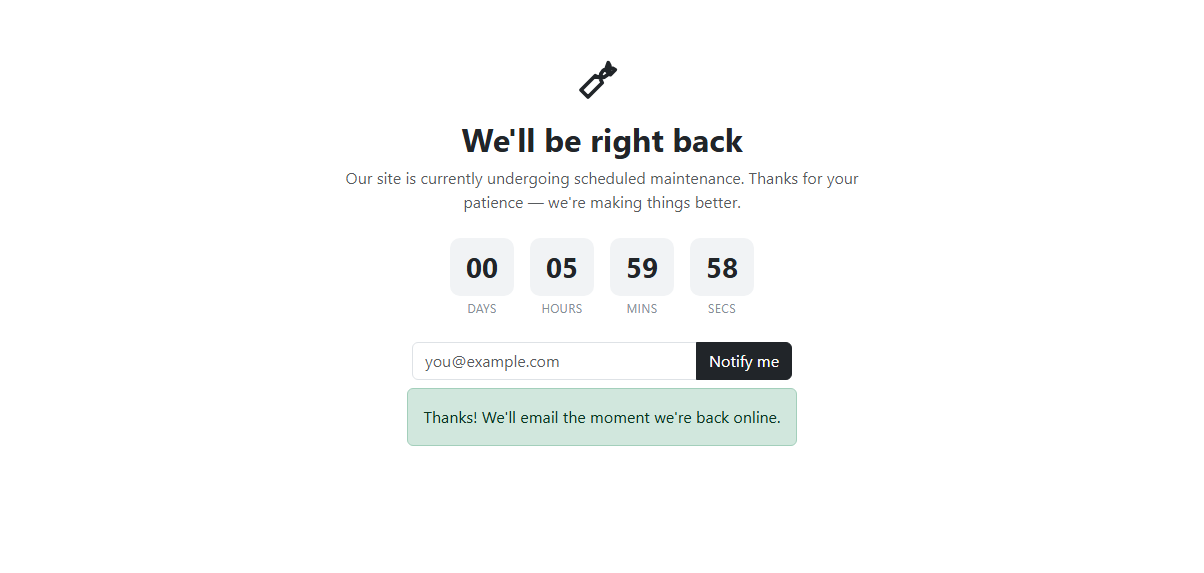
A maintenance page needs to do two jobs at once: reassure the visitor nothing is broken, and give them a reason to come back. This snippet builds both on top of real Bootstrap 5.3 markup — a centered .text-center card, an inline SVG wrench icon (no icon-font dependency), and a Bootstrap input-group combining an <input type="email"> with a dark submit button.
The countdown is computed, not hardcoded. On load, backOnline is set once to Date.now() + 6 * 60 * 60 * 1000 — six hours out — captured as a fixed timestamp rather than recalculated every tick, which matters: if you instead recomputed "6 hours from now" inside the interval, the countdown would never move. A tick() function run immediately and then every second via setInterval subtracts the current time from that fixed target, converts the millisecond difference into whole days, hours, minutes and seconds using integer division and modulo against 86400, 3600 and 60, and writes each zero-padded value (via a small pad() helper using padStart) into the four .bsmaint-num boxes. When the difference reaches zero or below, the digits are pinned to 00 and the interval is cleared with clearInterval(timer) so it does not keep ticking into negative numbers — a real edge case, since without that guard the display would show garbage once the target time passed while the tab stayed open.
The "Notify me" form intercepts its own submit event with e.preventDefault() so nothing actually posts anywhere, then validates the typed email against EMAIL_RE, a pragmatic /^[^\s@]+@[^\s@]+\.[^\s@]+$/ pattern. A failed check adds Bootstrap's is-invalid class to the input and reveals a small text-danger message below the field; a passing check hides both, writes the entered address into a <strong> echo inside a Bootstrap alert-success, hides the form wrapper entirely, and shows that confirmation in its place. A second input listener clears the invalid state the moment the user fixes the address, rather than waiting for another submit attempt, which is the small detail that keeps the form from feeling stuck in an error state.
Because every element is addressed by plain id selectors and the logic runs from a single top-level script, the whole thing drops into a React useEffect, a Vue onMounted, or an Angular ngAfterViewInit with only the timer's cleanup needing extra care — clearing the interval on unmount to avoid a state update after the component is gone. Restyling with Tailwind utility classes instead of Bootstrap's card and input-group primitives requires no change to the JavaScript at all, since none of the logic queries a Bootstrap-specific class name; it only reads plain ids like bsmaintForm and bsmaintEmail, which stay stable regardless of which design system paints the surrounding chrome.
Build with AI
Build, Understand, Optimize, and Extend It With AI
Ask an AI coding assistant like Claude to add a progress bar that fills as the countdown approaches zero, or to persist the target timestamp in localStorage so a page refresh does not reset the six-hour window. It is also worth asking it to wire the notify form to a real email API with a loading spinner on the submit button.
Prompt to recreate it
Copy this into your AI assistant of choice to build the effect from scratch, or as a jumping-off point for your own variant:
Build a Bootstrap 5.3 maintenance page using the real Bootstrap CDN (bootstrap.min.css and bootstrap.bundle.min.js), not custom CSS made to resemble Bootstrap.

Requirements:
- A centered card with an inline SVG icon, a heading, and a short message.
- A live countdown made of four boxes (Days, Hours, Mins, Secs) counting down to a fixed target time computed once on load as six hours from now, updated every second via setInterval, and halting at 00 instead of going negative once it reaches zero.
- An email-capture form using a Bootstrap input-group with an email input and a submit button. On submit, prevent the default form action, validate the email with a regex, and show a Bootstrap is-invalid state plus an error message on failure.
- On a valid submission, hide the form and show a Bootstrap alert-success confirmation that echoes back the submitted email address.
- Clearing the invalid state live as the user corrects the email, without requiring another submit click.
Want to tighten it up first? Run this prompt through the AI Prompt Studio to score it across 8 quality dimensions, catch anti-patterns, and tune the wording for Claude, ChatGPT, or Gemini before you paste it in.
Step by step
How to Use
- 1Load the snippetA wrench icon, a headline, and a live four-box countdown (Days/Hours/Mins/Secs) appear immediately, already counting down from six hours.
- 2Watch the countdownThe seconds box decrements every second; once minutes roll over to 60 the minutes box increments and seconds resets, exactly like a real clock.
- 3Submit an invalid emailTyping "abc" and clicking Notify me shows a red border on the input and a "Please enter a valid email address" message below it.
- 4Fix the emailAs soon as the address becomes valid, the red border and error message disappear automatically without needing to resubmit.
- 5Submit a valid emailThe form disappears and a green confirmation box appears in its place, echoing back the exact email address you entered.
- 6Leave the tab open past the target timeOnce the countdown reaches zero, all four boxes lock at 00 and stop updating instead of counting into negative numbers.
Real-world uses
Common Use Cases
Got questions?
Frequently Asked Questions
No — the target time is computed relative to when the page loads (Date.now() plus six hours), so reopening the tab resets the countdown to a fresh six hours unless you replace it with a fixed timestamp from your backend or a query parameter.
All four boxes lock at 00 and the setInterval loop is cleared via clearInterval(timer), so the numbers stop updating cleanly instead of drifting into negative values once Date.now() passes the target.
Yes — start the interval inside useEffect (React), onMounted (Vue), or ngAfterViewInit (Angular), store the interval id, and clear it in the cleanup function or ngOnDestroy; swap the getElementById calls for refs or a bound reactive value for the four numbers.
No — this is a front-end-only demo. The preventDefault() call stops the native form submission and the regex check only validates format; wire the fetch/axios POST to your notification service inside the same submit handler.
The HTML structure and JS logic are framework-agnostic — swap card, input-group, and alert-success for Tailwind utility classes on the same elements and every id-based selector in the JS keeps working unchanged.
The regex only checks structural shape (text, @, text, dot, text) — it deliberately does not verify the domain exists, since that requires a server round trip; pair it with server-side verification for production use.