Learn Coding Visually
Learn to code with interactive, live-preview playgrounds — HTML, CSS, JavaScript, React & more.
 HTML Playground42 lessons · Click-based · Live preview
 CSS PlaygroundLearn CSS with a live editor
 JavaScript Playground60 lessons · DOM · Async · Canvas
 React PlaygroundLearn React with a live code editor
 GSAP PlaygroundLearn GSAP animation interactively
 SVG Playground44 lessons · shapes · paths · animation
 SCSS Playground45 lessons · Sass modules · tokens
 Tailwind PlaygroundLearn Tailwind CSS with a live editor
 Bootstrap 5 Playground50 lessons · live preview
Matter.js Soft-Body Jelly Blobs — Free Squishy Physics Snippet
Matter.js Soft-Body Jelly Blobs · Animations · Plain HTML, CSS & JS · Live preview
What's included
Features
About this UI Snippet
Soft Bodies in Matter.js — Particles, Three Kinds of Spring and a Smooth Skin
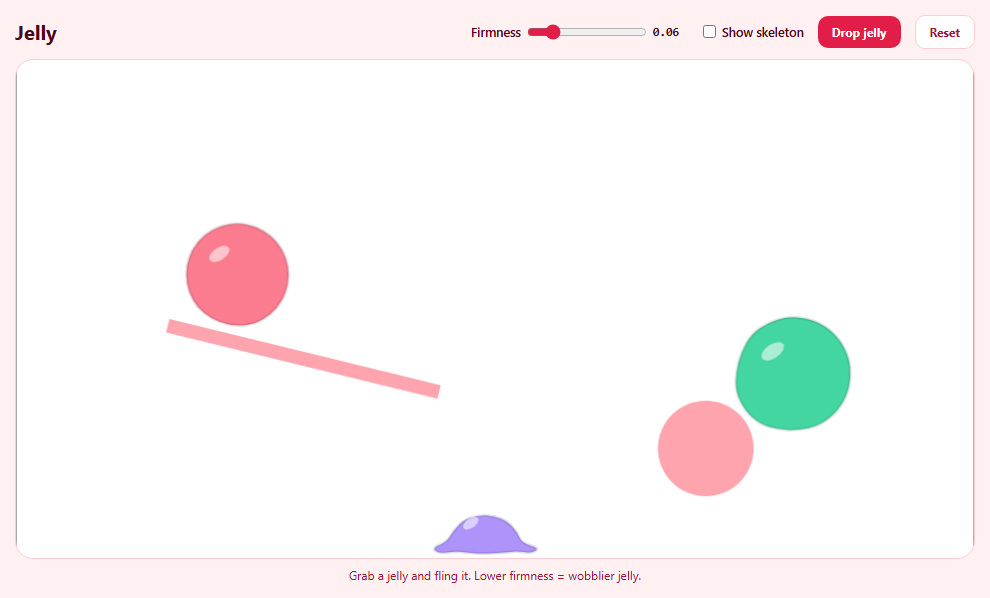
Matter.js simulates rigid bodies: a box never bends. Soft bodies are faked by joining many small rigid particles with springs — the same trick used in countless games — and hiding the machinery behind a smooth outline. This snippet builds wobbly jelly blobs that way. Tick "Show skeleton" to see what's really moving.
A ring and a centre
Each jelly is a centre particle plus a ring of 18 edge particles. Particles use inertia: Infinity so they don't spin, and they're invisible; only the outline is drawn.
Three kinds of spring, three jobs
- Rim springs join each ring particle to its neighbour. They are the skin and keep the circumference. - Skip-one springs join each ring particle to the one after next. Without them the skin can fold into sharp kinks; they give it bending resistance. - Spokes join the centre to every ring particle. They hold the volume, so a jelly squashes and bounces back instead of collapsing flat. Spokes are a little softer than the rim, which makes the blob squish before it stretches.
stiffness sets how firmly each spring returns to its rest length, and damping stops endless wobbling. Matter also ships Composites.softBody (a grid of particles); a ring gives a rounder, more jelly-like shape.
Collision groups stop self-collision
Particles of one jelly sit close together; if they collided with each other, the jelly would jitter and burst. Body.nextGroup(true) returns a fresh negative group per jelly, and bodies sharing a negative group never collide — while different jellies, with different groups, still bump into each other.
Drawing the skin
In afterRender, a closed path runs through the midpoints between ring neighbours, using each particle as a quadratic control point. That turns an 18-sided polygon into a smooth blob, and a glossy highlight follows the centre particle.
Live firmness
The slider changes the stiffness of every existing spring in place — turn a firm jelly floppy mid-bounce.
Build with AI
Build, Understand, Optimize, and Extend It With AI
Paste this snippet into an AI assistant like Claude and ask it to explain what each spring type contributes and why the spokes are softer. Ask it to add googly eyes that track the cursor, pressure that pushes the ring outward like a balloon, jellies that merge when they touch, or squash-and-stretch sound effects on impact. It can also help tune stability and particle count for mobile devices.
Prompt to recreate it
Copy this into your AI assistant of choice to build the effect from scratch, or as a jumping-off point for your own variant:
Build squishy soft-body jelly blobs with Matter.js 0.20 (from a CDN) in plain HTML, CSS and JavaScript.

Requirements:
- A walled canvas with an angled ledge and a round static bump as obstacles.
- Each jelly is a centre particle plus a ring of 18 small invisible edge particles (no rotation), all sharing a fresh negative collision group; join ring neighbours (rim springs), each ring particle to the one two along (bending springs), and the centre to each ring particle (spokes, 60% as stiff), all with small damping.
- In afterRender, draw each jelly as a smooth closed curve through the midpoints of ring neighbours using quadratic curves, filled with its colour, plus a glossy white highlight that follows the centre.
- A "Show skeleton" toggle that draws the three spring types in different shades and every particle.
- A firmness slider that updates all springs live, a Drop button for a random-size jelly, and Reset for three starting jellies.
- Drag and fling jellies with a mouse constraint, removing its wheel listeners so the page scrolls.
Want to tighten it up first? Run this prompt through the AI Prompt Studio to score it across 8 quality dimensions, catch anti-patterns, and tune the wording for Claude, ChatGPT, or Gemini before you paste it in.
Source Code
<div class="jl">
  <div class="jl-bar">
    <h2>Jelly</h2>
    <label>Firmness <input type="range" id="jlStiff" min="0.01" max="0.3" step="0.01" value="0.06"><output id="jlStiffOut"></output></label>
    <label class="jl-check"><input type="checkbox" id="jlSkeleton"> Show skeleton</label>
    <button type="button" id="jlDrop">Drop jelly</button>
    <button type="button" id="jlReset" class="ghost">Reset</button>
  </div>
  <div class="jl-stage" id="jlStage"></div>
  <p class="jl-hint">Grab a jelly and fling it. Lower firmness = wobblier jelly.</p>
</div>*{box-sizing:border-box;margin:0;padding:0}
body{font-family:system-ui,-apple-system,sans-serif;background:#fff1f2;color:#4c0519;min-height:100vh;display:flex;align-items:center;justify-content:center;padding:18px}
.jl{width:100%;max-width:960px}
.jl-bar{display:flex;align-items:center;gap:14px;flex-wrap:wrap;margin-bottom:10px;font-size:12.5px;font-weight:600}
.jl h2{font-size:20px;margin-right:auto}
.jl label{display:flex;align-items:center;gap:6px}
.jl input[type=range]{width:120px;accent-color:#e11d48}
.jl output{font:700 12px ui-monospace,monospace;width:36px}
.jl button{border:0;border-radius:10px;background:#e11d48;color:#fff;font:700 12px system-ui;padding:8px 14px;cursor:pointer}
.jl button.ghost{background:#fff;color:#9f1239;border:1px solid #fecdd3}
.jl :focus-visible{outline:2px solid #fb7185;outline-offset:2px}
.jl-stage{border-radius:18px;overflow:hidden;background:#fff;border:1px solid #fecdd3}
.jl-stage canvas{display:block;width:100%;height:auto;cursor:grab;touch-action:none}
.jl-hint{font-size:12px;color:#9f1239;margin-top:8px;text-align:center}var M = Matter, Engine = M.Engine, Render = M.Render, Runner = M.Runner, Bodies = M.Bodies, Body = M.Body,
Composite = M.Composite, Constraint = M.Constraint, Mouse = M.Mouse, MouseConstraint = M.MouseConstraint, Events = M.Events;
var W = 960, H = 500;
var COLORS = ['#fb7185', '#a78bfa', '#34d399', '#fbbf24', '#60a5fa'];
var engine = Engine.create();
engine.constraintIterations = 4;
var render = Render.create({
element: document.getElementById('jlStage'),
engine: engine,
options: { width: W, height: H, wireframes: false, background: 'transparent', pixelRatio: window.devicePixelRatio || 1 },
});
Composite.add(engine.world, [
Bodies.rectangle(W / 2, H + 25, W + 100, 50, { isStatic: true, render: { fillStyle: '#fecdd3' } }),
Bodies.rectangle(-25, H / 2, 50, H * 2, { isStatic: true }),
Bodies.rectangle(W + 25, H / 2, 50, H * 2, { isStatic: true }),
Bodies.rectangle(W * 0.3, H * 0.6, 280, 14, { isStatic: true, angle: 0.24, render: { fillStyle: '#fda4af' } }),
Bodies.circle(W * 0.72, H * 0.78, 48, { isStatic: true, render: { fillStyle: '#fda4af' } }),
]);
var jellies = [];
var firmness = 0.06;
var showSkeleton = false;
// A soft body is many small rigid particles held together by springs.
// Each jelly: one centre particle and a ring of edge particles, joined by
// - rim springs between ring neighbours (the skin),
// - skip-one springs across two neighbours (resist folding/kinking),
// - spokes from the centre to every ring particle (hold the volume).
// Matter.js has Composites.softBody for grids; a ring gives a rounder,
// more jelly-like shape and shows every spring you can tune.
function makeJelly(x, y, radius, color) {
var N = 18, P = 7;
// A fresh NEGATIVE collision group: particles of this jelly never collide
// with each other (they'd jitter apart), but still collide with the
// walls and with other jellies, which have different groups.
var group = Body.nextGroup(true);
var opts = { collisionFilter: { group: group }, friction: 0.08, frictionStatic: 0.2, restitution: 0.05, inertia: Infinity, render: { visible: false } };
var comp = Composite.create({ label: 'jelly' });
var centre = Bodies.circle(x, y, P, opts);
var ring = [];
for (var i = 0; i < N; i++) {
var a = (i / N) * Math.PI * 2;
ring.push(Bodies.circle(x + Math.cos(a) * radius, y + Math.sin(a) * radius, P, opts));
}
Composite.add(comp, [centre].concat(ring));
var springs = [];
function link(A, B, kind) {
var c = Constraint.create({ bodyA: A, bodyB: B, stiffness: firmness * (kind === 'spoke' ? 0.6 : 1), damping: 0.05, render: { visible: false } });
c.kind = kind;
springs.push(c);
}
for (i = 0; i < N; i++) {
link(ring[i], ring[(i + 1) % N], 'rim');
link(ring[i], ring[(i + 2) % N], 'skip');
link(centre, ring[i], 'spoke');
}
Composite.add(comp, springs);
Composite.add(engine.world, comp);
jellies.push({ comp: comp, ring: ring, centre: centre, springs: springs, color: color, r: radius });
}
var drops = 0;
function drop() {
makeJelly(120 + Math.random() * (W - 240), 70, 38 + Math.random() * 22, COLORS[drops++ % COLORS.length]);
}
function reset() {
jellies.forEach(function (j) { Composite.remove(engine.world, j.comp, true); });
jellies = [];
drops = 0;
[[200, 80, 52], [470, 60, 40], [720, 100, 58]].forEach(function (p) { makeJelly(p[0], p[1], p[2], COLORS[drops++ % COLORS.length]); });
}
// The skin: a closed curve through the midpoints of neighbouring ring
// particles, each particle acting as a quadratic control point. That turns
// an 18-sided polygon into a smooth blob that deforms naturally.
Events.on(render, 'afterRender', function () {
var ctx = render.context, pr = render.options.pixelRatio;
ctx.save(); ctx.scale(pr, pr);
jellies.forEach(function (j) {
var pts = j.ring.map(function (b) { return b.position; });
var n = pts.length;
function mid(a, b) { return { x: (a.x + b.x) / 2, y: (a.y + b.y) / 2 }; }
ctx.beginPath();
var s = mid(pts[n - 1], pts[0]);
ctx.moveTo(s.x, s.y);
for (var i = 0; i < n; i++) { var m = mid(pts[i], pts[(i + 1) % n]); ctx.quadraticCurveTo(pts[i].x, pts[i].y, m.x, m.y); }
ctx.closePath();
ctx.fillStyle = j.color;
ctx.globalAlpha = 0.92;
ctx.fill();
ctx.globalAlpha = 1;
ctx.lineWidth = 3;
ctx.strokeStyle = 'rgba(0,0,0,.1)';
ctx.stroke();
// A glossy highlight that follows the centre particle.
var c = j.centre.position;
ctx.fillStyle = 'rgba(255,255,255,.55)';
ctx.beginPath(); ctx.ellipse(c.x - j.r * 0.35, c.y - j.r * 0.4, j.r * 0.22, j.r * 0.12, -0.6, 0, Math.PI * 2); ctx.fill();
if (showSkeleton) {
j.springs.forEach(function (sp) {
ctx.strokeStyle = sp.kind === 'spoke' ? 'rgba(76,5,25,.25)' : sp.kind === 'skip' ? 'rgba(76,5,25,.18)' : 'rgba(76,5,25,.5)';
ctx.lineWidth = 1;
ctx.beginPath(); ctx.moveTo(sp.bodyA.position.x, sp.bodyA.position.y); ctx.lineTo(sp.bodyB.position.x, sp.bodyB.position.y); ctx.stroke();
});
ctx.fillStyle = '#4c0519';
[j.centre].concat(j.ring).forEach(function (b) { ctx.beginPath(); ctx.arc(b.position.x, b.position.y, 3, 0, Math.PI * 2); ctx.fill(); });
}
});
ctx.restore();
});
var mouse = Mouse.create(render.canvas);
var mc = MouseConstraint.create(engine, { mouse: mouse, constraint: { stiffness: 0.12, render: { visible: false } } });
['mousewheel', 'DOMMouseScroll', 'wheel'].forEach(function (t) { mouse.element.removeEventListener(t, mouse.mousewheel); });
Composite.add(engine.world, mc);
render.mouse = mouse;
// Springs are plain objects: changing stiffness takes effect next step.
var stiffIn = document.getElementById('jlStiff');
function showStiff() { document.getElementById('jlStiffOut').textContent = Number(stiffIn.value).toFixed(2); }
stiffIn.addEventListener('input', function () {
firmness = Number(stiffIn.value);
jellies.forEach(function (j) { j.springs.forEach(function (sp) { sp.stiffness = firmness * (sp.kind === 'spoke' ? 0.6 : 1); }); });
showStiff();
});
document.getElementById('jlSkeleton').addEventListener('change', function (e) { showSkeleton = e.target.checked; });
document.getElementById('jlDrop').addEventListener('click', drop);
document.getElementById('jlReset').addEventListener('click', reset);
showStiff();
reset();
Render.run(render);
Runner.run(Runner.create(), engine);Step by step
How to Use
- 1Watch them landThree jellies drop and squish over the obstacles.
- 2Fling oneGrab a jelly anywhere and throw it.
- 3Change firmnessLower it for wobbly jelly, raise it for firm.
- 4Show the skeletonSee the rim, bending and spoke springs.
- 5Drop moreEach new jelly gets a random size and colour.
Real-world uses
Common Use Cases
Got questions?
Frequently Asked Questions
Build it from small particles joined by Constraints with moderate stiffness and some damping. A ring of edge particles with neighbour springs, skip-one springs and spokes to a centre particle gives a round, squishy body. Give all its particles one negative collision group so they don't collide with each other.
They connect each edge particle to the one two places along, which resists sharp bending. Without them the outline can fold into kinks when squashed.
Usually its particles are colliding with each other. Use Body.nextGroup(true) to create a negative group for each soft body. Very high stiffness with few constraint iterations can also make it unstable.
Collect the edge particles in order and draw a closed path through the midpoints between neighbours, using each particle as a quadratic curve control point.
Yes. Constraints are plain objects; set constraint.stiffness and the next simulation step uses the new value.