


Learn Coding Visually
Learn to code with interactive, live-preview playgrounds — HTML, CSS, JavaScript, React & more.
 HTML Playground42 lessons · Click-based · Live preview
 CSS PlaygroundLearn CSS with a live editor
 JavaScript Playground60 lessons · DOM · Async · Canvas
 React PlaygroundLearn React with a live code editor
 GSAP PlaygroundLearn GSAP animation interactively
 SVG Playground44 lessons · shapes · paths · animation
 SCSS Playground45 lessons · Sass modules · tokens
 Tailwind PlaygroundLearn Tailwind CSS with a live editor
 Bootstrap 5 Playground50 lessons · live preview
Babylon.js Particle Fountain — Gravity-Fed ParticleSystem Snippet
Babylon.js Particle Fountain · Animations · Plain HTML, CSS & JS · Live preview
What's included
Features
About this UI Snippet
Babylon.js Particle Fountain — Emission, Gravity, and Fade Explained
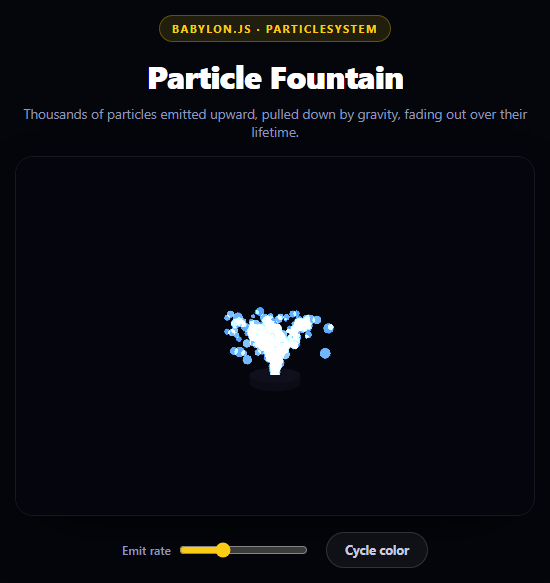
A particle fountain looks complex but is really four independent, composable systems working together: how particles are shaped (texture), where they start and in what spread (emitter), what forces act on them after emission (gravity), and how they visually disappear (lifetime-based color/alpha). Babylon.js's ParticleSystem exposes all four as plain properties, no custom shader code required.
A procedural sprite, no image asset
Instead of loading a PNG dot, the sprite is drawn at runtime onto a BABYLON.DynamicTexture, which wraps an offscreen <canvas> you can draw into with the normal 2D Canvas API:
var grad = ctx.createRadialGradient(...); grad.addColorStop(0, 'rgba(255,255,255,1)'); ... ctx.fillRect(0, 0, texSize, texSize); dynTex.update();
A radial gradient from opaque white at the center to transparent at the edge produces a soft glowing dot — exactly the shape you want for a particle, generated in a few lines instead of shipping an asset.
createPointEmitter defines the spray shape
ps.createPointEmitter(new BABYLON.Vector3(-0.5, 4, -0.5), new BABYLON.Vector3(0.5, 5.5, 0.5)) is what gives the fountain its cone shape rather than a single perfectly straight jet. Every new particle starts at ps.emitter's position, and its initial direction is chosen by picking a random value between the emitter's direction1 and direction2 vectors on each axis — so direction1 = (-0.4, 1, -0.4) and direction2 = (0.4, 1, 0.4) together define a narrow upward cone that varies slightly in x and z while staying strongly biased toward +y. Widen those vectors and the fountain sprays wider; narrow them and it becomes a tight jet.
Gravity, not a scripted arc
ps.gravity = new BABYLON.Vector3(0, -9.1, 0) is applied by the particle system to every live particle's velocity every update tick, exactly like real gravity accelerates a thrown object downward. This is why the fountain arcs and falls back down convincingly — nobody scripted a parabola; it emerges from constant downward acceleration acting on the particles' initial upward velocity, the same physics as a ball thrown into the air.
Lifetime-driven fade, via colorDead
Each particle is assigned a random lifetime between minLifeTime and maxLifeTime. Over that lifetime, Babylon interpolates the particle's color from color1/color2 (chosen randomly per particle at spawn) toward colorDead — and colorDead here is set with alpha 0:
ps.colorDead = new BABYLON.Color4(PALETTES[i][0].r, PALETTES[i][0].g, PALETTES[i][0].b, 0);
Fading alpha to zero rather than just changing hue is what makes particles disappear smoothly at the end of their life instead of blinking out of existence on their last rendered frame.
Additive blending for a glow
ps.blendMode = BABYLON.ParticleSystem.BLENDMODE_ONEONE switches from normal alpha blending to additive blending — overlapping particles' colors sum instead of layering opaquely, so the water source of a fountain looks bright and glowing where particle density is highest, rather than looking like a flat sprite stack.
Reusing it
The same four-part model — texture, emitter shape, forces, lifetime fade — applies to smoke, sparks, snow, or magic effects; only the vectors and colors change. Pair it with a Babylon.js Spinning Product Viewer to see the same ArcRotateCamera/render-loop setup used for a mesh instead of a particle system.
Build with AI
Build, Understand, Optimize, and Extend It With AI
Particle systems reward hands-on experimentation more than most animation techniques, so use an AI assistant to explore the parameter space quickly. Paste this snippet into Claude and ask it to explain exactly how minEmitPower/maxEmitPower interact with gravity to determine the maximum height and total flight time of a particle, and to derive the relationship (roughly: peak height scales with the square of initial vertical velocity, divided by twice the gravity magnitude, basic kinematics). Then ask what visual difference results from narrowing direction1/direction2 toward a single vector (a tight jet, more of a fire hose) versus widening them significantly (a broad spray, more of a sprinkler). To extend it: ask it to add a second particle system for splash/mist particles that spawns when fountain particles reach y=0, add mouse-attraction so particles bend toward the cursor, tie emitRate to an audio input for a music-reactive fountain, or replace the radial-gradient texture with a star or spark shape drawn on the same DynamicTexture canvas.
Prompt to recreate it
Copy this into your AI assistant of choice to build the effect from scratch, or as a jumping-off point for your own variant:
Build a particle fountain effect using Babylon.js (from a CDN, global namespace BABYLON) in plain HTML, CSS, and JavaScript with a single <canvas> element.

Requirements:
- Initialize a BABYLON.Engine and Scene with a very dark clear color, and an ArcRotateCamera with attachControl enabled so the user can orbit the scene, clamped with lowerRadiusLimit/upperRadiusLimit.
- Add a small cylinder mesh near the origin as a visual "base" the fountain appears to emit from.
- Generate the particle sprite procedurally at runtime using a BABYLON.DynamicTexture: draw a soft white radial gradient (opaque center fading to transparent edge) onto its 2D canvas context and call update() -- do not load any external image.
- Create a BABYLON.ParticleSystem with a capacity of a few thousand particles, set its particleTexture to the DynamicTexture, and use createPointEmitter(direction1, direction2) with two vectors that bias strongly upward (+y) but vary slightly on x/z, so particles spray in a narrow upward cone rather than a single straight line.
- Set minEmitPower/maxEmitPower for initial launch speed, minLifeTime/maxLifeTime for how long each particle lives, minSize/maxSize for particle scale, and an emitRate.
- Set ps.gravity to a downward vector (e.g. (0, -9.1, 0)) so gravity pulls emitted particles back down and produces a natural arcing fountain shape rather than particles flying straight up forever.
- Set color1, color2 for spawn color variation and colorDead with alpha 0 so particles fade out smoothly as their lifetime ends rather than disappearing abruptly.
- Set blendMode to BABYLON.ParticleSystem.BLENDMODE_ONEONE (additive blending) for a glowing look where dense particle clusters appear brighter.
- Call ps.start(), and run the render loop with engine.runRenderLoop(() => scene.render()), plus a resize handler.
- Add a slider that live-updates ps.emitRate and a button that cycles through at least 3 color palettes by reassigning color1/color2/colorDead.
- Style the page as a very dark panel with the canvas as the focal element, rounded corners, and a subtle border.
Want to tighten it up first? Run this prompt through the AI Prompt Studio to score it across 8 quality dimensions, catch anti-patterns, and tune the wording for Claude, ChatGPT, or Gemini before you paste it in.
Source Code
<div class="bpf-stage">
  <div class="bpf-head">
    <span class="bpf-tag">Babylon.js · ParticleSystem</span>
    <h2>Particle Fountain</h2>
    <p>Thousands of particles emitted upward, pulled down by gravity, fading out over their lifetime.</p>
  </div>
  <canvas id="bpfCanvas"></canvas>
  <div class="bpf-controls">
    <label class="bpf-label">Emit rate
      <input type="range" id="bpfRate" min="50" max="1000" value="350" />
    </label>
    <button class="bpf-btn" id="bpfColor">Cycle color</button>
  </div>
</div>*{box-sizing:border-box;margin:0;padding:0}
body{font-family:system-ui,-apple-system,sans-serif;background:#05060c;color:#fff;min-height:100vh;display:flex;align-items:center;justify-content:center;padding:24px}
.bpf-stage{width:min(520px,94vw);display:flex;flex-direction:column;align-items:center;gap:16px}
.bpf-head{text-align:center}
.bpf-tag{display:inline-block;font-size:11px;font-weight:700;letter-spacing:.14em;text-transform:uppercase;color:#facc15;background:rgba(250,204,21,.12);border:1px solid rgba(250,204,21,.3);padding:5px 12px;border-radius:99px;margin-bottom:12px}
.bpf-head h2{font-size:clamp(24px,5vw,32px);font-weight:800;letter-spacing:-.02em}
.bpf-head p{font-size:13.5px;color:#8e97b8;margin-top:7px}
#bpfCanvas{width:100%;height:360px;border-radius:18px;border:1px solid rgba(255,255,255,.08);box-shadow:0 24px 60px -24px rgba(0,0,0,.9);display:block;touch-action:none}
.bpf-controls{display:flex;align-items:center;gap:18px;flex-wrap:wrap;justify-content:center}
.bpf-label{display:flex;align-items:center;gap:8px;font-size:12px;font-weight:600;color:#8e97b8}
.bpf-label input{accent-color:#facc15}
.bpf-btn{padding:9px 18px;border-radius:99px;border:1px solid rgba(255,255,255,.14);background:rgba(255,255,255,.05);color:#c3cbe8;font:700 12.5px system-ui;cursor:pointer;transition:background .15s}
.bpf-btn:hover{background:rgba(255,255,255,.1)}var canvas = document.getElementById('bpfCanvas');
var engine = new BABYLON.Engine(canvas, true, { preserveDrawingBuffer: true, stencil: true });
var scene = new BABYLON.Scene(engine);
scene.clearColor = new BABYLON.Color4(0.02, 0.02, 0.05, 1);
var camera = new BABYLON.ArcRotateCamera('camera', Math.PI / 2, Math.PI / 2.3, 9, new BABYLON.Vector3(0, 1, 0), scene);
camera.attachControl(canvas, true);
camera.lowerRadiusLimit = 5;
camera.upperRadiusLimit = 16;
new BABYLON.HemisphericLight('light', new BABYLON.Vector3(0, 1, 0), scene).intensity = 0.35;
// A small dark disc marks the emitter base so the fountain reads as coming
// from a physical spout rather than floating in empty space.
var base = BABYLON.MeshBuilder.CreateCylinder('base', { diameter: 1.1, height: 0.18, tessellation: 32 }, scene);
var baseMat = new BABYLON.StandardMaterial('baseMat', scene);
baseMat.diffuseColor = new BABYLON.Color3(0.08, 0.09, 0.14);
baseMat.emissiveColor = new BABYLON.Color3(0.03, 0.03, 0.06);
base.material = baseMat;
base.position.y = 0.05;
// Procedural particle texture: a soft radial-gradient dot drawn to an
// offscreen <canvas> and handed to Babylon as a DynamicTexture. This avoids
// needing any external image asset for the particle sprite.
var texSize = 64;
var dynTex = new BABYLON.DynamicTexture('particleTex', texSize, scene, false);
var ctx = dynTex.getContext();
var grad = ctx.createRadialGradient(texSize / 2, texSize / 2, 0, texSize / 2, texSize / 2, texSize / 2);
grad.addColorStop(0, 'rgba(255,255,255,1)');
grad.addColorStop(0.4, 'rgba(255,255,255,0.7)');
grad.addColorStop(1, 'rgba(255,255,255,0)');
ctx.clearRect(0, 0, texSize, texSize);
ctx.fillStyle = grad;
ctx.fillRect(0, 0, texSize, texSize);
dynTex.update();
var emitter = new BABYLON.Vector3(0, 0.15, 0);
var ps = new BABYLON.ParticleSystem('fountain', 4000, scene);
ps.particleTexture = dynTex;
ps.emitter = emitter;
// createPointEmitter defines the emission shape: every particle starts at
// the emitter position and picks an initial direction randomly between
// direction1 and direction2, giving the fountain a narrow upward cone
// instead of a single perfectly straight jet.
ps.createPointEmitter(new BABYLON.Vector3(-0.5, 4, -0.5), new BABYLON.Vector3(0.5, 5.5, 0.5));
ps.minEmitPower = 3.5;
ps.maxEmitPower = 5;
ps.updateSpeed = 0.012;
ps.minSize = 0.08;
ps.maxSize = 0.22;
ps.minLifeTime = 1.4;
ps.maxLifeTime = 2.2;
ps.emitRate = 350;
var PALETTES = [
[new BABYLON.Color4(0.3, 0.6, 1, 1), new BABYLON.Color4(0.6, 0.85, 1, 1)],
[new BABYLON.Color4(1, 0.4, 0.65, 1), new BABYLON.Color4(1, 0.75, 0.85, 1)],
[new BABYLON.Color4(0.55, 1, 0.6, 1), new BABYLON.Color4(0.8, 1, 0.7, 1)],
[new BABYLON.Color4(1, 0.75, 0.2, 1), new BABYLON.Color4(1, 0.9, 0.5, 1)],
];
var paletteIndex = 0;
function applyPalette(i) {
ps.color1 = PALETTES[i][0];
ps.color2 = PALETTES[i][1];
// colorDead is the RGBA the particle fades toward as it nears the end of
// its lifetime -- alpha 0 is what actually makes it disappear smoothly
// rather than popping out of existence on its last frame.
ps.colorDead = new BABYLON.Color4(PALETTES[i][0].r, PALETTES[i][0].g, PALETTES[i][0].b, 0);
}
applyPalette(0);
ps.blendMode = BABYLON.ParticleSystem.BLENDMODE_ONEONE; // additive blending for a glowing look
// Gravity pulls emitted particles back down, so the jet arcs and falls
// instead of flying off forever in a straight line.
ps.gravity = new BABYLON.Vector3(0, -9.1, 0);
ps.direction1 = new BABYLON.Vector3(-0.4, 1, -0.4);
ps.direction2 = new BABYLON.Vector3(0.4, 1, 0.4);
ps.minAngularSpeed = -1.5;
ps.maxAngularSpeed = 1.5;
ps.start();
var rateInput = document.getElementById('bpfRate');
rateInput.addEventListener('input', function () { ps.emitRate = Number(rateInput.value); });
document.getElementById('bpfColor').addEventListener('click', function () {
paletteIndex = (paletteIndex + 1) % PALETTES.length;
applyPalette(paletteIndex);
});
engine.runRenderLoop(function () { scene.render(); });
window.addEventListener('resize', function () { engine.resize(); });Step by step
How to Use
- 1Add the Babylon.js CDNInclude the babylon.js UMD build for the global BABYLON namespace.
- 2Paste HTML, CSS, and JSA canvas renders a glowing particle fountain emitting from a small base disc.
- 3Watch the arc formGravity pulls emitted particles back down, producing a natural fountain arc.
- 4Drag the emit rate sliderps.emitRate changes live, thickening or thinning the stream.
- 5Click Cycle colorSwaps color1/color2/colorDead to a different palette from a preset list.
- 6Orbit the cameraDrag on the canvas to view the fountain from different angles via ArcRotateCamera.
Real-world uses
Common Use Cases
Got questions?
Frequently Asked Questions
It is drawn at runtime into a BABYLON.DynamicTexture, which exposes a standard CanvasRenderingContext2D via getContext(). A radial gradient from opaque white at the center to transparent at the edges is filled into it and dynTex.update() uploads it as the particle texture, avoiding any external asset request.
It sets the emission shape by defining two direction vectors, direction1 and direction2. Every particle spawns at the emitter position and picks a random initial direction with each axis independently interpolated between those two vectors, producing a cone spray rather than a single straight-line jet.
ps.gravity applies a constant downward acceleration to every particle's velocity on each update tick, exactly like real gravity. Particles start with strong upward velocity from minEmitPower/maxEmitPower, and gravity continuously reduces that vertical velocity until it reverses, producing the natural parabolic fountain arc with no scripted curve.
Each particle is assigned a random lifetime between minLifeTime and maxLifeTime, and Babylon interpolates its color from its spawn color (color1/color2) toward colorDead over that lifetime. Setting colorDead's alpha channel to 0 means the interpolation ends in full transparency, so the particle visually fades rather than vanishing on its last rendered frame.
It switches the particle system from standard alpha blending to additive blending, where overlapping particle colors are summed rather than composited normally. This makes dense clusters of particles -- like near the emitter -- appear brighter and glowing, which reads as more energetic/fluid than flat alpha-blended sprites.
Initialize the Engine, Scene, ParticleSystem, and DynamicTexture once inside a useEffect (React) or onMounted (Vue) against a canvas ref, keep a reference to the ParticleSystem instance to update emitRate or call dispose() on unmount, and drive UI controls (sliders, buttons) through normal component state that writes to that instance's properties directly rather than re-creating the particle system on every render.