Learn Coding Visually
Learn to code with interactive, live-preview playgrounds — HTML, CSS, JavaScript, React & more.
 HTML Playground42 lessons · Click-based · Live preview
 CSS PlaygroundLearn CSS with a live editor
 JavaScript Playground60 lessons · DOM · Async · Canvas
 React PlaygroundLearn React with a live code editor
 GSAP PlaygroundLearn GSAP animation interactively
 SVG Playground44 lessons · shapes · paths · animation
 SCSS Playground45 lessons · Sass modules · tokens
 Tailwind PlaygroundLearn Tailwind CSS with a live editor
 Bootstrap 5 Playground50 lessons · live preview
Loading Spinner to Checkmark — SVG Path Morph JS
Status Icon Morph — Spinner to Check/Cross · Animations · Plain HTML, CSS & JS · Live preview
What's included
Features
About this UI Snippet
Spinner-to-Checkmark SVG Morph — One Path Reshaping Through an Async Status
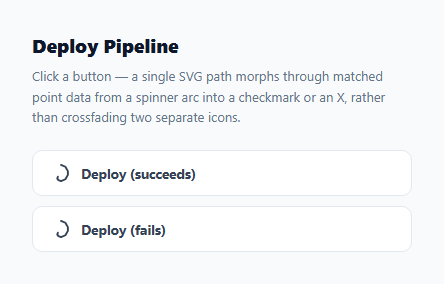
Most "loading then success" button patterns swap two separate SVG elements — a spinning circle fades out while a checkmark path fades in. This snippet does something different and more literal: a single <path> element continuously reshapes its own coordinate data, morphing directly from a spinner arc shape into a checkmark or an X, depending on whether the simulated async action succeeds or fails.
Three point-matched shapes, one path element
spinnerPts, checkPts, and crossPts are each a 10-point array in a shared 0–64 SVG viewBox. Keeping every shape at exactly 10 points means any of the three can interpolate cleanly into either of the other two — the spinner can become a check, or become a cross, using the exact same lerpPath(a, b, t) function. Notice that checkPts and crossPts repeat several coordinates three times in a row ([22, 42], [22, 42], [22, 42], for instance) — this is a deliberate padding technique: a checkmark's natural shape only needs a few real vertices, but padding it with duplicate points at the corners keeps the array at the same length as the 10-point spinner, without changing how the checkmark actually looks, since duplicate consecutive points don't add extra geometry.
The spin phase is separate from the morph phase
While the async action is "in flight", the icon does not use path interpolation at all — it uses an ordinary CSS animation: spin 0.9s linear infinite rotating the whole <svg>, which is far cheaper than continuously recomputing path data for a shape that isn't actually changing. Only once the result is known does runFlow() stop the CSS spin and hand off to the JavaScript-driven lerpPath morph — using the right tool for each phase of the animation instead of forcing one technique to do both jobs.
Driving the morph itself
runFlow(pathEl, btn, endPts, endClass, endLabel) is a small state machine: it disables the button, starts the CSS spin, waits (via setTimeout, standing in for a real network request), then runs a requestAnimationFrame loop that interpolates the path's d attribute from spinnerPts to whichever endPts array was passed in — checkPts for the success button, crossPts for the failure button — over 380ms with a cubic ease-out curve. The same function drives both outcomes; only the target point array, the CSS class applied on completion, and the label text differ.
Why this reads as more "real" feedback than a crossfade
When two separate icons crossfade, there is a brief moment where both are partially visible, overlapping — a soft but slightly muddled transition. A single path genuinely changing shape has no such overlap: every frame is one continuous, unambiguous glyph, which tends to read as more deliberate and "designed" than an opacity blend, especially at small icon sizes where two overlapping icons can look visually noisy.
Extending to more outcomes
Because every shape lives in the same point-matched format, adding a fourth or fifth end state — a warning triangle, a paused/dash icon — is just a matter of designing one more 10-point array and calling runFlow with it; no changes to the morphing logic itself are needed.
Build with AI
Build, Understand, Optimize, and Extend It With AI
Paste this snippet into an AI coding assistant like Claude and ask it to explain the duplicate-coordinate padding trick in checkPts and crossPts — understanding why repeating a point three times in a row does not distort the shape is the key to designing your own simple end-state icons that still match a more complex source shape's point count. It is also a good base to extend: ask the assistant to help you add a third or fourth outcome shape, or to wire an aria-live region so the status change is announced to screen reader users, not just shown visually.
Prompt to recreate it
Copy this into your AI assistant of choice to build the effect from scratch, or as a jumping-off point for your own variant:
Build an async status button in plain HTML, CSS, and JavaScript whose icon is a single SVG path that morphs directly from a spinner arc shape into either a checkmark or an X, depending on the simulated outcome — no crossfading two separate icon elements, no animation library.

Requirements:
- Represent a spinner arc, a checkmark, and an X (cross) as three arrays of [x, y] coordinate pairs, all with the exact same length, in a shared SVG viewBox. Pad the checkmark and cross arrays with repeated coordinates where needed so their point count matches the spinner's, without visibly changing their shape.
- Write a function that converts a point array into an SVG path "d" string, and a lerp function that linearly interpolates every coordinate between two same-length arrays at a progress value t.
- On button click: set the path to the spinner shape, spin the icon using a CSS keyframe rotation (not JS) for a simulated loading period, then after a delay, run a requestAnimationFrame loop that interpolates the path from the spinner shape to the target end shape (checkmark for success, cross for failure) over roughly 400ms with an ease-out curve.
- The same underlying function should handle both the success and failure button, parameterized by which end shape, CSS class, and label text to apply once the morph completes.
- Disable the button while a flow is in progress so it cannot be re-triggered mid-animation.
Want to tighten it up first? Run this prompt through the AI Prompt Studio to score it across 8 quality dimensions, catch anti-patterns, and tune the wording for Claude, ChatGPT, or Gemini before you paste it in.
Step by step
How to Use
- 1Click "Deploy (succeeds)"The icon spins via CSS, then the same path morphs from the spinner shape directly into a checkmark.
- 2Click "Deploy (fails)"Same spin phase, but the path morphs into an X instead, and the button turns red.
- 3Change the spin durationEdit the 1100 (ms) delay in the setTimeout inside runFlow() to simulate a longer or shorter request.
- 4Change the morph durationEdit the 380 (ms) duration constant used by the requestAnimationFrame morph loop.
- 5Add a third outcomeDesign a new 10-point array (matching the existing point count) and call runFlow() with it from a new button.
- 6Export in your formatClick "HTML" for a standalone file, "JSX" for a React component, or "Tailwind" for a React + Tailwind version.
Real-world uses
Common Use Cases
Got questions?
Frequently Asked Questions
A crossfade uses two separate elements with opacity transitions overlapping briefly. This snippet uses one single <path> element whose "d" coordinate data is continuously interpolated frame by frame, so there is only ever one unambiguous shape visible, genuinely reshaping rather than blending two shapes together.
Both shapes only need a handful of real vertices to look correct, but they must have the same point count (10) as the spinner arc for lerpPath to interpolate cleanly. Repeating a coordinate a few times in a row pads the array to the right length without adding any visible extra geometry, since duplicate consecutive points do not change how the path renders.
The spinner shape itself is not changing during that phase — only its rotation is. A CSS animation: spin rotating the whole SVG is much cheaper than recomputing path coordinates every frame for a shape that stays the same. JS-driven interpolation only takes over once the shape genuinely needs to change.
Yes — runFlow(pathEl, btn, endPts, endClass, endLabel) already takes the target shape, CSS class, and label as parameters. Design a new point-matched array for a third outcome (like a warning triangle) and call runFlow with it from any trigger.
No. All three shapes and the interpolation logic are plain JavaScript arrays and functions — no GSAP MorphSVG plugin, no KUTE.js, no external dependency.
Redesign spinnerPts, checkPts, and crossPts using coordinates traced from your own icon outlines, keeping the same point count and vertex order across all three arrays so every pairwise interpolation stays clean.