Learn Coding Visually
Learn to code with interactive, live-preview playgrounds — HTML, CSS, JavaScript, React & more.
 HTML Playground42 lessons · Click-based · Live preview
 CSS PlaygroundLearn CSS with a live editor
 JavaScript Playground60 lessons · DOM · Async · Canvas
 React PlaygroundLearn React with a live code editor
 GSAP PlaygroundLearn GSAP animation interactively
 SVG Playground44 lessons · shapes · paths · animation
 SCSS Playground45 lessons · Sass modules · tokens
 Tailwind PlaygroundLearn Tailwind CSS with a live editor
 Bootstrap 5 Playground50 lessons · live preview
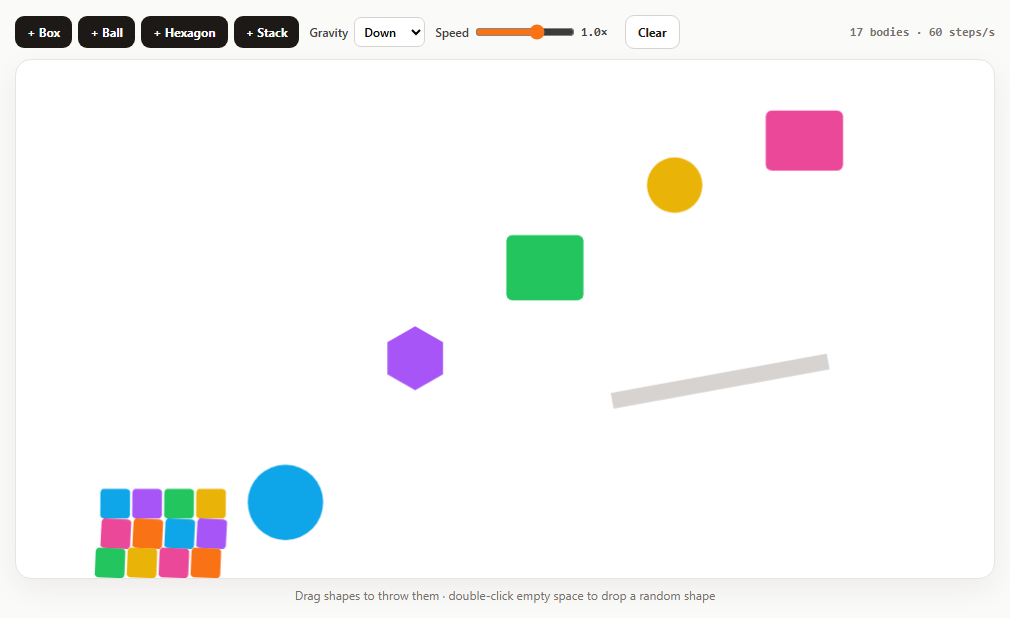
Matter.js Ball Pit Hero Section — Free Interactive Physics Hero
Matter.js Ball Pit Hero Section · Animations · Plain HTML, CSS & JS · Live preview
What's included
Features
About this UI Snippet
An Interactive Physics Hero with Matter.js — Cursor Pushing, Popping, Resizing and Performance
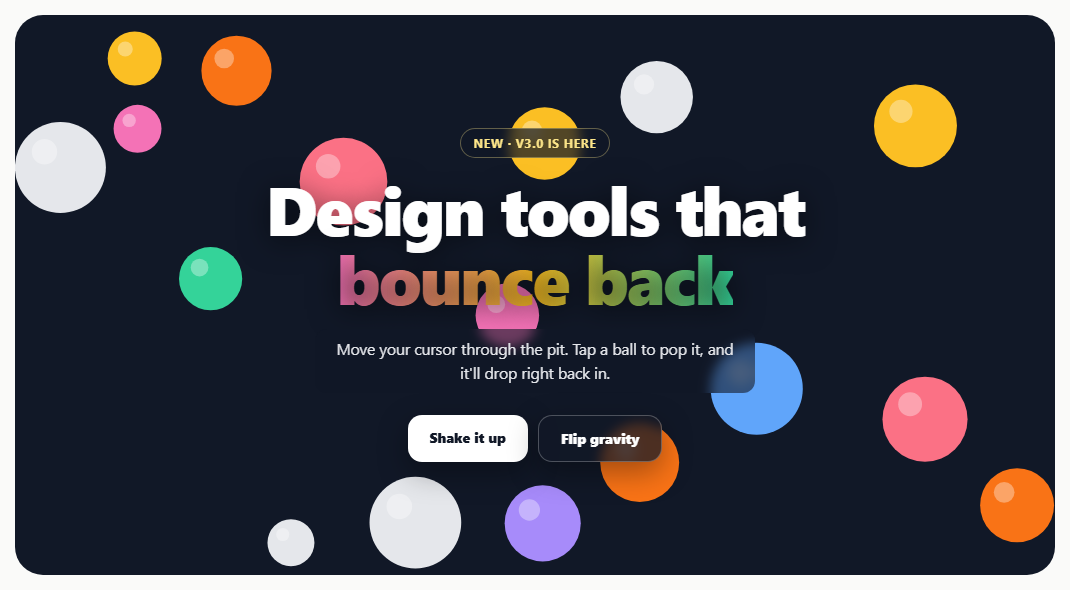
Physics ball-pit heroes are a popular way to make a landing page feel playful. The hard parts aren't the physics — they're making it responsive, readable and cheap to run. This snippet handles all three.
Pushing balls with the cursor
The pointer is represented by an invisible static circle. Each frame it's moved to the pointer with Body.setPosition(cursor, pointer, true) — the third argument, updateVelocity, gives it a velocity equal to how far it moved. Without it balls are just shoved out of the way; with it, a fast flick sends them flying while a slow drift nudges them gently. Big jumps (the pointer entering or leaving) skip the velocity so balls aren't blasted.
Tap to pop
Query.point(balls, point) finds the ball under the tap. It's removed, a fading ring is drawn where it was, and a new ball drops back in a moment later from whichever edge gravity pulls from.
Filling any size
The number of balls is computed from the hero's area (about 45% coverage), with smaller balls on narrow screens, so it looks full on a phone and a wide monitor alike.
Resizing without squashing
Scaling a canvas with CSS stretches circles into ovals. Instead, a ResizeObserver (debounced) recreates the renderer at the new size, rebuilds the four walls and nudges any ball that ended up outside back in. Walls are extra-thick so fast balls can't tunnel through them.
Readable content on top
The headline and copy sit above the canvas with pointer-events: none so the cursor reaches the balls, while the CTA buttons re-enable pointer events. Text gets a strong shadow and a translucent backdrop so it stays legible over any colour.
Performance and accessibility
An IntersectionObserver sets runner.enabled = false when the hero leaves the viewport, so it costs nothing while you read the rest of the page. With prefers-reduced-motion, balls start settled at the bottom instead of raining in.
Build with AI
Build, Understand, Optimize, and Extend It With AI
Paste this snippet into an AI assistant like Claude and ask it to explain the cursor collider and the resize strategy. Ask it to use your logo or emoji as ball sprites, tilt gravity with the phone's accelerometer, spell a word with letter-shaped bodies, or add sounds on collisions. It can also help port it into a React component with proper cleanup.
Prompt to recreate it
Copy this into your AI assistant of choice to build the effect from scratch, or as a jumping-off point for your own variant:
Build a landing page hero filled with Matter.js 0.20 (from a CDN) physics balls in plain HTML, CSS and JavaScript.

Requirements:
- A full-bleed dark hero with a kicker badge, big gradient headline, short copy and two CTA buttons layered above the canvas; the content uses pointer-events: none except the buttons, and has text shadows and translucent backdrops for readability.
- Colourful balls with a white highlight fill about 45% of the hero area (smaller balls on narrow screens) and rain in from above.
- An invisible static cursor circle that follows the pointer, with velocity set to its movement so it pushes balls realistically.
- Tapping a ball pops it with a fading ring (Query.point) and a new ball drops in shortly after.
- "Shake it up" launches all balls; "Flip gravity" inverts gravity.
- On resize (debounced ResizeObserver) recreate the renderer at the new size and rebuild thick walls, keeping balls inside; pause the runner with IntersectionObserver when off-screen; with prefers-reduced-motion start the balls settled.
Want to tighten it up first? Run this prompt through the AI Prompt Studio to score it across 8 quality dimensions, catch anti-patterns, and tune the wording for Claude, ChatGPT, or Gemini before you paste it in.
Source Code
<section class="bp" id="bpHero">
  <div class="bp-copy">
    <span class="bp-kicker">New · v3.0 is here</span>
    <h1>Design tools that<br><em>bounce back</em></h1>
    <p>Move your cursor through the pit. Tap a ball to pop it, and it'll drop right back in.</p>
    <div class="bp-cta">
      <a href="#" class="bp-btn" id="bpShake">Shake it up</a>
      <a href="#" class="bp-btn ghost" id="bpGravity">Flip gravity</a>
    </div>
  </div>
</section>*{box-sizing:border-box;margin:0;padding:0}
body{font-family:system-ui,-apple-system,sans-serif;background:#fafaf9;min-height:100vh;display:flex;align-items:center;justify-content:center;padding:18px}
.bp{position:relative;width:100%;max-width:1040px;height:560px;border-radius:28px;overflow:hidden;background:#111827;isolation:isolate}
.bp canvas{position:absolute;inset:0;width:100%;height:100%;display:block;z-index:0}
.bp-copy{position:relative;z-index:1;height:100%;display:flex;flex-direction:column;align-items:center;justify-content:center;text-align:center;padding:24px;pointer-events:none}
.bp-kicker{display:inline-block;font:700 12px system-ui;letter-spacing:.06em;text-transform:uppercase;color:#fde68a;background:rgba(17,24,39,.72);border:1px solid rgba(253,230,138,.35);padding:6px 12px;border-radius:99px;margin-bottom:16px;backdrop-filter:blur(6px)}
.bp h1{font-size:clamp(34px,6.4vw,68px);line-height:1.02;letter-spacing:-.03em;color:#fff;font-weight:900;text-shadow:0 4px 30px rgba(0,0,0,.55)}
.bp h1 em{font-style:normal;background:linear-gradient(90deg,#f472b6,#fbbf24,#34d399);-webkit-background-clip:text;background-clip:text;color:transparent}
.bp p{max-width:440px;margin:16px auto 0;font-size:15.5px;line-height:1.55;color:#e5e7eb;background:rgba(17,24,39,.6);padding:8px 14px;border-radius:12px;backdrop-filter:blur(6px)}
.bp-cta{display:flex;gap:10px;margin-top:22px;flex-wrap:wrap;justify-content:center}
.bp-btn{pointer-events:auto;text-decoration:none;border-radius:14px;background:#fff;color:#111827;font:800 14px system-ui;padding:13px 22px;box-shadow:0 10px 30px rgba(0,0,0,.35)}
.bp-btn.ghost{background:rgba(17,24,39,.75);color:#fff;border:1px solid rgba(255,255,255,.25);backdrop-filter:blur(6px)}
.bp-btn:focus-visible{outline:3px solid #fbbf24;outline-offset:3px}
@media (max-width:600px){.bp{height:520px;border-radius:20px}}var M = Matter, Engine = M.Engine, Render = M.Render, Runner = M.Runner, Bodies = M.Bodies, Body = M.Body,
Composite = M.Composite, Events = M.Events, Query = M.Query;
var hero = document.getElementById('bpHero');
var COLORS = ['#f472b6', '#fbbf24', '#34d399', '#60a5fa', '#a78bfa', '#fb7185', '#f97316', '#e5e7eb'];
var engine = Engine.create();
var render, walls = [], balls = [], cursor, W, H, runner;
// The pit fills the whole hero and must resize with it. Rather than scaling
// the canvas (which would squash the balls), the canvas is recreated at the
// new size and the walls rebuilt; balls keep their world positions.
function setup() {
var r = hero.getBoundingClientRect();
W = Math.round(r.width); H = Math.round(r.height);
if (render) { Render.stop(render); render.canvas.remove(); }
render = Render.create({
element: hero,
engine: engine,
options: { width: W, height: H, wireframes: false, background: 'transparent', pixelRatio: window.devicePixelRatio || 1 },
});
hero.prepend(render.canvas);
Events.on(render, 'afterRender', drawShine);
Composite.remove(engine.world, walls);
var t = 200, o = { isStatic: true, render: { visible: false } };
walls = [
Bodies.rectangle(W / 2, H + t / 2, W * 3, t, o),
Bodies.rectangle(W / 2, -t / 2, W * 3, t, o),
Bodies.rectangle(-t / 2, H / 2, t, H * 3, o),
Bodies.rectangle(W + t / 2, H / 2, t, H * 3, o),
];
Composite.add(engine.world, walls);
// Nudge any ball left outside the new bounds back inside.
balls.forEach(function (b) {
Body.setPosition(b, { x: Math.min(W - 30, Math.max(30, b.position.x)), y: Math.min(H - 30, Math.max(30, b.position.y)) });
});
Render.run(render);
}
function addBall(x, y) {
var small = W < 600;
var rad = (small ? 16 : 22) + Math.random() * (small ? 16 : 26);
var b = Bodies.circle(x, y, rad, {
restitution: 0.55, friction: 0.02, frictionAir: 0.008, density: 0.001,
render: { fillStyle: COLORS[(Math.random() * COLORS.length) | 0] },
});
balls.push(b);
Composite.add(engine.world, b);
return b;
}
// Balls rain in one at a time from just inside the edge gravity pulls away
// from. (Spawning above the canvas doesn't work: the pit has a ceiling so
// flipped gravity keeps balls on screen.)
var pending = 0, tick = 0;
function fill() {
// Enough balls to fill roughly 45% of the hero, whatever its size.
var target = Math.round((W * H * 0.45) / (Math.PI * Math.pow(W < 600 ? 24 : 34, 2)));
pending = Math.max(0, target - balls.length);
}
Events.on(engine, 'beforeUpdate', function () {
if (!pending || tick++ % 3) return;
var x = 50 + Math.random() * (W - 100), y = engine.gravity.y > 0 ? 50 : H - 50;
if (Query.point(balls, { x: x, y: y }).length) return; // spot taken, try next time
addBall(x, y);
pending--;
});
// The cursor is an invisible static circle we move every frame. Passing
// updateVelocity = true to setPosition gives it a velocity equal to how far
// it moved, so a fast flick throws balls and a slow drift nudges them.
var pointer = { x: -500, y: -500 };
cursor = Bodies.circle(-500, -500, 46, { isStatic: true, render: { visible: false } });
Composite.add(engine.world, cursor);
hero.addEventListener('pointermove', function (e) {
var r = hero.getBoundingClientRect();
pointer = { x: e.clientX - r.left, y: e.clientY - r.top };
});
hero.addEventListener('pointerleave', function () { pointer = { x: -500, y: -500 }; });
Events.on(engine, 'beforeUpdate', function () {
var p = cursor.position;
// Entering or leaving the hero is a teleport, not a flick: no velocity.
var jump = Math.hypot(pointer.x - p.x, pointer.y - p.y) > 160;
Body.setPosition(cursor, pointer, !jump);
});
// Tap/click a ball: pop it with a ring burst, then drop a new one in.
var pops = [];
hero.addEventListener('pointerdown', function (e) {
if (e.target.closest('.bp-btn')) return;
var r = hero.getBoundingClientRect();
var pt = { x: e.clientX - r.left, y: e.clientY - r.top };
var hit = Query.point(balls, pt)[0];
if (!hit) return;
pops.push({ x: hit.position.x, y: hit.position.y, r: hit.circleRadius, color: hit.render.fillStyle, t: 0 });
Composite.remove(engine.world, hit);
balls.splice(balls.indexOf(hit), 1);
setTimeout(function () { pending++; }, 400);
});
// A soft highlight on each ball plus the pop rings.
function drawShine() {
var ctx = render.context, pr = render.options.pixelRatio;
ctx.save(); ctx.scale(pr, pr);
balls.forEach(function (b) {
var r = b.circleRadius;
ctx.fillStyle = 'rgba(255,255,255,.35)';
ctx.beginPath(); ctx.arc(b.position.x - r * 0.35, b.position.y - r * 0.35, r * 0.28, 0, Math.PI * 2); ctx.fill();
});
pops = pops.filter(function (p) { return p.t < 1; });
pops.forEach(function (p) {
p.t += 0.06;
ctx.strokeStyle = p.color; ctx.globalAlpha = 1 - p.t; ctx.lineWidth = 4;
ctx.beginPath(); ctx.arc(p.x, p.y, p.r * (1 + p.t * 1.2), 0, Math.PI * 2); ctx.stroke();
ctx.globalAlpha = 1;
});
ctx.restore();
}
document.getElementById('bpShake').addEventListener('click', function (e) {
e.preventDefault();
balls.forEach(function (b) { Body.setVelocity(b, { x: (Math.random() - 0.5) * 24, y: -8 - Math.random() * 18 * Math.sign(engine.gravity.y || 1) }); });
});
document.getElementById('bpGravity').addEventListener('click', function (e) {
e.preventDefault();
engine.gravity.y *= -1;
});
// Pause the simulation while the hero is off-screen: a full-bleed physics
// hero shouldn't burn CPU when nobody is looking at it.
runner = Runner.create();
if ('IntersectionObserver' in window) {
new IntersectionObserver(function (entries) { runner.enabled = entries[0].isIntersecting; }).observe(hero);
}
var resizeTimer;
new ResizeObserver(function () {
clearTimeout(resizeTimer);
resizeTimer = setTimeout(function () {
var r = hero.getBoundingClientRect();
if (Math.round(r.width) !== W || Math.round(r.height) !== H) { setup(); fill(); }
}, 150);
}).observe(hero);
// Respect reduced motion: skip the dramatic rain-in and start settled.
setup();
fill();
if (window.matchMedia('(prefers-reduced-motion: reduce)').matches) {
// Lay the balls out in rows along the floor straight away.
var cols = Math.floor((W - 60) / 56);
for (var i = 0; pending > 0; i++, pending--) addBall(40 + (i % cols) * 56, H - 36 - Math.floor(i / cols) * 56);
}
Runner.run(runner, engine);Step by step
How to Use
- 1Move through the pitYour cursor pushes the balls around.
- 2Pop a ballTap or click one; a new one drops in.
- 3Shake it upLaunch every ball into the air.
- 4Flip gravitySend the pile to the ceiling and back.
- 5Resize the windowThe pit rebuilds at the new size.
Real-world uses
Common Use Cases
Got questions?
Frequently Asked Questions
Add an invisible static circle, and every frame move it with Body.setPosition(body, pointer, true); the updateVelocity flag sets its velocity to how far it moved, which makes collisions transfer the right amount of energy.
Don't stretch it with CSS. On resize (debounced with ResizeObserver), create a renderer at the new size, rebuild the walls, and move any bodies left outside back into bounds.
Yes. Position the content above the canvas with pointer-events: none so the cursor reaches the canvas, then set pointer-events: auto on buttons and links.
Use an IntersectionObserver on the hero and set runner.enabled to false when it leaves the viewport and true when it returns.
Matter.Query.point(bodies, {x, y}) returns the bodies containing that point.