Learn Coding Visually
Learn to code with interactive, live-preview playgrounds — HTML, CSS, JavaScript, React & more.
 HTML Playground42 lessons · Click-based · Live preview
 CSS PlaygroundLearn CSS with a live editor
 JavaScript Playground60 lessons · DOM · Async · Canvas
 React PlaygroundLearn React with a live code editor
 GSAP PlaygroundLearn GSAP animation interactively
 SVG Playground44 lessons · shapes · paths · animation
 SCSS Playground45 lessons · Sass modules · tokens
 Tailwind PlaygroundLearn Tailwind CSS with a live editor
 Bootstrap 5 Playground50 lessons · live preview
Matter.js Rope Bridge You Can Cut — Free Physics Snippet
Matter.js Rope Bridge You Can Cut · Animations · Plain HTML, CSS & JS · Live preview
What's included
Features
About this UI Snippet
Ropes, Bridges and Cutting Constraints in Matter.js
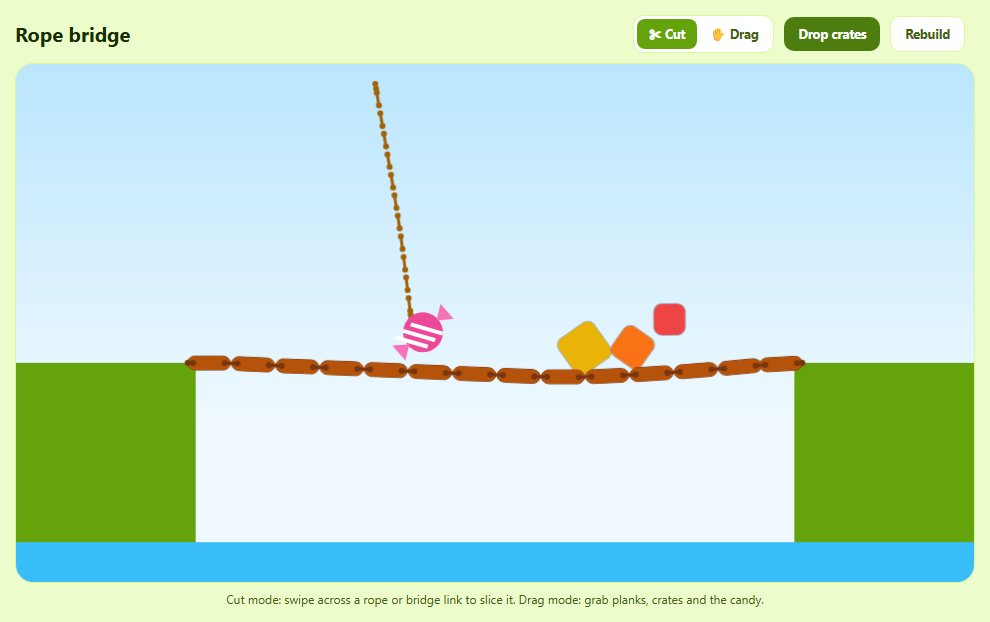
Ropes and bridges in Matter.js are chains: bodies joined end-to-end by constraints. Cutting one is simply removing a constraint — and this snippet shows how to find which constraint your swipe crossed.
Building the bridge with Composites
Composites.stack creates a row of 14 plank bodies. Composites.chain(bridge, 0.36, 0, -0.36, 0, options) links each plank to the next — the four numbers are the attachment points as fractions of each body's width and height, here near each plank's right and left ends. Two extra constraints with only pointA (a fixed world point) pin the ends to the cliffs. Planks share a negative collision group so neighbours don't fight each other.
A rope with a candy
The rope is a vertical stack of tiny invisible circles chained top to bottom with stiffness: 1 and short lengths, which makes it nearly inextensible. The top is pinned, the bottom holds a candy, and an initial velocity sets it swinging.
Cutting: line-segment intersection
In cut mode, every pointer move produces a small segment from the previous to the current position. For each constraint labelled link, the snippet computes its two world endpoints (body position plus its offset point, or the fixed pointA) and tests whether the swipe segment crosses it using the classic orientation test. Crossed constraints are removed with Composite.remove(composite, constraint) — walked via Composite.allComposites because they live inside the bridge and rope composites. Gravity takes it from there: the bridge splits and swings down, the candy flies off.
Cut vs drag mode
The MouseConstraint is always present; in cut mode its collision mask is set to 0 so it can't grab anything, and in drag mode it's restored. A fading, shadowed trail drawn in afterRender sells the blade.
Housekeeping
Crates drop onto the bridge to load it, and bodies that fall far below the canvas are removed to keep the simulation light.
Build with AI
Build, Understand, Optimize, and Extend It With AI
Paste this snippet into an AI assistant like Claude and ask it to explain how chain offsets, pins and the cut test work. Ask it to turn it into a Cut the Rope level with a hungry monster to feed, stars to collect, multiple ropes, air bubbles, or a bridge a car must cross before you cut it. It can also help make the rope render as a smooth curve.
Prompt to recreate it
Copy this into your AI assistant of choice to build the effect from scratch, or as a jumping-off point for your own variant:
Build a cuttable rope bridge with Matter.js 0.20 (from a CDN) in plain HTML, CSS and JavaScript.

Requirements:
- Two green cliffs with a blue river between them.
- A bridge of 14 wooden planks made with Composites.stack and Composites.chain (attach near plank ends), pinned to the cliffs with world-point constraints, planks in one negative collision group.
- A rope of 12 tiny invisible circles chained top to bottom (stiffness 1), pinned at the top, holding a striped pink candy that starts swinging.
- Label every link constraint; in cut mode, each pointer move forms a segment and any link whose endpoints' line crosses it is removed from its parent composite (search Composite.allComposites). Show a fading white blade trail.
- A Cut / Drag toggle (disable the mouse constraint via its collision mask in cut mode), a Drop crates button, Rebuild, and a cut counter.
- Remove bodies that fall far off-screen, and remove the mouse wheel listeners so the page scrolls.
Want to tighten it up first? Run this prompt through the AI Prompt Studio to score it across 8 quality dimensions, catch anti-patterns, and tune the wording for Claude, ChatGPT, or Gemini before you paste it in.
Source Code
<div class="rb">
  <div class="rb-bar">
    <h2>Rope bridge</h2>
    <div class="rb-seg" role="group" aria-label="Mouse mode">
      <button type="button" data-mode="cut" class="on">✂ Cut</button>
      <button type="button" data-mode="drag">✋ Drag</button>
    </div>
    <button type="button" id="rbCrates">Drop crates</button>
    <button type="button" id="rbReset" class="ghost">Rebuild</button>
    <span class="rb-count" id="rbCount"></span>
  </div>
  <div class="rb-stage" id="rbStage"></div>
  <p class="rb-hint">Cut mode: swipe across a rope or bridge link to slice it. Drag mode: grab planks, crates and the candy.</p>
</div>*{box-sizing:border-box;margin:0;padding:0}
body{font-family:system-ui,-apple-system,sans-serif;background:#ecfccb;color:#1a2e05;min-height:100vh;display:flex;align-items:center;justify-content:center;padding:18px}
.rb{width:100%;max-width:960px}
.rb-bar{display:flex;align-items:center;gap:10px;flex-wrap:wrap;margin-bottom:10px}
.rb h2{font-size:20px;margin-right:auto}
.rb-seg{display:flex;background:#fff;border:1px solid #d9f99d;border-radius:11px;padding:3px}
.rb-seg button{border:0;background:none;border-radius:8px;padding:7px 12px;font:700 12.5px system-ui;color:#3f6212;cursor:pointer}
.rb-seg button.on{background:#65a30d;color:#fff}
#rbCrates,#rbReset{border:0;border-radius:10px;background:#4d7c0f;color:#fff;font:700 12.5px system-ui;padding:9px 14px;cursor:pointer}
#rbReset.ghost{background:#fff;color:#3f6212;border:1px solid #d9f99d}
.rb :focus-visible{outline:2px solid #84cc16;outline-offset:2px}
.rb-count{font:700 12px ui-monospace,monospace;color:#3f6212}
.rb-stage{border-radius:18px;overflow:hidden;border:1px solid #d9f99d;background:linear-gradient(#bae6fd,#f0f9ff 70%)}
.rb-stage canvas{display:block;width:100%;height:auto;touch-action:none}
.rb-stage.cut canvas{cursor:crosshair}
.rb-stage.drag canvas{cursor:grab}
.rb-hint{font-size:12px;color:#3f6212;margin-top:8px;text-align:center}var M = Matter, Engine = M.Engine, Render = M.Render, Runner = M.Runner, Bodies = M.Bodies, Body = M.Body,
Composite = M.Composite, Composites = M.Composites, Constraint = M.Constraint, Mouse = M.Mouse,
MouseConstraint = M.MouseConstraint, Events = M.Events;
var W = 960, H = 520;
var stage = document.getElementById('rbStage');
var engine = Engine.create();
engine.constraintIterations = 6;
var render = Render.create({
element: stage,
engine: engine,
options: { width: W, height: H, wireframes: false, background: 'transparent', pixelRatio: window.devicePixelRatio || 1 },
});
var cuts = 0, trail = [];
function rebuild() {
Composite.clear(engine.world, false);
cuts = 0;
var ground = { isStatic: true, render: { fillStyle: '#65a30d' } };
Composite.add(engine.world, [
// Two cliffs and a river below.
Bodies.rectangle(80, 420, 200, 240, ground),
Bodies.rectangle(W - 80, 420, 200, 240, ground),
Bodies.rectangle(W / 2, H - 10, W, 60, { isStatic: true, render: { fillStyle: '#38bdf8' } }),
]);
// ---- The bridge ----
// Composites.stack makes a row of planks; Composites.chain links each
// plank to the next with constraints at their ends (pointA/pointB as a
// fraction of width). A negative group stops neighbours colliding.
var group = Body.nextGroup(true);
var bridge = Composites.stack(190, 293, 14, 1, 0, 0, function (x, y) {
return Bodies.rectangle(x, y, 44, 14, { collisionFilter: { group: group }, chamfer: 5, density: 0.004, frictionAir: 0.03, label: 'plank', render: { fillStyle: '#b45309', strokeStyle: '#78350f', lineWidth: 1 } });
});
Composites.chain(bridge, 0.36, 0, -0.36, 0, { stiffness: 0.9, length: 9, label: 'link', render: { type: 'line', strokeStyle: '#78350f', lineWidth: 3 } });
var planks = bridge.bodies;
Composite.add(bridge, [
Constraint.create({ pointA: { x: 172, y: 300 }, bodyB: planks[0], pointB: { x: -16, y: 0 }, length: 2, stiffness: 0.9, label: 'link', render: { strokeStyle: '#78350f', lineWidth: 3 } }),
Constraint.create({ pointA: { x: W - 172, y: 300 }, bodyB: planks[planks.length - 1], pointB: { x: 16, y: 0 }, length: 2, stiffness: 0.9, label: 'link', render: { strokeStyle: '#78350f', lineWidth: 3 } }),
]);
Composite.add(engine.world, bridge);
// ---- A candy on a rope (Cut the Rope style) ----
// A rope is a chain of tiny circles. Each is linked to the next; the first
// is pinned to the world. Short links + high stiffness = inextensible rope.
var ropeGroup = Body.nextGroup(true);
var rope = Composites.stack(W / 2, 30, 1, 12, 0, 0, function (x, y) {
return Bodies.circle(x, y, 4, { collisionFilter: { group: ropeGroup }, density: 0.001, frictionAir: 0.02, render: { visible: false } });
});
Composites.chain(rope, 0, 0.5, 0, -0.5, { stiffness: 1, length: 10, label: 'link', render: { type: 'line', strokeStyle: '#a16207', lineWidth: 3 } });
Composite.add(rope, Constraint.create({ pointA: { x: W / 2 - 120, y: 20 }, bodyB: rope.bodies[0], length: 2, stiffness: 1, label: 'link', render: { strokeStyle: '#a16207', lineWidth: 3 } }));
var candy = Bodies.circle(W / 2 - 20, 170, 20, { density: 0.004, restitution: 0.3, label: 'candy', render: { visible: false } });
Composite.add(rope, [candy, Constraint.create({ bodyA: rope.bodies[rope.bodies.length - 1], bodyB: candy, pointB: { x: 0, y: -18 }, length: 4, stiffness: 1, label: 'link', render: { strokeStyle: '#a16207', lineWidth: 3 } })]);
// Give it a push so it swings.
Body.setVelocity(candy, { x: 9, y: 0 });
Composite.add(engine.world, rope);
Composite.add(engine.world, mc);
dropCrates(3);
updateCount();
}
var CRATE = ['#f97316', '#eab308', '#ef4444', '#8b5cf6'];
function dropCrates(n) {
for (var i = 0; i < n; i++) {
var s = 30 + Math.random() * 16;
Composite.add(engine.world, Bodies.rectangle(260 + Math.random() * (W - 520), -20 - i * 60, s, s, { chamfer: 3, density: 0.002, angle: Math.random(), render: { fillStyle: CRATE[(Math.random() * 4) | 0], strokeStyle: 'rgba(0,0,0,.25)', lineWidth: 2 } }));
}
}
// ---- Cutting ----
// Swiping draws a segment each frame (previous → current pointer). Any
// constraint labelled 'link' whose line crosses that segment is removed
// from its composite — the physics does the rest.
function endPoint(c, which) {
var body = c['body' + which], pt = c['point' + which];
if (!body) return pt;
// point is relative to the body and already rotated with it in 0.20.
return { x: body.position.x + pt.x, y: body.position.y + pt.y };
}
function segmentsCross(p1, p2, p3, p4) {
function o(a, b, c) { return (b.x - a.x) * (c.y - a.y) - (b.y - a.y) * (c.x - a.x); }
var d1 = o(p3, p4, p1), d2 = o(p3, p4, p2), d3 = o(p1, p2, p3), d4 = o(p1, p2, p4);
return d1 * d2 < 0 && d3 * d4 < 0;
}
function cutAlong(a, b) {
Composite.allComposites(engine.world).concat([engine.world]).forEach(function (comp) {
comp.constraints.slice().forEach(function (c) {
if (c.label !== 'link') return;
if (segmentsCross(a, b, endPoint(c, 'A'), endPoint(c, 'B'))) {
Composite.remove(comp, c);
cuts++;
updateCount();
}
});
});
}
function updateCount() { document.getElementById('rbCount').textContent = cuts ? cuts + ' cut' + (cuts === 1 ? '' : 's') : ''; }
var mouse = Mouse.create(render.canvas);
var mc = MouseConstraint.create(engine, { mouse: mouse, constraint: { stiffness: 0.2, render: { visible: false } } });
['mousewheel', 'DOMMouseScroll', 'wheel'].forEach(function (t) { mouse.element.removeEventListener(t, mouse.mousewheel); });
render.mouse = mouse;
var mode = 'cut', last = null;
function setMode(m) {
mode = m;
// In cut mode the mouse constraint is disabled by filtering it to collide with nothing.
mc.collisionFilter.mask = m === 'drag' ? 0xFFFFFFFF : 0;
stage.className = 'rb-stage ' + m;
document.querySelectorAll('.rb-seg button').forEach(function (b) { b.classList.toggle('on', b.dataset.mode === m); });
}
document.querySelectorAll('.rb-seg button').forEach(function (b) { b.addEventListener('click', function () { setMode(b.dataset.mode); }); });
function canvasPoint(e) {
var r = render.canvas.getBoundingClientRect();
return { x: (e.clientX - r.left) * (W / r.width), y: (e.clientY - r.top) * (H / r.height) };
}
render.canvas.addEventListener('pointerdown', function (e) { if (mode === 'cut') { last = canvasPoint(e); trail = [{ p: last, t: Date.now() }]; } });
window.addEventListener('pointermove', function (e) {
if (mode !== 'cut' || !last) return;
var p = canvasPoint(e);
cutAlong(last, p);
trail.push({ p: p, t: Date.now() });
last = p;
});
window.addEventListener('pointerup', function () { last = null; });
// ---- Custom drawing: candy + fading swipe trail ----
Events.on(render, 'afterRender', function () {
var ctx = render.context, pr = render.options.pixelRatio;
ctx.save(); ctx.scale(pr, pr);
var candy = Composite.allBodies(engine.world).filter(function (b) { return b.label === 'candy'; })[0];
if (candy) {
ctx.save(); ctx.translate(candy.position.x, candy.position.y); ctx.rotate(candy.angle);
ctx.fillStyle = '#ec4899'; ctx.beginPath(); ctx.arc(0, 0, 20, 0, Math.PI * 2); ctx.fill();
ctx.strokeStyle = '#fff'; ctx.lineWidth = 4;
for (var i = -1; i <= 1; i++) { ctx.beginPath(); ctx.moveTo(-14 + i * 10, -14); ctx.lineTo(4 + i * 10, 14); ctx.stroke(); }
ctx.fillStyle = '#f472b6';
ctx.beginPath(); ctx.moveTo(-18, 0); ctx.lineTo(-32, -10); ctx.lineTo(-32, 10); ctx.fill();
ctx.beginPath(); ctx.moveTo(18, 0); ctx.lineTo(32, -10); ctx.lineTo(32, 10); ctx.fill();
ctx.restore();
}
var now = Date.now();
trail = trail.filter(function (t) { return now - t.t < 220; });
for (var j = 1; j < trail.length; j++) {
ctx.strokeStyle = 'rgba(255,255,255,' + (1 - (now - trail[j].t) / 220) + ')';
ctx.lineWidth = 5; ctx.lineCap = 'round';
ctx.shadowColor = 'rgba(0,0,0,.35)'; ctx.shadowBlur = 6;
ctx.beginPath(); ctx.moveTo(trail[j - 1].p.x, trail[j - 1].p.y); ctx.lineTo(trail[j].p.x, trail[j].p.y); ctx.stroke();
}
ctx.restore();
});
// Keep the world tidy: remove anything that falls far off-screen.
Events.on(engine, 'afterUpdate', function () {
Composite.allBodies(engine.world).forEach(function (b) {
if (!b.isStatic && b.position.y > H + 400) Composite.remove(engine.world, b, true);
});
});
document.getElementById('rbCrates').addEventListener('click', function () { dropCrates(4); });
document.getElementById('rbReset').addEventListener('click', rebuild);
setMode('cut');
rebuild();
Render.run(render);
Runner.run(Runner.create(), engine);Step by step
How to Use
- 1Swipe to cutSlice through the rope or any bridge link.
- 2Watch it fallThe bridge splits and swings; crates tumble.
- 3Drop cratesLoad the bridge before you cut.
- 4Switch to dragGrab planks, crates or the candy.
- 5RebuildStart fresh with the cut counter reset.
Real-world uses
Common Use Cases
Got questions?
Frequently Asked Questions
Create a column of small bodies with Composites.stack and link them with Composites.chain, using short lengths and high stiffness. Pin the first body with a Constraint that has only pointA (a world position).
Remove it with Composite.remove(parentComposite, constraint). Constraints created by Composites.chain live inside that composite, so search Composite.allComposites(world) to find them.
Take the swipe segment between two pointer positions and each constraint's two world endpoints, then run a segment-intersection test (orientation signs). If they cross, remove that constraint.
xOffsetA, yOffsetA, xOffsetB, yOffsetB: where each link attaches, as fractions of the body's width and height from its centre. 0.5, 0 and -0.5, 0 attach right edge to left edge.
Set mouseConstraint.collisionFilter.mask to 0 so it can't pick anything, and restore it (for example to 0xFFFFFFFF) to re-enable dragging.