Learn Coding Visually
Learn to code with interactive, live-preview playgrounds — HTML, CSS, JavaScript, React & more.
 HTML Playground42 lessons · Click-based · Live preview
 CSS PlaygroundLearn CSS with a live editor
 JavaScript Playground60 lessons · DOM · Async · Canvas
 React PlaygroundLearn React with a live code editor
 GSAP PlaygroundLearn GSAP animation interactively
 SVG Playground44 lessons · shapes · paths · animation
 SCSS Playground45 lessons · Sass modules · tokens
 Tailwind PlaygroundLearn Tailwind CSS with a live editor
 Bootstrap 5 Playground50 lessons · live preview
Matter.js Drag-and-Throw Physics Playground — Free Interactive Snippet
Matter.js Drag-and-Throw Physics Playground · Animations · Plain HTML, CSS & JS · Live preview
What's included
Features
About this UI Snippet
A Matter.js Playground — The Core API in One Toy
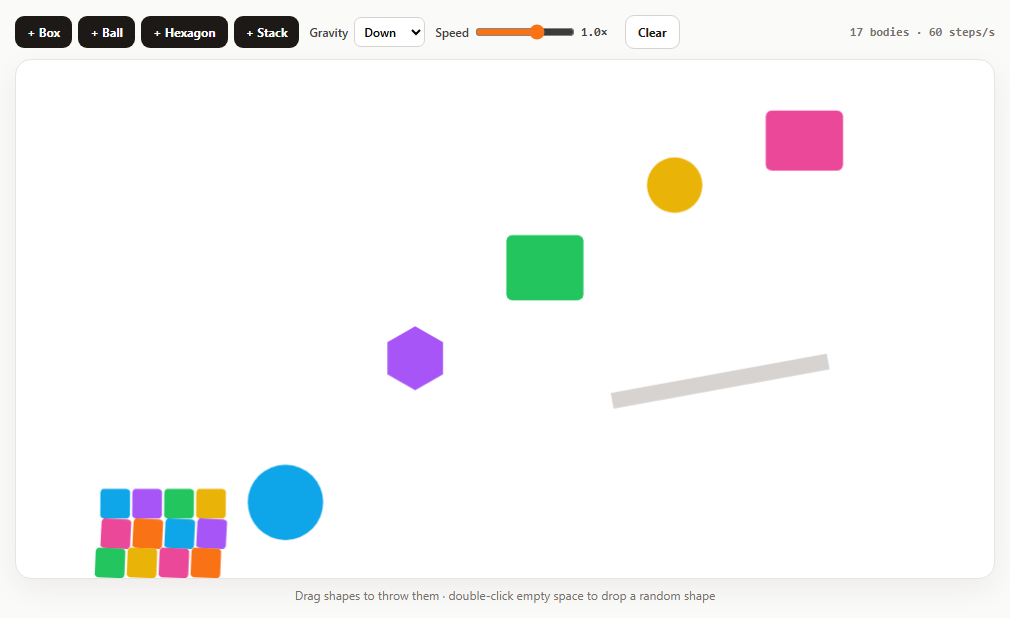
The fastest way to understand a physics engine is to throw things around in it. This playground wraps the parts of Matter.js you use in nearly every project — creating bodies, walls, mouse dragging, gravity and time — into one small toy, with each control mapped to a single API.
Engine, renderer, runner
Engine.create() holds the world and steps the simulation. Render.create() draws it on a canvas (wireframes: false enables colours), and Runner.run() advances the engine every animation frame. Everything added with Composite.add(engine.world, ...) becomes part of the simulation.
Bodies and composites
Bodies.rectangle (with a chamfer for rounded corners), Bodies.circle and Bodies.polygon create single bodies with options such as restitution (bounciness) and friction. Composites.stack lays out a grid of bodies from a callback — the "Stack" button drops twelve boxes at once. Walls are static bodies placed just outside the visible area.
Gravity is just a vector
engine.gravity.x and .y set the direction. Up, sideways, zero and a weak moon gravity are all one assignment each. (If you enable sleeping for performance, resting bodies must be woken to feel a new gravity.)
Time scale
engine.timing.timeScale slows or speeds the whole simulation without changing its behaviour: 0.2 is smooth slow motion, which is handy for inspecting collisions.
Dragging and spawning
MouseConstraint lets you grab and throw any body; its wheel listeners are removed so the page still scrolls over the canvas. Double-clicking empty space uses Query.point to check that nothing is under the cursor, then drops a random shape there.
Watching performance
The stats line counts non-static bodies and simulation steps per second, so you can see how the engine copes as you add dozens of stacks.
Build with AI
Build, Understand, Optimize, and Extend It With AI
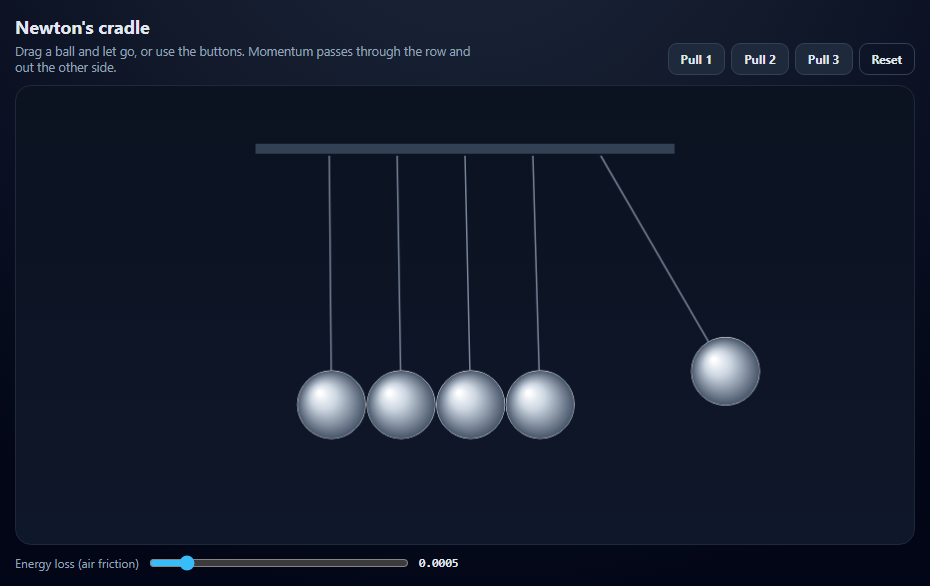
Paste this playground into an AI assistant like Claude and ask it to explain each Matter.js object it uses. Ask it to add shape presets like dominoes or a Newton's cradle, device-tilt gravity with the DeviceOrientation API, a "freeze" toggle using isStatic, or saving and restoring the scene. It can also help you find the body count where performance drops on mobile.
Prompt to recreate it
Copy this into your AI assistant of choice to build the effect from scratch, or as a jumping-off point for your own variant:
Build a Matter.js 0.20 physics playground (from a CDN) in plain HTML, CSS and JavaScript.

Requirements:
- A responsive canvas with invisible walls just outside the edges and one angled static platform.
- Buttons to add a rounded box, a ball, a hexagon or a 4×3 stack of boxes (Composites.stack) at a random x near the top, each with a colour from a palette; drop six shapes on load.
- A gravity select (down, up, right, zero, moon) that sets engine.gravity, and a speed slider that sets engine.timing.timeScale from 0.1 to 1.5.
- Drag and throw bodies with a mouse constraint, removing its wheel listeners so the page scrolls.
- Double-click empty space to spawn a random shape there, using Query.point to ignore clicks on existing bodies.
- A clear button that removes dynamic bodies, and a stats line with the body count and steps per second.
Want to tighten it up first? Run this prompt through the AI Prompt Studio to score it across 8 quality dimensions, catch anti-patterns, and tune the wording for Claude, ChatGPT, or Gemini before you paste it in.
Source Code
<div class="pg">
  <div class="pg-bar">
    <div class="pg-group" role="group" aria-label="Add shapes">
      <button type="button" data-add="box">+ Box</button>
      <button type="button" data-add="ball">+ Ball</button>
      <button type="button" data-add="poly">+ Hexagon</button>
      <button type="button" data-add="stack">+ Stack</button>
    </div>
    <label>Gravity <select id="pgGravity"><option value="0,1">Down</option><option value="0,-1">Up</option><option value="1,0">Right</option><option value="0,0">Zero-G</option><option value="0,0.3">Moon</option></select></label>
    <label>Speed <input type="range" id="pgSpeed" min="0.1" max="1.5" step="0.1" value="1"><output id="pgSpeedOut">1.0×</output></label>
    <button type="button" id="pgClear" class="ghost">Clear</button>
    <span class="pg-stats" id="pgStats"></span>
  </div>
  <div class="pg-stage" id="pgStage"></div>
  <p class="pg-hint">Drag shapes to throw them · double-click empty space to drop a random shape</p>
</div>*{box-sizing:border-box;margin:0;padding:0}
body{font-family:system-ui,-apple-system,sans-serif;background:#fafaf9;color:#1c1917;min-height:100vh;display:flex;align-items:center;justify-content:center;padding:18px}
.pg{width:100%;max-width:980px}
.pg-bar{display:flex;align-items:center;gap:10px;flex-wrap:wrap;margin-bottom:10px;font-size:12px;font-weight:600;color:#44403c}
.pg-group{display:flex;gap:6px}
.pg button{border:0;border-radius:9px;background:#1c1917;color:#fff;font:700 12px system-ui;padding:8px 12px;cursor:pointer}
.pg button.ghost{background:#fff;color:#1c1917;border:1px solid #d6d3d1}
.pg label{display:flex;align-items:center;gap:6px}
.pg select{font:600 12px system-ui;border:1px solid #d6d3d1;border-radius:7px;padding:5px}
.pg input[type=range]{width:100px;accent-color:#f97316}
.pg output{font:700 12px ui-monospace,monospace;width:34px}
.pg :focus-visible{outline:2px solid #f97316;outline-offset:2px}
.pg-stats{margin-left:auto;font:600 12px ui-monospace,monospace;color:#78716c}
.pg-stage{border-radius:16px;overflow:hidden;background:#fff;border:1px solid #e7e5e4;box-shadow:0 10px 30px rgba(28,25,23,.06)}
.pg-stage canvas{display:block;width:100%;height:auto;cursor:grab;touch-action:none}
.pg-hint{font-size:12px;color:#78716c;margin-top:8px;text-align:center}var M = Matter, Engine = M.Engine, Render = M.Render, Runner = M.Runner, Bodies = M.Bodies, Body = M.Body,
Composite = M.Composite, Composites = M.Composites, Mouse = M.Mouse, MouseConstraint = M.MouseConstraint, Events = M.Events, Query = M.Query;
var W = 980, H = 520;
var PALETTE = ['#f97316', '#0ea5e9', '#a855f7', '#22c55e', '#eab308', '#ec4899'];
var engine = Engine.create();
var render = Render.create({
element: document.getElementById('pgStage'),
engine: engine,
options: { width: W, height: H, wireframes: false, background: 'transparent', pixelRatio: window.devicePixelRatio || 1 },
});
var wallOpts = { isStatic: true, render: { fillStyle: '#e7e5e4' } };
Composite.add(engine.world, [
Bodies.rectangle(W / 2, H + 25, W + 100, 50, wallOpts),
Bodies.rectangle(W / 2, -25, W + 100, 50, wallOpts),
Bodies.rectangle(-25, H / 2, 50, H + 100, wallOpts),
Bodies.rectangle(W + 25, H / 2, 50, H + 100, wallOpts),
Bodies.rectangle(W * 0.72, H * 0.62, 220, 16, { isStatic: true, angle: -0.18, render: { fillStyle: '#d6d3d1' } }),
]);
function style(i) {
var c = PALETTE[i % PALETTE.length];
return { fillStyle: c, strokeStyle: '#1c1917', lineWidth: 0 };
}
var n = 0;
function make(type, x, y) {
x = x || 120 + Math.random() * (W - 240);
y = y || 60;
var opts = { restitution: 0.3, friction: 0.4, render: style(n++) };
if (type === 'box') return Bodies.rectangle(x, y, 40 + Math.random() * 40, 40 + Math.random() * 40, Object.assign(opts, { chamfer: { radius: 6 } }));
if (type === 'ball') return Bodies.circle(x, y, 18 + Math.random() * 20, Object.assign(opts, { restitution: 0.6 }));
if (type === 'poly') return Bodies.polygon(x, y, 6, 26 + Math.random() * 12, opts);
// Composites.stack lays out rows × columns of bodies from a callback.
return Composites.stack(x - 60, y, 4, 3, 2, 2, function (sx, sy) { return Bodies.rectangle(sx, sy, 30, 30, { chamfer: { radius: 4 }, render: style(n++) }); });
}
function add(type, x, y) { Composite.add(engine.world, make(type, x, y)); }
document.querySelectorAll('[data-add]').forEach(function (b) { b.addEventListener('click', function () { add(b.dataset.add); }); });
// Gravity is a vector on the engine; scale is its strength.
document.getElementById('pgGravity').addEventListener('change', function (e) {
var v = e.target.value.split(',').map(Number);
engine.gravity.x = v[0];
engine.gravity.y = v[1];
// Bodies that came to rest can be asleep; with sleeping enabled they
// would ignore a new gravity until woken. (Sleeping is off here.)
});
// timeScale slows or speeds up the whole simulation without changing the
// physics: 0.2 is slow motion, 1 is real time.
var speed = document.getElementById('pgSpeed');
speed.addEventListener('input', function () {
engine.timing.timeScale = Number(speed.value);
document.getElementById('pgSpeedOut').textContent = Number(speed.value).toFixed(1) + '×';
});
document.getElementById('pgClear').addEventListener('click', function () {
Composite.allBodies(engine.world).forEach(function (b) { if (!b.isStatic) Composite.remove(engine.world, b, true); });
Composite.allComposites(engine.world).forEach(function (c) { if (!Composite.allBodies(c).length) Composite.remove(engine.world, c, true); });
});
var mouse = Mouse.create(render.canvas);
var mc = MouseConstraint.create(engine, { mouse: mouse, constraint: { stiffness: 0.2, render: { visible: false } } });
['mousewheel', 'DOMMouseScroll', 'wheel'].forEach(function (t) { mouse.element.removeEventListener(t, mouse.mousewheel); });
Composite.add(engine.world, mc);
render.mouse = mouse;
// Double-click on empty space drops a random shape there. Query.point finds
// bodies under a point, so clicks on a shape don't spawn a new one.
render.canvas.addEventListener('dblclick', function () {
var p = mouse.position;
if (Query.point(Composite.allBodies(engine.world), p).length) return;
add(['box', 'ball', 'poly'][Math.floor(Math.random() * 3)], p.x, p.y);
});
// Show body count and simulation FPS.
var frames = 0, last = performance.now();
Events.on(engine, 'afterUpdate', function () {
frames++;
var now = performance.now();
if (now - last > 500) {
var bodies = Composite.allBodies(engine.world).filter(function (b) { return !b.isStatic; }).length;
document.getElementById('pgStats').textContent = bodies + ' bodies · ' + Math.round(frames * 1000 / (now - last)) + ' steps/s';
frames = 0; last = now;
}
});
Render.run(render);
Runner.run(Runner.create(), engine);
['stack', 'ball', 'poly', 'box', 'ball', 'box'].forEach(function (t, i) { setTimeout(function () { add(t, 140 + i * 130, 60); }, i * 180); });Step by step
How to Use
- 1Add shapesUse the buttons or double-click empty space.
- 2Throw themDrag any shape and release while moving.
- 3Change gravityDown, up, right, zero-G or moon.
- 4Slow timeDrag Speed to 0.2× for slow motion.
- 5Stress testAdd stacks and watch the body count and steps per second.
Real-world uses
Common Use Cases
Got questions?
Frequently Asked Questions
Create an engine with Engine.create(), a renderer with Render.create({ element, engine, options }), add bodies with Composite.add(engine.world, bodies), then start Render.run(render) and Runner.run(Runner.create(), engine).
Set engine.gravity.x and engine.gravity.y. For example x: 0, y: -1 makes things fall upward, and 0, 0 gives zero gravity. engine.gravity.scale adjusts overall strength.
Set engine.timing.timeScale to a value below 1, such as 0.2. The simulation runs slower but behaves the same way.
Create a Mouse on the canvas and a MouseConstraint for the engine, add the constraint to the world, and set render.mouse. Remove the mouse's wheel listeners if the page must scroll over the canvas.
Use Query.point(bodies, point), which returns every body containing that point.