You Might Also Like
Learn Coding Visually
Learn to code with interactive, live-preview playgrounds — HTML, CSS, JavaScript, React & more.
 HTML Playground42 lessons · Click-based · Live preview
 CSS PlaygroundLearn CSS with a live editor
 JavaScript Playground60 lessons · DOM · Async · Canvas
 React PlaygroundLearn React with a live code editor
 GSAP PlaygroundLearn GSAP animation interactively
 SVG Playground44 lessons · shapes · paths · animation
 SCSS Playground45 lessons · Sass modules · tokens
 Tailwind PlaygroundLearn Tailwind CSS with a live editor
 Bootstrap 5 Playground50 lessons · live preview
Matter.js Falling Tags — Draggable Physics Chips
Matter.js Falling Tags · Animations · Plain HTML, CSS & JS · Live preview
What's included
Features
About this UI Snippet
Matter.js Falling Tags — Physics Bodies Synced to Real DOM
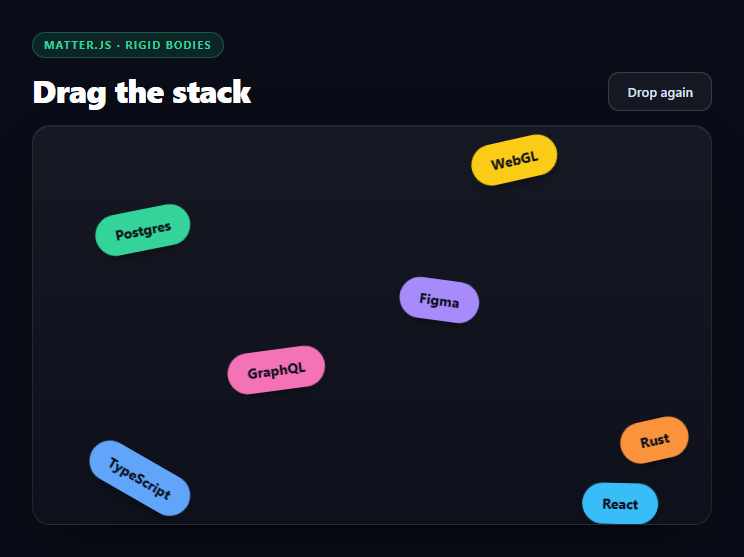
Physics-driven "skill chips that tumble into a pile" is one of the most-copied effects on award-winning portfolio sites, and almost every tutorial builds it the wrong way: they let Matter.js draw everything into its own <canvas> using Matter.Render. That is fine for a physics demo and useless for a real interface — canvas-drawn labels are not selectable, not readable by a screen reader, not stylable with CSS, and not indexable by search engines.
This snippet does it the way production sites do. The chips stay real DOM elements with real text, real border-radius, real box-shadows. Matter.js runs an invisible rigid-body simulation alongside them, and every frame each element's transform is written from its matching body's position and angle. You get genuine physics on genuine HTML.
Measuring first, simulating second
Each chip is measured before it gets a body:
var w = el.offsetWidth, h = el.offsetHeight;
That measurement is what makes the collision shape match what the user actually sees. "Tailwind" is a wider chip than "Go", so it needs a wider body — hard-coding one size for all of them produces the classic broken version where short chips float on invisible padding and long ones overlap.
The bodies are created with chamfer: { radius: h / 2 }, which rounds the rectangle's corners by half its height, turning the collision shape into a true pill that matches the CSS border-radius: 99px. Without the chamfer the physics body has square corners while the visual has round ones, and chips visibly snag on each other's invisible edges — the single most common giveaway that a physics-chip effect was built carelessly.
The sync loop
The bridge between simulation and DOM is four lines inside a requestAnimationFrame loop:
p.el.style.transform = 'translate(' + (pos.x - p.w / 2) + 'px,' + (pos.y - p.h / 2) + 'px) rotate(' + p.body.angle + 'rad)'
Two details matter. Matter.js positions bodies by their center, while CSS translate on an absolutely positioned element moves its top-left corner — so half the width and height are subtracted to convert between the two coordinate conventions. And body.angle is in radians, which is why the CSS uses rotate(...rad) rather than converting to degrees; CSS accepts radians natively, so the conversion is free.
Only transform is written — never top or left — so the browser composites the movement without recalculating layout for ten elements sixty times a second.
Dragging, and the wheel-event trap
MouseConstraint is what makes the pile grabbable: it creates a spring between the pointer and whichever body is under it, with stiffness: 0.16 giving a soft elastic pull rather than a rigid snap. Bodies dragged into the stack shove the others out of the way, because the constraint feeds forces back into the same solver.
There is a trap here that catches almost everyone. Matter.Mouse binds wheel listeners to its element by default, so a stage placed mid-page swallows page scrolling — the user's wheel does nothing and they cannot scroll past your section. Removing mouse.mousewheel from both mousewheel and DOMMouseScroll releases it. The guard around it exists because the property name has moved between Matter versions.
Walls, and why they are oversized
Three static bodies form the floor and side walls. They are deliberately far larger than the visible stage — W * 3 wide, H * 4 tall, 120px thick — because thin walls in a discrete-step solver can be tunneled through by a fast body that moves further in one step than the wall is deep. A thick, oversized wall makes escape geometrically impossible, which is much cheaper than enabling continuous collision detection. There is no ceiling on purpose: chips spawn above the stage at negative Y and fall in.
The resize handler repositions the three walls with Body.setPosition rather than rebuilding the world, so a rotated phone or a dragged window doesn't strand the pile outside the new bounds.
Reusing it
Swap the chip text for skills, tags, product categories, or filter values and the simulation adapts automatically, since every body is measured from its element. Raise restitution for a bouncier pile, raise frictionAir for a floatier one. It sits naturally beside a tag cloud as its playful counterpart, or a physics balls canvas if you want to see the same ideas without a library.
Build with AI
Build, Understand, Optimize, and Extend It With AI
The clever parts of this snippet are the seams between two coordinate systems, which is exactly what an AI assistant is good at making explicit. Paste the HTML, CSS, and JS into an assistant like Claude and ask it to explain why the sync loop subtracts p.w / 2 and p.h / 2 before writing the transform, and what the chips would look like if you removed that — then try it and watch every chip sit offset by half its own size. Ask it next why chamfer: { radius: h / 2 } is required rather than cosmetic, and have it describe the exact visual symptom of leaving it out. For optimization, ask whether writing transform on ten elements per frame is meaningfully cheaper than writing top and left, and at what body count you would stop syncing DOM and switch to canvas rendering. For extension: have it add touch support via Matter's pointer handling, spawn a new chip on click at the cursor, freeze the simulation with Runner.stop once the pile has settled to save battery, or drive the chip list from real data so a filter adds and removes bodies live. Treat the code less like a finished artifact and more like a starting point for a conversation.
Prompt to recreate it
Copy this into your AI assistant of choice to build the effect from scratch, or as a jumping-off point for your own variant:
Build a "falling tags" physics effect with Matter.js (from a CDN) where real HTML chips fall, collide, stack, and can be dragged — do NOT use Matter.Render or draw anything into a canvas.

Requirements:
- The tag chips must stay real DOM elements with real text, CSS border-radius and shadows, absolutely positioned inside a relative stage container. Matter.js runs an invisible simulation and you sync each element to its body every frame.
- Measure each chip with offsetWidth/offsetHeight BEFORE creating its body, and size the rectangle body from those measurements, so wide labels get wide colliders and short ones get short colliders.
- Give each body a chamfer with a radius of half the chip's height, so the collision shape is a true pill matching the CSS border-radius. Explain in a comment why square-cornered bodies would make rounded chips visibly snag on each other.
- Drive the visuals with a requestAnimationFrame loop that writes ONLY transform (never top/left): translate the element by the body position MINUS half the chip's width and height — because Matter positions bodies by their center while CSS translate moves the top-left corner — and rotate by body.angle using CSS rad units directly, since body.angle is in radians.
- Add a Matter MouseConstraint with a soft stiffness (around 0.16) so chips can be grabbed and thrown, shoving the rest of the pile realistically.
- After creating the Mouse, remove its 'mousewheel' and 'DOMMouseScroll' listeners (guarded, since the property name varies by version) so the stage does not swallow page scrolling — a section-embedded physics stage otherwise traps the user's wheel.
- Create three static walls (floor, left, right) that are deliberately oversized — several times the stage dimensions and around 120px thick — so fast-moving bodies cannot tunnel through them between discrete solver steps. No ceiling: chips spawn above the stage at negative Y and fall in, staggered so they don't all land at once.
- Add a reset button that repositions every body above the stage and zeroes its velocity and angular velocity, and a resize handler that repositions the three walls with Body.setPosition rather than rebuilding the world.
Want to tighten it up first? Run this prompt through the AI Prompt Studio to score it across 8 quality dimensions, catch anti-patterns, and tune the wording for Claude, ChatGPT, or Gemini before you paste it in.
Step by step
How to Use
- 1Add the Matter.js CDNInclude matter-js from the CDN panel — one script, no bundler needed.
- 2Paste HTML, CSS, and JSTen tag chips drop in from above and settle into a pile.
- 3Drag a chipGrab any tag and throw it — the rest of the stack reacts and reshuffles.
- 4Press Drop againEvery body is repositioned above the stage and falls fresh.
- 5Edit the tagsChange the chip text — bodies are measured from the DOM, so sizes follow.
- 6Tune the feelAdjust restitution for bounce and frictionAir for how floaty the fall is.
Real-world uses
Common Use Cases
Got questions?
Frequently Asked Questions
Matter.Render paints into a canvas, which means the labels are not real text — they cannot be selected, read by a screen reader, styled with CSS, or indexed. Keeping the chips as HTML and only borrowing positions from the simulation gives you real, accessible markup with real physics behind it.
Matter.js stores a body position at its center point, but a CSS translate on an absolutely positioned element moves its top-left corner. Subtracting half the measured width and height converts between the two conventions; skip it and every chip renders offset down and to the right by half its own size.
It rounds the corners of the rectangular collision shape. Setting the radius to half the chip height makes the physics body a true pill, matching the visual border-radius. Without it the invisible body has square corners while the chip looks rounded, so chips catch on edges that appear to be nowhere near them.
Matter.Mouse binds wheel handlers to its element so a canvas game can zoom. On a page section that means the stage swallows scrolling — the user hits your component and the page stops moving. Unbinding mousewheel and DOMMouseScroll hands scrolling back to the browser while leaving drag intact.
Discrete physics steps let a fast body jump past a thin wall between frames, escaping the world entirely. Making the walls 120px thick and several times the stage size makes that geometrically impossible, which is far cheaper than enabling continuous collision detection.
Create the engine, bodies, and runner inside a mount effect with a ref to the stage, and keep the body list in a ref rather than state since it mutates every frame. Cancel the requestAnimationFrame handle and call Matter.Runner.stop plus Matter.Engine.clear in the cleanup, or each mount leaks a running simulation. Render the chips from an array and measure them after the first paint.