You Might Also Like
Learn Coding Visually
Learn to code with interactive, live-preview playgrounds — HTML, CSS, JavaScript, React & more.
 HTML Playground42 lessons · Click-based · Live preview
 CSS PlaygroundLearn CSS with a live editor
 JavaScript Playground60 lessons · DOM · Async · Canvas
 React PlaygroundLearn React with a live code editor
 GSAP PlaygroundLearn GSAP animation interactively
 SVG Playground44 lessons · shapes · paths · animation
 SCSS Playground45 lessons · Sass modules · tokens
 Tailwind PlaygroundLearn Tailwind CSS with a live editor
 Bootstrap 5 Playground50 lessons · live preview
404 Page — Free HTML CSS Error Page Snippet
404 Error Page · Layouts · Plain HTML & CSS · Live preview
What's included
Features
About this UI Snippet
404 Page — Dark Glitch Animation, Search Box & Popular Pages Navigation
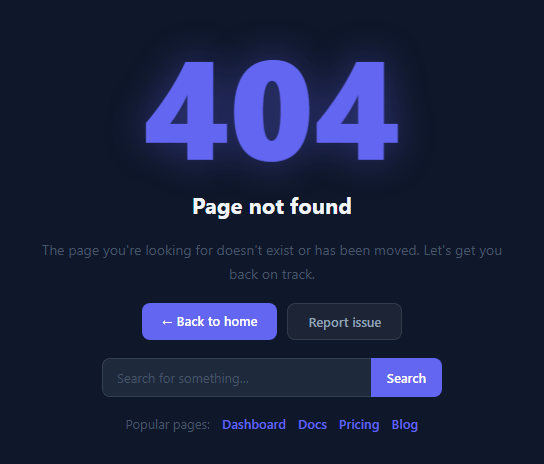
A 404 page is what users see when they follow a broken link or mistype a URL. It is one of the most important pages on any website because it directly determines whether a user abandons your site or finds what they were looking for. A poorly designed 404 page showing just "Page not found" with no navigation sends users to your competitors. A well-crafted 404 page reassures users, explains the situation, and offers clear recovery paths — turning a dead end into a retention opportunity.
This snippet delivers a complete, production-ready 404 error page built entirely with HTML and CSS. The centerpiece is a large "404" number that uses the same glitch text animation technique: CSS @keyframes combined with ::before and ::after pseudo-elements using content: attr(data-text) to duplicate the number, then clip-path: polygon() to slice each pseudo-element to a horizontal band. The two pseudo-elements are offset by a few pixels horizontally via translateX, creating a RGB-split glitch effect that triggers every few seconds.
The glitch animation technique
The .glitch-num element stores the text value in data-text="404". Both pseudo-elements read this via content: attr(data-text) and position absolutely over the original. The ::before pseudo-element renders in pink (#ec4899) and is clipped to the upper band; the ::after renders in blue (#0ea5e9) and is clipped to the lower band. Three separate @keyframes animations (glitch, gb, ga) fire in a staggered sequence to produce the displacement effect.
The font size scaling with clamp()
The 404 number uses font-size: clamp(80px, 18vw, 140px) — it scales from 80px on a 375px mobile up to 140px on a 1200px+ desktop, without any media query. This same technique works for any display headline that needs to scale fluidly across viewports.
Action buttons and recovery UI
Below the error message, two buttons provide the primary recovery paths: a filled primary "Back to home" button and a ghost "Report issue" button. Below the buttons, a search box lets users search for the missing content directly on the 404 page — reducing bounce rate by giving users something useful to do. The "Popular pages" link row at the bottom provides direct navigation to high-traffic pages like Dashboard, Docs, and Pricing, covering the most common destinations users may have been trying to reach.
Dark theme with a deep navy background
The dark #0f172a background with an indigo accent (#6366f1) gives the page a premium, tech-focused feel that matches developer tools, SaaS dashboards, and modern product brands. The text shadow on the 404 number (0 0 40px rgba(99,102,241,0.4)) creates a soft ambient glow that reinforces the accent colour throughout the layout.
Build with AI
Build, Understand, Optimize, and Extend It With AI
You don't have to reverse-engineer the glitch timing by hand — paste this snippet's HTML and CSS into an AI coding assistant like Claude and ask it to explain exactly how the ::before and ::after pseudo-elements use content: attr(data-text) plus clip-path polygon bands to slice the "404" number into offset RGB layers, and why three separate keyframe animations are staggered rather than combined into one. The same assistant is useful for optimizing it — asking whether the infinite glitch keyframes should pause under prefers-reduced-motion, or whether the clip-path polygon coordinates could be generated programmatically for an arbitrary number of bands. It's just as good for extending the page: ask it to wire the search input to a real endpoint with fetch, add a GA4 tracking snippet for the missing URL and referrer, or generalize the glitch effect into a reusable component that accepts any data-text string for a 500 or maintenance page. Treat the code less like a finished artifact and more like a starting point for a conversation.
Prompt to recreate it
Copy this into your AI assistant of choice to build the effect from scratch, or as a jumping-off point for your own variant:
Build a dark-themed "404 error page" in plain HTML and CSS only — no JavaScript required, no images, no external fonts.

Requirements:
- A large "404" heading element whose text is duplicated into a data-text HTML attribute (not just its inner text), so pseudo-elements can read the same string via content: attr(data-text).
- Two absolutely-positioned pseudo-elements (::before and ::after) layered exactly over the original number, each in a different accent color, each clipped to a distinct horizontal band using clip-path: polygon(...) so only a slice of the duplicated number shows through each layer.
- Three separate @keyframes animations running infinitely: one on the base number applying a barely-perceptible skewX wobble for a couple of percentage points of its duration, and one each on the ::before/::after layers that translateX them a few pixels in opposite directions and toggle their opacity, so the glitch reads as a brief RGB-split flicker rather than a constant effect.
- The number's font-size must use clamp() with a small viewport-width-based middle value so it scales fluidly between a mobile minimum and a desktop maximum with no media queries.
- Below the heading, include a short reassuring message, a primary "back to home" button, a secondary ghost-style button, an inline search input plus button styled as a joined pill (shared border-radius split across both elements), and a row of "popular pages" links — all reachable and legible against a dark navy background.
- Keep the whole thing pure HTML/CSS so it can be dropped in as a static 404.html on any static host with zero JavaScript dependency for the visual effect itself.
Want to tighten it up first? Run this prompt through the AI Prompt Studio to score it across 8 quality dimensions, catch anti-patterns, and tune the wording for Claude, ChatGPT, or Gemini before you paste it in.
Step by step
How to Use
- 1Preview the animated 404 pageThe preview shows the dark navy page with the large glitching 404 number, error headline, description text, action buttons, search input, and popular page links in a flex column layout.
- 2Update the error message textIn the HTML panel, find the h1 and p elements. Change the headline and description text to match your site's tone of voice — keep the message friendly, short, and focused on helping the user recover.
- 3Update the navigation linksIn the HTML panel, update the href values on the 'Back to home' button and the popular page links to match your site's actual URL structure and most-visited pages.
- 4Change the accent colour to match your brandIn the CSS panel, find every instance of #6366f1 (the indigo accent) and replace it with your brand's primary colour. This updates the 404 text glow, button backgrounds, link colours, and search button simultaneously.
- 5Wire up the search box to your site searchIn the HTML, update the search button to submit the form: add a form element wrapping the search inputs and set action='/search' method='get'. The input name='q' will append the query as a URL parameter your search page can read.
- 6Deploy as your custom 404 pageClick 'HTML' to export as a standalone file. Save it as 404.html in your project root. Netlify and Vercel automatically serve this file for all not-found routes. For Apache, add ErrorDocument 404 /404.html to your .htaccess file.
Real-world uses
Common Use Cases
Got questions?
Frequently Asked Questions
Export the snippet as HTML using the 'HTML' button, then save the file as 404.html in the root of your project repository. Netlify automatically detects 404.html and serves it for all not-found routes — no configuration needed. Vercel also serves 404.html automatically. For Next.js specifically, create src/app/not-found.js and export a React component — Next.js renders it for unmatched routes. For Apache servers, add ErrorDocument 404 /404.html to your .htaccess file. For nginx, add error_page 404 /404.html inside your server block.
The .glitch-num element has data-text='404' as an HTML attribute. Both ::before and ::after pseudo-elements use content: attr(data-text) to duplicate the number text and position: absolute to overlay it exactly over the original. The ::before pseudo-element is coloured pink (#ec4899) and the ::after is blue (#0ea5e9). Each is clipped to a horizontal band using clip-path: polygon() — upper band for before, lower band for after. Three separate @keyframes animations fire in a coordinated sequence: the main element skews slightly, while each pseudo-element translates horizontally in opposite directions and fades in/out. The combination creates the RGB-split glitch effect that triggers every few seconds.
Wrap the search input and button in a form element with action pointing to your search page and method='get'. Set the input's name attribute to 'q' (the standard search query parameter). When submitted, the browser navigates to /search?q=userquery and your search page reads the q parameter. If your site uses a search service like Algolia or a CMS search API, the form action can point directly to that endpoint. For a JavaScript-powered search, add an onsubmit handler that prevents the default form submission and instead calls your search function: event.preventDefault(); window.location.href = '/search?q=' + encodeURIComponent(searchInput.value).
Add a script tag to the 404 page that fires a Google Analytics 4 event recording the missing URL. Inside a script block: if (typeof gtag !== 'undefined') { gtag('event', 'page_not_found', { page_location: window.location.href, page_path: window.location.pathname, page_referrer: document.referrer }); } The page_referrer field tells you which page linked to the missing URL, making it easy to find and fix broken internal links. In GA4, create a custom exploration report filtered to the page_not_found event to see your top 404 pages sorted by frequency.