You Might Also Like
Learn Coding Visually
Learn to code with interactive, live-preview playgrounds — HTML, CSS, JavaScript, React & more.
 HTML Playground42 lessons · Click-based · Live preview
 CSS PlaygroundLearn CSS with a live editor
 JavaScript Playground60 lessons · DOM · Async · Canvas
 React PlaygroundLearn React with a live code editor
 GSAP PlaygroundLearn GSAP animation interactively
 SVG Playground44 lessons · shapes · paths · animation
 SCSS Playground45 lessons · Sass modules · tokens
 Tailwind PlaygroundLearn Tailwind CSS with a live editor
 Bootstrap 5 Playground50 lessons · live preview
Maintenance Page with Countdown — HTML CSS JS Snippet
Maintenance Page · Heroes · Plain HTML, CSS & JS · Live preview
What's included
Features
About this UI Snippet
Maintenance Page — Countdown Timer, Status Pill, Email Notify & Grid Background
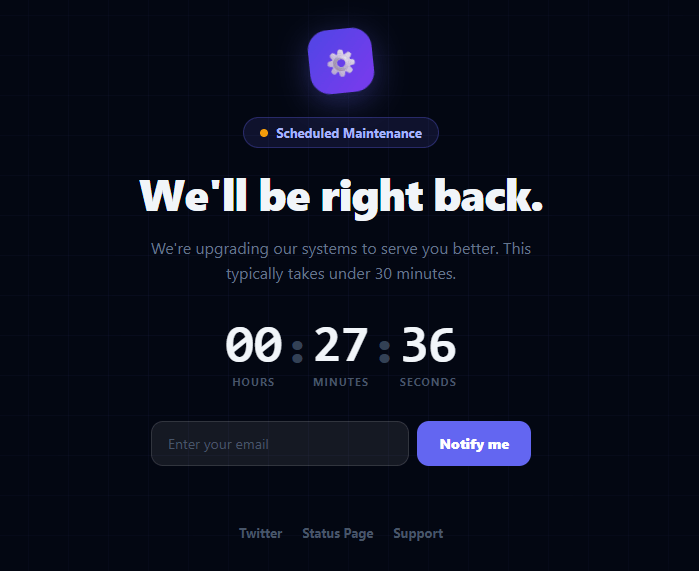
A maintenance page (also called a "down for maintenance" or "we'll be right back" page) is a standard need for any production web application. Showing a polished, branded holding page instead of a server error keeps users informed and reduces support ticket volume during planned outages. This snippet provides a complete maintenance page with a dark-themed design, a subtle grid background, an animated status pill, a countdown timer, an email notification sign-up, and social/status links — for a pre-launch variant, see the coming soon hero.
The countdown timer
The timer targets a configurable end time (set 28 minutes from load in the snippet). tick() runs every second, computing the remaining hours, minutes, and seconds by dividing the millisecond diff and taking modulo values. It pads each unit to two digits with padStart(2, '0') for a consistent display width. The timer stops when the diff reaches zero and fades the countdown to indicate the expected window has passed. In production, the target time would come from a server-rendered config variable so the countdown reflects the actual maintenance window.
The status pill and pulse dot
The amber pulse dot uses a CSS keyframe animation cycling between opacity and scale — a lightweight way to convey "in progress" status. The pill's border and background both use rgba values of the brand colour so it reads against any dark background without hardcoding neutrals.
The grid background
The page background uses two overlapping CSS linear-gradient "lines" at 40px spacing to create a dot-grid pattern, masked with a radial gradient so it fades to black at the edges. This technique creates a sophisticated tech aesthetic with no images or SVG. The mask-image radial gradient is the key detail — without it the grid would be uniform and flat.
Email notification capture
The notify form validates the email client-side and shows a confirmation message on submission. In production this would POST to an endpoint that stores the email and sends a "we're back" email when the maintenance window ends. The form is disabled after submission to prevent duplicate entries.
The rocking gear animation
The logo icon uses a CSS keyframe that rotates between −6° and +6°, creating a mechanical rocking motion that reinforces the maintenance concept without requiring an external animation library or lottie file. The animation is subtle enough not to be distracting during what is a tense moment for the user.
Build with AI
Build, Understand, Optimize, and Extend It With AI
You do not have to guess why the countdown uses setTimeout instead of setInterval. Paste this snippet's HTML, CSS, and JS into an AI coding assistant like Claude and ask it to explain exactly why tick() re-schedules itself with setTimeout(tick, 1000) rather than using a single setInterval, and how that choice affects drift if the browser tab is backgrounded for a while. The same assistant can help optimize it, for instance asking whether the target end time should be read from a server-injected value instead of Date.now() plus a fixed offset, since every visitor currently gets their own independent 28-minute window rather than a shared one. It is also useful for extending the page: ask it to auto-reload the page once the countdown reaches zero so returning users land back on the live site automatically, wire the notify form to a real email-capture endpoint, or add a live status feed pulling from an incident-management API. Treat the code less like a finished artifact and more like a starting point for a conversation.
Prompt to recreate it
Copy this into your AI assistant of choice to build the effect from scratch, or as a jumping-off point for your own variant:
Build a "maintenance page" in plain HTML, CSS, and JavaScript with no libraries, intended to be servable as a static 503 response with no backend dependency.

Requirements:
- A full-screen dark page with a status pill containing a continuously pulsing dot (a CSS keyframe animating opacity and scale) and the text "Scheduled Maintenance", plus a heading and supporting copy.
- A live countdown made of three two-digit segments (hours, minutes, seconds) counting down toward a fixed target Date computed once at load, updating once per second by having the tick function re-schedule itself rather than relying on a repeating interval, so it is trivial to stop cleanly.
- Each countdown segment must be zero-padded to two digits regardless of its numeric value, and the whole countdown group must visually fade (reduced opacity) once the countdown reaches zero, rather than disappearing or showing negative numbers.
- An email input and "Notify me" button where clicking validates the email with a basic regex, shows a red inline error message for an invalid or empty address without submitting anything, and on a valid address shows a green confirmation message and disables both the input and the button so the same address cannot be submitted twice.
- A decorative background built from two overlapping CSS linear-gradient lines forming a grid pattern, masked with a radial gradient so the grid fades out toward the page edges instead of tiling uniformly to the viewport border.
- A small logo/icon element that continuously rocks back and forth a few degrees using a CSS keyframe, distinct from the pulsing status dot's animation.
Want to tighten it up first? Run this prompt through the AI Prompt Studio to score it across 8 quality dimensions, catch anti-patterns, and tune the wording for Claude, ChatGPT, or Gemini before you paste it in.
Step by step
How to Use
- 1Set the maintenance end timeChange the target variable from Date.now() + 28 * 60 * 1000 to a specific end time (e.g. new Date("2026-06-16T14:00:00Z")) to reflect your actual maintenance window.
- 2Update the heading and messageChange the heading and sub-text to match your brand voice and include any relevant details (what system is being updated, why).
- 3Replace the logoSwap the ⚙️ emoji with your logo SVG or an <img> tag. The logo container already handles sizing and shadow.
- 4Wire the email formIn notifyMe(), POST the validated email to your API endpoint. Store it and send a notification email when the maintenance concludes.
- 5Update the social linksReplace the Twitter, Status Page, and Support hrefs with your actual links. The status page link is particularly important during outages.
- 6Export for your frameworkClick "React" for a component with the countdown in useEffect and useRef. Click "Vue" for a Vue 3 SFC with onMounted and onUnmounted interval cleanup.
Real-world uses
Common Use Cases
Got questions?
Frequently Asked Questions
Replace var target = new Date(Date.now() + 28 * 60 * 1000) with var target = new Date("2026-06-16T15:00:00Z"), using your actual maintenance window end time in ISO 8601 UTC format. All visitors then see the same remaining time regardless of when they load the page, which is the correct behaviour for a shared maintenance window. If your maintenance window is server-configured, inject the end time as a JavaScript variable from your server-side template.
When diff reaches zero, tick() stops calling itself and fades the countdown numbers to 0.4 opacity to signal that the expected window has elapsed. In production you should also add a page-reload after a short delay (e.g., setTimeout(() => location.reload(), 15000)) so users whose page was open during maintenance automatically return to the live site once it comes back up.
In nginx, add error_page 503 /maintenance.html; and return 503; in a location block. In Caddy, use the respond directive with a 503 status and the page HTML as the body, or rewrite to a static HTML file. With Cloudflare, use a Worker that returns the maintenance page with a 503 status when a kill-switch KV key is set. The page should itself be a static file with no backend dependencies so it serves even when your application is completely down.
In a useEffect, set up a setInterval(tick, 1000) that computes remaining time from a target Date and updates a timeLeft state object { h, m, s }. Clear the interval in the useEffect cleanup. The notify form keeps email and submitted in useState; on submit, validate and call your API. Because maintenance pages should work without JavaScript in some configurations, consider a server-rendered version (Next.js getServerSideProps returning the target time as a prop) so the countdown is pre-rendered on the correct value. For the Tailwind version, click "Tailwind" to get the same markup with utility classes instead of a scoped stylesheet.