You Might Also Like
Learn Coding Visually
Learn to code with interactive, live-preview playgrounds — HTML, CSS, JavaScript, React & more.
 HTML Playground42 lessons · Click-based · Live preview
 CSS PlaygroundLearn CSS with a live editor
 JavaScript Playground60 lessons · DOM · Async · Canvas
 React PlaygroundLearn React with a live code editor
 GSAP PlaygroundLearn GSAP animation interactively
 SVG Playground44 lessons · shapes · paths · animation
 SCSS Playground45 lessons · Sass modules · tokens
 Tailwind PlaygroundLearn Tailwind CSS with a live editor
 Bootstrap 5 Playground50 lessons · live preview
Vivus SVG Line Draw — Self-Drawing SVG Animation
Vivus SVG Line Draw · Animations · Plain HTML, CSS & JS · Live preview
What's included
Features
About this UI Snippet
Vivus SVG Line Draw — How Stroke-Dashoffset Animation Actually Works
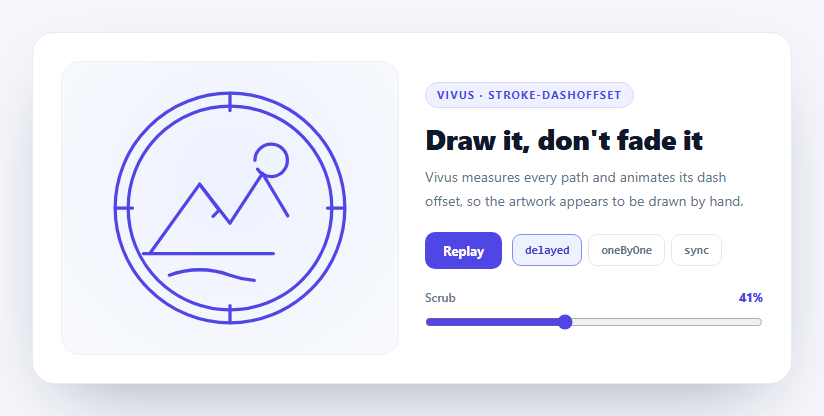
A logo that draws itself is one of the few web animations that still stops people mid-scroll. It also looks like it must involve a video or a Lottie file, and it involves neither — it is one CSS property, applied cleverly.
The trick underneath
Every SVG stroke supports stroke-dasharray, which turns a solid line into a dashed one, and stroke-dashoffset, which slides those dashes along the path. Set the dash length to exactly the total length of the path and you get a single dash covering the whole line, with a single gap of the same size after it. Push the offset to that same length and the dash is pushed entirely out of view — the path is invisible. Animate the offset back to zero and the line appears to be drawn from one end to the other.
Doing it by hand means calling path.getTotalLength() on every element, writing two properties per path, and hand-scheduling the timing. Vivus is a 5kb library that does exactly that, for every drawable element in an SVG, automatically.
What the three types actually change
The type option is the whole personality of the animation, and the three modes here are meaningfully different:
- `delayed` — every path animates over the full duration, but each starts at a slightly staggered offset. Strokes overlap heavily, so the drawing appears to emerge everywhere at once while still resolving in order. This is the most "designed" looking option and the default here. - `oneByOne` — each path waits for the previous to finish completely. The duration is divided by total path length, so long paths take proportionally longer. This is the literal "someone is drawing this" reading, and it is much slower to complete. - `sync` — every path starts and ends together. The whole illustration materializes as one, which suits geometric marks and looks wrong on illustrative ones.
Because oneByOne and delayed derive their schedule from measured path lengths, document order matters — the SVG here is authored deliberately, with the outer rings first and the foreground detail last, so the drawing builds from frame to subject.
Manual start, and driving it yourself
start: 'manual' is what makes this snippet interactive rather than a fire-and-forget intro. Nothing plays until .play() is called, which means you can trigger on scroll with an IntersectionObserver, on hover, or on a button as done here.
The scrubber is the more interesting half. vivus.setFrameProgress(0.5) jumps the drawing to any point between 0 and 1 instantly — so the animation becomes a timeline you can drag, not just something you watch. Wiring that to a scroll position instead of a range input is the scroll-driven logo-draw effect seen on agency sites, and it is one line different from what is here.
Keeping the slider in sync *during* playback needs a small loop, because Vivus does not emit progress events. It exposes currentFrame and frameLength, so a requestAnimationFrame poll converts them to a percentage while playing is true and stops the moment the completion callback fires.
The gotcha: destroy before rebuilding
Switching the timing type requires a new Vivus instance, and this line is not optional:
if (vivus) vivus.destroy();
Vivus mutates the SVG it is given, writing stroke-dasharray and stroke-dashoffset inline on every path. Constructing a second instance over the same markup makes it measure paths that already carry the previous run's dash values, and the result is an animation that starts half-drawn or never completes. destroy() restores the original attributes so the new instance measures clean geometry. This is the single most common Vivus bug and it only appears once you make the animation reconfigurable.
Authoring SVG that Vivus can draw
The requirement is simple and absolute: Vivus animates strokes, not fills. Every element here is fill: none with an explicit stroke and stroke-width, set in CSS rather than as attributes so the artwork stays themeable. Shapes that are filled rather than stroked are skipped entirely — which is why exporting a logo from a design tool usually produces nothing until the fills are converted to outlined strokes.
stroke-linecap: round and stroke-linejoin: round matter more than they look: a drawing animation constantly reveals path *ends*, and square caps make every in-progress stroke read as cut off.
Reusing it
Drop in your own line-art SVG, keep everything fill: none with strokes, and order the paths the way you want them drawn. Trigger play() from an IntersectionObserver for a scroll-triggered logo intro, or feed scroll progress into setFrameProgress() for a scrubbed one. It pairs naturally with a draw SVG success checkmark for micro-feedback, or morph SVG icons when shapes need to become other shapes rather than appear.
Build with AI
Build, Understand, Optimize, and Extend It With AI
This snippet is a good one to interrogate because the underlying trick is simpler than it looks and the failure modes are specific. Paste the HTML, CSS, and JS into an AI assistant like Claude and ask it to explain, with numbers, how setting stroke-dasharray to a path's total length and then animating stroke-dashoffset from that length to zero produces a drawing effect — then ask what happens visually if the dasharray is set to half the path length instead. Ask it why build() calls vivus.destroy() before constructing a new instance, and reproduce the bug by deleting that line so you can see the animation start half-drawn. For optimization, ask whether polling currentFrame and frameLength in a requestAnimationFrame loop is wasteful compared to computing the elapsed percentage from the duration, and what the trade-off is. To extend it: have it trigger play() from an IntersectionObserver instead of a button, drive setFrameProgress from scroll position for a scrubbed logo draw, add a prefers-reduced-motion branch that calls finish() immediately, or chain a fill fade-in after the strokes complete. Treat the code less like a finished artifact and more like a starting point for a conversation.
Prompt to recreate it
Copy this into your AI assistant of choice to build the effect from scratch, or as a jumping-off point for your own variant:
Build a self-drawing SVG line-art animation using the Vivus library (from a CDN, global Vivus) in plain HTML, CSS, and JavaScript.

Requirements:
- Author an original line-art SVG (for example a compass or badge: concentric circles, tick marks, a mountain range polyline, a sun circle and a ground line). Every element must be fill: none with an explicit stroke, stroke-width, stroke-linecap: round and stroke-linejoin: round — set in CSS rather than as SVG attributes so the artwork is themeable. Explain that Vivus animates strokes only and skips filled shapes entirely.
- Order the SVG elements deliberately in document order, outer frame first and foreground detail last, because the delayed and oneByOne timing modes derive their schedule from document order and measured path length.
- Initialize Vivus with start: 'manual' so playback is triggered explicitly rather than on load, a duration around 160, and easing set with Vivus.EASE_OUT for the overall animation and Vivus.LINEAR per path.
- Provide buttons to switch between the three timing types — 'delayed', 'oneByOne' and 'sync' — rebuilding the instance each time. CRITICAL: call destroy() on the existing instance before constructing the new one, and comment why: Vivus writes stroke-dasharray and stroke-dashoffset inline on every path, so a second instance measuring the same markup inherits the previous run's dash values and the drawing starts half-finished.
- Add a range input that scrubs the animation using vivus.setFrameProgress(value / 100), stopping playback first, so the drawing becomes a draggable timeline rather than only something you watch.
- Keep the scrubber in sync DURING playback: Vivus emits no progress events, so poll vivus.currentFrame divided by vivus.frameLength inside a requestAnimationFrame loop while a playing flag is true, and stop the loop when Vivus's completion callback fires.
- Add a replay button that calls reset() then play(), and lay it out as a clean light two-column card: artwork on the left, controls and copy on the right, collapsing to one column under 640px.
Want to tighten it up first? Run this prompt through the AI Prompt Studio to score it across 8 quality dimensions, catch anti-patterns, and tune the wording for Claude, ChatGPT, or Gemini before you paste it in.
Step by step
How to Use
- 1Add the Vivus CDNInclude vivus from the CDN panel — one script, global Vivus.
- 2Paste HTML, CSS, and JSThe compass badge draws itself as soon as the snippet loads.
- 3Press ReplayThe instance resets to zero length and redraws from the start.
- 4Switch timing typesCompare delayed, oneByOne, and sync on the same artwork.
- 5Drag the scrubbersetFrameProgress jumps the drawing to any point in its timeline.
- 6Swap in your own SVGUse fill:none stroked paths and order them the way you want them drawn.
Real-world uses
Common Use Cases
Got questions?
Frequently Asked Questions
stroke-dasharray sets the dash length to the path total length, so there is one dash covering the whole line. stroke-dashoffset then pushes that dash entirely out of view, making the path invisible. Animating the offset back to zero slides the dash into place, which reads as the line being drawn. Vivus measures every path with getTotalLength and applies both properties automatically.
delayed animates every path over the full duration but staggers their start times, so strokes overlap and the whole drawing emerges together while still resolving in order. oneByOne waits for each path to finish before starting the next, which is the most literal hand-drawn reading and takes longest. sync starts and ends every path simultaneously, which suits geometric marks and looks wrong on illustrations.
Vivus mutates the SVG, writing stroke-dasharray and stroke-dashoffset inline on every path. A second instance built over the same markup measures paths that still carry the previous run values, so the animation starts half-drawn or never completes. destroy() restores the original attributes so the new instance measures clean geometry.
Almost always because the shapes are filled rather than stroked. Vivus animates strokes only — every element needs fill: none with an explicit stroke and stroke-width. Logos exported from design tools are usually filled outlines, so they must be converted to stroked paths first.
Vivus does not emit progress events, but it exposes currentFrame and frameLength. A requestAnimationFrame loop divides one by the other while a playing flag is true and writes the percentage to the range input, stopping when the completion callback flips the flag.
Create the Vivus instance in a mount effect against a ref to the SVG element, never during render, since it measures live geometry. Call instance.destroy() in the cleanup so remounts do not stack mutations on the same markup. Keep the instance in a ref rather than state, and rebuild it in an effect keyed to the timing type when that changes.