You Might Also Like
Learn Coding Visually
Learn to code with interactive, live-preview playgrounds — HTML, CSS, JavaScript, React & more.
 HTML Playground42 lessons · Click-based · Live preview
 CSS PlaygroundLearn CSS with a live editor
 JavaScript Playground60 lessons · DOM · Async · Canvas
 React PlaygroundLearn React with a live code editor
 GSAP PlaygroundLearn GSAP animation interactively
 SVG Playground44 lessons · shapes · paths · animation
 SCSS Playground45 lessons · Sass modules · tokens
 Tailwind PlaygroundLearn Tailwind CSS with a live editor
 Bootstrap 5 Playground50 lessons · live preview
Anime.js Ripple Grid — Grid Stagger Animation Snippet
Anime.js Ripple Grid · Animations · Plain HTML, CSS & JS · Live preview
What's included
Features
About this UI Snippet
Anime.js Ripple Grid — Two-Dimensional Stagger Explained
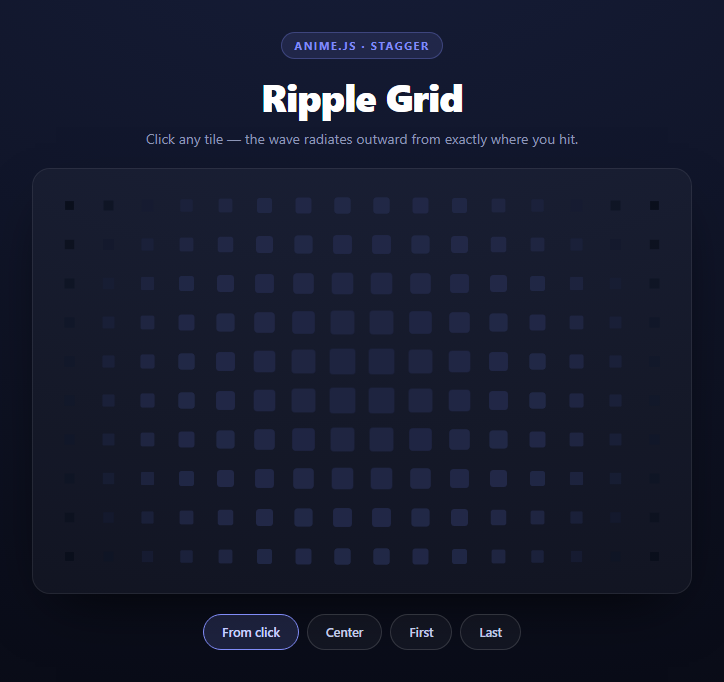
Most stagger animations are one-dimensional: a list animates top to bottom, each item delayed a little more than the last. That works because a list has one axis. A grid has two, and the moment you want a wave to radiate *outward from a point* rather than sweep in one direction, the naive per-index delay falls apart — index order runs left to right, row by row, so a "ripple" ends up looking like a typewriter.
This snippet uses anime.js's anime.stagger() with its grid option, which is the single most useful feature in the library and the reason it is still worth reaching for in 2026. You click a tile, and the animation radiates from that tile in a true circular wave.
The grid stagger, and why it needs two numbers
The whole effect is one property:
delay: anime.stagger(58, { grid: [COLS, ROWS], from: from })
Passing grid: [16, 10] tells anime.js to stop treating the target list as a flat array and start treating it as a 16×10 matrix. Internally it converts each target's array index into an (x, y) coordinate, computes the Euclidean distance from that coordinate to the origin point, and multiplies that distance by the base value of 58ms. Tiles equidistant from the click fire at the same moment, which is exactly what produces a circular wavefront instead of a diagonal sweep.
The from value accepts either a keyword — 'first', 'center', 'last' — or a numeric index, and the numeric form is what makes this interactive. The click handler finds which tile was hit and passes its index straight through:
ripple(Array.prototype.indexOf.call(tiles, tile))
tiles is a NodeList, not an array, so it has no .indexOf. Borrowing Array.prototype.indexOf with .call() is the compact fix; Array.from(tiles).indexOf(tile) works too but allocates a new array on every click.
Keyframe arrays, not single values
Each animated property is an array of keyframes rather than a single target value:
scale: [{ value: 0.18, duration: 380, easing: 'easeOutSine' }, { value: 1, duration: 1150, easing: 'easeInOutQuad' }]
This is what gives the wave a body. A single scale: 0.18 would shrink every tile and leave it shrunk. The two-stage form makes each tile collapse fast (380ms, ease-out so it snaps away) and then recover slowly (1150ms, ease-in-out so it settles). Because the collapse is roughly a third the duration of the recovery, at any given moment you see a tight bright ring of collapsed tiles chasing a wide field of tiles still easing back — a wavefront with a trailing edge, not a uniform pulse.
backgroundColor and borderRadius are keyframed on the same schedule, so a tile simultaneously shrinks, turns indigo, and rounds to a circle at the crest of the wave, then squares off and fades back to slate as it recovers. Animating three properties in lockstep is what sells it as a physical ripple rather than a scale tween.
The gotcha: killing in-flight tweens
The first line of ripple() is anime.remove(tiles), and it is not optional. anime.js queues animations per target, so clicking twice in quick succession without it stacks two competing tweens on every tile. They fight over scale, and tiles routinely end up stranded at 0.18 with no animation left to restore them — a grid permanently pockmarked with shrunken squares. anime.remove() cancels anything currently animating those targets so each click starts from a clean slate. This is the most common anime.js bug in interactive work and it is one line to avoid.
Building the grid
The tiles are generated in JavaScript rather than hand-written in HTML, appended through a DocumentFragment so 160 elements cause a single reflow instead of 160. The column count is pushed to CSS as a custom property (grid.style.setProperty('--cols', COLS)) and consumed by grid-template-columns: repeat(var(--cols), 1fr), so COLS is defined once in JS and the layout follows automatically. Tiles use aspect-ratio: 1 so they stay square at any container width, and will-change: transform promotes them so the scale animation runs on the compositor.
Reusing it
Change COLS and ROWS and everything else adapts. Point the click handler at real data — a heatmap cell, a seat in a picker, a calendar day — and the ripple becomes selection feedback that shows *where* the user touched rather than just *that* they touched. Pair it with a stagger grid ripple for a CSS-only variant, or an activity heatmap if the grid needs to carry values.
Build with AI
Build, Understand, Optimize, and Extend It With AI
The interesting part of this snippet is one argument, so it rewards a targeted conversation. Paste the HTML, CSS, and JS into an AI assistant like Claude and ask it to explain precisely how anime.stagger's grid option converts a flat array index into (x, y) coordinates and why delaying by Euclidean distance produces a circular wavefront where plain index order produces a diagonal sweep. Then ask what breaks if you delete anime.remove(tiles) from the top of ripple() — the answer, tiles permanently stranded at scale 0.18 after rapid clicks, is worth reproducing deliberately once. For optimization, ask whether animating backgroundColor on 160 elements is more expensive than animating opacity on a colored pseudo-element, and at what grid size you would need to switch from DOM tiles to a single canvas. To extend it: have it add a from: 'last' style diagonal by passing an axis option, support non-uniform tile sizes, ripple automatically on an interval when the pointer is idle, or wire each tile to a real data value so the grid doubles as a heatmap. Treat the code less like a finished artifact and more like a starting point for a conversation.
Prompt to recreate it
Copy this into your AI assistant of choice to build the effect from scratch, or as a jumping-off point for your own variant:
Build an interactive "ripple grid" using anime.js (v3, from a CDN) in plain HTML, CSS, and JavaScript.

Requirements:
- Generate a 16-column by 10-row grid of square tiles entirely in JavaScript, appending them through a DocumentFragment so all tiles are inserted in a single reflow. Write the column count to a CSS custom property from JS and have grid-template-columns read it with repeat(var(--cols), 1fr), so the column count is defined once.
- Each tile must use aspect-ratio: 1 to stay square at any container width, and will-change: transform so the scale animation is compositor-friendly.
- Animate the tiles with a single anime() call whose delay is anime.stagger(58, { grid: [COLS, ROWS], from: origin }) — the grid option is essential, because it makes anime.js delay each tile by its Euclidean distance from the origin (producing a circular wavefront) instead of by its flat array index (which would produce a diagonal typewriter sweep).
- The origin must be settable two ways: the string keywords 'first', 'center', and 'last' from preset buttons, and a numeric tile index taken from a click, so the wave radiates from the exact tile the user hits. Get the clicked tile with event delegation via e.target.closest() and find its index by borrowing Array.prototype.indexOf with .call() on the NodeList.
- Animate scale, backgroundColor, and borderRadius as anime.js keyframe ARRAYS, not single values: a fast first stage (around 380ms, ease-out) that collapses the tile toward scale 0.18, turns it an accent color, and rounds it to a full circle, then a slower second stage (around 1150ms, ease-in-out) returning it to scale 1, the base color, and a small corner radius. The asymmetric durations are what give the wave a sharp leading edge and a soft trailing one.
- Call anime.remove() on the tiles as the first line of the ripple function, so rapid repeated clicks cancel in-flight tweens instead of stacking competing animations that strand tiles mid-scale.
- Play an opening ripple from 'center' on load, and style it as a dark premium panel with a rounded bordered container and a soft outer shadow.
Want to tighten it up first? Run this prompt through the AI Prompt Studio to score it across 8 quality dimensions, catch anti-patterns, and tune the wording for Claude, ChatGPT, or Gemini before you paste it in.
Step by step
How to Use
- 1Add the anime.js CDNInclude animejs from the CDN panel — one script tag, no build step.
- 2Paste HTML, CSS, and JSA 16×10 tile grid builds itself and plays an opening ripple from center.
- 3Click a tileThe wave radiates outward from the exact tile you hit, not from a fixed point.
- 4Try the origin presetsCenter, First, and Last show how the same stagger reads from different origins.
- 5Resize the gridChange the COLS and ROWS constants — the CSS column count follows automatically.
- 6Wire it to real dataReplace the tiles with heatmap cells or seats and ripple from the selected one.
Real-world uses
Common Use Cases
Got questions?
Frequently Asked Questions
Without it, anime.js delays each target by its position in the array, which runs left to right and row by row — so the wave sweeps like a typewriter. Passing grid: [COLS, ROWS] makes it convert each index into an (x, y) coordinate and delay by the straight-line distance from the origin, so all tiles the same distance away fire together and the front is circular.
The from option accepts a numeric index as well as the keywords first, center, and last. The click handler finds the clicked tile with e.target.closest(".arg-tile"), gets its position with Array.prototype.indexOf.call(tiles, tile), and passes that number as from — so the wave starts from whichever tile was hit.
It cancels any animation currently running on those targets. anime.js otherwise stacks tweens, so two fast clicks put two competing scale animations on every tile; they conflict and tiles get stranded at scale 0.18 with nothing left to restore them. Removing first guarantees each ripple starts clean.
Arrays of objects are anime.js keyframes. A single scale value would shrink the tiles and leave them shrunk. The two-stage form collapses fast at 380ms with an ease-out and recovers slowly at 1150ms with an ease-in-out, which is what gives the wave a sharp leading edge and a soft trailing one.
Edit the COLS and ROWS constants at the top. The tile loop, the stagger grid array, and the CSS all read from them — COLS is written to a --cols custom property that grid-template-columns consumes, so the layout updates without touching the stylesheet.
Render the tiles from an array and keep a ref to the container. Run the anime call inside a click handler, and call anime.remove on the tile refs before each new ripple. In React put the initial center ripple in a useEffect with an empty dependency array; Vue uses onMounted and Angular ngAfterViewInit. Tailwind expresses the grid with grid-cols and aspect-square while the animation stays in JS.