You Might Also Like
Learn Coding Visually
Learn to code with interactive, live-preview playgrounds — HTML, CSS, JavaScript, React & more.
 HTML Playground42 lessons · Click-based · Live preview
 CSS PlaygroundLearn CSS with a live editor
 JavaScript Playground60 lessons · DOM · Async · Canvas
 React PlaygroundLearn React with a live code editor
 GSAP PlaygroundLearn GSAP animation interactively
 SVG Playground44 lessons · shapes · paths · animation
 SCSS Playground45 lessons · Sass modules · tokens
 Tailwind PlaygroundLearn Tailwind CSS with a live editor
 Bootstrap 5 Playground50 lessons · live preview
Seat Picker — Cinema/Event Seat Map HTML CSS JS
Seat Picker · Forms · Plain HTML, CSS & JS · Live preview
What's included
Features
About this UI Snippet
Seat Picker — Interactive Seat Map, Premium Pricing & Running Total
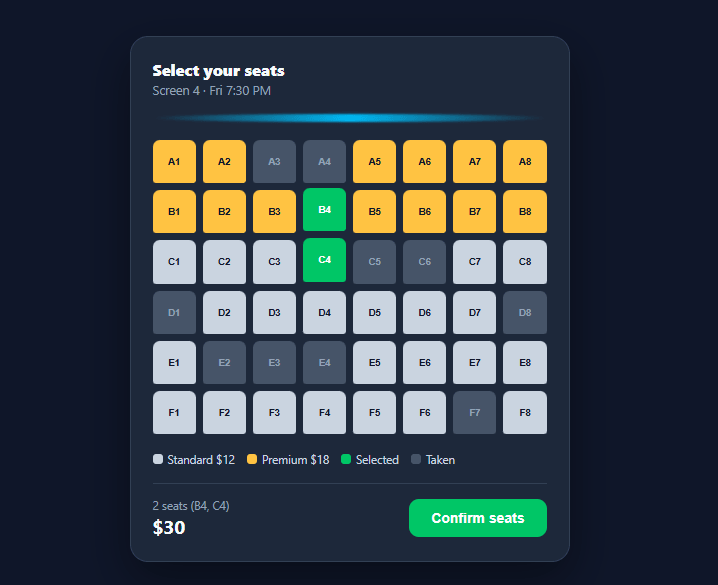
Booking a seat is more reassuring than booking a generic "ticket" — seeing the actual row and number you'll sit in, with taken seats clearly blocked off, is what makes a checkout feel trustworthy. This snippet builds a complete cinema/event seat map in plain HTML, CSS, and vanilla JavaScript: a generated grid, three seat states (available, premium, taken), a selection cap, and a live running total.
Generating the grid from data, not markup
Rather than hand-writing 48 <button> elements, buildGrid() loops over a ROWS array and a fixed seat count per row, building each seat's id (A1, A2, …) and class (taken, premium, or avail) from three small config arrays: ROWS, PREMIUM_ROWS, and a TAKEN id list. Change the venue by editing these arrays — the grid, pricing, and taken-seat blocking all follow automatically with no template changes.
Three seat states and tiered pricing
Front rows (A, B) are flagged as premium and styled gold at $18; the rest are standard gray at $12. priceOf(id) reads the row letter from the seat id to look up the right price, so the pricing logic lives in one function instead of being duplicated across the grid and the total calculation. Taken seats get the disabled attribute and a taken class, which removes both the hover lift and the pointer cursor — they are visually and functionally inert.
Selection with a cap
Clicking an available or premium seat toggles it into selected (a plain array of ids) and swaps its class to green; clicking it again removes it and restores its original tier color. A MAX_SEATS cap (six, configurable) silently rejects further clicks once reached rather than showing an error — appropriate for a soft limit most users won't hit, though you could add a toast warning if you want it surfaced explicitly.
Live running total
Every click recomputes the summary: the seat count and a sorted, comma-separated list of selected ids (e.g. "2 seats (A2, B5)"), and the total price via selected.reduce, summing each seat's tier price. The Confirm button stays disabled until at least one seat is selected, then shows a checkmark confirmation for 1.8 seconds on click — a placeholder for handing the selection off to a real checkout flow.
Why buttons, not divs
Every seat is a real <button>, so it's keyboard-focusable and clickable with Enter/Space out of the box, and disabled correctly removes taken seats from the tab order — accessibility that a clickable <div> would need extra ARIA and key-handling code to replicate.
Build with AI
Build, Understand, Optimize, and Extend It With AI
You don't need to trace how the grid, pricing, and taken-seat blocking all derive from three small arrays on your own. Paste this snippet's HTML, CSS, and JS into an AI coding assistant like Claude and ask it to explain exactly how buildGrid combines ROWS, PREMIUM_ROWS, and TAKEN into each seat's id and class, or why priceOf reading only the row letter keeps pricing consistent between the grid and the running total. The same assistant can help optimize it, for example checking whether rebuilding the entire grid's innerHTML on every load scales to a venue with hundreds of seats, or whether a single delegated click listener could replace a heavier per-button approach as the grid grows. It's also useful for extending the feature: ask it to add a seat-hold countdown timer after confirm, group selected seats visually when they are adjacent, or fetch the TAKEN list from a live booking API instead of a hardcoded array. Treat the code less like a finished artifact and more like a starting point for a conversation.
Prompt to recreate it
Copy this into your AI assistant of choice to build the effect from scratch, or as a jumping-off point for your own variant:
Build an interactive cinema-style seat picker in plain HTML, CSS, and JavaScript, no framework, no libraries.

Requirements:
- Generate the seat grid entirely from data, not hand-written markup: a ROWS array of row letters, a fixed SEATS_PER_ROW count, a PREMIUM_ROWS array marking which rows cost more, and a TAKEN array of already-booked seat ids (e.g. "A3"). Build every seat button's id and CSS class from these arrays in a loop.
- Give seats exactly three visual and functional states: available (standard price), premium (higher price, for rows in PREMIUM_ROWS), and taken (disabled attribute set, not just a CSS class, so it is unfocusable and unclickable).
- Every seat must be a real button element, not a clickable div, so taken seats are correctly removed from the tab order via the disabled attribute alone.
- Write a single priceOf(seatId) function that derives the price from the seat's row letter, and reuse that same function both when computing the running total and anywhere else a seat's price is needed, so pricing logic exists in exactly one place.
- Clicking an available or premium seat toggles it into a selected array and recolors it; clicking a selected seat again removes it and restores its original tier color exactly.
- Enforce a MAX_SEATS cap that silently ignores further selection clicks once reached, without an error dialog.
- After every click, recompute and display: the count of selected seats, a sorted comma-separated list of their ids, and the total price via a reduce over the selected array's priceOf values. Keep a confirm button disabled whenever zero seats are selected.
Want to tighten it up first? Run this prompt through the AI Prompt Studio to score it across 8 quality dimensions, catch anti-patterns, and tune the wording for Claude, ChatGPT, or Gemini before you paste it in.
Step by step
How to Use
- 1Paste HTML, CSS, and JSA 6×8 seat grid renders with gold premium rows up front, gray standard rows behind, and pre-blocked taken seats.
- 2Click an available seatIt turns green and is added to the running total; the footer shows the seat count, ids, and price.
- 3Click a selected seat againIt deselects and returns to its original tier color (gold or gray); the total updates.
- 4Try a taken seatGray-blue taken seats are disabled and don't respond to clicks — they can't be selected.
- 5Hit the selection capAfter selecting MAX_SEATS (6 by default) seats, further clicks on new seats are ignored until you deselect one.
- 6Confirm your seatsClick "Confirm seats" — the button shows a checkmark confirmation, a placeholder for your real checkout call.
Real-world uses
Common Use Cases
Got questions?
Frequently Asked Questions
Replace the static TAKEN array with data fetched from your booking API (an array or Set of taken seat ids), and call buildGrid() once it resolves; re-fetch and rebuild after a successful booking so other users see updated availability.
Edit the ROWS array (row letters), SEATS_PER_ROW (seats per row), and PREMIUM_ROWS (which rows cost more) — buildGrid() regenerates the entire grid and pricing from these three values with no other code changes.
On confirm, send the selected seat ids to your server, which should atomically check and mark them taken; if the server rejects any seat (already taken), remove it from selected, mark it taken in the UI, and ask the user to pick again.
On confirm, start a countdown (e.g. with setInterval) showing "Seats held for 5:00"; if it expires before checkout completes, clear selected, restore the seats to available, and notify the user.
In React, keep selected as state and derive the grid with .map() over ROWS/seat numbers, computing each seat's class from props; in Vue, use a computed seats array with v-for; in Angular, use *ngFor with a component method for class binding. The pricing and cap logic ports unchanged.