Learn Coding Visually
Learn to code with interactive, live-preview playgrounds — HTML, CSS, JavaScript, React & more.
 HTML Playground42 lessons · Click-based · Live preview
 CSS PlaygroundLearn CSS with a live editor
 JavaScript Playground60 lessons · DOM · Async · Canvas
 React PlaygroundLearn React with a live code editor
 GSAP PlaygroundLearn GSAP animation interactively
 SVG Playground44 lessons · shapes · paths · animation
 SCSS Playground45 lessons · Sass modules · tokens
 Tailwind PlaygroundLearn Tailwind CSS with a live editor
 Bootstrap 5 Playground50 lessons · live preview
Magic Link Login — Passwordless Email Sign-In
Magic Link Login · Forms · Plain HTML, CSS & JS · Live preview
What's included
Features
About this UI Snippet
Magic Link Login — Passwordless Sign-In, Resend Cooldown & Check-Your-Email State
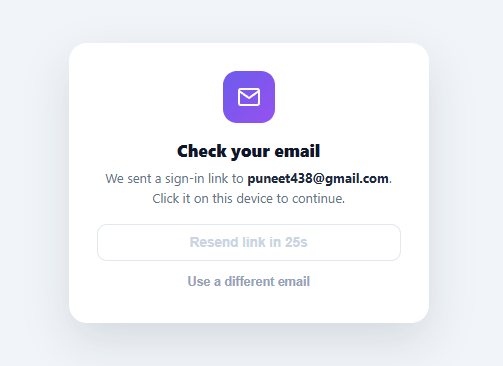
Passwordless sign-in removes the single biggest source of authentication friction — a forgotten password — by sending a one-time sign-in link to a verified email instead. This snippet builds the complete client-side flow: email validation, a simulated send, a "check your email" confirmation screen, and a resend button gated by a real countdown so it can't be spammed.
Two screens, one card
The component is really two states sharing one container: the email-entry form and the check-your-email confirmation, toggled via hidden. Rather than navigating to a new page, swapping the inner content keeps the user anchored to the same card, which matters for a flow whose entire job is to get the user comfortable waiting for an email — a page navigation here would feel like the flow had "moved on" without them.
Validation before the simulated send
A simple regex (/^[^\s@]+@[^\s@]+\.[^\s@]+$/) checks for a plausible email shape — not full RFC 5322 compliance, which is famously a rabbit hole no client-side regex fully solves, but the basic local-part@domain.tld shape that catches the vast majority of real typos. An empty field and an invalid shape get distinct messages, and the submit button disables with a "Sending…" label during the simulated 900ms delay, so the interaction reads as a real network round trip.
A resend button with teeth
The "Resend link" button isn't just decorative — clicking the original submit (or resend) starts a real 30-second countdown via setInterval, during which the resend button is disabled and shows "Resend link in 27s", ticking down live. This is a meaningful anti-abuse pattern: without it, a button that silently fires another email on every click is an easy way to accidentally (or deliberately) spam an inbox or a rate-limited API.
Going back without losing context
"Use a different email" clears the countdown timer, swaps back to the entry form, clears the input, and refocuses it — so correcting a typo'd email doesn't require a page reload and doesn't leave a stale countdown silently running in the background after the user has already navigated away from that state.
Why this beats a traditional password field
A password field comes with its own failure modes — weak passwords, reused passwords, forgotten passwords, and the support burden of a reset flow that itself usually emails a link anyway. Magic links collapse all of that into the one flow most users already trust: check email, click link, you're in. The tradeoff is a dependency on email deliverability, which is why the resend control and a clear "check your spam folder" expectation matter as much as the visual design.
Build with AI
Build, Understand, Optimize, and Extend It With AI
You do not have to reconstruct the two-screen-one-card structure by inspecting the markup cold. Paste this snippet's HTML, CSS, and JS into an AI coding assistant like Claude and ask it to explain precisely how toggling the hidden attribute on mllForm and mllSent swaps state without a page navigation, and why startCooldown() clears the previous interval with clearInterval before starting a new one. The same assistant can help optimize it, for instance asking whether the 30-second resend cooldown should also be enforced server-side so reloading the page cannot bypass the client-side timer entirely. It is also useful for extending the flow: ask it to wire the submit handler to a real auth provider's magic-link endpoint with proper error states, add a fallback password or OTP option for users whose email is slow to arrive, or persist the pending email across a page refresh using sessionStorage. Treat the code less like a finished artifact and more like a starting point for a conversation.
Prompt to recreate it
Copy this into your AI assistant of choice to build the effect from scratch, or as a jumping-off point for your own variant:
Build a "magic link login" flow in plain HTML, CSS, and JavaScript with no libraries, using a single card that toggles between two states rather than navigating to a new page.

Requirements:
- One card element containing two child sections, an email-entry form and a check-your-email confirmation, where exactly one is visible at a time via the hidden attribute (no separate route or page load involved in switching between them).
- Submitting the form must validate the email with a pragmatic regex (rejecting empty input and input without an @ and a domain with a dot) and show a specific, distinct error message for "empty" versus "invalid shape" — not one generic error string.
- On valid submission, disable the submit button and change its label to a sending state, then after a simulated delay reveal the confirmation section showing the exact email address that was submitted, and hide the form section.
- Revealing the confirmation section must start a real visible countdown (not just a disabled flag): a resend button that is disabled and shows the exact remaining seconds counting down once per second via setInterval, re-enabling itself and reverting its label only once the countdown reaches zero.
- Clicking resend while the countdown is at zero must restart the same cooldown sequence, and any previously running interval must be explicitly cleared before starting a new one so multiple intervals never stack.
- A "use a different email" control must clear the running cooldown interval, switch back to the form section, clear the email input's value, and return keyboard focus to that input.
Want to tighten it up first? Run this prompt through the AI Prompt Studio to score it across 8 quality dimensions, catch anti-patterns, and tune the wording for Claude, ChatGPT, or Gemini before you paste it in.
Step by step
How to Use
- 1Paste HTML, CSS, and JSA "Sign in" card renders with an email input and a "Send magic link" button.
- 2Submit an invalid or empty emailAn inline error message appears below the field without sending anything.
- 3Submit a valid emailThe button shows "Sending…", then the card swaps to a "Check your email" confirmation showing the address you entered.
- 4Try resendingThe "Resend link" button is disabled with a live "Resend link in 30s" countdown immediately after sending.
- 5Wait out the cooldownOnce it reaches 0, the resend button re-enables and can be clicked to restart the cooldown.
- 6Connect a real email-sending APIReplace the setTimeout in the submit handler with a fetch call to your auth provider's magic-link endpoint, keeping the same UI state transitions.
Real-world uses
Common Use Cases
Got questions?
Frequently Asked Questions
Replace the setTimeout in the submit handler with a fetch POST to your auth provider (Supabase, Auth0, Firebase, or your own backend) passing the validated email; show the check-your-email state only after that request resolves successfully, and show the existing error element if it fails.
The magic link itself points to a callback route in your app containing a one-time token; on that page, verify the token server-side, create a session, and redirect to your authenticated area — this snippet only covers the request side of the flow, not the callback handler.
Mirror the client-side 30-second cooldown with a server-side check (e.g. a timestamp stored per email/IP) so the cooldown can't be bypassed by simply reloading the page and resubmitting, since client-side timers alone are not a security control.
Add a "Sign in with a password instead" link beneath the form that swaps to a password field, or combine with an OTP input for a code-based alternative if email delivery is unreliable for some users.
In React, track the email, error, sent, and cooldown values in useState and run the countdown with setInterval inside useEffect (clearing it on unmount); in Vue, use ref()/onUnmounted for the same cleanup; in Angular, use a component field with ngOnDestroy. The validation regex and state transitions port directly.