Source Code
<div class="demo">
  <h3>Verify your email</h3>
  <p>Enter the 6-digit code sent to you@example.com</p>
  <div class="otp" id="otp">
    <input maxlength="1" type="text" inputmode="numeric" />
    <input maxlength="1" type="text" inputmode="numeric" />
    <input maxlength="1" type="text" inputmode="numeric" />
    <span class="sep">—</span>
    <input maxlength="1" type="text" inputmode="numeric" />
    <input maxlength="1" type="text" inputmode="numeric" />
    <input maxlength="1" type="text" inputmode="numeric" />
  </div>
  <button class="btn" onclick="verify()">Verify</button>
  <p class="resend">Didn't receive it? <a href="#">Resend code</a></p>
</div>
* { box-sizing: border-box; margin: 0; padding: 0; }
body { font-family: system-ui, sans-serif; background: #f8fafc; display: flex; align-items: center; justify-content: center; min-height: 100vh; padding: 20px; }
.demo { background: #fff; border-radius: 18px; padding: 36px 28px; width: 100%; max-width: 340px; text-align: center; box-shadow: 0 4px 24px rgba(0,0,0,0.07); display: flex; flex-direction: column; gap: 14px; }
h3 { font-size: 18px; font-weight: 700; color: #1e293b; }
p { font-size: 13px; color: #64748b; }
.otp { display: flex; gap: 8px; align-items: center; justify-content: center; }
.otp input { flex: 1 1 0; min-width: 0; max-width: 44px; height: 52px; text-align: center; font-size: 22px; font-weight: 700; color: #1e293b; font-family: monospace; border: 2px solid #e2e8f0; border-radius: 10px; outline: none; background: #f8fafc; transition: border-color 0.15s, box-shadow 0.15s; }
.otp input:focus { border-color: #6366f1; box-shadow: 0 0 0 3px rgba(99,102,241,0.12); background: #fff; }
.otp input.filled { border-color: #6366f1; background: #eef2ff; }
.sep { font-size: 20px; color: #cbd5e1; }
.btn { padding: 11px; background: #6366f1; color: #fff; border: none; border-radius: 8px; font-size: 14px; font-weight: 600; cursor: pointer; font-family: inherit; }
.btn:hover { background: #4f46e5; }
.resend { font-size: 12px; color: #64748b; }
.resend a { color: #6366f1; text-decoration: none; font-weight: 600; }const inputs = [...document.querySelectorAll('#otp input')];
inputs.forEach((inp, i) => {
inp.addEventListener('input', () => {
inp.value = inp.value.replace(/D/g, '');
inp.classList.toggle('filled', !!inp.value);
if (inp.value && i < inputs.length - 1) inputs[i + 1].focus();
});
inp.addEventListener('keydown', e => { if (e.key === 'Backspace' && !inp.value && i > 0) inputs[i - 1].focus(); });
inp.addEventListener('paste', e => {
e.preventDefault();
const paste = (e.clipboardData.getData('text')).replace(/D/g,'').slice(0, inputs.length);
paste.split('').forEach((ch, j) => { if (inputs[j]) { inputs[j].value = ch; inputs[j].classList.add('filled'); } });
if (inputs[paste.length]) inputs[paste.length].focus();
});
});
function verify() {
const code = inputs.map(i => i.value).join('');
alert(code.length === 6 ? 'Code: ' + code : 'Please enter all 6 digits');
}Learn Coding Visually
Learn to code with interactive, live-preview playgrounds — HTML, CSS, JavaScript, React & more.
 HTML Playground42 lessons · Click-based · Live preview
 CSS PlaygroundLearn CSS with a live editor
 JavaScript Playground60 lessons · DOM · Async · Canvas
 React PlaygroundLearn React with a live code editor
 GSAP PlaygroundLearn GSAP animation interactively
 SVG Playground44 lessons · shapes · paths · animation
 SCSS Playground45 lessons · Sass modules · tokens
 Tailwind PlaygroundLearn Tailwind CSS with a live editor
 Bootstrap 5 Playground50 lessons · live preview
OTP Input — Free HTML CSS JS 6-Digit Code Snippet
OTP / PIN Input · Forms · Plain HTML, CSS & JS · Live preview
What's included
Features
About this UI Snippet
OTP / PIN Input — Auto-Focus Advance, Paste Handler & Backspace Navigation
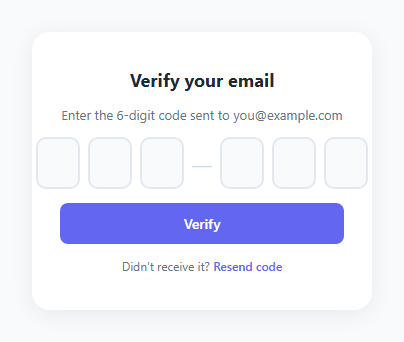
An OTP (one-time password) or PIN input is a row of individual character boxes used for verification codes, 2FA authentication, and payment PINs — see the full OTP verification flow and the keypad-style PIN pad, or skip codes entirely with a magic link. Each box accepts one character and the cursor automatically moves to the next box after input. This snippet implements the complete interaction: auto-focus advance, paste-to-fill, backspace-to-previous, and a filled box highlight.
Auto-focus advance
The input event listener strips non-digit characters with inp.value = inp.value.replace(/\D/g, ''), then checks if (inp.value && i < inputs.length - 1) inputs[i + 1].focus(). Replacing non-digits means letters and symbols are silently rejected — only numbers pass. Auto-advancing after the digit is entered means users never need to click the next box.
Paste-to-fill
The paste event handler prevents the default paste (which would place all text in one box), extracts the clipboard text, strips non-digits, slices to the number of inputs, and distributes each character to the corresponding input: paste.split('').forEach((ch, j) => { if (inputs[j]) { inputs[j].value = ch; inputs[j].classList.add('filled'); } }). Focus moves to the box after the last filled character.
Backspace navigation
The keydown listener checks if (e.key === 'Backspace' && !inp.value && i > 0) inputs[i - 1].focus(). If Backspace is pressed on an empty box, focus moves back to the previous box. If the box has a value, the default behaviour clears it without moving focus — the user can then press Backspace again to go back.
The filled highlight
.otp input.filled { border-color: #6366f1; background: #eef2ff; } gives filled boxes a visible indicator that they contain a value. The class is added on input and removed if the value is cleared.
Verification
The verify() function joins all input values and checks if the length equals 6. Replace the alert with your API verification call.
Auto-advance focus
On each input event, if the current input has a value (exactly one digit), focus() moves to the next input: inputs[i+1].focus(). This creates the auto-advance experience users expect from OTP fields. The input uses maxlength="1" to limit entry to one character. On input, the current value is sanitised to only digits: input.value = input.value.replace(/D/g, '').slice(-1) — the slice(-1) keeps only the last entered character in case the browser's input event fires with multiple characters.
Paste handling
A paste event listener on the first input (or any input) reads e.clipboardData.getData('text') and distributes the pasted characters across all inputs: pastedText.split('').forEach((char, i) => { if (inputs[i]) inputs[i].value = char; }). Focus moves to the last filled input or the first empty one after paste. This is the critical OTP UX feature — paste an SMS code and the entire field fills instantly.
Backspace navigation
A keydown listener on each input checks for Backspace. If the current input is already empty and Backspace is pressed, focus moves to the previous input: inputs[i-1].focus(). This allows the user to correct a mistake without clicking the previous box.
Build with AI
Build, Understand, Optimize, and Extend It With AI
You don't have to work out every focus jump in your head. Paste this snippet's HTML, CSS, and JS into an AI coding assistant like Claude and ask it to explain exactly why the input handler strips non-digit characters before checking whether to auto-advance focus, or how the paste handler distributes characters across boxes without letting the browser's default paste behavior dump the whole string into one field. The same assistant can help you optimize it too, for example asking whether re-querying all the input elements on every keystroke is worth caching once versus reading it fresh each time. It's just as useful for extending the interaction: ask it to add a visual shake on an invalid submission, mask entered digits after a short delay for privacy on a shared screen, or generalize the digit count so the same script drives a 4-digit PIN and an 8-digit recovery code from one config value. Treat the code less like a finished artifact and more like a starting point for a conversation.
Prompt to recreate it
Copy this into your AI assistant of choice to build the effect from scratch, or as a jumping-off point for your own variant:
Build an "OTP / PIN code input" made of individual single-character boxes in plain HTML, CSS, and JavaScript, using only native input and keyboard/clipboard events — no input masking library.

Requirements:
- A row of separate text input elements, each limited to a single character with maxlength, using inputmode numeric so mobile shows a number pad.
- On the input event of each box: strip any non-digit character from the typed value, toggle a filled visual class based on whether the box now has a value, and if the box now has a value and it is not the last box, move focus to the next box automatically.
- On keydown of each box: if Backspace is pressed while the box is already empty and it is not the first box, move focus back to the previous box (do not intercept Backspace when the box still has a value — let it clear normally first).
- On paste: prevent the default paste behavior entirely, read the clipboard text, strip everything that is not a digit, truncate it to the number of boxes, then distribute one character to each box in order, marking each as filled, and finally move focus to the box right after the last one that was filled.
- A Verify action that joins every box's current value into a single string and only treats it as complete when its length equals the total number of boxes, otherwise reporting that not all digits have been entered.
- Do not hardcode the number of boxes anywhere in the JavaScript logic — query the boxes from the DOM so the same script works whether there are 4, 6, or 8 boxes.
Want to tighten it up first? Run this prompt through the AI Prompt Studio to score it across 8 quality dimensions, catch anti-patterns, and tune the wording for Claude, ChatGPT, or Gemini before you paste it in.
Step by step
How to Use
- 1Type in the first boxClick the first box in the preview and type digits. Focus automatically moves to the next box after each digit.
- 2Test pasteCopy "123456" and paste it into the first box. All six boxes fill instantly and focus moves to the last box.
- 3Test backspaceWith a filled box focused, press Backspace to clear it. Press again on an empty box to move focus back.
- 4Change the digit countIn the HTML panel, add or remove input elements inside #otp. The JS uses querySelectorAll so it picks up any number of inputs.
- 5Connect to verificationIn the JS panel, replace the alert in verify() with your API call: fetch("/verify", { method: "POST", body: JSON.stringify({ code }) }).
- 6Export in your formatClick "HTML" for a standalone file, "JSX" for a React component, or "Tailwind" for a React + Tailwind version.
Real-world uses
Common Use Cases
Got questions?
Frequently Asked Questions
The input event fires after each character is typed. After stripping non-digits and confirming the value is non-empty, inputs[i + 1].focus() moves focus to the next input. On the last input, no advance occurs.
The paste event calls e.preventDefault() to block default paste. It reads e.clipboardData.getData("text"), strips non-digits, and slices to the input count. It then loops through the characters and sets each inputs[j].value = character, filling boxes left to right.
The keydown handler checks e.key === "Backspace" and !inp.value (the current box is empty). If both are true, inputs[i - 1].focus() moves back. If the box has a value, the default Backspace clears it first — the user presses again to go back.
In the HTML panel, remove two input elements from the #otp div. The querySelectorAll selector picks up any number of inputs automatically. Also remove the .sep separator if you have one between the groups.
inputs.map(i => i.value).join("") concatenates all values into a string. The verify() function already does this. Replace the alert with your fetch() API call, passing the code as a request body parameter.
Yes. Click "JSX" to download a React component. In React, manage a values array in useState. Each input is controlled: value={values[i]}. Update the array on change: setValues(prev => { const next = [...prev]; next[i] = e.target.value.replace(/\D/g,""); return next; }). Use refs for focus management.