PIN Pad — Secure Keypad HTML CSS JS Snippet

PIN Pad · Forms · Plain HTML, CSS & JS · Live preview

Share & Support

What's included

Features

Masked filling dots
Four dots fill (and scale) as digits are entered, showing progress without ever revealing the PIN.
Auto-submit on length
Entering the fourth digit auto-validates after a short delay so the last dot fills before the check runs.
Shake-on-error
A wrong PIN plays a horizontal shake keyframe (re-triggered via forced reflow) — the universal "incorrect" cue.
Unlock success state
A correct PIN turns the dots and lock icon green, updates the title to "✓ Unlocked", and locks further input.
Backspace support
del removes the last digit and unfills its dot, on-screen (⌫) or via the Backspace key.
Full keyboard input
A keydown listener routes number keys and Backspace through the same pressKey/del as the pad.
Tactile keypad
A clean 3×4 grid with press scale/colour states gives satisfying physical feedback on tap.
Export-safe feedback
Colour states use transition and the shake uses a transform keyframe, so feedback renders identically across frameworks.

About this UI Snippet

PIN Pad — Filling Dots, Shake-on-Error & Unlock Success State
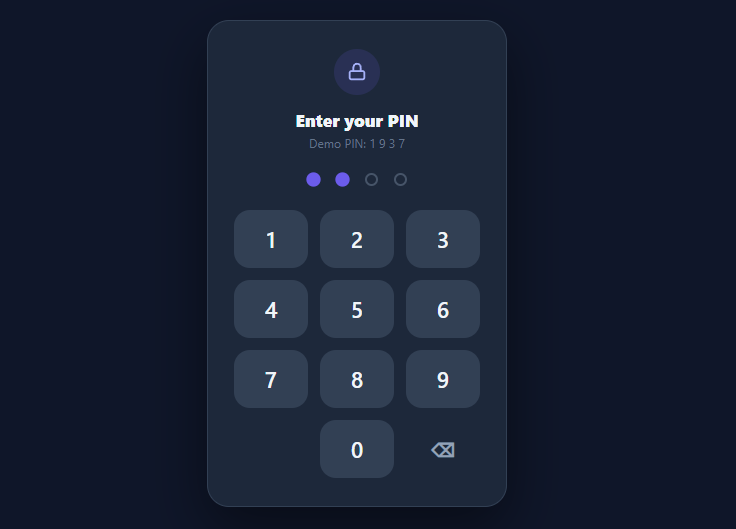
Screenshot of the PIN Pad snippet rendered live

A PIN pad is the focused, secure-feeling way to take a short numeric code — lock screens, payment confirmation, parental gates, 2FA backup. Unlike a free-text field, it shows masked dots that fill as you type, validates automatically at the right length, and gives unmistakable feedback: a shake for wrong, a colour shift for correct. This snippet implements all of that in plain HTML, CSS, and vanilla JavaScript, with mouse, touch, and physical-keyboard input.

Masked dots that fill

Four dots represent the PIN. pressKey appends a digit to the pin string (capped at four) and render fills the corresponding dots — filled dots scale up slightly and take the accent colour. The actual digits are never shown, only the count, which is the privacy expectation for a PIN. Backspace (del) removes the last digit and unfills its dot.

Auto-submit and validation

There is no submit button — entering the fourth digit auto-checks after a short 180ms delay (so the final dot visibly fills before validation). check compares the pin to the correct value: a match locks the pad and switches to a success state (green dots, green lock icon, "✓ Unlocked"); a mismatch triggers feedback and clears.

Shake-on-error

A wrong PIN plays a horizontal pp-shake keyframe on the whole card — the universally understood "nope" gesture from iOS and macOS lock screens. It's re-triggered each time with the remove-class / force-reflow / add-class pattern so it fires on every failed attempt, the hint updates to "Wrong PIN — try again", and the entry clears after the shake so the user can retry. A locked flag blocks further input once unlocked.

Three input methods

The on-screen keypad is a clean 3×4 grid (1–9, blank, 0, backspace) with tactile press states. A keydown listener mirrors it so physical number keys and Backspace work too — every path routes through the same pressKey/del, so they can't diverge. The success/colour states use transition on colour and background, and the shake uses a transform keyframe — both export cleanly.

In production the check would call your backend (never compare a real PIN client-side), and you'd rate-limit attempts. Pair this with an OTP input for emailed codes, a pattern lock for gesture entry, or an auth login card for full sign-in.

Step by step

How to Use

  1. 1
    Paste HTML, CSS, and JSA dark PIN card appears with a lock icon, four empty dots, and a 3×4 numeric keypad.
  2. 2
    Enter the PINTap digits — each fills the next dot. Entering the fourth digit auto-validates after a brief beat.
  3. 3
    Try a wrong PINEnter anything but 1 9 3 7 — the card shakes, the hint says "Wrong PIN", and the dots clear so you can retry.
  4. 4
    Enter the correct PINType 1 9 3 7 — the dots and lock icon turn green and the title becomes "✓ Unlocked".
  5. 5
    Use backspaceTap ⌫ (or press Backspace) to remove the last digit before submitting.
  6. 6
    Type on your keyboardPhysical number keys and Backspace work too, routed through the same logic as the on-screen pad.

Real-world uses

Common Use Cases

Lock and unlock screens
App or kiosk lock screens where a quick PIN beats a password. Pair with a pattern lock as an alternative gesture.
Payment and transaction confirmation
Confirm a payment or transfer with a PIN; combine with a checkout payment form for the full flow.
2FA backup and verification
Numeric verification entry; for emailed/SMS codes use a longer OTP input instead.
Parental gates and kid modes
A simple barrier before sensitive settings or purchases in family apps.
POS and kiosk access
Staff PIN entry on shared point-of-sale or kiosk devices where a numeric pad suits touch screens.
Vault and secure sections
Gate a private area of an app; combine with an auth login card for account sign-in.

Got questions?

Frequently Asked Questions

Never compare the real PIN on the client. Send the entered PIN to your backend over HTTPS and verify it there (against a salted hash), returning success/failure. Keep the client-side check only for demos. Always rate-limit attempts server-side and lock the account or add a cooldown after several failures to prevent brute-forcing a 4-digit space.

Add two more .pp-dot elements and change the length checks from 4 to 6 in pressKey and the auto-submit condition. Everything else — fill rendering, shake, success — scales automatically since it's driven by pin.length and the number of dot elements.

The dots already mask digits. For stronger privacy, optionally shuffle the keypad layout each session (randomise the 0–9 positions) so observers can't infer the PIN from finger positions. For brute force, enforce server-side attempt limits and exponential backoff; the client locked flag is only a UX guard, not security.

The keys are real <button>s, so they're keyboard- and screen-reader operable, and a keydown handler adds physical number-key entry. Add an aria-label to each key, announce remaining digits and errors via an aria-live="polite" region (e.g. "3 of 4 entered", "incorrect PIN"), and ensure the success/error states are conveyed by text and icon, not colour alone.

In React, hold pin and a status ('idle' | 'ok' | 'error') in useState; pressKey appends and triggers validation in an effect when length hits 4, and the shake is a class keyed off status. In Vue, use refs and a watcher on pin.length. In Angular, track pin on the component. The dot-fill and shake CSS port unchanged.

PIN Pad — Export as HTML, React, Vue, Angular & Tailwind

HTML
<!DOCTYPE html>
<html lang="en">
<head>
  <meta charset="UTF-8" />
  <meta name="viewport" content="width=device-width, initial-scale=1.0" />
  <title>PIN Pad</title>
  <style>
    *{box-sizing:border-box;margin:0;padding:0}
    body{font-family:system-ui,-apple-system,sans-serif;background:#0f172a;min-height:100vh;display:flex;align-items:center;justify-content:center;padding:24px}
    .pp-card{background:#1e293b;border:1px solid #334155;border-radius:22px;padding:28px 26px;width:100%;max-width:300px;text-align:center;box-shadow:0 22px 55px rgba(0,0,0,.45)}
    .pp-card.shake{animation:pp-shake .45s ease}
    @keyframes pp-shake{0%,100%{transform:translateX(0)}20%{transform:translateX(-9px)}40%{transform:translateX(8px)}60%{transform:translateX(-6px)}80%{transform:translateX(4px)}}
    
    .pp-icon{width:46px;height:46px;border-radius:50%;background:rgba(99,102,241,.15);color:#a5b4fc;display:flex;align-items:center;justify-content:center;margin:0 auto 14px;transition:background .3s,color .3s}
    .pp-card.ok .pp-icon{background:rgba(16,185,129,.18);color:#34d399}
    .pp-title{font-size:17px;font-weight:800;color:#f1f5f9}
    .pp-card.ok .pp-title{color:#34d399}
    .pp-hint{font-size:12px;color:#64748b;margin-top:4px}
    
    .pp-dots{display:flex;justify-content:center;gap:16px;margin:22px 0 24px}
    .pp-dot{width:13px;height:13px;border-radius:50%;background:transparent;border:2px solid #475569;transition:all .15s}
    .pp-dot.filled{background:#6366f1;border-color:#6366f1;transform:scale(1.1)}
    .pp-card.ok .pp-dot.filled{background:#10b981;border-color:#10b981}
    
    .pp-keys{display:grid;grid-template-columns:repeat(3,1fr);gap:12px}
    .pp-key{height:58px;border:none;border-radius:16px;background:#334155;color:#f1f5f9;font-size:22px;font-weight:600;cursor:pointer;font-family:inherit;transition:background .12s,transform .06s}
    .pp-key:hover{background:#3f4d63}
    .pp-key:active{transform:scale(.92);background:#475569}
    .pp-blank{background:none;cursor:default;pointer-events:none}
    .pp-del{background:none;font-size:20px;color:#94a3b8}
    .pp-del:hover{background:#334155}
  </style>
</head>
<body>
  <div class="pp-card" id="ppCard">
    <div class="pp-icon" id="ppIcon">
      <svg viewBox="0 0 24 24" width="22" height="22" fill="none" stroke="currentColor" stroke-width="2" stroke-linecap="round" stroke-linejoin="round"><rect x="4" y="11" width="16" height="9" rx="2"/><path d="M8 11V7a4 4 0 0 1 8 0v4"/></svg>
    </div>
    <h2 class="pp-title" id="ppTitle">Enter your PIN</h2>
    <p class="pp-hint" id="ppHint">Demo PIN: 1 9 3 7</p>
  
    <div class="pp-dots" id="ppDots">
      <span class="pp-dot"></span><span class="pp-dot"></span><span class="pp-dot"></span><span class="pp-dot"></span>
    </div>
  
    <div class="pp-keys">
      <button class="pp-key" onclick="pressKey('1')">1</button>
      <button class="pp-key" onclick="pressKey('2')">2</button>
      <button class="pp-key" onclick="pressKey('3')">3</button>
      <button class="pp-key" onclick="pressKey('4')">4</button>
      <button class="pp-key" onclick="pressKey('5')">5</button>
      <button class="pp-key" onclick="pressKey('6')">6</button>
      <button class="pp-key" onclick="pressKey('7')">7</button>
      <button class="pp-key" onclick="pressKey('8')">8</button>
      <button class="pp-key" onclick="pressKey('9')">9</button>
      <span class="pp-key pp-blank"></span>
      <button class="pp-key" onclick="pressKey('0')">0</button>
      <button class="pp-key pp-del" onclick="del()" aria-label="Delete">⌫</button>
    </div>
  </div>
  <script>
    var CORRECT = '1937';
    var pin = '';
    var locked = false;
    var card = document.getElementById('ppCard');
    
    function render() {
      var dots = document.querySelectorAll('.pp-dot');
      dots.forEach(function (d, i) { d.classList.toggle('filled', i < pin.length); });
    }
    
    function pressKey(n) {
      if (locked || pin.length >= 4) return;
      pin += n;
      render();
      if (pin.length === 4) setTimeout(check, 180);
    }
    
    function del() {
      if (locked) return;
      pin = pin.slice(0, -1);
      render();
    }
    
    function check() {
      if (pin === CORRECT) {
        locked = true;
        card.classList.add('ok');
        document.getElementById('ppTitle').textContent = '✓ Unlocked';
        document.getElementById('ppHint').textContent = 'Welcome back!';
      } else {
        card.classList.remove('shake');
        void card.offsetWidth;
        card.classList.add('shake');
        document.getElementById('ppHint').textContent = 'Wrong PIN — try again';
        setTimeout(function () { pin = ''; render(); }, 450);
      }
    }
    
    document.addEventListener('keydown', function (e) {
      if (/[0-9]/.test(e.key)) pressKey(e.key);
      else if (e.key === 'Backspace') del();
    });
    
    render();
  </script>
</body>
</html>
Tailwind
<!DOCTYPE html>
<html lang="en">
<head>
  <meta charset="UTF-8" />
  <meta name="viewport" content="width=device-width, initial-scale=1.0" />
  <title>PIN Pad</title>
  <!-- Tailwind CSS v3+ — arbitrary value classes (e.g. bg-[#0f172a]) are valid -->
  <script src="https://cdn.tailwindcss.com"></script>
  <style>
    @keyframes pp-shake{0%,100%{transform:translateX(0)}20%{transform:translateX(-9px)}40%{transform:translateX(8px)}60%{transform:translateX(-6px)}80%{transform:translateX(4px)}}

    * {
      box-sizing:border-box;margin:0;padding:0
    }

    body {
      font-family:system-ui,-apple-system,sans-serif;background:#0f172a;min-height:100vh;display:flex;align-items:center;justify-content:center;padding:24px
    }

    .pp-card.shake {
      animation:pp-shake .45s ease
    }

    .pp-card.ok .pp-icon {
      background:rgba(16,185,129,.18);color:#34d399
    }

    .pp-card.ok .pp-title {
      color:#34d399
    }

    .pp-dot.filled {
      background:#6366f1;border-color:#6366f1;transform:scale(1.1)
    }

    .pp-card.ok .pp-dot.filled {
      background:#10b981;border-color:#10b981
    }
  </style>
</head>
<body>
  <div class="pp-card bg-[#1e293b] border border-[#334155] rounded-[22px] py-7 px-[26px] w-full max-w-[300px] text-center shadow-[0_22px_55px_rgba(0,0,0,.45)]" id="ppCard">
    <div class="pp-icon w-[46px] h-[46px] rounded-full bg-[rgba(99,102,241,.15)] text-[#a5b4fc] flex items-center justify-center mt-0 mx-auto mb-3.5 [transition:background_.3s,color_.3s]" id="ppIcon">
      <svg viewBox="0 0 24 24" width="22" height="22" fill="none" stroke="currentColor" stroke-width="2" stroke-linecap="round" stroke-linejoin="round"><rect x="4" y="11" width="16" height="9" rx="2"/><path d="M8 11V7a4 4 0 0 1 8 0v4"/></svg>
    </div>
    <h2 class="pp-title text-[17px] font-extrabold text-[#f1f5f9]" id="ppTitle">Enter your PIN</h2>
    <p class="text-xs text-[#64748b] mt-1" id="ppHint">Demo PIN: 1 9 3 7</p>
  
    <div class="flex justify-center gap-4 mt-[22px] mx-0 mb-6" id="ppDots">
      <span class="pp-dot w-[13px] h-[13px] rounded-full bg-transparent border-2 border-[#475569] [transition:all_.15s]"></span><span class="pp-dot w-[13px] h-[13px] rounded-full bg-transparent border-2 border-[#475569] [transition:all_.15s]"></span><span class="pp-dot w-[13px] h-[13px] rounded-full bg-transparent border-2 border-[#475569] [transition:all_.15s]"></span><span class="pp-dot w-[13px] h-[13px] rounded-full bg-transparent border-2 border-[#475569] [transition:all_.15s]"></span>
    </div>
  
    <div class="grid grid-cols-3 gap-3">
      <button class="h-[58px] border-0 rounded-2xl bg-[#334155] text-[#f1f5f9] text-[22px] font-semibold cursor-pointer font-[inherit] [transition:background_.12s,transform_.06s] hover:bg-[#3f4d63] active:[transform:scale(.92)] active:bg-[#475569]" onclick="pressKey('1')">1</button>
      <button class="h-[58px] border-0 rounded-2xl bg-[#334155] text-[#f1f5f9] text-[22px] font-semibold cursor-pointer font-[inherit] [transition:background_.12s,transform_.06s] hover:bg-[#3f4d63] active:[transform:scale(.92)] active:bg-[#475569]" onclick="pressKey('2')">2</button>
      <button class="h-[58px] border-0 rounded-2xl bg-[#334155] text-[#f1f5f9] text-[22px] font-semibold cursor-pointer font-[inherit] [transition:background_.12s,transform_.06s] hover:bg-[#3f4d63] active:[transform:scale(.92)] active:bg-[#475569]" onclick="pressKey('3')">3</button>
      <button class="h-[58px] border-0 rounded-2xl bg-[#334155] text-[#f1f5f9] text-[22px] font-semibold cursor-pointer font-[inherit] [transition:background_.12s,transform_.06s] hover:bg-[#3f4d63] active:[transform:scale(.92)] active:bg-[#475569]" onclick="pressKey('4')">4</button>
      <button class="h-[58px] border-0 rounded-2xl bg-[#334155] text-[#f1f5f9] text-[22px] font-semibold cursor-pointer font-[inherit] [transition:background_.12s,transform_.06s] hover:bg-[#3f4d63] active:[transform:scale(.92)] active:bg-[#475569]" onclick="pressKey('5')">5</button>
      <button class="h-[58px] border-0 rounded-2xl bg-[#334155] text-[#f1f5f9] text-[22px] font-semibold cursor-pointer font-[inherit] [transition:background_.12s,transform_.06s] hover:bg-[#3f4d63] active:[transform:scale(.92)] active:bg-[#475569]" onclick="pressKey('6')">6</button>
      <button class="h-[58px] border-0 rounded-2xl bg-[#334155] text-[#f1f5f9] text-[22px] font-semibold cursor-pointer font-[inherit] [transition:background_.12s,transform_.06s] hover:bg-[#3f4d63] active:[transform:scale(.92)] active:bg-[#475569]" onclick="pressKey('7')">7</button>
      <button class="h-[58px] border-0 rounded-2xl bg-[#334155] text-[#f1f5f9] text-[22px] font-semibold cursor-pointer font-[inherit] [transition:background_.12s,transform_.06s] hover:bg-[#3f4d63] active:[transform:scale(.92)] active:bg-[#475569]" onclick="pressKey('8')">8</button>
      <button class="h-[58px] border-0 rounded-2xl bg-[#334155] text-[#f1f5f9] text-[22px] font-semibold cursor-pointer font-[inherit] [transition:background_.12s,transform_.06s] hover:bg-[#3f4d63] active:[transform:scale(.92)] active:bg-[#475569]" onclick="pressKey('9')">9</button>
      <span class="h-[58px] border-0 rounded-2xl bg-[#334155] text-[#f1f5f9] text-[22px] font-semibold cursor-pointer font-[inherit] [transition:background_.12s,transform_.06s] hover:bg-[#3f4d63] active:[transform:scale(.92)] active:bg-[#475569] bg-transparent cursor-default pointer-events-none"></span>
      <button class="h-[58px] border-0 rounded-2xl bg-[#334155] text-[#f1f5f9] text-[22px] font-semibold cursor-pointer font-[inherit] [transition:background_.12s,transform_.06s] hover:bg-[#3f4d63] active:[transform:scale(.92)] active:bg-[#475569]" onclick="pressKey('0')">0</button>
      <button class="h-[58px] border-0 rounded-2xl bg-[#334155] text-[#f1f5f9] text-[22px] font-semibold cursor-pointer font-[inherit] [transition:background_.12s,transform_.06s] hover:bg-[#3f4d63] active:[transform:scale(.92)] active:bg-[#475569] bg-transparent text-xl text-[#94a3b8] hover:bg-[#334155]" onclick="del()" aria-label="Delete">⌫</button>
    </div>
  </div>
  <script>
    var CORRECT = '1937';
    var pin = '';
    var locked = false;
    var card = document.getElementById('ppCard');
    
    function render() {
      var dots = document.querySelectorAll('.pp-dot');
      dots.forEach(function (d, i) { d.classList.toggle('filled', i < pin.length); });
    }
    
    function pressKey(n) {
      if (locked || pin.length >= 4) return;
      pin += n;
      render();
      if (pin.length === 4) setTimeout(check, 180);
    }
    
    function del() {
      if (locked) return;
      pin = pin.slice(0, -1);
      render();
    }
    
    function check() {
      if (pin === CORRECT) {
        locked = true;
        card.classList.add('ok');
        document.getElementById('ppTitle').textContent = '✓ Unlocked';
        document.getElementById('ppHint').textContent = 'Welcome back!';
      } else {
        card.classList.remove('shake');
        void card.offsetWidth;
        card.classList.add('shake');
        document.getElementById('ppHint').textContent = 'Wrong PIN — try again';
        setTimeout(function () { pin = ''; render(); }, 450);
      }
    }
    
    document.addEventListener('keydown', function (e) {
      if (/[0-9]/.test(e.key)) pressKey(e.key);
      else if (e.key === 'Backspace') del();
    });
    
    render();
  </script>
</body>
</html>
React
import React, { useEffect } from 'react';

// CSS — optionally move to PINPad.module.css
const css = `
*{box-sizing:border-box;margin:0;padding:0}
body{font-family:system-ui,-apple-system,sans-serif;background:#0f172a;min-height:100vh;display:flex;align-items:center;justify-content:center;padding:24px}
.pp-card{background:#1e293b;border:1px solid #334155;border-radius:22px;padding:28px 26px;width:100%;max-width:300px;text-align:center;box-shadow:0 22px 55px rgba(0,0,0,.45)}
.pp-card.shake{animation:pp-shake .45s ease}
@keyframes pp-shake{0%,100%{transform:translateX(0)}20%{transform:translateX(-9px)}40%{transform:translateX(8px)}60%{transform:translateX(-6px)}80%{transform:translateX(4px)}}

.pp-icon{width:46px;height:46px;border-radius:50%;background:rgba(99,102,241,.15);color:#a5b4fc;display:flex;align-items:center;justify-content:center;margin:0 auto 14px;transition:background .3s,color .3s}
.pp-card.ok .pp-icon{background:rgba(16,185,129,.18);color:#34d399}
.pp-title{font-size:17px;font-weight:800;color:#f1f5f9}
.pp-card.ok .pp-title{color:#34d399}
.pp-hint{font-size:12px;color:#64748b;margin-top:4px}

.pp-dots{display:flex;justify-content:center;gap:16px;margin:22px 0 24px}
.pp-dot{width:13px;height:13px;border-radius:50%;background:transparent;border:2px solid #475569;transition:all .15s}
.pp-dot.filled{background:#6366f1;border-color:#6366f1;transform:scale(1.1)}
.pp-card.ok .pp-dot.filled{background:#10b981;border-color:#10b981}

.pp-keys{display:grid;grid-template-columns:repeat(3,1fr);gap:12px}
.pp-key{height:58px;border:none;border-radius:16px;background:#334155;color:#f1f5f9;font-size:22px;font-weight:600;cursor:pointer;font-family:inherit;transition:background .12s,transform .06s}
.pp-key:hover{background:#3f4d63}
.pp-key:active{transform:scale(.92);background:#475569}
.pp-blank{background:none;cursor:default;pointer-events:none}
.pp-del{background:none;font-size:20px;color:#94a3b8}
.pp-del:hover{background:#334155}
`;

export default function PINPad() {
  // Auto-generated escape hatch: the original snippet's vanilla JS runs once
  // after mount and queries the rendered DOM. For idiomatic React, lift this
  // into state + handlers.
  useEffect(() => {
    const _listeners = [];
    const _originalAddEventListener = EventTarget.prototype.addEventListener;
    EventTarget.prototype.addEventListener = function(type, listener, options) {
      _listeners.push({ target: this, type, listener, options });
      return _originalAddEventListener.call(this, type, listener, options);
    };
    var CORRECT = '1937';
    var pin = '';
    var locked = false;
    var card = document.getElementById('ppCard');
    
    function render() {
      var dots = document.querySelectorAll('.pp-dot');
      dots.forEach(function (d, i) { d.classList.toggle('filled', i < pin.length); });
    }
    
    function pressKey(n) {
      if (locked || pin.length >= 4) return;
      pin += n;
      render();
      if (pin.length === 4) setTimeout(check, 180);
    }
    
    function del() {
      if (locked) return;
      pin = pin.slice(0, -1);
      render();
    }
    
    function check() {
      if (pin === CORRECT) {
        locked = true;
        card.classList.add('ok');
        document.getElementById('ppTitle').textContent = '✓ Unlocked';
        document.getElementById('ppHint').textContent = 'Welcome back!';
      } else {
        card.classList.remove('shake');
        void card.offsetWidth;
        card.classList.add('shake');
        document.getElementById('ppHint').textContent = 'Wrong PIN — try again';
        setTimeout(function () { pin = ''; render(); }, 450);
      }
    }
    
    document.addEventListener('keydown', function (e) {
      if (/[0-9]/.test(e.key)) pressKey(e.key);
      else if (e.key === 'Backspace') del();
    });
    
    render();
    // Cleanup: restore addEventListener and remove all listeners
    return () => {
      EventTarget.prototype.addEventListener = _originalAddEventListener;
      for (const { target, type, listener, options } of _listeners) {
        target.removeEventListener(type, listener, options);
      }
    };

    // Expose handlers used by inline JSX events to the global scope
    if (typeof pressKey === 'function') window.pressKey = pressKey;
    if (typeof del === 'function') window.del = del;
  }, []);

  return (
    <>
      <style>{css}</style>
      <div className="pp-card" id="ppCard">
        <div className="pp-icon" id="ppIcon">
          <svg viewBox="0 0 24 24" width="22" height="22" fill="none" stroke="currentColor" strokeWidth="2" strokeLinecap="round" stroke-linejoin="round"><rect x="4" y="11" width="16" height="9" rx="2"/><path d="M8 11V7a4 4 0 0 1 8 0v4"/></svg>
        </div>
        <h2 className="pp-title" id="ppTitle">Enter your PIN</h2>
        <p className="pp-hint" id="ppHint">Demo PIN: 1 9 3 7</p>
      
        <div className="pp-dots" id="ppDots">
          <span className="pp-dot"></span><span className="pp-dot"></span><span className="pp-dot"></span><span className="pp-dot"></span>
        </div>
      
        <div className="pp-keys">
          <button className="pp-key" onClick={(event) => { pressKey('1') }}>1</button>
          <button className="pp-key" onClick={(event) => { pressKey('2') }}>2</button>
          <button className="pp-key" onClick={(event) => { pressKey('3') }}>3</button>
          <button className="pp-key" onClick={(event) => { pressKey('4') }}>4</button>
          <button className="pp-key" onClick={(event) => { pressKey('5') }}>5</button>
          <button className="pp-key" onClick={(event) => { pressKey('6') }}>6</button>
          <button className="pp-key" onClick={(event) => { pressKey('7') }}>7</button>
          <button className="pp-key" onClick={(event) => { pressKey('8') }}>8</button>
          <button className="pp-key" onClick={(event) => { pressKey('9') }}>9</button>
          <span className="pp-key pp-blank"></span>
          <button className="pp-key" onClick={(event) => { pressKey('0') }}>0</button>
          <button className="pp-key pp-del" onClick={(event) => { del() }} aria-label="Delete">⌫</button>
        </div>
      </div>
    </>
  );
}
React + Tailwind
import React, { useEffect } from 'react';
// Requires Tailwind CSS v3+ — https://tailwindcss.com/docs/installation
// Arbitrary value classes (e.g. bg-[#0f172a]) are valid Tailwind v3+

export default function PINPad() {
  // Auto-generated escape hatch: the original snippet's vanilla JS runs once
  // after mount and queries the rendered DOM. For idiomatic React, lift this
  // into state + handlers.
  useEffect(() => {
    const _listeners = [];
    const _originalAddEventListener = EventTarget.prototype.addEventListener;
    EventTarget.prototype.addEventListener = function(type, listener, options) {
      _listeners.push({ target: this, type, listener, options });
      return _originalAddEventListener.call(this, type, listener, options);
    };
    var CORRECT = '1937';
    var pin = '';
    var locked = false;
    var card = document.getElementById('ppCard');
    
    function render() {
      var dots = document.querySelectorAll('.pp-dot');
      dots.forEach(function (d, i) { d.classList.toggle('filled', i < pin.length); });
    }
    
    function pressKey(n) {
      if (locked || pin.length >= 4) return;
      pin += n;
      render();
      if (pin.length === 4) setTimeout(check, 180);
    }
    
    function del() {
      if (locked) return;
      pin = pin.slice(0, -1);
      render();
    }
    
    function check() {
      if (pin === CORRECT) {
        locked = true;
        card.classList.add('ok');
        document.getElementById('ppTitle').textContent = '✓ Unlocked';
        document.getElementById('ppHint').textContent = 'Welcome back!';
      } else {
        card.classList.remove('shake');
        void card.offsetWidth;
        card.classList.add('shake');
        document.getElementById('ppHint').textContent = 'Wrong PIN — try again';
        setTimeout(function () { pin = ''; render(); }, 450);
      }
    }
    
    document.addEventListener('keydown', function (e) {
      if (/[0-9]/.test(e.key)) pressKey(e.key);
      else if (e.key === 'Backspace') del();
    });
    
    render();
    // Cleanup: restore addEventListener and remove all listeners
    return () => {
      EventTarget.prototype.addEventListener = _originalAddEventListener;
      for (const { target, type, listener, options } of _listeners) {
        target.removeEventListener(type, listener, options);
      }
    };

    // Expose handlers used by inline JSX events to the global scope
    if (typeof pressKey === 'function') window.pressKey = pressKey;
    if (typeof del === 'function') window.del = del;
  }, []);

  return (
    <>
      <style>{`
@keyframes pp-shake{0%,100%{transform:translateX(0)}20%{transform:translateX(-9px)}40%{transform:translateX(8px)}60%{transform:translateX(-6px)}80%{transform:translateX(4px)}}

* {
  box-sizing:border-box;margin:0;padding:0
}

body {
  font-family:system-ui,-apple-system,sans-serif;background:#0f172a;min-height:100vh;display:flex;align-items:center;justify-content:center;padding:24px
}

.pp-card.shake {
  animation:pp-shake .45s ease
}

.pp-card.ok .pp-icon {
  background:rgba(16,185,129,.18);color:#34d399
}

.pp-card.ok .pp-title {
  color:#34d399
}

.pp-dot.filled {
  background:#6366f1;border-color:#6366f1;transform:scale(1.1)
}

.pp-card.ok .pp-dot.filled {
  background:#10b981;border-color:#10b981
}
      `}</style>
      <div className="pp-card bg-[#1e293b] border border-[#334155] rounded-[22px] py-7 px-[26px] w-full max-w-[300px] text-center shadow-[0_22px_55px_rgba(0,0,0,.45)]" id="ppCard">
        <div className="pp-icon w-[46px] h-[46px] rounded-full bg-[rgba(99,102,241,.15)] text-[#a5b4fc] flex items-center justify-center mt-0 mx-auto mb-3.5 [transition:background_.3s,color_.3s]" id="ppIcon">
          <svg viewBox="0 0 24 24" width="22" height="22" fill="none" stroke="currentColor" strokeWidth="2" strokeLinecap="round" stroke-linejoin="round"><rect x="4" y="11" width="16" height="9" rx="2"/><path d="M8 11V7a4 4 0 0 1 8 0v4"/></svg>
        </div>
        <h2 className="pp-title text-[17px] font-extrabold text-[#f1f5f9]" id="ppTitle">Enter your PIN</h2>
        <p className="text-xs text-[#64748b] mt-1" id="ppHint">Demo PIN: 1 9 3 7</p>
      
        <div className="flex justify-center gap-4 mt-[22px] mx-0 mb-6" id="ppDots">
          <span className="pp-dot w-[13px] h-[13px] rounded-full bg-transparent border-2 border-[#475569] [transition:all_.15s]"></span><span className="pp-dot w-[13px] h-[13px] rounded-full bg-transparent border-2 border-[#475569] [transition:all_.15s]"></span><span className="pp-dot w-[13px] h-[13px] rounded-full bg-transparent border-2 border-[#475569] [transition:all_.15s]"></span><span className="pp-dot w-[13px] h-[13px] rounded-full bg-transparent border-2 border-[#475569] [transition:all_.15s]"></span>
        </div>
      
        <div className="grid grid-cols-3 gap-3">
          <button className="h-[58px] border-0 rounded-2xl bg-[#334155] text-[#f1f5f9] text-[22px] font-semibold cursor-pointer font-[inherit] [transition:background_.12s,transform_.06s] hover:bg-[#3f4d63] active:[transform:scale(.92)] active:bg-[#475569]" onClick={(event) => { pressKey('1') }}>1</button>
          <button className="h-[58px] border-0 rounded-2xl bg-[#334155] text-[#f1f5f9] text-[22px] font-semibold cursor-pointer font-[inherit] [transition:background_.12s,transform_.06s] hover:bg-[#3f4d63] active:[transform:scale(.92)] active:bg-[#475569]" onClick={(event) => { pressKey('2') }}>2</button>
          <button className="h-[58px] border-0 rounded-2xl bg-[#334155] text-[#f1f5f9] text-[22px] font-semibold cursor-pointer font-[inherit] [transition:background_.12s,transform_.06s] hover:bg-[#3f4d63] active:[transform:scale(.92)] active:bg-[#475569]" onClick={(event) => { pressKey('3') }}>3</button>
          <button className="h-[58px] border-0 rounded-2xl bg-[#334155] text-[#f1f5f9] text-[22px] font-semibold cursor-pointer font-[inherit] [transition:background_.12s,transform_.06s] hover:bg-[#3f4d63] active:[transform:scale(.92)] active:bg-[#475569]" onClick={(event) => { pressKey('4') }}>4</button>
          <button className="h-[58px] border-0 rounded-2xl bg-[#334155] text-[#f1f5f9] text-[22px] font-semibold cursor-pointer font-[inherit] [transition:background_.12s,transform_.06s] hover:bg-[#3f4d63] active:[transform:scale(.92)] active:bg-[#475569]" onClick={(event) => { pressKey('5') }}>5</button>
          <button className="h-[58px] border-0 rounded-2xl bg-[#334155] text-[#f1f5f9] text-[22px] font-semibold cursor-pointer font-[inherit] [transition:background_.12s,transform_.06s] hover:bg-[#3f4d63] active:[transform:scale(.92)] active:bg-[#475569]" onClick={(event) => { pressKey('6') }}>6</button>
          <button className="h-[58px] border-0 rounded-2xl bg-[#334155] text-[#f1f5f9] text-[22px] font-semibold cursor-pointer font-[inherit] [transition:background_.12s,transform_.06s] hover:bg-[#3f4d63] active:[transform:scale(.92)] active:bg-[#475569]" onClick={(event) => { pressKey('7') }}>7</button>
          <button className="h-[58px] border-0 rounded-2xl bg-[#334155] text-[#f1f5f9] text-[22px] font-semibold cursor-pointer font-[inherit] [transition:background_.12s,transform_.06s] hover:bg-[#3f4d63] active:[transform:scale(.92)] active:bg-[#475569]" onClick={(event) => { pressKey('8') }}>8</button>
          <button className="h-[58px] border-0 rounded-2xl bg-[#334155] text-[#f1f5f9] text-[22px] font-semibold cursor-pointer font-[inherit] [transition:background_.12s,transform_.06s] hover:bg-[#3f4d63] active:[transform:scale(.92)] active:bg-[#475569]" onClick={(event) => { pressKey('9') }}>9</button>
          <span className="h-[58px] border-0 rounded-2xl bg-[#334155] text-[#f1f5f9] text-[22px] font-semibold cursor-pointer font-[inherit] [transition:background_.12s,transform_.06s] hover:bg-[#3f4d63] active:[transform:scale(.92)] active:bg-[#475569] bg-transparent cursor-default pointer-events-none"></span>
          <button className="h-[58px] border-0 rounded-2xl bg-[#334155] text-[#f1f5f9] text-[22px] font-semibold cursor-pointer font-[inherit] [transition:background_.12s,transform_.06s] hover:bg-[#3f4d63] active:[transform:scale(.92)] active:bg-[#475569]" onClick={(event) => { pressKey('0') }}>0</button>
          <button className="h-[58px] border-0 rounded-2xl bg-[#334155] text-[#f1f5f9] text-[22px] font-semibold cursor-pointer font-[inherit] [transition:background_.12s,transform_.06s] hover:bg-[#3f4d63] active:[transform:scale(.92)] active:bg-[#475569] bg-transparent text-xl text-[#94a3b8] hover:bg-[#334155]" onClick={(event) => { del() }} aria-label="Delete">⌫</button>
        </div>
      </div>
    </>
  );
}
Vue
<template>
  <div class="pp-card" id="ppCard">
    <div class="pp-icon" id="ppIcon">
      <svg viewBox="0 0 24 24" width="22" height="22" fill="none" stroke="currentColor" stroke-width="2" stroke-linecap="round" stroke-linejoin="round"><rect x="4" y="11" width="16" height="9" rx="2"/><path d="M8 11V7a4 4 0 0 1 8 0v4"/></svg>
    </div>
    <h2 class="pp-title" id="ppTitle">Enter your PIN</h2>
    <p class="pp-hint" id="ppHint">Demo PIN: 1 9 3 7</p>
  
    <div class="pp-dots" id="ppDots">
      <span class="pp-dot"></span><span class="pp-dot"></span><span class="pp-dot"></span><span class="pp-dot"></span>
    </div>
  
    <div class="pp-keys">
      <button class="pp-key" @click="pressKey('1')">1</button>
      <button class="pp-key" @click="pressKey('2')">2</button>
      <button class="pp-key" @click="pressKey('3')">3</button>
      <button class="pp-key" @click="pressKey('4')">4</button>
      <button class="pp-key" @click="pressKey('5')">5</button>
      <button class="pp-key" @click="pressKey('6')">6</button>
      <button class="pp-key" @click="pressKey('7')">7</button>
      <button class="pp-key" @click="pressKey('8')">8</button>
      <button class="pp-key" @click="pressKey('9')">9</button>
      <span class="pp-key pp-blank"></span>
      <button class="pp-key" @click="pressKey('0')">0</button>
      <button class="pp-key pp-del" @click="del()" aria-label="Delete">⌫</button>
    </div>
  </div>
</template>

<script setup>
import { onMounted } from 'vue';

var CORRECT = '1937';
var pin = '';
var locked = false;
let card;
function render() {
  var dots = document.querySelectorAll('.pp-dot');
  dots.forEach(function (d, i) { d.classList.toggle('filled', i < pin.length); });
}
function pressKey(n) {
  if (locked || pin.length >= 4) return;
  pin += n;
  render();
  if (pin.length === 4) setTimeout(check, 180);
}
function del() {
  if (locked) return;
  pin = pin.slice(0, -1);
  render();
}
function check() {
  if (pin === CORRECT) {
    locked = true;
    card.classList.add('ok');
    document.getElementById('ppTitle').textContent = '✓ Unlocked';
    document.getElementById('ppHint').textContent = 'Welcome back!';
  } else {
    card.classList.remove('shake');
    void card.offsetWidth;
    card.classList.add('shake');
    document.getElementById('ppHint').textContent = 'Wrong PIN — try again';
    setTimeout(function () { pin = ''; render(); }, 450);
  }
}

onMounted(() => {
  card = document.getElementById('ppCard');
  document.addEventListener('keydown', function (e) {
    if (/[0-9]/.test(e.key)) pressKey(e.key);
    else if (e.key === 'Backspace') del();
  });
  render();
});
</script>

<style scoped>
*{box-sizing:border-box;margin:0;padding:0}
body{font-family:system-ui,-apple-system,sans-serif;background:#0f172a;min-height:100vh;display:flex;align-items:center;justify-content:center;padding:24px}
.pp-card{background:#1e293b;border:1px solid #334155;border-radius:22px;padding:28px 26px;width:100%;max-width:300px;text-align:center;box-shadow:0 22px 55px rgba(0,0,0,.45)}
.pp-card.shake{animation:pp-shake .45s ease}
@keyframes pp-shake{0%,100%{transform:translateX(0)}20%{transform:translateX(-9px)}40%{transform:translateX(8px)}60%{transform:translateX(-6px)}80%{transform:translateX(4px)}}

.pp-icon{width:46px;height:46px;border-radius:50%;background:rgba(99,102,241,.15);color:#a5b4fc;display:flex;align-items:center;justify-content:center;margin:0 auto 14px;transition:background .3s,color .3s}
.pp-card.ok .pp-icon{background:rgba(16,185,129,.18);color:#34d399}
.pp-title{font-size:17px;font-weight:800;color:#f1f5f9}
.pp-card.ok .pp-title{color:#34d399}
.pp-hint{font-size:12px;color:#64748b;margin-top:4px}

.pp-dots{display:flex;justify-content:center;gap:16px;margin:22px 0 24px}
.pp-dot{width:13px;height:13px;border-radius:50%;background:transparent;border:2px solid #475569;transition:all .15s}
.pp-dot.filled{background:#6366f1;border-color:#6366f1;transform:scale(1.1)}
.pp-card.ok .pp-dot.filled{background:#10b981;border-color:#10b981}

.pp-keys{display:grid;grid-template-columns:repeat(3,1fr);gap:12px}
.pp-key{height:58px;border:none;border-radius:16px;background:#334155;color:#f1f5f9;font-size:22px;font-weight:600;cursor:pointer;font-family:inherit;transition:background .12s,transform .06s}
.pp-key:hover{background:#3f4d63}
.pp-key:active{transform:scale(.92);background:#475569}
.pp-blank{background:none;cursor:default;pointer-events:none}
.pp-del{background:none;font-size:20px;color:#94a3b8}
.pp-del:hover{background:#334155}
</style>
Angular
// @ts-nocheck
// Note: vanilla JS DOM manipulation is preserved as-is inside ngAfterViewInit().
// For idiomatic Angular, replace document.getElementById() with @ViewChild() refs
// and move state into component properties with two-way binding.
import { Component, AfterViewInit, ViewEncapsulation } from '@angular/core';
import { CommonModule } from '@angular/common';

@Component({
  selector: 'app-p-i-n-pad',
  standalone: true,
  imports: [CommonModule],
  encapsulation: ViewEncapsulation.None,
  template: `
    <div class="pp-card" id="ppCard">
      <div class="pp-icon" id="ppIcon">
        <svg viewBox="0 0 24 24" width="22" height="22" fill="none" stroke="currentColor" stroke-width="2" stroke-linecap="round" stroke-linejoin="round"><rect x="4" y="11" width="16" height="9" rx="2"/><path d="M8 11V7a4 4 0 0 1 8 0v4"/></svg>
      </div>
      <h2 class="pp-title" id="ppTitle">Enter your PIN</h2>
      <p class="pp-hint" id="ppHint">Demo PIN: 1 9 3 7</p>
    
      <div class="pp-dots" id="ppDots">
        <span class="pp-dot"></span><span class="pp-dot"></span><span class="pp-dot"></span><span class="pp-dot"></span>
      </div>
    
      <div class="pp-keys">
        <button class="pp-key" (click)="pressKey('1')">1</button>
        <button class="pp-key" (click)="pressKey('2')">2</button>
        <button class="pp-key" (click)="pressKey('3')">3</button>
        <button class="pp-key" (click)="pressKey('4')">4</button>
        <button class="pp-key" (click)="pressKey('5')">5</button>
        <button class="pp-key" (click)="pressKey('6')">6</button>
        <button class="pp-key" (click)="pressKey('7')">7</button>
        <button class="pp-key" (click)="pressKey('8')">8</button>
        <button class="pp-key" (click)="pressKey('9')">9</button>
        <span class="pp-key pp-blank"></span>
        <button class="pp-key" (click)="pressKey('0')">0</button>
        <button class="pp-key pp-del" (click)="del()" aria-label="Delete">⌫</button>
      </div>
    </div>
  `,
  styles: [`
    *{box-sizing:border-box;margin:0;padding:0}
    body{font-family:system-ui,-apple-system,sans-serif;background:#0f172a;min-height:100vh;display:flex;align-items:center;justify-content:center;padding:24px}
    .pp-card{background:#1e293b;border:1px solid #334155;border-radius:22px;padding:28px 26px;width:100%;max-width:300px;text-align:center;box-shadow:0 22px 55px rgba(0,0,0,.45)}
    .pp-card.shake{animation:pp-shake .45s ease}
    @keyframes pp-shake{0%,100%{transform:translateX(0)}20%{transform:translateX(-9px)}40%{transform:translateX(8px)}60%{transform:translateX(-6px)}80%{transform:translateX(4px)}}
    
    .pp-icon{width:46px;height:46px;border-radius:50%;background:rgba(99,102,241,.15);color:#a5b4fc;display:flex;align-items:center;justify-content:center;margin:0 auto 14px;transition:background .3s,color .3s}
    .pp-card.ok .pp-icon{background:rgba(16,185,129,.18);color:#34d399}
    .pp-title{font-size:17px;font-weight:800;color:#f1f5f9}
    .pp-card.ok .pp-title{color:#34d399}
    .pp-hint{font-size:12px;color:#64748b;margin-top:4px}
    
    .pp-dots{display:flex;justify-content:center;gap:16px;margin:22px 0 24px}
    .pp-dot{width:13px;height:13px;border-radius:50%;background:transparent;border:2px solid #475569;transition:all .15s}
    .pp-dot.filled{background:#6366f1;border-color:#6366f1;transform:scale(1.1)}
    .pp-card.ok .pp-dot.filled{background:#10b981;border-color:#10b981}
    
    .pp-keys{display:grid;grid-template-columns:repeat(3,1fr);gap:12px}
    .pp-key{height:58px;border:none;border-radius:16px;background:#334155;color:#f1f5f9;font-size:22px;font-weight:600;cursor:pointer;font-family:inherit;transition:background .12s,transform .06s}
    .pp-key:hover{background:#3f4d63}
    .pp-key:active{transform:scale(.92);background:#475569}
    .pp-blank{background:none;cursor:default;pointer-events:none}
    .pp-del{background:none;font-size:20px;color:#94a3b8}
    .pp-del:hover{background:#334155}
  `]
})
export class PINPadComponent implements AfterViewInit {
  ngAfterViewInit(): void {
    var CORRECT = '1937';
    var pin = '';
    var locked = false;
    var card = document.getElementById('ppCard');
    
    function render() {
      var dots = document.querySelectorAll('.pp-dot');
      dots.forEach(function (d, i) { d.classList.toggle('filled', i < pin.length); });
    }
    
    function pressKey(n) {
      if (locked || pin.length >= 4) return;
      pin += n;
      render();
      if (pin.length === 4) setTimeout(check, 180);
    }
    
    function del() {
      if (locked) return;
      pin = pin.slice(0, -1);
      render();
    }
    
    function check() {
      if (pin === CORRECT) {
        locked = true;
        card.classList.add('ok');
        document.getElementById('ppTitle').textContent = '✓ Unlocked';
        document.getElementById('ppHint').textContent = 'Welcome back!';
      } else {
        card.classList.remove('shake');
        void card.offsetWidth;
        card.classList.add('shake');
        document.getElementById('ppHint').textContent = 'Wrong PIN — try again';
        setTimeout(function () { pin = ''; render(); }, 450);
      }
    }
    
    document.addEventListener('keydown', function (e) {
      if (/[0-9]/.test(e.key)) pressKey(e.key);
      else if (e.key === 'Backspace') del();
    });
    
    render();

    // Bind inline-handler functions to the component so the template can call them
    Object.assign(this, { render, pressKey, del, check });
  }
}