Source Code
<div class="aac-wrap">
  <label class="aac-label" for="aacInput">Shipping address</label>
  <div class="aac-field">
    <svg class="aac-pin" width="16" height="16" viewBox="0 0 24 24" fill="none" stroke="currentColor" stroke-width="2"><path d="M21 10c0 7-9 13-9 13s-9-6-9-13a9 9 0 1 1 18 0z"/><circle cx="12" cy="10" r="3"/></svg>
    <input type="text" id="aacInput" placeholder="Start typing a street, city, or zip…" autocomplete="off">
    <button type="button" class="aac-clear" id="aacClear" hidden aria-label="Clear address">✕</button>
  </div>
  <ul class="aac-list" id="aacList" hidden></ul>
  <div class="aac-selected" id="aacSelected" hidden>
    <svg width="16" height="16" viewBox="0 0 24 24" fill="none" stroke="currentColor" stroke-width="2.4"><polyline points="20 6 9 17 4 12"/></svg>
    <span id="aacSelectedText"></span>
  </div>
</div>*{box-sizing:border-box;margin:0;padding:0}
body{font-family:system-ui,-apple-system,sans-serif;background:#f8fafc;min-height:100vh;display:flex;align-items:center;justify-content:center;padding:24px}
.aac-wrap{width:100%;max-width:420px;position:relative}
.aac-label{display:block;font-size:13px;font-weight:700;color:#334155;margin-bottom:7px}
.aac-field{position:relative;display:flex;align-items:center}
.aac-pin{position:absolute;left:12px;color:#94a3b8;pointer-events:none}
.aac-field input{width:100%;border:1.5px solid #e2e8f0;border-radius:10px;padding:11px 38px 11px 36px;font-size:14px;font-family:inherit;color:#0f172a;transition:border-color .15s,box-shadow .15s}
.aac-field input:focus{outline:none;border-color:#6366f1;box-shadow:0 0 0 3px rgba(99,102,241,.15)}
.aac-clear{position:absolute;right:10px;width:22px;height:22px;border:none;background:#e2e8f0;color:#475569;border-radius:50%;cursor:pointer;font-size:11px;display:flex;align-items:center;justify-content:center}
.aac-clear:hover{background:#cbd5e1}
.aac-list{position:absolute;top:calc(100% + 6px);left:0;right:0;background:#fff;border:1px solid #e2e8f0;border-radius:12px;box-shadow:0 16px 40px rgba(15,23,42,.14);max-height:260px;overflow-y:auto;z-index:10;list-style:none;
opacity:0;transform:translateY(-6px);transition:opacity .12s,transform .12s}
.aac-list.show{opacity:1;transform:translateY(0)}
.aac-item{padding:10px 14px;cursor:pointer;display:flex;flex-direction:column;gap:2px;border-bottom:1px solid #f1f5f9}
.aac-item:last-child{border-bottom:none}
.aac-item:hover,.aac-item.active{background:#eef2ff}
.aac-item-main{font-size:13.5px;font-weight:600;color:#1e293b}
.aac-item-main mark{background:transparent;color:#6366f1;font-weight:800}
.aac-item-sub{font-size:11.5px;color:#94a3b8}
.aac-empty{padding:16px;text-align:center;font-size:13px;color:#94a3b8}
.aac-selected{margin-top:10px;display:flex;align-items:center;gap:8px;background:#ecfdf5;border:1px solid #a7f3d0;border-radius:10px;padding:9px 12px;color:#047857;font-size:13px;font-weight:600}var ADDRESSES = [
{ main: '350 5th Avenue', sub: 'New York, NY 10118' },
{ main: '221B Baker Street', sub: 'London, NW1 6XE, UK' },
{ main: '1600 Amphitheatre Parkway', sub: 'Mountain View, CA 94043' },
{ main: '20 W 34th St', sub: 'New York, NY 10001' },
{ main: '1 Infinite Loop', sub: 'Cupertino, CA 95014' },
{ main: '4059 Mt Lee Dr', sub: 'Los Angeles, CA 90068' },
{ main: '11 Wall Street', sub: 'New York, NY 10005' },
{ main: '233 S Wacker Dr', sub: 'Chicago, IL 60606' },
{ main: '1313 Disneyland Dr', sub: 'Anaheim, CA 92802' },
{ main: '700 5th Ave', sub: 'Seattle, WA 98104' },
{ main: '85 10th Ave', sub: 'New York, NY 10011' },
{ main: '1 Microsoft Way', sub: 'Redmond, WA 98052' },
];
var input = document.getElementById('aacInput');
var list = document.getElementById('aacList');
var clearBtn = document.getElementById('aacClear');
var selectedBox = document.getElementById('aacSelected');
var selectedText = document.getElementById('aacSelectedText');
var debounceTimer = null;
var activeIndex = -1;
var currentMatches = [];
function highlight(text, query) {
var i = text.toLowerCase().indexOf(query.toLowerCase());
if (i < 0) return text;
return text.slice(0, i) + '<mark>' + text.slice(i, i + query.length) + '</mark>' + text.slice(i + query.length);
}
function render(matches, query) {
currentMatches = matches;
activeIndex = -1;
if (!matches.length) {
list.innerHTML = '<li class="aac-empty">No addresses match "' + query + '"</li>';
} else {
list.innerHTML = matches.map(function (a, i) {
return '<li class="aac-item" data-i="' + i + '">' +
'<span class="aac-item-main">' + highlight(a.main, query) + '</span>' +
'<span class="aac-item-sub">' + a.sub + '</span></li>';
}).join('');
}
list.hidden = false;
requestAnimationFrame(function () { list.classList.add('show'); });
}
function closeList() {
list.classList.remove('show');
setTimeout(function () { list.hidden = true; }, 120);
}
function selectAddress(addr) {
selectedText.textContent = addr.main + ', ' + addr.sub;
selectedBox.hidden = false;
input.value = addr.main;
clearBtn.hidden = false;
closeList();
}
input.addEventListener('input', function () {
var q = input.value.trim();
clearBtn.hidden = !q;
selectedBox.hidden = true;
clearTimeout(debounceTimer);
if (!q) { closeList(); return; }
debounceTimer = setTimeout(function () {
var matches = ADDRESSES.filter(function (a) {
return (a.main + ' ' + a.sub).toLowerCase().indexOf(q.toLowerCase()) !== -1;
}).slice(0, 6);
render(matches, q);
}, 220);
});
input.addEventListener('keydown', function (e) {
var items = list.querySelectorAll('.aac-item');
if (!items.length) return;
if (e.key === 'ArrowDown') {
e.preventDefault();
activeIndex = Math.min(activeIndex + 1, items.length - 1);
} else if (e.key === 'ArrowUp') {
e.preventDefault();
activeIndex = Math.max(activeIndex - 1, 0);
} else if (e.key === 'Enter') {
e.preventDefault();
if (activeIndex >= 0) selectAddress(currentMatches[activeIndex]);
return;
} else if (e.key === 'Escape') {
closeList();
return;
} else return;
items.forEach(function (it, i) { it.classList.toggle('active', i === activeIndex); });
items[activeIndex].scrollIntoView({ block: 'nearest' });
});
list.addEventListener('click', function (e) {
var item = e.target.closest('.aac-item');
if (!item || item.dataset.i === undefined) return;
selectAddress(currentMatches[+item.dataset.i]);
});
clearBtn.addEventListener('click', function () {
input.value = '';
clearBtn.hidden = true;
selectedBox.hidden = true;
closeList();
input.focus();
});
document.addEventListener('click', function (e) {
if (!e.target.closest('.aac-wrap')) closeList();
});Learn Coding Visually
Learn to code with interactive, live-preview playgrounds — HTML, CSS, JavaScript, React & more.
 HTML Playground42 lessons · Click-based · Live preview
 CSS PlaygroundLearn CSS with a live editor
 JavaScript Playground60 lessons · DOM · Async · Canvas
 React PlaygroundLearn React with a live code editor
 GSAP PlaygroundLearn GSAP animation interactively
 SVG Playground44 lessons · shapes · paths · animation
 SCSS Playground45 lessons · Sass modules · tokens
 Tailwind PlaygroundLearn Tailwind CSS with a live editor
 Bootstrap 5 Playground50 lessons · live preview
Address Autocomplete — Search-As-You-Type HTML CSS JS
Address Autocomplete · Forms · Plain HTML, CSS & JS · Live preview
What's included
Features
About this UI Snippet
Address Autocomplete — Debounced Search, Highlighted Matches & Keyboard Navigation
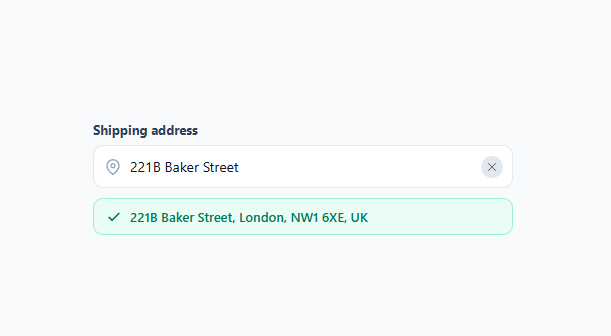
Address autocomplete is one of the highest-value form upgrades you can make: typing a full street address by hand is slow and error-prone, while a filtered suggestion list lets users confirm an address in two keystrokes. This snippet builds the complete pattern — without a paid geocoding API — over a static address list, ready to swap for a real provider.
Debounced filtering
Every keystroke clears a pending setTimeout and schedules a new one 220ms out, so the filter only runs once typing pauses rather than on every single character. This is the standard debounce pattern for search-as-you-type: it keeps the UI responsive while avoiding wasted filter passes (or, with a real API, wasted network requests) on every keystroke.
Substring highlighting
highlight() finds the query's position in each candidate's text with indexOf and wraps the matching slice in a <mark> tag, styled here as a colored, bold span rather than the default yellow highlight. This lets users see *why* each suggestion matched, which builds trust in the list faster than an unhighlighted result.
Full keyboard navigation
Arrow Down/Up move an activeIndex through the visible <li> items, toggling an .active class and calling scrollIntoView({ block: 'nearest' }) so the highlighted item never leaves the dropdown's visible area on a long list. Enter selects the active item (or does nothing if none is highlighted, avoiding an accidental selection), and Escape closes the dropdown without selecting — mirroring native <select> and combobox behavior so keyboard users get an experience they already know.
Selection state and confirmation
Selecting an address (by click or Enter) fills the input with the address's main line, reveals a green confirmation chip showing the full address, and shows a clear ("✕") button. Typing again after a selection hides the confirmation chip immediately, so the UI never shows a stale "confirmed" state next to an edited query.
Animation and dismissal
The dropdown fades and slides in with opacity/transform only (never height), and closes the same way before being hidden via hidden after the transition — keeping it crash-safe across every export target. A document-level click listener closes the list when you click anywhere outside the .aac-wrap container, the same outside-click pattern used by dropdown menus and popovers throughout this library.
Accessibility and a real production geocoder
This demo filters a small static array client-side, which is enough to show the interaction pattern but not enough for real addresses worldwide. A production build swaps the array filter for a debounced fetch to a geocoding provider — Google Places, Mapbox, or Loqate all expose an autocomplete endpoint that takes a partial query and returns ranked suggestions — while keeping the exact same debounce timing, highlight rendering, and keyboard handling described above. For accessibility, add role="combobox" to the input, role="listbox" to the suggestion list, and aria-activedescendant pointing at the currently highlighted option's id, so screen reader users get the same "which suggestion is focused" feedback that sighted keyboard users already see via the .active class.
Build with AI
Build, Understand, Optimize, and Extend It With AI
You don't have to trace the keyboard state machine by hand — paste this snippet's HTML, CSS, and JS into an AI coding assistant like Claude and ask it to explain exactly how activeIndex, currentMatches, and the debounce timer interact so that arrow keys, mouse hover, and Enter never fall out of sync with each other. The same assistant is useful for optimizing it — asking whether 220ms is the right debounce delay for a real geocoding API call versus this static array filter, and whether the highlight function's simple indexOf approach needs to change to handle multi-word or reordered query matches. It's just as good for extending the widget: ask it to add role="combobox" and aria-activedescendant for full screen-reader support, wire it to a real provider like Google Places or Mapbox with the same render function, or add a "use my current location" button using the Geolocation API. Treat the code less like a finished artifact and more like a starting point for a conversation.
Prompt to recreate it
Copy this into your AI assistant of choice to build the effect from scratch, or as a jumping-off point for your own variant:
Build a debounced "address autocomplete" input in plain HTML, CSS, and JavaScript — no external geocoding API required for this version (filter a static in-memory array), but structured so a real API call could be dropped in later.

Requirements:
- A text input that, on every keystroke, clears any pending debounce timer and starts a new one (around 200ms) before filtering — so filtering (or in production, a network request) only happens once typing pauses, not on every character.
- A filtering function that matches the query against a list of address objects (each with a main line and a sub line) case-insensitively, limited to a small number of results (e.g. 6), and renders a "no results" message when nothing matches instead of an empty dropdown.
- Each rendered suggestion must highlight the exact substring that matched the query by wrapping it in a mark element, computed via a simple case-insensitive indexOf, not a regex-based fuzzy match.
- Full keyboard navigation: ArrowDown/ArrowUp move an active-item index through the currently rendered suggestions (clamped to the list bounds, not wrapping), Enter selects the active suggestion (doing nothing if no suggestion is active), and Escape closes the dropdown without selecting. Whenever the active index changes, scroll that item into view within the dropdown using scrollIntoView with block: nearest.
- Selecting a suggestion (by click or Enter) must fill the input with the address's main line, show a separate confirmation element with a checkmark and the full address text, and reveal a clear button; editing the input again after a selection must immediately hide the confirmation element.
- The dropdown must animate in and out using only opacity and transform (never height or a display toggle mid-transition), and must close whenever a click happens anywhere outside the widget's wrapping container.
Want to tighten it up first? Run this prompt through the AI Prompt Studio to score it across 8 quality dimensions, catch anti-patterns, and tune the wording for Claude, ChatGPT, or Gemini before you paste it in.
Step by step
How to Use
- 1Paste HTML, CSS, and JSAn address input with a pin icon appears. Type at least one character to trigger suggestions.
- 2Watch the debounced filterAfter a short pause in typing, a dropdown shows up to 6 matches with the typed text highlighted in each one.
- 3Navigate with the keyboardPress ArrowDown/ArrowUp to highlight a suggestion, Enter to select it, or Escape to dismiss the list.
- 4Select an addressClick a suggestion or press Enter — the input fills in and a green confirmation chip shows the full address.
- 5Clear and start overClick the ✕ button to clear the input, hide the confirmation, and refocus the field.
- 6Swap in a real geocoding APIReplace the ADDRESSES array filter with a fetch to a provider (Google Places, Mapbox, Loqate) inside the debounce timeout, keeping the same render(matches, query) call.
Real-world uses
Common Use Cases
Got questions?
Frequently Asked Questions
Replace the ADDRESSES.filter() call inside the debounce timeout with a fetch to your provider's autocomplete endpoint, map its response into { main, sub } objects, and pass them to the existing render(matches, query) function — the highlighting, keyboard navigation, and selection logic all stay the same.
Add role="combobox" and aria-expanded to the input, role="listbox" to the <ul>, role="option" plus aria-selected to each <li>, and an aria-activedescendant on the input pointing at the active item's id — update these alongside the existing activeIndex logic.
Animating height or using display toggles directly causes dropdowns to snap instead of glide once converted to a framework's utility classes. Sticking to opacity and transform (translateY) guarantees a smooth open/close in every export target, including Tailwind.
Filter the ADDRESSES array (or your API request) by a country/region field before applying the text match — add a country dropdown above the input and pass its value into the filter condition.
In React, track the query, matches, and activeIndex in useState and debounce with a useRef timer inside useEffect; in Vue, use ref()/watch(); in Angular, use a component method with a debounce via RxJS. The highlight, keyboard handling, and outside-click logic port directly.