Source Code
<section class="lcc-hero">
  <div class="lcc-inner">
    <span class="lcc-eyebrow">Coming soon</span>
    <h1 class="lcc-headline">We're launching soon</h1>
    <p class="lcc-sub">Something we've been building for months is almost ready. Be the first to know when the doors open.</p>

    <div class="lcc-boxes" id="lccBoxes">
      <div class="lcc-box"><span class="lcc-num" id="lccDays">00</span><span class="lcc-label">Days</span></div>
      <div class="lcc-box"><span class="lcc-num" id="lccHours">00</span><span class="lcc-label">Hours</span></div>
      <div class="lcc-box"><span class="lcc-num" id="lccMinutes">00</span><span class="lcc-label">Minutes</span></div>
      <div class="lcc-box"><span class="lcc-num" id="lccSeconds">00</span><span class="lcc-label">Seconds</span></div>
    </div>

    <form class="lcc-notify" id="lccForm">
      <input type="email" class="lcc-input" id="lccEmail" placeholder="you@example.com" required />
      <button type="submit" class="lcc-btn">Notify me</button>
    </form>
    <div class="lcc-confirm" id="lccConfirm" hidden>You're on the list — we'll email you at launch.</div>
  </div>
</section>
* { box-sizing: border-box; margin: 0; padding: 0; }
body { font-family: system-ui, -apple-system, sans-serif; min-height: 100vh; display: flex; align-items: center; justify-content: center; }
.lcc-hero {
width: 100%; min-height: 100vh; display: flex; align-items: center; justify-content: center; padding: 40px 24px;
background: radial-gradient(circle at 30% 20%, #312e81, #0f172a 60%);
}
.lcc-inner { max-width: 560px; text-align: center; }
.lcc-eyebrow {
display: inline-block; font-size: 11px; font-weight: 800; letter-spacing: 0.08em; text-transform: uppercase;
color: #a5b4fc; background: rgba(165,180,252,0.12); padding: 6px 14px; border-radius: 999px; margin-bottom: 18px;
}
.lcc-headline { font-size: clamp(28px, 5vw, 42px); font-weight: 800; color: #fff; margin-bottom: 12px; letter-spacing: -0.5px; }
.lcc-sub { font-size: 14.5px; color: #cbd5e1; line-height: 1.7; max-width: 440px; margin: 0 auto 34px; }
.lcc-boxes { display: flex; gap: 12px; justify-content: center; margin-bottom: 34px; flex-wrap: wrap; }
.lcc-box {
width: 84px; padding: 16px 8px; background: rgba(255,255,255,0.06); border: 1px solid rgba(255,255,255,0.1);
border-radius: 14px; backdrop-filter: blur(6px);
}
.lcc-num { display: block; font-size: 28px; font-weight: 800; color: #fff; font-variant-numeric: tabular-nums; letter-spacing: -0.5px; }
.lcc-label { display: block; font-size: 10.5px; font-weight: 700; text-transform: uppercase; letter-spacing: 0.06em; color: #94a3b8; margin-top: 4px; }
.lcc-notify { display: flex; gap: 8px; max-width: 380px; margin: 0 auto; flex-wrap: wrap; justify-content: center; }
.lcc-input {
flex: 1; min-width: 200px; padding: 12px 14px; border-radius: 10px; border: 1px solid rgba(255,255,255,0.15);
background: rgba(255,255,255,0.08); color: #fff; font-size: 13.5px; font-family: inherit; outline: none;
}
.lcc-input::placeholder { color: #94a3b8; }
.lcc-input:focus { border-color: #a5b4fc; }
.lcc-btn {
padding: 12px 20px; border-radius: 10px; border: none; background: #fff; color: #1e293b;
font-size: 13.5px; font-weight: 800; font-family: inherit; cursor: pointer; transition: background 0.15s;
}
.lcc-btn:hover { background: #e2e8f0; }
.lcc-confirm { margin-top: 16px; font-size: 13px; font-weight: 700; color: #86efac; }const TARGET_DATE = new Date(Date.now() + 14 * 24 * 60 * 60 * 1000);
const daysEl = document.getElementById('lccDays');
const hoursEl = document.getElementById('lccHours');
const minutesEl = document.getElementById('lccMinutes');
const secondsEl = document.getElementById('lccSeconds');
function pad(n) {
return String(n).padStart(2, '0');
}
function tick() {
const remaining = TARGET_DATE.getTime() - Date.now();
if (remaining <= 0) {
daysEl.textContent = '00';
hoursEl.textContent = '00';
minutesEl.textContent = '00';
secondsEl.textContent = '00';
clearInterval(intervalId);
return;
}
const totalSeconds = Math.floor(remaining / 1000);
const days = Math.floor(totalSeconds / 86400);
const hours = Math.floor((totalSeconds % 86400) / 3600);
const minutes = Math.floor((totalSeconds % 3600) / 60);
const seconds = totalSeconds % 60;
daysEl.textContent = pad(days);
hoursEl.textContent = pad(hours);
minutesEl.textContent = pad(minutes);
secondsEl.textContent = pad(seconds);
}
const intervalId = setInterval(tick, 1000);
tick();
const form = document.getElementById('lccForm');
const emailInput = document.getElementById('lccEmail');
const confirm = document.getElementById('lccConfirm');
form.addEventListener('submit', (e) => {
e.preventDefault();
const value = emailInput.value.trim();
if (!value) return;
confirm.hidden = false;
form.hidden = true;
});Learn Coding Visually
Learn to code with interactive, live-preview playgrounds — HTML, CSS, JavaScript, React & more.
 HTML Playground42 lessons · Click-based · Live preview
 CSS PlaygroundLearn CSS with a live editor
 JavaScript Playground60 lessons · DOM · Async · Canvas
 React PlaygroundLearn React with a live code editor
 GSAP PlaygroundLearn GSAP animation interactively
 SVG Playground44 lessons · shapes · paths · animation
 SCSS Playground45 lessons · Sass modules · tokens
 Tailwind PlaygroundLearn Tailwind CSS with a live editor
 Bootstrap 5 Playground50 lessons · live preview
Launch Countdown Clock — Free HTML CSS JS Snippet
Launch Countdown Clock · Heroes · Plain HTML, CSS & JS · Live preview
What's included
Features
About this UI Snippet
Launch Countdown Clock — Hero Countdown-to-Launch Section
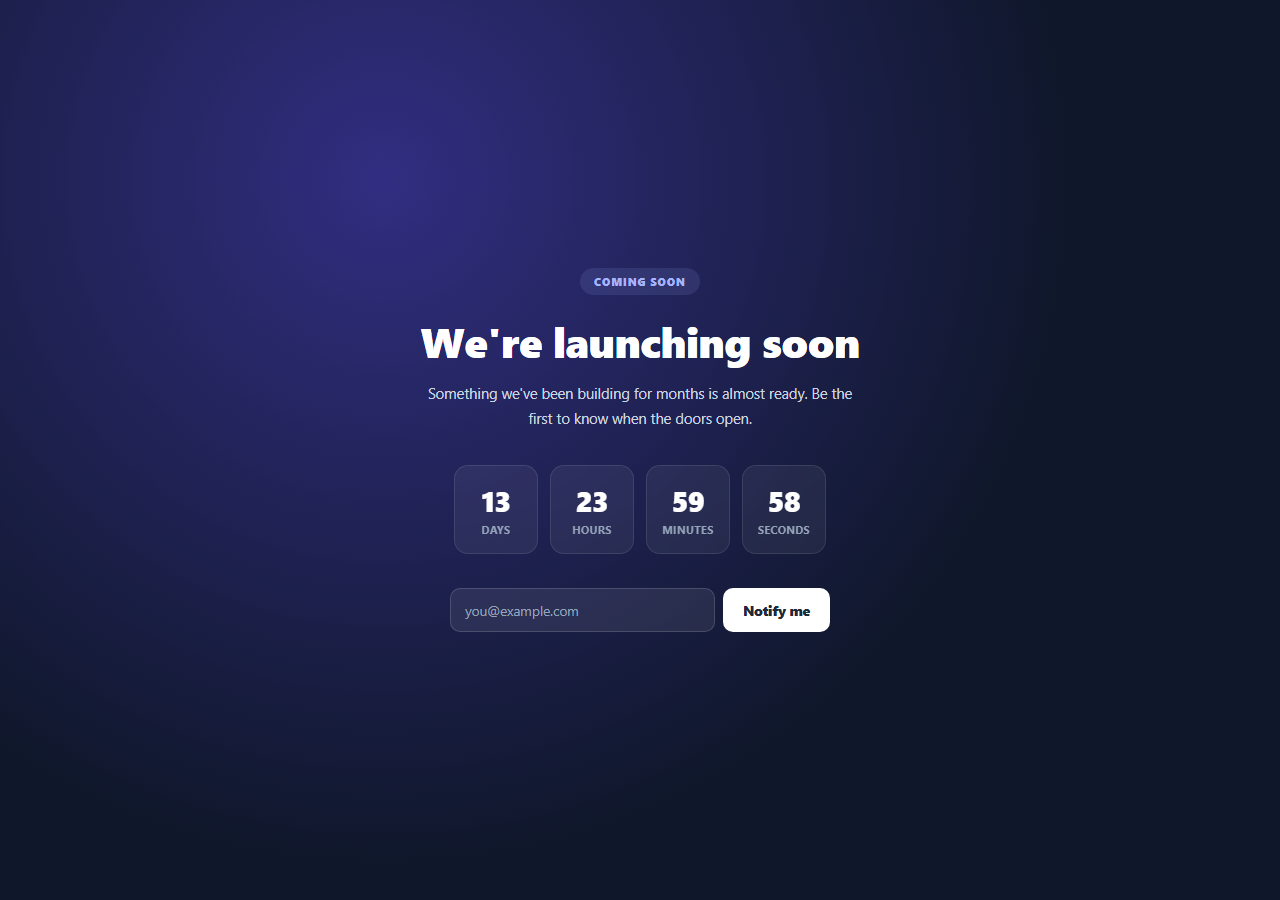
Pre-launch and "coming soon" pages typically lead with a countdown to build anticipation for a fixed date. This snippet implements that as a full hero section: a headline, a row of four countdown boxes, and an email capture form, with the countdown logic built to avoid the drift that a naive decrementing timer would accumulate.
A fixed target date computed once
TARGET_DATE is set once at load time as new Date(Date.now() + 14 * 24 * 60 * 60 * 1000) — 14 days out from whenever the page loads. In a real deployment this would instead be a fixed, hardcoded date (e.g. your actual launch date), but computing it relative to load time here keeps the demo always showing a live, non-expired countdown.
Recomputed from the timestamp on every tick, not decremented
Rather than subtracting one second from a counter every tick, tick() recalculates the entire remaining duration from scratch as TARGET_DATE.getTime() - Date.now() each time setInterval fires, then derives days/hours/minutes/seconds from that fresh millisecond value via integer division and modulo. Because every tick independently re-derives the correct remaining time from two real timestamps, small delays in when setInterval actually fires (which are common, especially in background tabs) never accumulate into visible drift.
Four independent unit boxes
Days, hours, minutes, and seconds are each written to their own <span> with padStart(2, '0') for consistent two-digit formatting, laid out as four separate boxed cards — a common visual pattern for launch countdowns that reads clearly at a glance even before someone processes the exact numbers.
A simple notify-me capture
The email form's submit handler prevents the default page reload, does a minimal non-empty check, and swaps the form out for a confirmation message — a realistic front-end interaction pattern ready to be wired to a real email capture endpoint.
Step by step
How to Use
- 1Load the snippetClick "Launch Countdown Clock" in the sidebar to load its HTML, CSS, and JS into the editor panels. The preview updates instantly.
- 2Edit the codeModify any panel — HTML, CSS, or JS. The preview refreshes as you type. Use Reset in each panel header to restore the original.
- 3Preview on devicesClick the Mobile (375px), Tablet (768px), or Desktop buttons in the preview header to check responsiveness.
- 4Export in your formatClick "HTML" to download a standalone file, "JSX" for a React component, "Tailwind" for a React + Tailwind CSS component, "Tailwind HTML" for a standalone HTML file with Tailwind CDN, "Vue" for a Vue 3 SFC with <template>/<script setup>/<style scoped>, or "Angular" for a standalone Angular .component.ts file. "Copy all" copies the full code to clipboard.
- 5Save your versionClick "Save as", type a name, and press Enter. Your snippet saves to IndexedDB and appears in the Saved tab.
Real-world uses
Common Use Cases
Got questions?
Frequently Asked Questions
Replace the TARGET_DATE line with a fixed date, e.g. new Date('2026-12-01T09:00:00'), instead of computing it relative to Date.now(). The rest of the countdown logic works unchanged against any fixed target date.
setInterval isn't guaranteed to fire at exactly 1000ms intervals — delays can accumulate, especially in backgrounded tabs. By recalculating remaining = TARGET_DATE - Date.now() fresh on every tick, the displayed countdown is always accurate regardless of any timing variance in when a tick actually runs.
All four boxes display "00" and the interval is cleared via clearInterval, stopping further updates. You can extend this to show a "We're live!" message or redirect instead.
No — it's a front-end-only simulation that swaps the form for a confirmation message on submit. Wire the submit handler to your real email capture or CRM endpoint to make it functional.