Source Code
<div class="sw-card">
  <div class="sw-dots">
    <div class="sw-dot sw-active" id="swDot0"><span>1</span></div>
    <div class="sw-line"></div>
    <div class="sw-dot" id="swDot1"><span>2</span></div>
    <div class="sw-line"></div>
    <div class="sw-dot" id="swDot2"><span>3</span></div>
  </div>

  <form id="swForm" novalidate>
    <div class="sw-step sw-step-active" id="swStep0">
      <h2>Create your account</h2>
      <label class="sw-field">
        <span>Full name</span>
        <input type="text" id="swName" placeholder="Ava Thompson" autocomplete="name" />
      </label>
      <label class="sw-field">
        <span>Email address</span>
        <input type="text" id="swEmail" placeholder="ava@example.com" autocomplete="email" />
      </label>
      <p class="sw-error" id="swError0"></p>
    </div>

    <div class="sw-step" id="swStep1">
      <h2>Secure your account</h2>
      <label class="sw-field">
        <span>Password</span>
        <input type="password" id="swPassword" placeholder="At least 8 characters" autocomplete="new-password" />
      </label>
      <label class="sw-field">
        <span>Confirm password</span>
        <input type="password" id="swConfirm" placeholder="Re-enter your password" autocomplete="new-password" />
      </label>
      <p class="sw-error" id="swError1"></p>
    </div>

    <div class="sw-step" id="swStep2">
      <h2>Choose a plan</h2>
      <div class="sw-plans">
        <label class="sw-plan">
          <input type="radio" name="swPlan" value="free" checked />
          <span class="sw-plan-name">Free</span>
          <span class="sw-plan-price">$0/mo</span>
        </label>
        <label class="sw-plan">
          <input type="radio" name="swPlan" value="pro" />
          <span class="sw-plan-name">Pro</span>
          <span class="sw-plan-price">$12/mo</span>
        </label>
        <label class="sw-plan">
          <input type="radio" name="swPlan" value="team" />
          <span class="sw-plan-name">Team</span>
          <span class="sw-plan-price">$29/mo</span>
        </label>
      </div>
    </div>

    <div class="sw-step" id="swSuccess">
      <div class="sw-success-icon">
        <svg width="28" height="28" viewBox="0 0 24 24" fill="none" stroke="#fff" stroke-width="3" stroke-linecap="round" stroke-linejoin="round"><path d="M5 13l4 4L19 7"/></svg>
      </div>
      <h2>Account created!</h2>
      <p>Welcome aboard — check your inbox to confirm your email address.</p>
    </div>

    <div class="sw-nav" id="swNav">
      <button type="button" class="sw-btn sw-btn-ghost" id="swBack">Back</button>
      <button type="button" class="sw-btn sw-btn-primary" id="swNext">Next</button>
    </div>
  </form>
</div>
* { box-sizing: border-box; }
body { font-family: system-ui, -apple-system, sans-serif; background: #f1f5f9; margin: 0; min-height: 100vh; display: flex; align-items: center; justify-content: center; padding: 24px; }
.sw-card { width: 100%; max-width: 400px; background: #fff; border: 1px solid #e2e8f0; border-radius: 16px; padding: 28px; box-shadow: 0 10px 30px rgba(15,23,42,0.06); }
.sw-dots { display: flex; align-items: center; margin-bottom: 26px; }
.sw-dot { width: 28px; height: 28px; border-radius: 50%; background: #eef2ff; color: #94a3b8; display: flex; align-items: center; justify-content: center; font-size: 12px; font-weight: 800; flex-shrink: 0; transition: background 0.2s, color 0.2s; }
.sw-dot.sw-active, .sw-dot.sw-done { background: #4f46e5; color: #fff; }
.sw-line { flex: 1; height: 2px; background: #eef2ff; margin: 0 6px; }
.sw-step { display: none; }
.sw-step.sw-step-active { display: block; }
.sw-step h2 { margin: 0 0 18px; font-size: 18px; color: #1e293b; }
.sw-field { display: block; margin-bottom: 14px; }
.sw-field span { display: block; font-size: 12.5px; font-weight: 700; color: #475569; margin-bottom: 6px; }
.sw-field input { width: 100%; padding: 10px 12px; border: 1.5px solid #e2e8f0; border-radius: 9px; font-size: 13.5px; font-family: inherit; }
.sw-field input:focus { outline: none; border-color: #4f46e5; }
.sw-error { min-height: 16px; font-size: 12px; color: #dc2626; font-weight: 600; margin: 4px 0 0; }
.sw-plans { display: flex; flex-direction: column; gap: 10px; }
.sw-plan { display: flex; align-items: center; gap: 10px; border: 1.5px solid #e2e8f0; border-radius: 10px; padding: 12px 14px; cursor: pointer; }
.sw-plan:has(input:checked) { border-color: #4f46e5; background: #f5f3ff; }
.sw-plan-name { font-size: 13.5px; font-weight: 700; color: #1e293b; flex: 1; }
.sw-plan-price { font-size: 12.5px; font-weight: 700; color: #64748b; }
.sw-success-icon { width: 52px; height: 52px; border-radius: 50%; background: #22c55e; display: flex; align-items: center; justify-content: center; margin: 0 auto 16px; }
#swSuccess { text-align: center; }
#swSuccess h2 { margin-bottom: 8px; }
#swSuccess p { margin: 0; font-size: 13px; color: #64748b; line-height: 1.6; }
.sw-nav { display: flex; justify-content: space-between; gap: 10px; margin-top: 20px; }
.sw-btn { border: none; border-radius: 9px; padding: 10px 18px; font-size: 13.5px; font-weight: 700; cursor: pointer; font-family: inherit; }
.sw-btn-primary { background: #4f46e5; color: #fff; margin-left: auto; }
.sw-btn-ghost { background: #f1f5f9; color: #475569; }
.sw-btn-ghost:disabled { opacity: 0.4; cursor: not-allowed; }var steps = [document.getElementById('swStep0'), document.getElementById('swStep1'), document.getElementById('swStep2')];
var dots = [document.getElementById('swDot0'), document.getElementById('swDot1'), document.getElementById('swDot2')];
var errors = [document.getElementById('swError0'), document.getElementById('swError1')];
var nav = document.getElementById('swNav');
var backBtn = document.getElementById('swBack');
var nextBtn = document.getElementById('swNext');
var successStep = document.getElementById('swSuccess');
var current = 0;
function setError(index, message) {
if (errors[index]) errors[index].textContent = message;
}
function validateStep(index) {
if (index === 0) {
var name = document.getElementById('swName').value.trim();
var email = document.getElementById('swEmail').value.trim();
if (!name) { setError(0, 'Please enter your full name.'); return false; }
if (!email || email.indexOf('@') === -1) { setError(0, 'Please enter a valid email address.'); return false; }
setError(0, '');
return true;
}
if (index === 1) {
var password = document.getElementById('swPassword').value;
var confirm = document.getElementById('swConfirm').value;
if (password.length < 8) { setError(1, 'Password must be at least 8 characters.'); return false; }
if (password !== confirm) { setError(1, 'Passwords do not match.'); return false; }
setError(1, '');
return true;
}
return true;
}
function renderStep() {
steps.forEach(function (step, i) {
step.classList.toggle('sw-step-active', i === current);
});
dots.forEach(function (dot, i) {
dot.classList.toggle('sw-active', i === current);
dot.classList.toggle('sw-done', i < current);
});
backBtn.disabled = current === 0;
nextBtn.textContent = current === steps.length - 1 ? 'Create account' : 'Next';
}
nextBtn.addEventListener('click', function () {
if (!validateStep(current)) return;
if (current === steps.length - 1) {
steps.forEach(function (step) { step.classList.remove('sw-step-active'); });
successStep.classList.add('sw-step-active');
nav.style.display = 'none';
document.querySelectorAll('.sw-dots')[0].style.display = 'none';
return;
}
current += 1;
renderStep();
});
backBtn.addEventListener('click', function () {
if (current === 0) return;
current -= 1;
renderStep();
});
renderStep();Learn Coding Visually
Learn to code with interactive, live-preview playgrounds — HTML, CSS, JavaScript, React & more.
 HTML Playground42 lessons · Click-based · Live preview
 CSS PlaygroundLearn CSS with a live editor
 JavaScript Playground60 lessons · DOM · Async · Canvas
 React PlaygroundLearn React with a live code editor
 GSAP PlaygroundLearn GSAP animation interactively
 SVG Playground44 lessons · shapes · paths · animation
 SCSS Playground45 lessons · Sass modules · tokens
 Tailwind PlaygroundLearn Tailwind CSS with a live editor
 Bootstrap 5 Playground50 lessons · live preview
Multi-Step Signup Wizard — Free HTML CSS JS Snippet
Multi-Step Signup Wizard · Forms · Plain HTML, CSS & JS · Live preview
What's included
Features
About this UI Snippet
Multi-Step Signup Wizard — Validated 3-Step Account Creation Flow
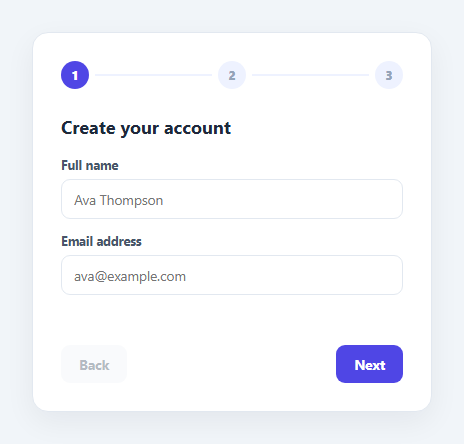
Long signup forms convert better when broken into short, focused steps. This snippet implements a 3-step wizard — name/email, password, and plan selection — with a step-dot indicator at the top, per-step client-side validation that blocks advancement until satisfied, and a final success screen.
Step visibility and the dot indicator
Each step is a <div class="sw-step"> toggled visible via a .sw-step-active class; only the current index's step is ever shown. The dot row mirrors the same index: the current dot gets .sw-active, and every dot before it gets .sw-done, giving a clear sense of progress and completed steps at a glance.
Blocking, per-step validation
validateStep(index) runs only against the fields relevant to the current step. Step 1 requires a non-empty name and an email containing @; step 2 requires a password of at least 8 characters that matches its confirmation field. Clicking Next calls this function first and returns early — without advancing current — if validation fails, instead rendering an inline error message in that step's .sw-error element.
Plan selection and the success state
Step 3 is a set of radio-styled plan cards (Free/Pro/Team) with no required validation beyond a default selection. Submitting from the final step hides all wizard steps and the dot indicator, then reveals a dedicated success panel with a checkmark icon and confirmation copy — a clear terminal state distinct from any of the numbered steps.
Step by step
How to Use
- 1Load the snippetClick "Multi-Step Signup Wizard" in the sidebar to load its HTML, CSS, and JS into the editor panels. The preview updates instantly.
- 2Edit the codeModify any panel — HTML, CSS, or JS. The preview refreshes as you type. Use Reset in each panel header to restore the original.
- 3Preview on devicesClick the Mobile (375px), Tablet (768px), or Desktop buttons in the preview header to check responsiveness.
- 4Export in your formatClick "HTML" to download a standalone file, "JSX" for a React component, "Tailwind" for a React + Tailwind CSS component, "Tailwind HTML" for a standalone HTML file with Tailwind CDN, "Vue" for a Vue 3 SFC with <template>/<script setup>/<style scoped>, or "Angular" for a standalone Angular .component.ts file. "Copy all" copies the full code to clipboard.
- 5Save your versionClick "Save as", type a name, and press Enter. Your snippet saves to IndexedDB and appears in the Saved tab.
Real-world uses
Common Use Cases
Got questions?
Frequently Asked Questions
The Next button click handler calls validateStep(current) first. If it returns false, the function returns immediately without incrementing the current step index, and an inline error message is shown in that step.
The check only requires the trimmed email string to be non-empty and contain an "@" character — a lightweight check appropriate for a demo, not full RFC email validation.
Yes — add another label.sw-plan block with a radio input sharing the swPlan name; the existing CSS automatically highlights whichever option is checked.
All wizard steps and the dot indicator are hidden, and a dedicated success panel with a checkmark icon and confirmation message is shown in their place.