Source Code
<div class="prf-card" id="prfCard">
  <div class="prf-inner" id="prfInner"></div>
</div>
* { box-sizing: border-box; margin: 0; padding: 0; }
body { font-family: system-ui, -apple-system, sans-serif; background: #f8fafc; min-height: 100vh; display: flex; align-items: center; justify-content: center; padding: 24px; }
.prf-card { width: 100%; max-width: 380px; background: #fff; border: 1px solid #e2e8f0; border-radius: 18px; padding: 30px 28px; box-shadow: 0 16px 36px rgba(30,41,59,0.08); }
.prf-icon { width: 48px; height: 48px; border-radius: 50%; background: #eef2ff; color: #6366f1; display: flex; align-items: center; justify-content: center; margin-bottom: 16px; }
.prf-title { font-size: 18px; font-weight: 800; color: #1e293b; margin-bottom: 6px; }
.prf-sub { font-size: 13px; color: #64748b; line-height: 1.6; margin-bottom: 20px; }
.prf-sub b { color: #334155; }
.prf-field { margin-bottom: 14px; }
.prf-label { display: block; font-size: 12px; font-weight: 700; color: #334155; margin-bottom: 6px; }
.prf-input {
width: 100%; padding: 11px 12px; border-radius: 10px; border: 1.5px solid #e2e8f0;
font-size: 13.5px; font-family: inherit; outline: none; transition: border-color 0.15s;
}
.prf-input:focus { border-color: #6366f1; }
.prf-input.prf-error { border-color: #f43f5e; }
.prf-error-text { font-size: 11.5px; color: #f43f5e; margin-top: 5px; min-height: 14px; }
.prf-btn {
width: 100%; padding: 12px; border-radius: 10px; border: none; background: #6366f1; color: #fff;
font-size: 13.5px; font-weight: 700; font-family: inherit; cursor: pointer; transition: background 0.15s;
margin-top: 4px;
}
.prf-btn:hover { background: #4f46e5; }
.prf-btn:disabled { background: #c7d2fe; cursor: not-allowed; }
.prf-link-row { text-align: center; margin-top: 16px; font-size: 12.5px; color: #64748b; }
.prf-link { color: #6366f1; font-weight: 700; cursor: pointer; background: none; border: none; font-family: inherit; font-size: inherit; text-decoration: underline; }
.prf-link:disabled { color: #94a3b8; cursor: not-allowed; text-decoration: none; }
.prf-success-icon { width: 56px; height: 56px; border-radius: 50%; background: #dcfce7; color: #16a34a; display: flex; align-items: center; justify-content: center; margin: 0 auto 18px; }
.prf-center { text-align: center; }const card = document.getElementById('prfInner');
let userEmail = '';
let resendCooldown = 0;
let resendTimer = null;
const ICONS = {
lock: '<svg width="22" height="22" viewBox="0 0 24 24" fill="none" stroke="currentColor" stroke-width="2" stroke-linecap="round" stroke-linejoin="round"><rect x="4" y="10" width="16" height="10" rx="2"/><path d="M8 10V7a4 4 0 0 1 8 0v3"/></svg>',
mail: '<svg width="22" height="22" viewBox="0 0 24 24" fill="none" stroke="currentColor" stroke-width="2" stroke-linecap="round" stroke-linejoin="round"><rect x="3" y="5" width="18" height="14" rx="2"/><path d="M3 7l9 6 9-6"/></svg>',
check: '<svg width="26" height="26" viewBox="0 0 24 24" fill="none" stroke="currentColor" stroke-width="3" stroke-linecap="round" stroke-linejoin="round"><path d="M20 6L9 17l-5-5"/></svg>',
};
function renderStepOne(error) {
card.innerHTML = `
<div class="prf-icon">${ICONS.lock}</div>
<div class="prf-title">Forgot your password?</div>
<div class="prf-sub">Enter the email associated with your account and we'll send you a link to reset your password.</div>
<div class="prf-field">
<label class="prf-label" for="prfEmail">Email address</label>
<input type="email" id="prfEmail" class="prf-input ${error ? 'prf-error' : ''}" placeholder="you@example.com" value="${userEmail}" />
<div class="prf-error-text">${error || ''}</div>
</div>
<button class="prf-btn" id="prfSubmitBtn">Send reset link</button>
`;
document.getElementById('prfSubmitBtn').addEventListener('click', () => {
const input = document.getElementById('prfEmail');
const value = input.value.trim();
const valid = /^[^\s@]+@[^\s@]+\.[^\s@]+$/.test(value);
if (!valid) {
userEmail = value;
renderStepOne('Please enter a valid email address.');
return;
}
userEmail = value;
renderStepTwo();
});
}
function renderStepTwo() {
clearInterval(resendTimer);
resendCooldown = 20;
card.innerHTML = `
<div class="prf-center">
<div class="prf-icon" style="margin:0 auto 16px;">${ICONS.mail}</div>
<div class="prf-title">Check your email</div>
<div class="prf-sub">We sent a password reset link to<br/><b>${userEmail}</b></div>
</div>
<button class="prf-btn" id="prfContinueBtn">I clicked the link</button>
<div class="prf-link-row">
Didn't get it? <button class="prf-link" id="prfResendBtn" disabled>Resend (20s)</button>
</div>
`;
const resendBtn = document.getElementById('prfResendBtn');
resendTimer = setInterval(() => {
resendCooldown -= 1;
if (resendCooldown <= 0) {
clearInterval(resendTimer);
resendBtn.disabled = false;
resendBtn.textContent = 'Resend email';
} else {
resendBtn.textContent = `Resend (${resendCooldown}s)`;
}
}, 1000);
resendBtn.addEventListener('click', () => {
if (resendBtn.disabled) return;
renderStepTwo();
});
document.getElementById('prfContinueBtn').addEventListener('click', () => {
clearInterval(resendTimer);
renderStepThree();
});
}
function renderStepThree(error) {
card.innerHTML = `
<div class="prf-icon">${ICONS.lock}</div>
<div class="prf-title">Set a new password</div>
<div class="prf-sub">Choose a strong password you haven't used before.</div>
<div class="prf-field">
<label class="prf-label" for="prfPass1">New password</label>
<input type="password" id="prfPass1" class="prf-input ${error ? 'prf-error' : ''}" placeholder="At least 8 characters" />
</div>
<div class="prf-field">
<label class="prf-label" for="prfPass2">Confirm password</label>
<input type="password" id="prfPass2" class="prf-input ${error ? 'prf-error' : ''}" placeholder="Re-enter password" />
<div class="prf-error-text">${error || ''}</div>
</div>
<button class="prf-btn" id="prfResetBtn">Reset password</button>
`;
document.getElementById('prfResetBtn').addEventListener('click', () => {
const p1 = document.getElementById('prfPass1').value;
const p2 = document.getElementById('prfPass2').value;
if (p1.length < 8) {
renderStepThree('Password must be at least 8 characters long.');
return;
}
if (p1 !== p2) {
renderStepThree('Passwords do not match.');
return;
}
renderSuccess();
});
}
function renderSuccess() {
card.innerHTML = `
<div class="prf-center">
<div class="prf-success-icon">${ICONS.check}</div>
<div class="prf-title">Password reset!</div>
<div class="prf-sub">Your password has been updated. You can now sign in with your new password.</div>
</div>
<button class="prf-btn" id="prfDoneBtn">Back to sign in</button>
`;
document.getElementById('prfDoneBtn').addEventListener('click', () => {
userEmail = '';
renderStepOne();
});
}
renderStepOne();Learn Coding Visually
Learn to code with interactive, live-preview playgrounds — HTML, CSS, JavaScript, React & more.
 HTML Playground42 lessons · Click-based · Live preview
 CSS PlaygroundLearn CSS with a live editor
 JavaScript Playground60 lessons · DOM · Async · Canvas
 React PlaygroundLearn React with a live code editor
 GSAP PlaygroundLearn GSAP animation interactively
 SVG Playground44 lessons · shapes · paths · animation
 SCSS Playground45 lessons · Sass modules · tokens
 Tailwind PlaygroundLearn Tailwind CSS with a live editor
 Bootstrap 5 Playground50 lessons · live preview
Password Reset Flow Card — Free HTML CSS JS Snippet
Password Reset Flow Card · Cards · Plain HTML, CSS & JS · Live preview
What's included
Features
About this UI Snippet
Password Reset Flow Card — Multi-Step Reset Password Card in One Container
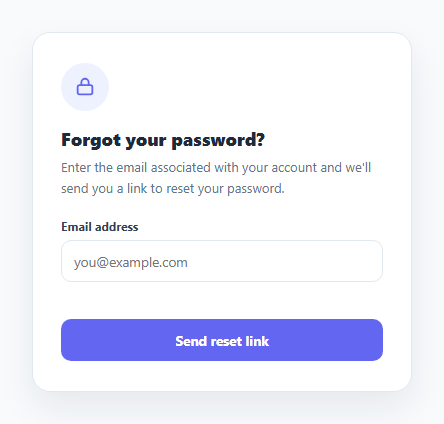
Most password reset flows are built as three separate pages, which means three separate route changes and three chances for the visual container to jump or flicker between steps. This snippet instead uses one fixed card element whose inner content is entirely replaced by JavaScript as the user moves through the flow, so the outer card frame never changes — only what's inside it does.
One container, three rendered states
renderStepOne(), renderStepTwo(), and renderStepThree() each set card.innerHTML to a different markup block and then attach their own event listeners to the buttons they just created. Because listeners are attached fresh after every re-render, there's no need to track or remove old handlers — the previous state's DOM (and its listeners) is simply discarded when innerHTML is reassigned.
Step one: email validation before advancing
The email step runs a regex check (/^[^\s@]+@[^\s@]+\.[^\s@]+$/) before calling renderStepTwo(). On failure it re-renders step one with an error message passed as an argument, rather than trying to mutate the existing DOM in place — keeping every state's render function the single place that decides what that state looks like, error included.
Step two: a real resend cooldown
The confirmation step starts a setInterval that ticks a resendCooldown counter down from 20 and disables the "Resend" link until it reaches zero, updating the button's label each second. Clicking resend while enabled just calls renderStepTwo() again, which naturally resets the cooldown and clears the previous interval first via clearInterval.
Step three: length and match validation
The new-password step checks both that the password is at least 8 characters and that the confirm field matches exactly before calling renderSuccess(), otherwise it re-renders itself with a specific error message so the user knows exactly which rule failed.
Step by step
How to Use
- 1Load the snippetClick "Password Reset Flow Card" in the sidebar to load its HTML, CSS, and JS into the editor panels. The preview updates instantly.
- 2Edit the codeModify any panel — HTML, CSS, or JS. The preview refreshes as you type. Use Reset in each panel header to restore the original.
- 3Preview on devicesClick the Mobile (375px), Tablet (768px), or Desktop buttons in the preview header to check responsiveness.
- 4Export in your formatClick "HTML" to download a standalone file, "JSX" for a React component, "Tailwind" for a React + Tailwind CSS component, "Tailwind HTML" for a standalone HTML file with Tailwind CDN, "Vue" for a Vue 3 SFC with <template>/<script setup>/<style scoped>, or "Angular" for a standalone Angular .component.ts file. "Copy all" copies the full code to clipboard.
- 5Save your versionClick "Save as", type a name, and press Enter. Your snippet saves to IndexedDB and appears in the Saved tab.
Real-world uses
Common Use Cases
Got questions?
Frequently Asked Questions
No — this is a self-contained front-end simulation. The "Send reset link" and "Resend" actions only transition the UI between states; wire them to your real backend endpoint to send actual emails.
renderStepTwo() starts a setInterval that decrements a resendCooldown counter every second and updates the resend button label and disabled state, clearing any previous interval first so re-entering the step never stacks multiple timers.
The new-password step requires at least 8 characters and requires the confirm-password field to exactly match, both checked in JavaScript before the success state is shown.
Yes — extend the check inside the reset button click handler in renderStepThree() with any additional regex or length rules, and pass a specific error string to renderStepThree() when they fail.