Source Code
<div class="kb-board" id="kbBoard">
  <div class="kb-column" data-status="todo">
    <div class="kb-col-header">
      <span class="kb-col-title">To Do</span>
      <span class="kb-col-count" id="kbCountTodo">0</span>
    </div>
    <div class="kb-col-body" data-status="todo"></div>
  </div>
  <div class="kb-column" data-status="progress">
    <div class="kb-col-header">
      <span class="kb-col-title">In Progress</span>
      <span class="kb-col-count" id="kbCountProgress">0</span>
    </div>
    <div class="kb-col-body" data-status="progress"></div>
  </div>
  <div class="kb-column" data-status="done">
    <div class="kb-col-header">
      <span class="kb-col-title">Done</span>
      <span class="kb-col-count" id="kbCountDone">0</span>
    </div>
    <div class="kb-col-body" data-status="done"></div>
  </div>
</div>
* { box-sizing: border-box; margin: 0; padding: 0; }
body { font-family: system-ui, -apple-system, sans-serif; background: #f1f5f9; min-height: 100vh; padding: 24px; }
.kb-board { display: grid; grid-template-columns: repeat(3, minmax(220px, 1fr)); gap: 16px; max-width: 900px; margin: 0 auto; }
.kb-column {
background: #eef1f6; border-radius: 14px; padding: 12px;
display: flex; flex-direction: column; min-height: 320px;
transition: background 0.15s;
}
.kb-column.kb-drag-over { background: #dbeafe; }
.kb-col-header { display: flex; align-items: center; justify-content: space-between; padding: 4px 6px 12px; }
.kb-col-title { font-size: 13px; font-weight: 800; color: #1e293b; text-transform: uppercase; letter-spacing: 0.04em; }
.kb-col-count { font-size: 11px; font-weight: 700; background: #fff; color: #64748b; padding: 2px 8px; border-radius: 999px; }
.kb-col-body { flex: 1; display: flex; flex-direction: column; gap: 8px; min-height: 60px; }
.kb-card {
background: #fff; border-radius: 10px; padding: 12px 14px; cursor: grab;
box-shadow: 0 1px 2px rgba(15,23,42,0.06); border-left: 3px solid #6366f1;
font-size: 13px; color: #334155; font-weight: 600;
transition: opacity 0.15s, transform 0.1s;
}
.kb-card:active { cursor: grabbing; }
.kb-card.kb-dragging { opacity: 0.4; transform: scale(0.98); }
.kb-card-tag { display: inline-block; margin-top: 8px; font-size: 10px; font-weight: 700; color: #6366f1; background: #eef2ff; padding: 2px 7px; border-radius: 6px; }const columns = document.querySelectorAll('.kb-col-body');
const board = document.getElementById('kbBoard');
const TASKS = [
{ id: 't1', text: 'Design onboarding flow wireframes', tag: 'Design', status: 'todo' },
{ id: 't2', text: 'Write API docs for billing endpoints', tag: 'Docs', status: 'todo' },
{ id: 't3', text: 'Fix flaky checkout test', tag: 'Bug', status: 'progress' },
{ id: 't4', text: 'Implement dark mode toggle', tag: 'Feature', status: 'progress' },
{ id: 't5', text: 'Set up staging environment', tag: 'DevOps', status: 'done' },
{ id: 't6', text: 'Ship Q3 changelog email', tag: 'Marketing', status: 'done' },
{ id: 't7', text: 'Review pull request #482', tag: 'Review', status: 'todo' },
];
function createCard(task) {
const card = document.createElement('div');
card.className = 'kb-card';
card.draggable = true;
card.dataset.id = task.id;
card.innerHTML = task.text + '<br><span class="kb-card-tag">' + task.tag + '</span>';
card.addEventListener('dragstart', (e) => {
e.dataTransfer.setData('text/plain', task.id);
card.classList.add('kb-dragging');
});
card.addEventListener('dragend', () => {
card.classList.remove('kb-dragging');
});
return card;
}
function updateCounts() {
document.getElementById('kbCountTodo').textContent = document.querySelector('.kb-col-body[data-status="todo"]').children.length;
document.getElementById('kbCountProgress').textContent = document.querySelector('.kb-col-body[data-status="progress"]').children.length;
document.getElementById('kbCountDone').textContent = document.querySelector('.kb-col-body[data-status="done"]').children.length;
}
function renderBoard() {
columns.forEach((col) => { col.innerHTML = ''; });
TASKS.forEach((task) => {
const col = document.querySelector('.kb-col-body[data-status="' + task.status + '"]');
if (col) col.appendChild(createCard(task));
});
updateCounts();
}
columns.forEach((col) => {
const columnEl = col.closest('.kb-column');
col.addEventListener('dragover', (e) => {
e.preventDefault();
columnEl.classList.add('kb-drag-over');
});
col.addEventListener('dragleave', () => {
columnEl.classList.remove('kb-drag-over');
});
col.addEventListener('drop', (e) => {
e.preventDefault();
columnEl.classList.remove('kb-drag-over');
const id = e.dataTransfer.getData('text/plain');
const task = TASKS.find((t) => t.id === id);
if (!task) return;
task.status = col.dataset.status;
renderBoard();
});
});
renderBoard();Learn Coding Visually
Learn to code with interactive, live-preview playgrounds — HTML, CSS, JavaScript, React & more.
 HTML Playground42 lessons · Click-based · Live preview
 CSS PlaygroundLearn CSS with a live editor
 JavaScript Playground60 lessons · DOM · Async · Canvas
 React PlaygroundLearn React with a live code editor
 GSAP PlaygroundLearn GSAP animation interactively
 SVG Playground44 lessons · shapes · paths · animation
 SCSS Playground45 lessons · Sass modules · tokens
 Tailwind PlaygroundLearn Tailwind CSS with a live editor
 Bootstrap 5 Playground50 lessons · live preview
Kanban Drag & Drop Board — Free HTML CSS JS Snippet
Kanban Drag & Drop Board · Dashboards · Plain HTML, CSS & JS · Live preview
What's included
Features
About this UI Snippet
Kanban Drag & Drop Board — Native HTML5 Drag-and-Drop Task Board
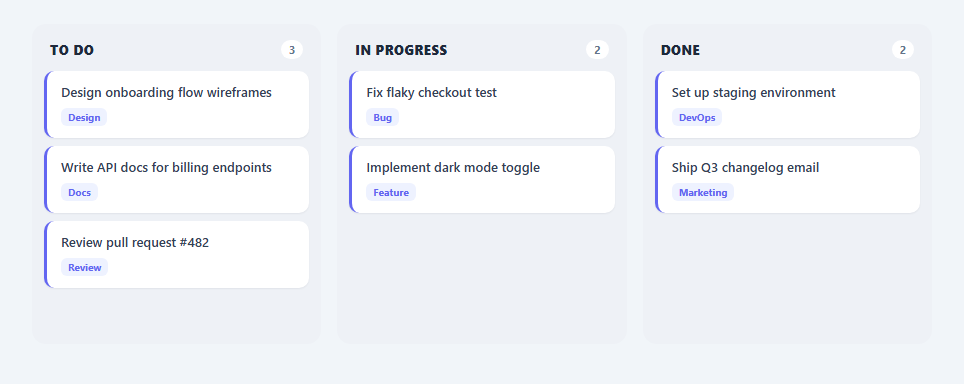
This snippet is a small kanban board — three columns holding draggable task cards that can be moved between "To Do", "In Progress", and "Done" purely with the browser's built-in drag-and-drop API, no library involved.
How the drag lifecycle works
Each card is a div with draggable="true". Its dragstart handler stores the card's task id in event.dataTransfer.setData('text/plain', task.id) and adds a .kb-dragging class for a faded, slightly-scaled visual state; dragend removes that class regardless of whether the drop succeeded. Each column body listens for dragover, calling preventDefault() (required for a drop to be permitted at all) and toggling a .kb-drag-over highlight class on the parent column; dragleave removes that highlight.
A single source of truth drives the DOM
Rather than manually moving the dragged DOM node, the drop handler reads the task id back out of dataTransfer, finds the matching task object in the TASKS array, updates its status field, and calls renderBoard() to fully re-render all three columns from that array. This keeps the board's visual state always in sync with a single JS data model instead of drifting between DOM state and data state.
Live counts
Each column header shows a badge with its current card count. updateCounts() runs after every render, reading the live child count of each column body directly from the DOM, so the numbers are always accurate after a drop.
Step by step
How to Use
- 1Load the snippetClick "Kanban Drag & Drop Board" in the sidebar to load its HTML, CSS, and JS into the editor panels. The preview updates instantly.
- 2Edit the codeModify any panel — HTML, CSS, or JS. The preview refreshes as you type. Use Reset in each panel header to restore the original.
- 3Preview on devicesClick the Mobile (375px), Tablet (768px), or Desktop buttons in the preview header to check responsiveness.
- 4Export in your formatClick "HTML" to download a standalone file, "JSX" for a React component, "Tailwind" for a React + Tailwind CSS component, "Tailwind HTML" for a standalone HTML file with Tailwind CDN, "Vue" for a Vue 3 SFC with <template>/<script setup>/<style scoped>, or "Angular" for a standalone Angular .component.ts file. "Copy all" copies the full code to clipboard.
- 5Save your versionClick "Save as", type a name, and press Enter. Your snippet saves to IndexedDB and appears in the Saved tab.
Real-world uses
Common Use Cases
Got questions?
Frequently Asked Questions
Each column body element carries a data-status attribute. The drop handler reads that attribute off the column the event fired on and assigns it to the matching task object before re-rendering.
Browsers block dropping onto an element by default. Calling preventDefault() inside dragover is required to signal that the element is a valid drop target, which is what makes the drop event fire at all.
No, this implementation moves cards between columns by status. Reordering within a column would need additional logic comparing drop position against sibling card positions.
The dragstart handler adds a .kb-dragging class that reduces opacity and scale slightly; dragend removes it whether the drop succeeded or was cancelled.